






 Work by Jianfei is licensed under a Creative Commons wei 3.0 Unported License.
[Background: In this document it will show you how to build one test execution automation framework with STAF+STAX. And make it helps you daily testing schedule.
The STAF is a Java open source testing automation framework , it could provide a good resolution for our agile testing request. Basically, if your need assign a lof of automated test case to multi-machine or OS and execute them or running a somking testing against to latest product build by automatically, it is shoud be a good candiate to select.
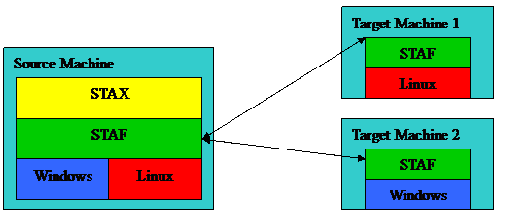
And i think the difficulty points in that is the XML defination part, you will see all the programing and attributes is coded in the XML file. The 'Pathon' script , one flexible interface which is supported by the STAF , also intergrated to the XML configure file
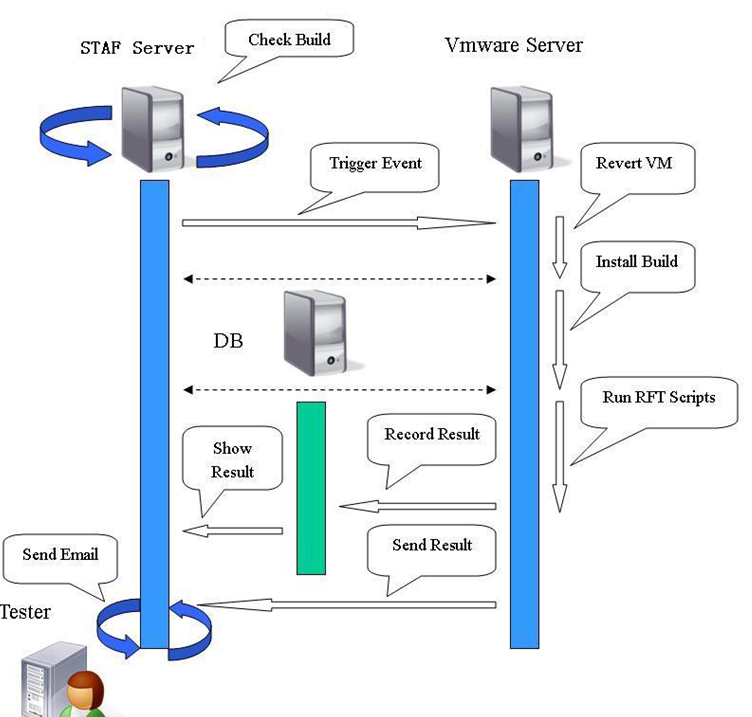
[Resource : We need to download these two plug-in and install them from http://staf.sourceforge.net/.
Latest Releases
[Note:] The STAX is not an install package, only need to extract it to the folder of STAF location e.g. C:\STAF\services\stax .If there is no the 'services' folder under the 'staf' should to create one by ourself.
[Configuration] Now we need to make some modifications to the file of '$STAF_Install_Directory\services\stax\STAF.cfg ', please pay attention to the stax path, we need make sure the folder name does not contains the other context like version etc. Because after we extracted the stax as one sub folder under the staf, its name would contain the version info like 'stax350' we need change it to 'stax'.
1 SERVICE STAX LIBRARY JSTAF EXECUTE \
2 {STAF/Config/STAFRoot}/services/stax/STAX.jar OPTION J2=-Xmx384m
3 SERVICE EVENT LIBRARY JSTAF EXECUTE \
4 {STAF/Config/STAFRoot}/services/stax/STAFEvent.jar
5 SET MAXQUEUESIZE 10000
[Check Env Status] When you finished the STAF+STAF installation, please using the commandd of 'staf local service list' in cmd model to verify you configuration status. You should get the response list like below. Sorry,  before that please click the menu of ' programs->STAF->start STAF ...' to open the STAF service .
C:\>staf local service list
Response
--------
Name Library Executable
--------- ---------- -----------------------------------
DELAY <Internal> <None>
DIAG <Internal> <None>
ECHO <Internal> <None>
EVENT JSTAF C:\STAF/services/stax/STAFEvent.jar
FS <Internal> <None>
HANDLE <Internal> <None>
HELP <Internal> <None>
LIFECYCLE <Internal> <None>
LOG STAFLog <None>
MISC <Internal> <None>
PING <Internal> <None>
PROCESS <Internal> <None>
QUEUE <Internal> <None>
SEM <Internal> <None>
SERVICE <Internal> <None>
SHUTDOWN <Internal> <None>
STAX JSTAF C:\STAF/services/stax/STAX.jar
TRACE <Internal> <None>
TRUST <Internal> <None>
VAR <Internal> <None>
[RFT Test Case Prepare: ] For now the STAF and STAX service is build successfully, then we need to get the case and execution work flow ready. Firstly, I have wrap up my RFT case execution as one command line batch file 'RunCommRFT.bat'. The context is
java -jar "%IBM_RATIONAL_RFT_INSTALL_DIR%\rational_ft.jar" -datastore E:\David\Trunk\RFTTrunk\Geneva -playback Core_Accounting.TestSTAFFScript
, and about run the RFT using command line method I will talk it in another session later.
[XML Configuration:] At the first paragraph , I have introducted there has one important component to the STAF framework is the XML. Now, let us to make a simple XML file to run our test script. The detailed description for each element node please see the comment with green color.
<?xml version="1.0" encoding="UTF-8" standalone="no"?>
<!DOCTYPE stax SYSTEM "stax.dtd"><stax><!--

1. The element of <defaultcall> is define a default execution function , name = 'main'.
2. The <function > is the method structure ,tell the STAF service which machie is our target to run the command file.
Note: The target machine also need install the STAF & STAX successful.
-->
<defaultcall function ="main"/>
<function name="main">
<process>
<location>'10.2.159.121'</location>
<command>'E:\David\RunCommRFT.bat'</command>
</process>
</function>
</stax>
[Run the remoting command: ] Type into the command line like below in the CMD model, it will call the remoting machine 10.2.159.121 to run the command of 'E:\David\RunCommRFT.bat'. Finally, you will get a return number that mean the task in process....
staf local stax execute file C:/STAF/services/stax/samples/Mysample.xml MACHINE 10.2.159.121 FUNCTION main
[Reference documentation:]
1. http://wenku.baidu.com/view/467a4834eefdc8d376ee3265.html
2. http://wenku.baidu.com/view/9f517fd084254b35eefd3465.html
3. http://wenku.baidu.com/view/1ae05244b307e87101f696c6.html
Work by Jianfei is licensed under a Creative Commons wei 3.0 Unported License.
- Make people around you successful is the biggest contribution to ourselves. -
此内容由惯性聚合(RSS阅读器)自动聚合整理,仅供阅读参考。 原文来自 — 版权归原作者所有。
