








最近折腾SharePoint 2010 比较多,有些客户想定制EditPeople控件,有些领导感觉那个搜索不太“好”,希望能有一个树形选择就完美了
哎,客户有要求,咱们哪里能不办?
图1
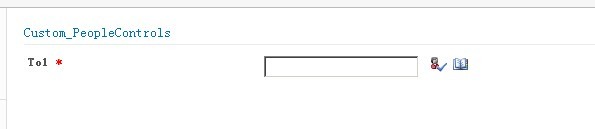
图2
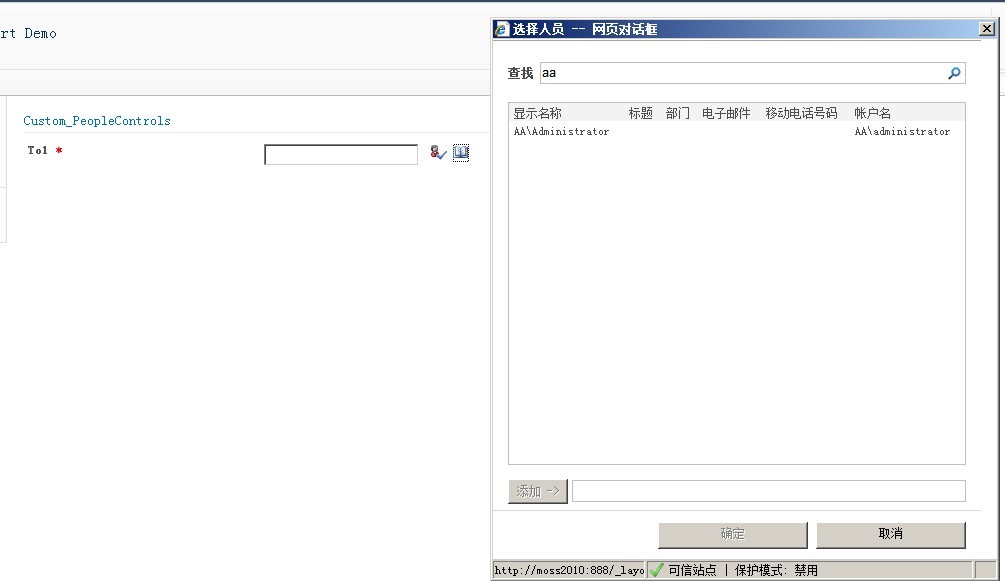
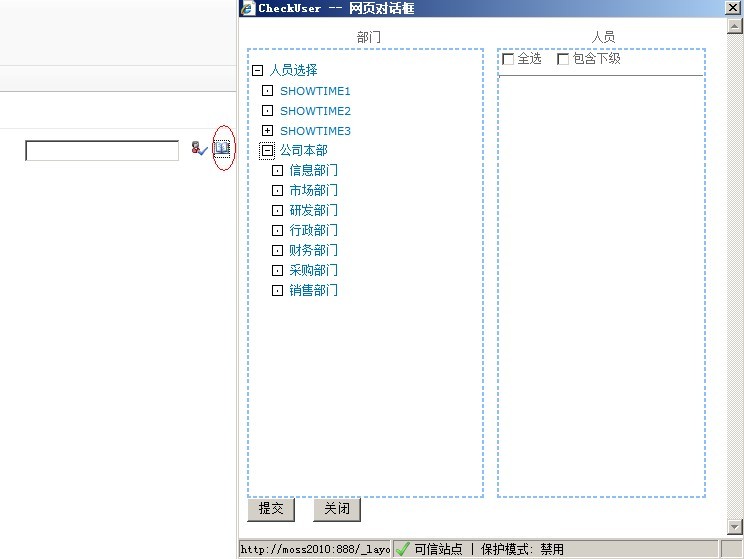
图3
代码 :
<script type="text/javascript" language="javascript">
/*
* Validate User name
*/
function fetchUserName() {
var buttonClientID = '<%=imgButtonCheckNames.ClientID%>';
var htmlButton = document.getElementById(buttonClientID);
if (htmlButton != null) { // if the html button found ..
htmlButton.click();
}
}
function Callback_User(xml) {
if (xml == null)
return;
var xmlDoc = new ActiveXObject("Microsoft.XMLDOM");
xmlDoc.async = "false";
xmlDoc.loadXML(xml);
var txtUserName = document.getElementById('<%=txtUserName.ClientID %>');
var node = xmlDoc.getElementsByTagName('Entity');
var userName = '';
if (node != null) {
if (node[0].attributes.getNamedItem('Key') != null) {
var userName = node[0].attributes.getNamedItem('Key').value;
txtUserName.value = userName;
}
}
}
function _Dialog_UserCheck(defaultSearch) {
var txtUserName = document.getElementById('<%=txtUserName.ClientID %>');
// ctl00$m$g_ab19aaaf_a004_4410_97b2_7974ffada0af$ctl00$txtUserName
if (txtUserName.disabled)
return;
if (defaultSearch == undefined)
defaultSearch = '';
var txtSiteName = document.getElementById('<%=hidSiteName.ClientID %>');
var sDialogUrl = '\u002f' + txtSiteName.value + '\u002f_layouts\u002fPicker.aspx?MultiSelect=True\u0026CustomProperty=User\u00253B\u00253B15\u00253B\u00253B\u00253BFalse\u0026DialogTitle=\u0025E9\u002580\u002589\u0025E6\u00258B\u0025A9\u0025E4\u0025BA\u0025BA\u0025E5\u002591\u002598\u0026DialogImage=\u00252F\u00255Flayouts\u00252Fimages\u00252Fppeople\u00252Egif\u0026PickerDialogType=Microsoft\u00252ESharePoint\u00252EWebControls\u00252EPeoplePickerDialog\u00252C\u002520Microsoft\u00252ESharePoint\u00252C\u002520Version\u00253D14\u00252E0\u00252E0\u00252E0\u00252C\u002520Culture\u00253Dneutral\u00252C\u002520PublicKeyToken\u00253D71e9bce111e9429c\u0026ForceClaims=False\u0026DisableClaims=False\u0026EnabledClaimProviders=\u0026EntitySeparator=\u00253B\u0025EF\u0025BC\u00259B\u0025EF\u0025B9\u002594\u0025EF\u0025B8\u002594\u0025E2\u00258D\u0025AE\u0025E2\u002581\u00258F\u0025E1\u00258D\u0025A4\u0025D8\u00259B';
if (txtSiteName.value == '') {
sDialogUrl = '\u002f_layouts\u002fPicker.aspx?MultiSelect=True\u0026CustomProperty=User\u00253B\u00253B15\u00253B\u00253B\u00253BFalse\u0026DialogTitle=\u0025E9\u002580\u002589\u0025E6\u00258B\u0025A9\u0025E4\u0025BA\u0025BA\u0025E5\u002591\u002598\u0026DialogImage=\u00252F\u00255Flayouts\u00252Fimages\u00252Fppeople\u00252Egif\u0026PickerDialogType=Microsoft\u00252ESharePoint\u00252EWebControls\u00252EPeoplePickerDialog\u00252C\u002520Microsoft\u00252ESharePoint\u00252C\u002520Version\u00253D14\u00252E0\u00252E0\u00252E0\u00252C\u002520Culture\u00253Dneutral\u00252C\u002520PublicKeyToken\u00253D71e9bce111e9429c\u0026ForceClaims=False\u0026DisableClaims=False\u0026EnabledClaimProviders=\u0026EntitySeparator=\u00253B\u0025EF\u0025BC\u00259B\u0025EF\u0025B9\u002594\u0025EF\u0025B8\u002594\u0025E2\u00258D\u0025AE\u0025E2\u002581\u00258F\u0025E1\u00258D\u0025A4\u0025D8\u00259B';
}
sDialogUrl = sDialogUrl + '&DefaultSearch=' + escapeProperly(defaultSearch);
//sDialogUrl = "/_layouts/CustomPeopleEditor/CheckUsesr.aspx?IsDlg=1";
var sFeatures = 'resizable=yes,status=no,scrollbars=no,menubar=no,directories=no,location=no,width=470,height=530px';
var rv = commonShowModalDialog(sDialogUrl, sFeatures, Callback_User);
}
</script>
如果我们把 sDialogUrl = sDialogUrl + '&DefaultSearch=' + escapeProperly(defaultSearch);
换成 sDialogUrl = "/_layouts/CustomPeopleEditor/CheckUsesr.aspx?IsDlg=1";
就会调出我们自己写的treeview控件
首先动态调用_Dialog_UserCheck 这个函数,然后根据Callback_User回写value
当然要完美实现这一应用,可能还需要额外的代码,作为Demo代码可能已经够了,核心函数都在这里·
此内容由惯性聚合(RSS阅读器)自动聚合整理,仅供阅读参考。 原文来自 — 版权归原作者所有。