


由于要给客户做培训,关于sharepoint 2010 工作流的,打算在网上找个demo看看的,结果这方面的demo 还比较少,只能自己折腾了
哎,谁叫客户就是上帝嘛。 开始打算用顺序流的,发现网上这方面的资料比较多,而且顺序流不能体现实际的业务,看起来太“土”。。。。
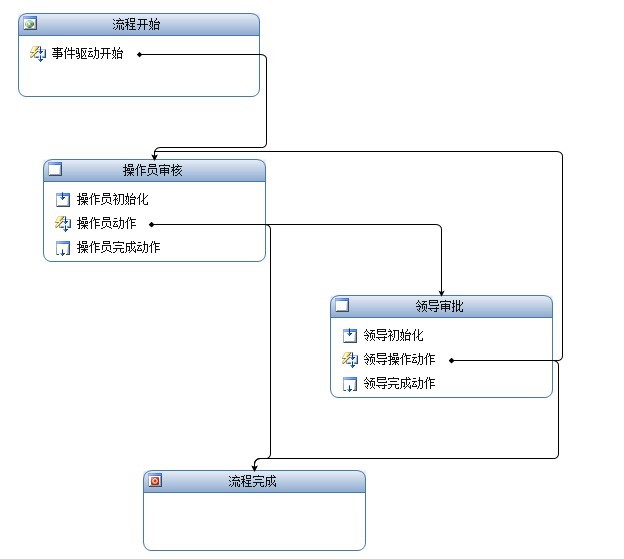
状态机流程图
首先申请人---〉操作员审批----领导审批---结束
当然还有拒绝的动作,我就不在这里说明了,大家看图·
申请表单

审批表单

流程结束

设计这个流程的时候,发现和2007的版本一样,在基于VS这块,无论顺序还是状态流程,貌似变化不大@
开发sharepoint 2010 工作流 需要注意这个配置xml
<Elements xmlns="http://schemas.microsoft.com/sharepoint/">
<Workflow
Name="AA.Workflows.State - StateMachine"
Description="My SharePoint Workflow"
Id="630ffa3d-6da8-4e77-a77c-c602e49f956d"
CodeBesideClass="AA.Workflows.State.StateMachine.StateMachine"
CodeBesideAssembly="$assemblyname$"
AssociationUrl="_layouts/AA.Workflows.State/StateMachine/WorkflowAssociationForm1.aspx"
InstantiationUrl="_layouts/AA.Workflows.State/StateMachine/WorkflowInitiationForm1.aspx"
TaskListContentTypeId="0x010801005e7969df923b4d7190ee6dcdae487a57">
<Categories/>
<MetaData>
<AssociationCategories>List</AssociationCategories>
<!-- Tags to specify InfoPath forms for the workflow; delete tags for forms that you do not have -->
<!--<Association_FormURN>[URN FOR ASSOCIATION FORM]</Association_FormURN>
<Instantiation_FormURN>[URN FOR INSTANTIATION FORM]</Instantiation_FormURN>
<Task0_FormURN>[URN FOR TASK (type 0) FORM]</Task0_FormURN>
<Task1_FormURN>[URN FOR TASK (type 1) FORM]</Task1_FormURN>-->
<!-- Modification forms: create a unique guid for each modification form -->
<!--<Modification_[UNIQUE GUID]_FormURN>[URN FOR MODIFICATION FORM]</Modification_[UNIQUE GUID]_FormURN>
<Modification_[UNIQUE GUID]_Name>[NAME OF MODIFICATION TO BE DISPLAYED AS A LINK ON WORKFLOW STATUS PAGE</Modification_[UNIQUE GUID]_Name>
-->
<StatusPageUrl>_layouts/WrkStat.aspx</StatusPageUrl>
</MetaData>
</Workflow>
<ContentType ID="0x010801005e7969df923b4d7190ee6dcdae487a57"
Name="AA.Workflows.State - ContentType2"
Group="Custom Content Types"
Description="My Content Type"
Version="0">
<FieldRefs>
<FieldRef ID="{F2C72B83-CA8A-45EE-9F72-3286F6E37E12}" Name="TaskData" DisplayName ="Task Data"/>
</FieldRefs>
<XmlDocuments>
<XmlDocument NamespaceURI="http://schemas.microsoft.com/sharepoint/v3/contenttype/forms/url">
<FormUrls xmlns="http://schemas.microsoft.com/sharepoint/v3/contenttype/forms/url">
<Edit>_layouts/AA.Workflows.State/TaskApprove.aspx</Edit>
</FormUrls>
</XmlDocument>
</XmlDocuments>
</ContentType>
</Elements>
尤其是这个内容ID
后台aspx页面像Workflow传送value的时候可以通过
Hashtable htData = new Hashtable();
htData["TaskData"] = "true";
这个hashtable来做
SPWorkflowTask.AlterTask(this.taskItem, htData, true);
可以把value传送给工作流
在流程里面取值:
在审批动作里面直接这样取
private void onTaskChanged1_Invoked(object sender, ExternalDataEventArgs e)
{
this.IsOperatorPenson = bool.Parse(this.afterProperties1.ExtendedProperties["TaskData"].ToString());
this.leaderPenson = this.afterProperties1.ExtendedProperties["ApproveUser"].ToString();
this.auditComments = this.afterProperties1.ExtendedProperties["Comments"].ToString();
}
需要代码学习的,可以留下邮箱,我稍后也会把代码上传的
困。。。
此内容由惯性聚合(RSS阅读器)自动聚合整理,仅供阅读参考。 原文来自 — 版权归原作者所有。