

惯性聚合 高效追踪和阅读你感兴趣的博客、新闻、科技资讯
阅读原文 在惯性聚合中打开

推荐订阅源

cs.AI updates on arXiv.org
GbyAI
GbyAI
Jina AI
Jina AI
博客园_首页
Y
Y Combinator Blog
美团技术团队
钛媒体:引领未来商业与生活新知
钛媒体:引领未来商业与生活新知
M
MIT News - Artificial intelligence
OSCHINA 社区最新新闻
OSCHINA 社区最新新闻
MyScale Blog
MyScale Blog
MongoDB | Blog
MongoDB | Blog
雷峰网
雷峰网
罗磊的独立博客
博客园 - Franky
Last Week in AI
Last Week in AI
Vercel News
Vercel News
Martin Fowler
Martin Fowler
Stack Overflow Blog
Stack Overflow Blog
Microsoft Security Blog
月光博客
月光博客
WordPress大学
WordPress大学
W
WeLiveSecurity
Apple Machine Learning Research
TaoSecurity Blog
TaoSecurity Blog
阮一峰的网络日志
阮一峰的网络日志
博客园 - 聂微东
Schneier on Security
Engineering at Meta
Engineering at Meta
Simon Willison's Weblog
博客园 - 【当耐特】
宝玉的分享
宝玉的分享
大猫的无限游戏
大猫的无限游戏
S
SegmentFault 最新的问题
P
Proofpoint News Feed
C
Cyber Attacks, Cyber Crime and Cyber Security
博客园 - 叶小钗
Exploit-DB.com RSS Feed
L
LINUX DO - 最新话题
S
Security @ Cisco Blogs
B
Blog RSS Feed
B
Blog
爱范儿
爱范儿
D
Darknet – Hacking Tools, Hacker News & Cyber Security
T
Tailwind CSS Blog
Attack and Defense Labs
V
Visual Studio Blog
NISL@THU
NISL@THU
U
Unit 42
Hugging Face - Blog
Hugging Face - Blog
A
Arctic Wolf

博客园 - 心利

SharePoint GroupedItemPicker Control Drag & Drop between SharePoint Document libraries Improving SharePoint User Experience With JQuery-Client Side Form Validate SharePoint How To:定位错误:“An SPRequest object was not disposed .." SharePoint Tips and Tricks --如何用JS向PeopleEditor填充数据 SharePoint Tips and Tricks -- Ribbon,People Editor 使用T4为数据库自动生成实体类(C#) (Tips&Tricks)用客户端模板精简JavaScript代码 (Tips &Tricks)如何为Windows Mobile 创建拨号连接--C# System.Xml FAQ Part 1 Windows Ce vs Windows Mobile Asp.net程序中生成Excel报表 My Page StartKit项目概览 做一个更好的程序员 .Net类库中实现的HashTable 为Asp.net控件写单元测试(ViewState) 使用Control Adapters优化Asp.net控件 ViewState 简述一(With Example And Apply to Asp.net) 桌面背景:rss新闻阅读器(图)
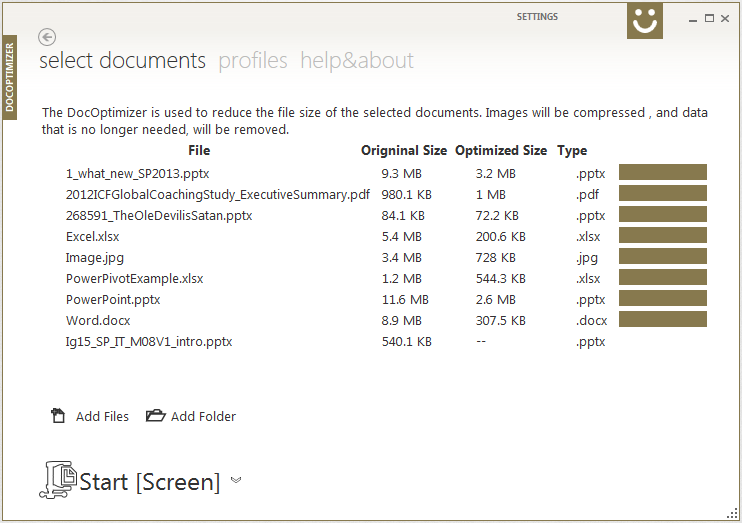
DocOptimizer 0.9.0 Beta Released
心利 · 2014-06-11 · via 博客园 - 心利

DocOptimizer  是一个文档优化工具,它通过移除Excel中多余的单元格;将嵌入的OLE替换成图片;移除文档中的隐藏信息;优化文档中的图片等等手段,将Office或PDF文件压缩20%-90%. 压缩过的文件和源文件看起来完全一样,Word还是Word,PPT还是PPT, 只是文件大小从几M,几十M,变成了几K.
Features:

  • 【可选】移除冗余信息,比如多余的Excel单元格等。
  • 【可选】无损压缩图片,并移除多余像素。
  • 【可选】移文档中的隐藏信息,例如Comments,Document properties and personal information, Hidden text,Hidden rows,Invisible content,Presentation notes
  • 【可选】将Object Linking and Embedding (OLE)替换为图片。OLE对象只有编辑文档时才有用。

Visit docoptimizer.com to learn more, or download it from here.