



这个控件SharePoint用来选择Field ,和Content Type, 以下是一个完整的示例。
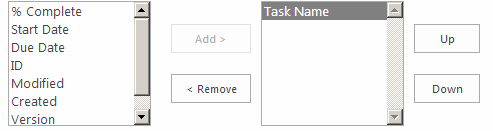
<SharePoint:GroupedItemPicker ID="SelectColumn" runat="server"

                CandidateControlId="SelectCandidate"

                ResultControlId="SelectResult"

                AddButtonId="AddButton"

                RemoveButtonId="RemoveButton" />

            <table class="ms-long" cellpadding="0" cellspacing="0" border="0">

                <tr>

                    <td class="ms-input">

                        <SharePoint:SPHtmlSelect ID="SelectCandidate" Width="143" Height="125" runat="server" multiple="true" />

                    </td>

                    <td style="padding-left: 10px"/>

                    <td align="center" valign="middle" class="ms-input">

                        <button id="AddButton" runat="server" style="width:80px">

                            <SharePoint:EncodedLiteral ID="EncodedLiteral3" runat="server" Text="<%$Resources:wss,multipages_gip_add%>" EncodeMethod='HtmlEncode' />

                        </button>

                        <br />

                        <br />

                        <button id="RemoveButton" runat="server" style="width:80px">

                            <SharePoint:EncodedLiteral ID="EncodedLiteral4" runat="server" Text="<%$Resources:wss,multipages_gip_remove%>" EncodeMethod='HtmlEncode' />

                        </button>

                    </td>

                    <td style="padding-left: 10px"/>

                    <td class="ms-input">

                        <SharePoint:SPHtmlSelect ID="SelectResult" Width="143" Height="125" runat="server" multiple="true" />

                    </td>


                    <td align="center" valign="middle" class="ms-input">

                        <input type="button" runat="server" id="SelectResultUp" value="Up" onclick="listbox_move(SelectResultID, 'up'); GipSetHiddenControlValue(window[SelectColumnsID + '_m']);"/>

                         <br />

                        <br />

                        <input type="button" runat="server" id="SelectResultDown" value="Down" onclick="listbox_move(SelectResultID, 'down'); GipSetHiddenControlValue(window[SelectColumnID + '_m']);"/>

                    </td>


                </tr>

            </table>
服务器端代码:
     foreach (SPField field in SPContext.Current.List.Fields)

            {

                SelectColumn.AddChoice(field.InternalName, field.Title, string.Empty, string.Empty);

            }
1 调整选中项的顺序:
function listbox_move(listID, direction) {

    var listbox = document.getElementById(listID);


    if (direction == "up") {

        for (var i = 0; i < listbox.options.length; i++) {

            var option = listbox.options[i];

            if (option.selected == true) {

                listbox_moveOption(listbox, i, direction);

            }

        }

    } else {

        for (var i = listbox.options.length-1; i >=0; i--) {

            var option = listbox.options[i];

            if (option.selected == true) {

                listbox_moveOption(listbox, i, direction);

            }

        }

    }

}


function listbox_moveOption(listbox, i, direction) {

    var selIndex = i;


    if (-1 == selIndex) {

        alert("Please select an option to move.");

        return;

    }


    var increment = -1;

    if (direction == 'up')

        increment = -1;

    else

        increment = 1;


    if ((selIndex + increment) < 0 ||

        (selIndex + increment) > (listbox.options.length - 1)) {

        return;

    }

    var selValue = listbox.options[selIndex].value;

    var selText = listbox.options[selIndex].text;

    listbox.options[selIndex].value = listbox.options[selIndex + increment].value

    listbox.options[selIndex].text = listbox.options[selIndex + increment].text

    listbox.options[selIndex].selected = false;

    listbox.options[selIndex + increment].value = selValue;

    listbox.options[selIndex + increment].text = selText;

    listbox.options[selIndex + increment].selected = true;

}
2, 更新HiddenField
函数 GipSetHiddenControlValue 位于 "%program files%\Common Files\microsoft shared\Web Server Extensions\15\TEMPLATE\LAYOUTS\GroupedItemPicker.js"
var groupItemData = [];

        for (var i = 0, max = fields.length; i < max; i++) {

            options += "<option value=\"" + fields[i].Second + "\">" + STSHtmlEncode(fields[i].First) + "</option>";

            groupItemData[i+1] = [fields[i].Second, fields[i].First];

        }


        spbLookup(this.lookupFieldSelect).html(options);

        window[this.context.appearanceColumnsID + "_m"].data = [groupItemData];

        spbLookup(this.appearanceColumnsSelectResult).html("");

        GipRefreshGroupCore(window[this.context.appearanceColumnsID + "_m"]);
此内容由惯性聚合(RSS阅读器)自动聚合整理,仅供阅读参考。 原文来自 — 版权归原作者所有。