惯性聚合 高效追踪和阅读你感兴趣的博客、新闻、科技资讯
阅读原文 在惯性聚合中打开

推荐订阅源

cs.AI updates on arXiv.org
B
Blog
freeCodeCamp Programming Tutorials: Python, JavaScript, Git & More
V
Visual Studio Blog
S
SegmentFault 最新的问题
腾讯CDC
博客园 - 叶小钗
WordPress大学
WordPress大学
大猫的无限游戏
大猫的无限游戏
宝玉的分享
宝玉的分享
Last Week in AI
Last Week in AI
Jina AI
Jina AI
A
About on SuperTechFans
博客园 - 司徒正美
C
Check Point Blog
博客园 - 聂微东
Microsoft Security Blog
N
Netflix TechBlog - Medium
T
Tenable Blog
Threat Intelligence Blog | Flashpoint
小众软件
小众软件
Spread Privacy
Spread Privacy
阮一峰的网络日志
阮一峰的网络日志
Know Your Adversary
Know Your Adversary
NISL@THU
NISL@THU
K
Kaspersky official blog
Stack Overflow Blog
Stack Overflow Blog
Y
Y Combinator Blog
D
DataBreaches.Net
A
Arctic Wolf
I
InfoQ
量子位
IT之家
IT之家
Security Latest
Security Latest
D
Darknet – Hacking Tools, Hacker News & Cyber Security
Google DeepMind News
The Hacker News
The Hacker News
Cyber Security Advisories - MS-ISAC
G
Google Developers Blog
P
Proofpoint News Feed
P
Privacy International News Feed
T
Threatpost
L
Lohrmann on Cybersecurity
P
Proofpoint News Feed
G
GRAHAM CLULEY
V
Vulnerabilities – Threatpost
Martin Fowler
Martin Fowler
C
Cyber Attacks, Cyber Crime and Cyber Security
PCI Perspectives
PCI Perspectives
F
Full Disclosure

博客园 - sunfishlu

一步一步学习Windows Azure(一)概述 一步一步学习CakePHP(三)model 一步一步学习CakePHP(二)controllers 一步一步学习CakePHP(一)基本概念 JQuery写的个性导航菜单 - sunfishlu - 博客园 JQueryUI(五):Dialog(第二部分) JQueryUI(四):Dialog(第一部分) - sunfishlu - 博客园 JQueryUI(三):Accordion JQueryUI(二):Tabs(第二部分) JQueryUI(一):Tabs(第一部分) - sunfishlu - 博客园 封装的Ext Grid javascript与dom编程(五)ajax 无法在Web服务器上启动调试。您不具备调试此应用程序的权限,此项目的URL位于Internet区域。 - sunfishlu - 博客园 ToolTip(图片文字) with Jquery Ext中combobox在Grid里显示问题 javascript与dom编程(四)animation(例)Tooltips javascript与dom编程(三)animation extjs grid设置某列背景颜色 javascript与dom编程(二)Event
一步一步学习Windows Azure(二)Azure之Hello World
sunfishlu · 2011-05-12 · via 博客园 - sunfishlu

在这篇文章中,我们将使用.net在Azure中创建Hello World程序,环境为VS2010和Azure SDK 1.4。
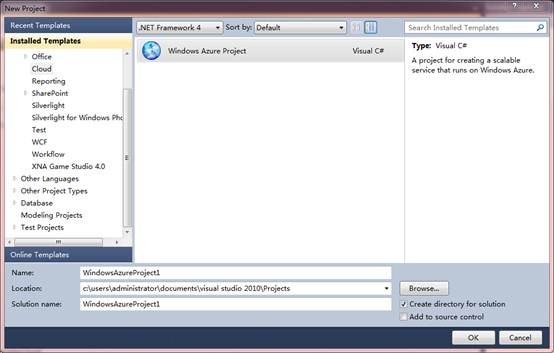
clip_image002

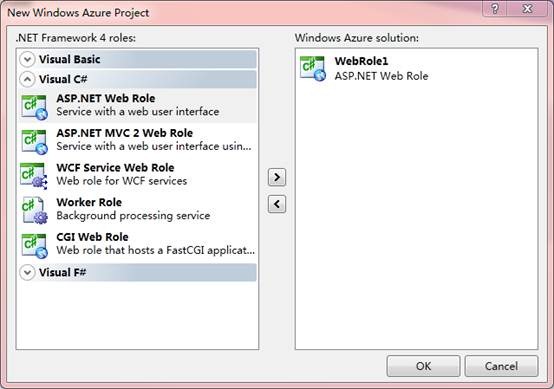
点击OK后,为让我们选择一个角色,这里我们增添asp.net web role。
clip_image004

这就会创建两个项目,WindowsAzureProject1(Azure service项目)和WebRole1(asp.net项目),Azure service项目用于配置应用程序,创建部署包,asp.net项目非常类似普通的web项目。

clip_image005

在web role default.aspx中,

<asp:Content ID="BodyContent" runat="server" ContentPlaceHolderID="MainContent">

Hello World!

</asp:Content>

现在我们就完成了,使WindowsAzureProject1成为启动项目,运行后,云仿真环境会进行初始化,并且会启动development storage。下图中的蓝色图标就是Windows Azure模拟器。

clip_image006

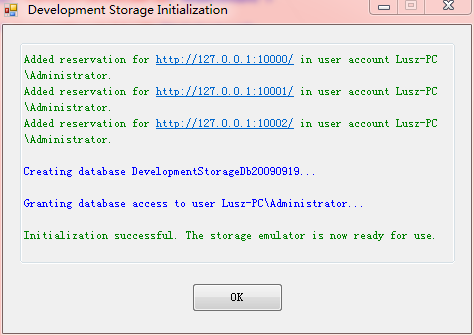
如果是第一次运行Windows Azure项目,你还将会看到Development Storage初始化窗口。
clip_image007

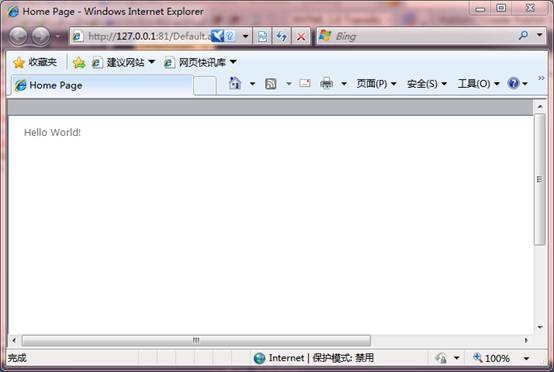
点击OK按钮后,会看到下面的页面。

clip_image009

如果你点击了Compute Emulator,选择Show Compute Emulator UI,Azure Service将会运行在你的机器上。
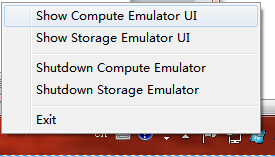
clip_image010

WindowsAzureProject1,刚才所定义的服务,会运行webrole的一个单独实例。
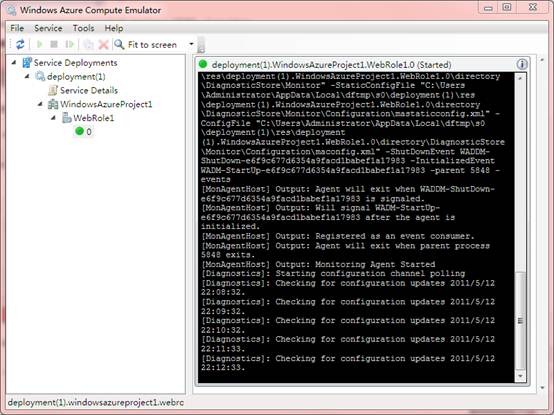
clip_image012