
惯性聚合 高效追踪和阅读你感兴趣的博客、新闻、科技资讯
阅读原文 在惯性聚合中打开

推荐订阅源

人人都是产品经理
人人都是产品经理
Stack Overflow Blog
Stack Overflow Blog
L
LINUX DO - 最新话题
Google Online Security Blog
Schneier on Security
Spread Privacy
Spread Privacy
www.infosecurity-magazine.com
雷峰网
雷峰网
Google DeepMind News
Microsoft Azure Blog
IT之家
IT之家
V
Vulnerabilities – Threatpost
K
Kaspersky official blog
S
Schneier on Security
B
Blog
The Register - Security
SecWiki News
SecWiki News
Hacker News: Ask HN
Hacker News: Ask HN
cs.AI updates on arXiv.org
S
Security Affairs
T
The Blog of Author Tim Ferriss
G
Google Developers Blog
T
Tenable Blog
P
Proofpoint News Feed
Apple Machine Learning Research
D
DataBreaches.Net
S
Secure Thoughts
Security Latest
Security Latest
H
Heimdal Security Blog
The Hacker News
The Hacker News
O
OpenAI News
AWS News Blog
AWS News Blog
量子位
Exploit-DB.com RSS Feed
腾讯CDC
U
Unit 42
L
Lohrmann on Cybersecurity
cs.CL updates on arXiv.org
L
LangChain Blog
阮一峰的网络日志
阮一峰的网络日志
T
The Exploit Database - CXSecurity.com
NISL@THU
NISL@THU
cs.CV updates on arXiv.org
Application and Cybersecurity Blog
Hugging Face - Blog
Hugging Face - Blog
The Last Watchdog
The Last Watchdog
Recorded Future
Recorded Future
V2EX - 技术
V2EX - 技术
爱范儿
爱范儿
F
Full Disclosure

博客园 - sunfishlu

一步一步学习Windows Azure(二)Azure之Hello World 一步一步学习Windows Azure(一)概述 一步一步学习CakePHP(三)model 一步一步学习CakePHP(二)controllers 一步一步学习CakePHP(一)基本概念 JQuery写的个性导航菜单 - sunfishlu - 博客园 JQueryUI(五):Dialog(第二部分) JQueryUI(三):Accordion JQueryUI(二):Tabs(第二部分) JQueryUI(一):Tabs(第一部分) - sunfishlu - 博客园 封装的Ext Grid javascript与dom编程(五)ajax 无法在Web服务器上启动调试。您不具备调试此应用程序的权限,此项目的URL位于Internet区域。 - sunfishlu - 博客园 ToolTip(图片文字) with Jquery Ext中combobox在Grid里显示问题 javascript与dom编程(四)animation(例)Tooltips javascript与dom编程(三)animation extjs grid设置某列背景颜色 javascript与dom编程(二)Event
JQueryUI(四):Dialog(第一部分) - sunfishlu - 博客园
sunfishlu · 2009-09-27 · via 博客园 - sunfishlu

1:基本的对话框

在页面上显示对话框非常简单,只需要定义一个div即可。如:

<!DOCTYPE HTML PUBLIC "-//W3C//DTD HTML 4.01//EN" "http://www.w3.org/TR/html4/strict.dtd">
<html>
<head>
    <meta http-equiv="Content-Type" content="text/html; charset=iso-8859-1" />
    <title>A basic dialog</title>
    <link href="../css/redmond/jquery-ui.css" rel="stylesheet" type="text/css" />
    <link rel="stylesheet" type="text/css" href="../css/redmond/ui.dialog.css" />
    <script type="text/javascript" src="../jquery-1.3.2.min.js"></script>
    <script type="text/javascript" src="../ui/ui.core.js"></script>
    <script type="text/javascript" src="../ui/ui.dialog.js"></script>
    <script type="text/javascript" src="../ui/ui.draggable.js"></script>
    <script type="text/javascript" src="../ui/ui.resizable.js"></script>
    <script type="text/javascript">
            $(document).ready(function () {
               $("#myDialog").dialog();
            });
    </script>
    <style type="text/css">
        body
        {
            font: 62.5% "Trebuchet MS" , sans-serif;
            margin: 10px;
        }
    </style>
</head>
<body>
    <div id="myDialog" title="This is the title">
    sunfishlu,I believe I can fly.
    </div>
</body>
</html>

效果图如下:
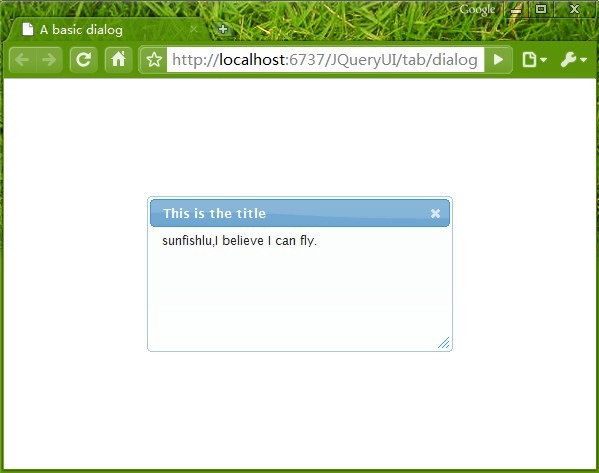
1T`TGFFMW4S~1H7`HKIIHJ7

2:属性

2.1:aotoOpen,初始化时,是否自动显示对话框,默认为true。

2.2:bgifame,是否使用bgiframe插件来解决IE6下无法遮盖select元素的问题,默认为false。

2.3:buttons,设置对话框底部的按钮。

2.4:draggable,设置对话框是否可以拖动,默认为true。

2.5:height,设置对话框的高度,默认为200.

2.6:hide,关闭对话框时的特效。

2.7:maxHeight/minHeight,设置最大、小高度。

2.8:maxWidth/minWidth,设置最大、小宽度。

2.9:modal,是否未模态窗口。默认为false。

2.10:overlay,

2.11:position,设置对话框显示位置。

2.12:resizable,设置对话框是否可以重置大小。

2.13:show,显示对话框时的特效。

2.14:stack,是否可以覆盖其它对话框。默认为true。

2.15:title,设置对话框标题。

2.16:width,宽度。

如:

    <script type="text/javascript">
            $(document).ready(function () {
                var doOk = function() {
                    alert(1);
                }
                var dialogOpts = {
                    modal: true,
                    overlay: {
                        background: "url(img/modal.png) repeat",
                    },
                buttons: {
                    "Ok!": doOk
                },
                height: "300px"
                };
               $("#myDialog").dialog(dialogOpts);
            });
    </script>

效果图如下:

5)UPB957~ESNSKUIOR$6)CO