









Security cameras have become as essential to your infrastructure as access points, switches, routers, and firewalls, and with Cisco, they’re seamlessly integrated into your network for unified protection.
As an IT professional, managing this growing ecosystem might seem overwhelming, especially with the addition of smart cameras. However, with the Cisco Meraki dashboard, your Cisco Meraki MV smart cameras are managed as easily as your other network devices: monitored, configured, and kept up to date with the latest firmware.
Cisco cloud-managed security cameras integrate with your critical infrastructure for centralized management, eliminating the complexity and uncertainty of legacy network video recorders or servers. This gives you complete visibility into your physical spaces to protect people, places, and assets.
For physical security leaders, the value of this is immense. With so much footage and so few incidents, finding the exact moment you need can feel like searching for a needle in a haystack. Accessible via the Meraki dashboard, the Meraki Vision portal makes it easy to passively monitor cameras, rapidly identify and export critical footage, and respond. Fast action means quicker investigations and better protection for your organization.
Let’s run through a demonstration of what incident response could look like with some of our new software features, designed to help you perform strategic incident management by locating footage quickly with less manual work.
When an incident happens, you don’t always have all the information you need to respond appropriately. Sometimes you only have a vague clue; other times, you get specific details. Cisco physical security solutions are built to help you react quickly and strategically, no matter how much you know. Let’s look at how this works in different scenarios.
Scenario 1: When you have minimal information
Imagine you are the lead security associate for a large retail store. One of its locations reports suspicious activity, but details are scarce—no clear eyewitnesses, just a general time frame and a mention that someone in a green shirt was seen near the incident around the time it took place. The suspect reportedly entered the store after driving recklessly.
Nearby cameras
With only a rough idea of the suspect’s path, you can explore Vision portal and view single cameras while clicking the camera icon to switch into nearby cameras and follow where your person of interest went next in real time.
Figure 1. Leverage nearby cameras to follow a person of interest quickly
Quick walls
Next, you may build a custom “quick wall,” selecting only the cameras pertinent to your investigation: those covering the entrance and likely routes. In a retail space with 50+ cameras, a quick wall allows for seamless, efficient monitoring that focuses on relevant footage.
Figure 2. Create a custom, temporary, multi-camera “quick wall” for investigations
Rapid review
Use rapid review to scrub through footage at up to 32x speed. Reverse playback makes it easy to review footage, and enables you to quickly identify the person of interest across your camera deployment.
Figure 3. Scrub through camera footage at up to 32x speed using rapid review
Cross-camera tracking
Having identified your person of interest, you pause the footage and use the single-camera search to select that person in frame. This enables you to launch a network-wide search, instantly finding them across all cameras. After reviewing the relevant clips, you can leverage the footage for your investigation and share it with local authorities as needed.
Figure 4. Select a person in paused footage to initiate a network-wide search
Scenario 2: When you have specific detailed information
Imagine the same incident has occurred, but this time, an eyewitness provides more information about the person of interest: a white vehicle was seen near the incident, the last three digits of its license plate are “058,” and the driver was wearing a green shirt.
License plate recognition and video clip API
The video clip API helps build a dashboard for quick searches. Using the Meraki MV53X camera deployed at the parking lot entrance, you search for the partial license plate and easily pinpoint exactly when the vehicle arrived.
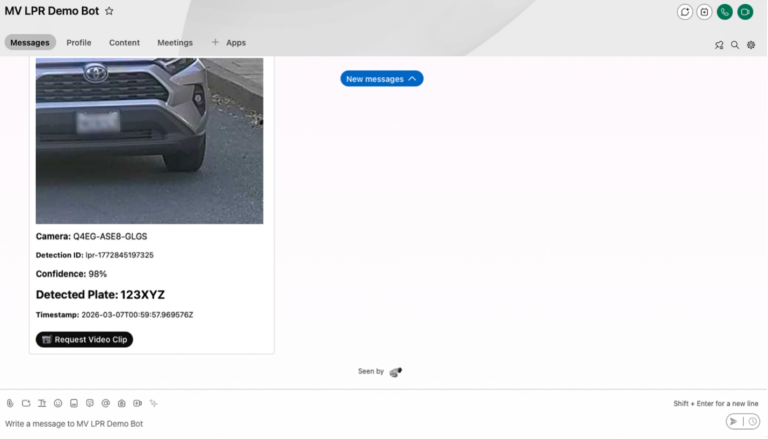
Figure 5. MV LPR Demo Bot notification: Camera detected license plate with 98% confidence via Cisco Webex messaging
Attribute search
With the suspect’s clothing color identified, you navigate to “event search” and use “attribute search” to filter video clips of people wearing a green shirt. Cisco Meraki cloud-managed security cameras leverage artificial intelligence and machine learning to highlight only relevant footage, speeding up incident resolution.
Figure 6. Filter video clips using attribute search to highlight relevant footage
Cross-camera tracking
After locating the person of interest, cross-camera tracking lets you follow their movements across all cameras, building a complete timeline. You once again can package up the footage and export it for the necessary teams to view.
Figure 7. Cross-camera tracking helps build a movement timeline to follow the person of interest
No matter how much information you have, the Meraki Vision portal streamlines information gathering with just a few clicks. Every investigation is unique, and these features work together or independently to fit your needs. All footage can be securely sent to your team for investigation, assisting retail safety.
Learn more about solving critical incidents through the Vision portal and enable these features on your physical security solution today. Or get a free trial and try out Cisco Meraki smart cameras on your Cisco network.
the Meraki Vision portal smart camera features for free
此内容由惯性聚合(RSS阅读器)自动聚合整理,仅供阅读参考。 原文来自 — 版权归原作者所有。