1.三维拾取技术
在3D游戏中通常会有这样的需求,用户可以选取3D世界中的某些物体进行如拖拽等操作,这时便需要程序通过将二维屏幕上的点坐标转换为三维世界中的坐标,并进行比对,这个过程就需要用到三维拾取。
三维拾取的基本原理并不复杂,我们仍然以Cocos2d-x 3.3beta0版本来分析。拾取思想可以简单的理解为:首先得到在屏幕上的触摸点的坐标,然后根据摄像机投影矩阵与屏幕上的触摸点计算出一条射线ray,注意,正常情况下之后应该去找与射线相交并且交点距离射线起点最近的点所在的包围盒,这个包围盒才是应该被触摸到的包围盒,但是实际上Cocos2d-x 3.3beta0中并没有做此操作,这个问题在后文讨论。
2.原理图
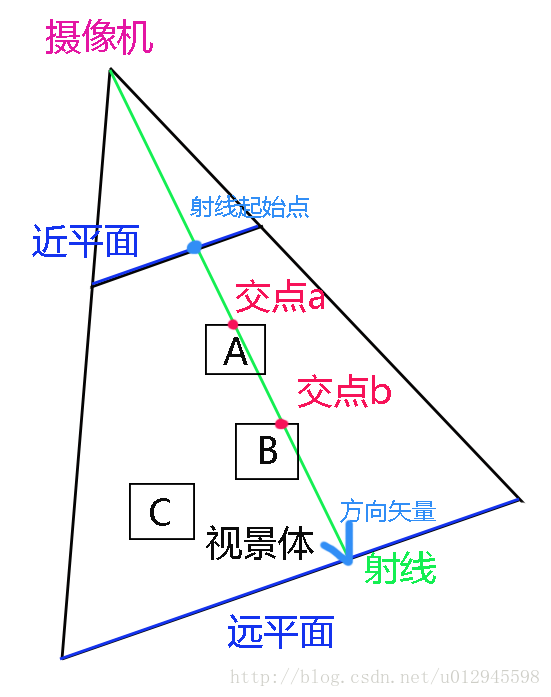
三维拾取原理图如图1-1所示:
![]()
图1-1
如上图的这种情况,射线实际上会与物体A和物体B都相交,但是实际上物体A才应该是被触摸到的物体。但是Cocos2d-x 3.3beta0中目前还没有做此处理,仅判断出了射线是否与某一当前存在的包围盒存在交点。下面看一下Cocos2d-x 3.3beta0中OBB包围盒Demo中的一段的码:
- void Sprite3DWithOBBPerfromanceTest::onTouchesBegan(const std::vector<Touch*>& touches, Event* event)
- {
- for (auto touch: touches)
- {
- auto location = touch->getLocationInView();
-
- if(_obb.size() > 0)
- {
- _intersetList.clear();
- Ray ray;
-
- calculateRayByLocationInView(&ray,location);
-
- for(int i = 0; i < _obb.size(); i++)
- {
- if(ray.intersects(_obb[i]))
- {
- _intersetList.insert(i);
- return;
- }
- }
- }
- }
- }
这个算法在对包围盒进行遍历时,一旦得出的射线和某一个包围盒碰撞了,循环便终止了,然后取到了这个物体的包围盒。但是如果两个包围盒重叠在一起的时候,应该判断是哪个包围盒距离射线起点的距离更近,更近的才是应该被摸到的盒子。而此种做法相当于,两个重叠的盒子哪个排在容器前面先被遍历到了就相当于摸到了哪个。
下面抛开上述问题,回到图1-1。按照图1-1所示,最终需要做的就是,根据屏幕上的触摸点求出射线与近平面和远平面的交点,这样便能得到我们所需要的射线了。在Cocos2d-x 3.3beta0中,Ray表示的便是射线类,里面包含了射线的起点以及方向矢量,同时提供了与AABB包围盒、OBB包围盒碰撞检测的算法。同时在上述代码中,调用了一个方法:calculateRayByLocationInView(Ray* ray, const Vec2& location)。这个方法便是根据屏幕坐标系上一点坐标求射线的方法,下面来看一下实现:
- void Sprite3DWithOBBPerfromanceTest::unproject(const Mat4& viewProjection, const Size* viewport, Vec3* src, Vec3* dst)
- {
- assert(dst);
-
- assert(viewport->width != 0.0f && viewport->height != 0.0f);
-
-
- Vec4 screen(src->x / viewport->width, ((viewport->height - src->y)) / viewport->height, src->z, 1.0f);
-
- screen.x = screen.x * 2.0f - 1.0f;
- screen.y = screen.y * 2.0f - 1.0f;
- screen.z = screen.z * 2.0f - 1.0f;
-
-
- viewProjection.getInversed().transformVector(screen, &screen);
-
-
- if (screen.w != 0.0f)
- {
- screen.x /= screen.w;
- screen.y /= screen.w;
- screen.z /= screen.w;
- }
-
- dst->set(screen.x, screen.y, screen.z);
- }
- void Sprite3DWithOBBPerfromanceTest::calculateRayByLocationInView(Ray* ray, const Vec2& location)
- {
- auto dir = Director::getInstance();
- auto view = dir->getWinSize();
- Mat4 mat = dir->getMatrix(MATRIX_STACK_TYPE::MATRIX_STACK_MODELVIEW);
-
- mat = dir->getMatrix(MATRIX_STACK_TYPE::MATRIX_STACK_PROJECTION);
-
- Vec3 src = Vec3(location.x, location.y, -1);
- Vec3 nearPoint;
- unproject(mat, &view, &src, &nearPoint);
-
- src = Vec3(location.x, location.y, 1);
- Vec3 farPoint;
- unproject(mat, &view, &src, &farPoint);
-
- Vec3 direction;
- Vec3::subtract(farPoint, nearPoint, &direction);
- direction.normalize();
-
- ray->_origin = nearPoint;
- ray->_direction = direction;
- }
3.Ray-AABB碰撞检测
进行求出射线后,需要做的便是与包围盒的碰撞检测了,如之前的代码所示,在做碰撞检测时,Cocos2d-x 3.3beta0中的Ray类里面为我们提供了intersects()方法,该方法的参数有OBB对象和AABB对象两种,实际上最终都是转换成了对AABB的检测,最后来看一下碰撞检测相关代码:
- bool Ray::intersects(const AABB& aabb) const
- {
- Vec3 ptOnPlane;
- Vec3 min = aabb._min;
- Vec3 max = aabb._max;
-
- const Vec3& origin = _origin;
- const Vec3& dir = _direction;
-
- float t;
-
-
-
-
- if (dir.x != 0.f)
- {
-
- if (dir.x > 0)
- t = (min.x - origin.x) / dir.x;
- else
- t = (max.x - origin.x) / dir.x;
-
- if (t > 0.f)
- {
- ptOnPlane = origin + t * dir;
-
- if (min.y < ptOnPlane.y && ptOnPlane.y < max.y && min.z < ptOnPlane.z && ptOnPlane.z < max.z)
- {
- return true;
- }
- }
- }
-
-
- if (dir.y != 0.f)
- {
- if (dir.y > 0)
- t = (min.y - origin.y) / dir.y;
- else
- t = (max.y - origin.y) / dir.y;
-
- if (t > 0.f)
- {
- ptOnPlane = origin + t * dir;
-
- if (min.z < ptOnPlane.z && ptOnPlane.z < max.z && min.x < ptOnPlane.x && ptOnPlane.x < max.x)
- {
- return true;
- }
- }
- }
-
-
- if (dir.z != 0.f)
- {
- if (dir.z > 0)
- t = (min.z - origin.z) / dir.z;
- else
- t = (max.z - origin.z) / dir.z;
-
- if (t > 0.f)
- {
- ptOnPlane = origin + t * dir;
-
- if (min.x < ptOnPlane.x && ptOnPlane.x < max.x && min.y < ptOnPlane.y && ptOnPlane.y < max.y)
- {
- return true;
- }
- }
- }
-
- return false;
- }
原文:http://blog.csdn.net/u012945598/article/details/39927911