





Dell’s Alienware lineup has long been synonymous with high-octane gaming, and the 16 Area-51 proves the legacy continues. Its 16-inch WQXGA LCD display delivers vibrant visuals, while the tactile CherryMX mechanical keyboard and striking Liquid Teal chassis make it as much a showpiece as a performance monster. Sleek yet imposing, this laptop is built for gamers who crave an uncompromising experience. But with a ₹4,02,490 price tag, a hefty 3.4 kg frame, and middling battery life, it’s clear this powerhouse favours desktop-level dominance over portability.
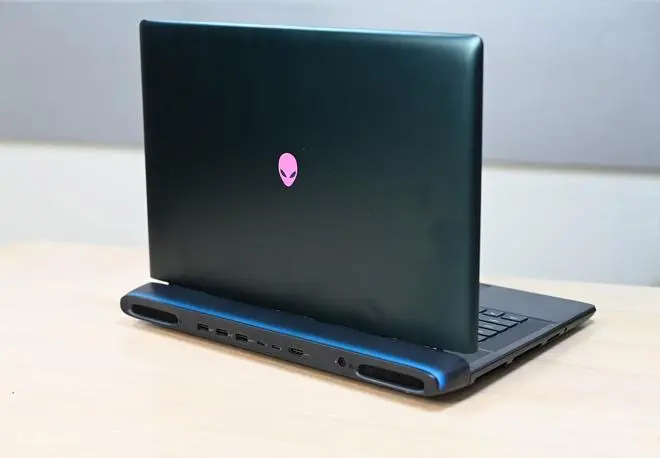
The Dell Alienware 16 Area-51 exudes premium quality, with a sturdy build and a hefty 3.4 kg weight. The aluminium panel makes the laptop durable and gives it a premium feel. However, the top and bottom panels are smudge magnets, which quickly diminishes the appeal of the colour tint. The ‘Liquid Teal’ anodised aluminium chassis adds a distinct greenish-blue flair, making it a standout piece on any desk.

Dell Alienware 16 Area-51. | Photo Credit: Bijoy Ghosh
A glass window sits below the fan array on the underside of the aluminium chassis—a small design indulgence that catches the shimmer of lights reflecting on my desk. It doesn’t serve any real functional purpose, but it does add a bit of personality to the otherwise serious-looking machine.
Vents run along both sides and across the rear, and the LED accents around the back exhaust give the laptop a subtle sci-fi glow. It’s a thoughtful touch that complements the design without feeling over the top.
The 16-inch WQXGA LCD panel rounds out the package, delivering sharp, vibrant visuals that excel in both productivity and entertainment. While I wish it were OLED, the colours are impressively bright and punchy, with crisp detail across the board. The display has a peak brightness of 500 nits, which is decent for a gaming laptop.
Whether I was running through Marvel Rivals or Black Myth: Wukong at well over 120 Hz, or unwinding with the latest season of Delhi Crime on Netflix, the display consistently delivered a smooth, immersive experience. Colours hold up beautifully, with natural-looking skin tones in films and videos, and the 240 Hz panel keeps pace with fast action without a hint of ghosting, tearing, or other visual artifacts.

Dell Alienware 16 Area-51. | Photo Credit: Bijoy Ghosh
The speakers aren’t just good; they are significantly better than what most gaming laptops offer. The laptop has a pair of 4W woofers and a pair of 4W tweeters, which deliver clear highs and solid bass. There’s a decent sense of depth to the soundstage as well. The overall volume sits a notch below what you’d get from a typical multimedia laptop, but the audio still carries well enough to comfortably fill a room.
The Area 51 laptop comes equipped with a CherryMX ultra-low-profile mechanical keyboard featuring per-key AlienFX RGB lighting. Key travel feels excellent—comparable to full-sized Cherry MX switch gaming keyboards by many brands. It delivered sharp, tactile keystrokes for typing and responsive performance during intense gaming sessions, along with that classic clickety-clackety sound of mechanical keyboards. Thanks to anti-ghosting and N-key rollover, multiple keypresses register flawlessly without phantom inputs, whether you’re strafing in Counter-Strike 2 or pulling off quick combos in Valorant.
Dell Alienware 16 Area-51. | Photo Credit: Bijoy Ghosh
The laptop features a 2 MP FHD HDR IR camera (1920 × 1080) paired with dual-array microphones. It works well for video calls in a pinch, though low-light performance is slightly grainy, and there’s no physical shutter for privacy. Streamers may want to invest in a dedicated webcam for better detail and clarity. On the plus side, Windows Hello facial login is supported and works reliably.
The review unit was configured with serious power, headlined by the 24-core Intel Core Ultra 9 275HX processor. This is seamlessly paired with the NVIDIA GeForce RTX5080 GPU and its 16 GB of VRAM, creating an absolute powerhouse capable of handling demanding 2K gaming, complex creative workloads, and intensive multitasking.
The system runs on Windows 11 Home with 32 GB of fast DDR5 RAM for smooth performance. It’s future-proof, with two accessible slots supporting up to 64 GB (2x 32GB) of memory.
Storage is handled by an ultra-responsive 2 TB SSD, providing ample space for massive modern game installations, which often exceed 100 GB.
The Dell Alienware Area-51 16-inch crushed the Cinebench R24 benchmarks, scoring 129 (Single-Core) and 2065 (Multi-Core). Its performance surpassed key rivals such as the uber-competent Apple M1 Max/Ultra and even desktop-grade CPUs, including the Intel Xeon and Threadripper processors.
In titles such as Counter-Strike 2, the Nvidia RTX 5080 (16 GB VRAM) blazed through the benchmarks, delivering over 225 FPS with graphical details maxed out at ‘Very High’ graphics settings. Similarly, in games such as Marvel Rivals and Tom Clancy’s The Division 2, I was able to get around 60 fps at Ultra settings. These are a testament to its graphical prowess with DLSS image rendering tech, ray tracing and other graphical bells and whistles turned on.
Performance remained steady for over an hour of Counter-Strike 2 gaming without throttling. The cooling system—complete with RGB rings and chunky rear exhausts—is as loud as you’d expect from a machine of this calibre, and the hot air pushed out to the sides can feel a bit intrusive if you’re using a mouse nearby. However, the keyboard area stayed cool during gaming, stress tests, and video editing in Premiere Pro.
I could use Alienware Command Centre to tune the performance profiles as well as adjust the per-key and zone LED colours on the keyboard, the rear exhaust vent and the Alienware logo on the lid. The software is refined and definitely complements the overall power experience well.
The hardcore gaming laptop offers a solid selection of ports. On the rear panel—alongside the exhaust vents—you’ll find two USB Type-A 3.2 Gen 1 (5 Gbps) ports, two Thunderbolt 5 USB-C ports, and an HDMI 2.1 output. While this rear-facing layout is convenient for a gaming setup, it would have been nice to see some ports distributed across the sides for easier access. The large side exhausts and hot air flow have possibly influenced this design choice.
A welcome touch, though, is the inclusion of a full-size SD card slot and a universal headset jack on the left—small conveniences that go a long way for content creators and audiophiles alike.
The Alienware 16 has a 96 Wh battery, typical for high-end gaming laptops. Expect 2–3 hours of light use(browsing videos), but gaming and Adobe Premiere Pro will drain it in about 1 hour and 20 minutes. The 360 W charger quickly restores full capacity in around an hour.
The Alienware Area-51 16 stands out as a formidable gaming machine, delivering exceptional performance, a sharp and vibrant display, and surprisingly capable audio. Its weak spots are familiar ones: middling battery life and its hefty weight—comparable to a 5 kg dumbbell (with the charger) —hurt portability.
Priced at ₹4,02,490, it is quite steep and would be ideal for e-sports teams and gamers seeking the highest-spec configuration for their money. Performance-wise, it rivals top-tier contenders such as the Asus ROG Strix 16 and Lenovo Legion Pro 7i with 50 series GPUs, offering a niche experience for those who demand uncompromising specs.
Price - ₹4,02,490 (the specs reviewed)
Pros - Great performance, premium build quality, vibrant display, mechanical keyboard, decent acoustics
Cons - Expensive, runs hot, bulky, lacks portability, rear ports can be inconvenient, average battery life
Published on November 26, 2025
此内容由惯性聚合(RSS阅读器)自动聚合整理,仅供阅读参考。 原文来自 — 版权归原作者所有。