惯性聚合 高效追踪和阅读你感兴趣的博客、新闻、科技资讯
阅读原文 在惯性聚合中打开

推荐订阅源

T
Troy Hunt's Blog
GbyAI
GbyAI
大猫的无限游戏
大猫的无限游戏
Apple Machine Learning Research
爱范儿
爱范儿
OSCHINA 社区最新新闻
OSCHINA 社区最新新闻
博客园 - 三生石上(FineUI控件)
罗磊的独立博客
Know Your Adversary
Know Your Adversary
Project Zero
Project Zero
G
GRAHAM CLULEY
T
Threatpost
T
Threat Research - Cisco Blogs
博客园 - 叶小钗
雷峰网
雷峰网
Hugging Face - Blog
Hugging Face - Blog
钛媒体:引领未来商业与生活新知
钛媒体:引领未来商业与生活新知
Threat Intelligence Blog | Flashpoint
IT之家
IT之家
月光博客
月光博客
C
CXSECURITY Database RSS Feed - CXSecurity.com
W
WeLiveSecurity
阮一峰的网络日志
阮一峰的网络日志
C
Cisco Blogs
S
Schneier on Security
cs.AI updates on arXiv.org
V
Visual Studio Blog
宝玉的分享
宝玉的分享
Recent Commits to openclaw:main
Last Week in AI
Last Week in AI
T
Tenable Blog
V
V2EX
I
Intezer
T
Tailwind CSS Blog
博客园_首页
S
Security @ Cisco Blogs
量子位
PCI Perspectives
PCI Perspectives
cs.CV updates on arXiv.org
D
Darknet – Hacking Tools, Hacker News & Cyber Security
人人都是产品经理
人人都是产品经理
SecWiki News
SecWiki News
小众软件
小众软件
Spread Privacy
Spread Privacy
D
DataBreaches.Net
Cyber Security Advisories - MS-ISAC
P
Palo Alto Networks Blog
T
The Exploit Database - CXSecurity.com
Application and Cybersecurity Blog
C
CERT Recently Published Vulnerability Notes

Databricks

Why Talent Transformation Is the Missing Focus of Enterprise AI Public Health Intelligence Shouldn't Require a Data Scientist Mean Time to Detect Is a Data Access Problem First-party audience data is the ad sales relationship now Rethinking Distributed Systems for Serverless Performance and Reliability The AI Scaling Gap Hiding in Digital Native Companies 10 trillion samples a day: Scaling beyond traditional monitoring infra at Databricks AI success starts with clean data, not just better models How nOps Rebuilt Their Cloud Optimization Platform on Databricks Lakebase, and Why Other ISVs Should Too Peril Predicts: Precision Payouts for a Volatile World The foundation of AI scalability: one team, one platform, one operating model The Federal Data Paradox: Rich in Data, Poor in Access Driving Budapest Forward: How BKK Uses Databricks to Transform City Mobility LLM Vs AI: A Practical Guide to Differences, Use Cases, and Tools Model Risk Governance Is Not the Same as Risk Intelligence Generative AI for Business: A Complete Strategy and Implementation Guide Data Science vs Data Engineering: Choosing Analysis or Infrastructure AI Applications: Tools, Use Cases, and Platforms MLOps vs DevOps: A Practical Guide for Data Scientists and IT Teams Top Data Warehouse Tools For Modern Data Analytics Unlocking SAP Business Context in Databricks with Semantic Metadata Delta Sharing The marketing activation gap has a fix: Databricks and Stitch partner to turn data infrastructure into marketing performance Alert Fatigue Is a Business Risk Backstage with Lakebase Shipping Faster isn’t Learning Faster Why Your OEE Dashboard Is Lying to You The Turbine That Tried to Tell You It Was Failing Predicting Readmissions Isn't Enough. Acting in Time Is. Clinical Trials Run Longer Than They Have To. That's a Patient Problem Network Quality Is a Revenue Problem, Not a Technical One Shelf Availability Starts with Better Demand Visibility When Predicting the Next Hit Requires More Than Intuition Approximate Answers, Exact Decisions: New Sketch Functions for Analytics Companies Winning with AI Built the Data Layer First Rethinking SQL ETL for modern data platforms Stripe data now available on Databricks via Databricks Marketplace Databricks and Stripe Projects: Infrastructure Built for Agents Agents are ready but your architecture probably isn't Interoperability Between Unity Catalog and Google BigQuery via Catalog Federation Built In, Not Bolted On: What AI-Native Actually Means in Cybersecurity Operationalizing AI for public sector fraud prevention From months to minutes: Building real-time clinical data pipelines with natural language Agentic Data Engineering with Genie Code and Lakeflow Securely send first-party conversion signals with Snapchat Conversions API on Databricks Marketplace How leading tech companies are killing the builder’s tax with Lakebase Inside one of the first production deployments of Lakebase: LangGuard's agentic workflow governance engine The next generation of Databricks Genie Model Risk Management in 2026: A Banker’s Guide to the Revised Interagency Guidance OpenAI GPT-5.5 now available on Databricks, fully-governed through Unity AI Gateway Operational databases: How they work and when to use them Databricks partners with OpenAI on GPT-5.5 Announcing the Public Preview of Lakeflow Designer Are LLM agents good at join order optimization? How conversational analytics removes the BI bottleneck How to transform document activation workflows with Genie and Agent Bricks Beyond the spreadsheet: how Databricks is delivering the modern CFO in Financial Services AI App Development: Guide To Building AI-Powered Apps IoT in Manufacturing: Strategy, Components, Use Cases, and Challenges Stop Hand-Coding Change Data Capture Pipelines Multimodal Data Integration: Production Architectures for Healthcare AI Personalization Strategies for Media Companies A Modern AI Risk Management Framework Introducing the Databricks Excel Add-in for Business Users Real-Time Decisioning for AI Agents: Why you Need a Customer Context Layer First A Practical Guide to LLM Fine Tuning AI Data Transformation Guide for Data Engineers and Data Scientists Concurrency Control in DBMS: How Locking, MVCC and Optimistic Strategies Keep Data Consistent Bridging data science and marketing: Databricks unveils Delta Sharing integration for Adobe Experience Platform and agentic marketing workflows Take Control: Customer-Managed Keys for Lakebase Postgres Get hands on with agents, vibe coding and more at Data+ AI Summit Mercedes-Benz Builds a Cross-Cloud Data Mesh with Delta Sharing and Intelligent Replication, Cutting Costs by 66% What Is a Transactional Database? Introducing Genie Agent Mode Governing coding agent sprawl with Unity AI Gateway Governing Coding Agent Sprawl with Unity AI Gateway What is pgvector? Banks Don’t Have an AI Problem – They Have a Data Platform Problem Open Platform, Unified Pipelines: Why dbt on Databricks is Accelerating Why Your Agents Can’t Read Enterprise Documents — and How to Fix It Building with Databricks Document Intelligence and Lakeflow Databricks on Google Cloud: Innovate Faster. Smarter. Together. Introducing the Databricks Connector for Google Sheets: Real-Time, Governed Lakehouse Data in the Sheets Users Love Unity AI Gateway: How to connect agents to external MCPs securely Expanding agent governance with Unity AI Gateway Agentic reasoning in practice: Making sense of structured and unstructured data Agent Bricks: The Governed Enterprise Agent Platform 8 AI and data trends shaping financial services in 2026 Building real-time product search on Databricks Lovable + Databricks: Build Data-Driven Apps at the Speed of Thought Memory scaling for AI agents Powering clinical research innovation: How TriNetX uses Databricks to accelerate drug development Database Branching in Postgres: Git-Style Workflows with Databricks Lakebase How Zalando built a unified data foundation for AI and analytics on Databricks The next era of the open lakehouse: Apache Iceberg™ v3 in Public Preview on Databricks How FSIs eliminate silos between clients, operations, and finance How MakeMyTrip achieved millisecond personalization at scale with Databricks A multi-agent approach to audience intelligence AiChemy: Next-generation agent with MCP, skills and custom data for drug discovery Accelerate business insights with Lakeflow Connect, now with a Free Tier Unlocking Next-Gen Customer Experiences with Data Intelligence for Marketing
Design Beautiful Dashboards in AI/BI
Maggie Li · 2026-06-17 · via Databricks

Introduction

Every company has a brand identity that reflects what it stands for, shaped by its logo, colors, fonts, and tone. Our most recognizable customers, like Rivian and Wineshipping, apply that identity consistently across every surface: marketing, slide decks, websites, and products. That consistency is what earns trust with their customers and partners.

Dashboards are a crucial medium through which business teams share data with decision makers and external partners. Dashboard authors craft this experience to help viewers understand their data and surface key insights. For dashboards to look trustworthy and professional, authors need to make them feel cohesive and on-brand. Dashboard themes let you update the look and feel of individual dashboards to match your vision.

Workspace themes take this further by applying a consistent theme across all dashboards in the workspace, which inherit it automatically. This can of course be extended and/or modified locally as needed. In this post, we will explore some design best practices and create a custom theme to reflect the brand.

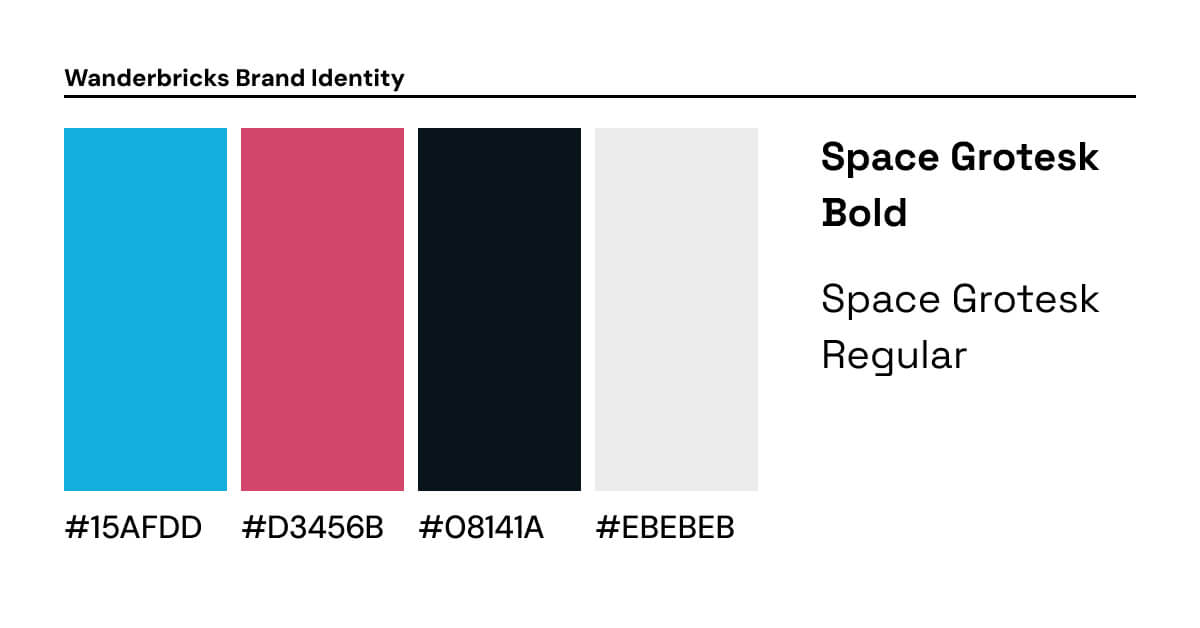
We will use some fictional Wanderbrick’s brand guidelines as an example to create a dashboard. image8.jpg
Want to follow along? Wanderbricks is a fictional travel and hospitality company with a sample dataset available in every Databricks workspace. You can recreate the dashboard from scratch using the Genie Code prompts in each section, or just read along and apply the ideas to your own. Start by opening a new dashboard and dropping in this prompt. It creates a local metric view on top of the samples.wanderbricks schema with the dimensions and measures we'll use throughout.

#1 — Create a layout based on your end users' needs

Setting up your grid

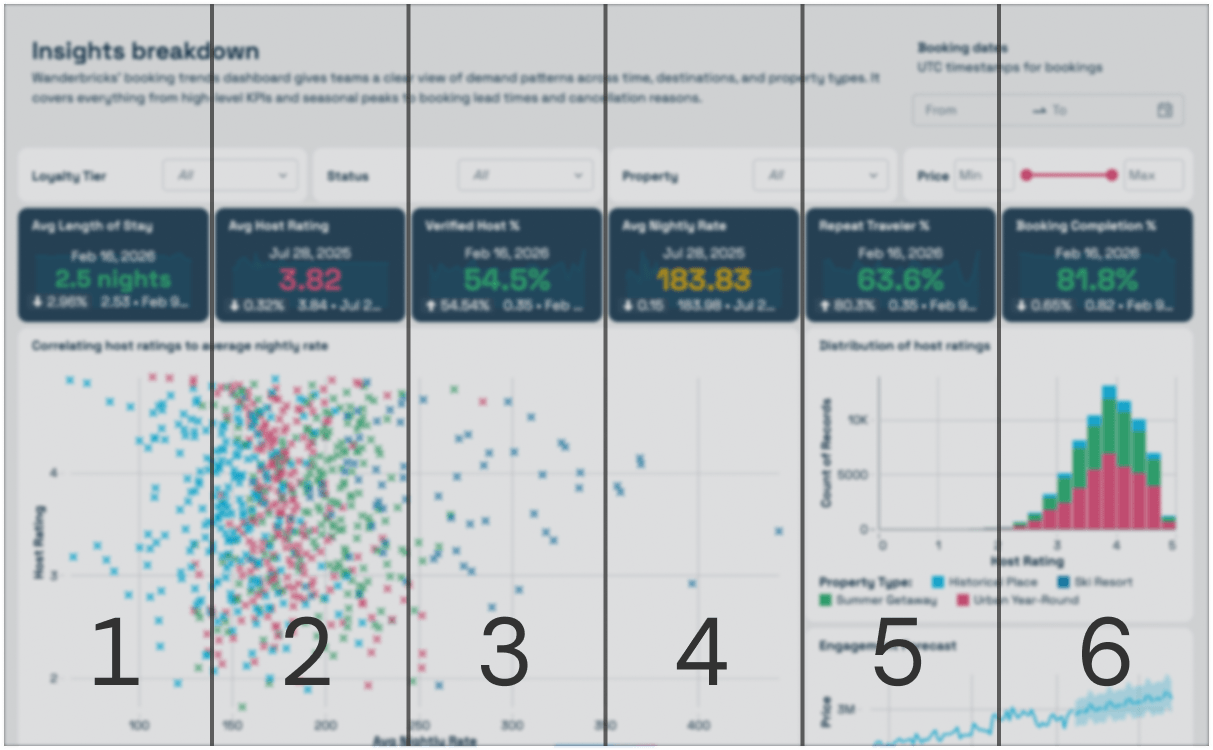
The purpose of your dashboard should determine how many columns are in your grid layout. AI/BI offers a flexible 12-column grid that you can subdivide into 3, 4, or 6 columns depending on your needs. Dense, technical dashboards with many widgets benefit from a 6-column layout, fitting more widgets into view. On the other hand, an executive dashboard could use a 3-column layout to reduce cognitive load. 

image19.png
An executive dashboard with a 3 column layout
image22.png
A denser technical dashboard with a 6 column layout

Creating hierarchy

When viewing a dashboard, the human eye naturally scans to find the most important information before reading. Depending on the design of your dashboard, the eye will follow one of two paths across the dashboard: an F-pattern or Z-pattern.

For dashboards that are heavy on imagery and visualizations, the eye naturally follows a Z-pattern across visual layouts, starting top-left with titles and filters, cutting diagonally down, and landing bottom-right on detailed visualizations and tables. 

image23.png
 The eyes scan visual pages in a Z pattern

For dashboards that are more text or table-heavy, an F-pattern can emerge. The eye scans the first row fully, then moves down the left. In either pattern, the principle is the same: put what matters most where the eye lands first.
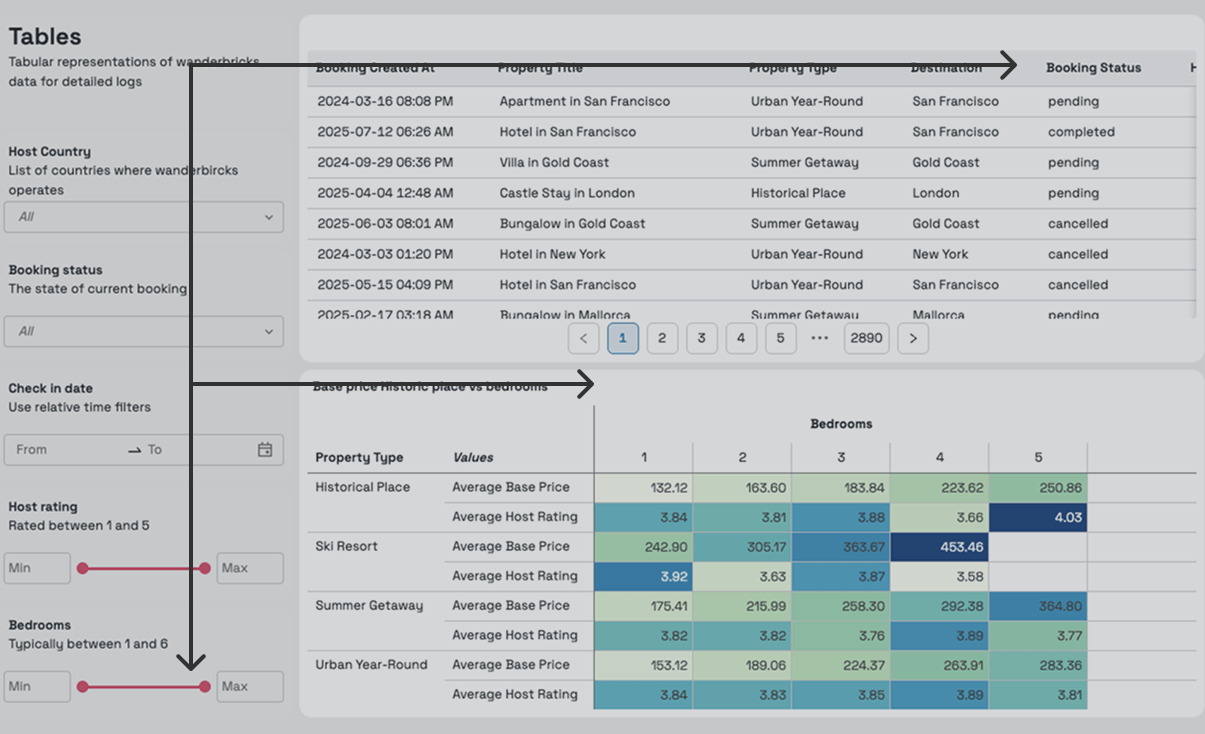
The eyes scan text heavy pages in an F pattern

Resize to emphasize

If everything on your dashboard is the same size, nothing stands out. Viewers need visual cues to know where to focus first. Establish a clear hierarchy by making your most critical metrics and primary visuals larger, and letting secondary elements recede into the background.

image16.png
Avoid ❌: Equal size widgets result in a lack of clear hierarchy.
image12.png
Adopt ✅: Creating a layout based on visualization’s relative importance

Try applying this to the Wanderbricks dashboard. The first prompt builds an executive overview page following the hierarchy we just covered, and the second adds a denser technical page to show how the same principles adapt to a different audience.
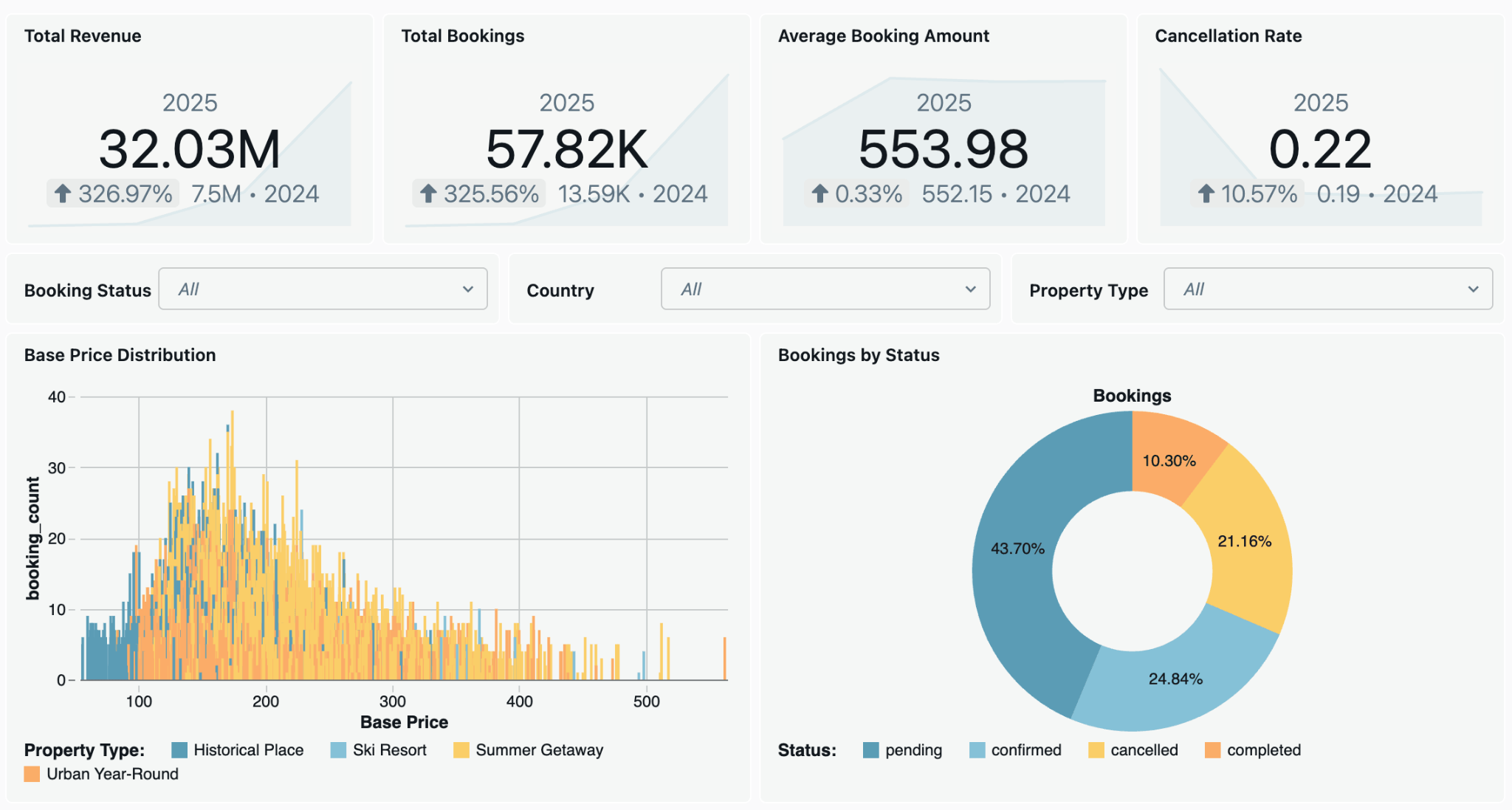
image3.png

#2 — Select font for tone & readability

Choosing a font for a dashboard is a functional decision as much as an aesthetic one. Your brand identity and audience should both factor into your font choice. A more technical audience might appreciate something expressive like Space Grotesk, while an executive dashboard benefits from something more familiar and conservative, like Arial. The goal isn't just style but setting the tone.

Dashboards tend to be information-dense, so readability comes first. We recommend sans-serif fonts since they reduce visual strain. AI/BI natively supports a few web safe sans-serif options out of the box, including Arial, Tahoma, and Verdana.

image7.png
You can now pick a local font from your computer.

 If you want to use your own font, you can now add a local font to your dashboard. This is especially useful when dashboards are being embedded within your internal tools for consistency. For this dashboard we will use a local font and set it to Space Grotesk.

To ensure legibility, pick font colors that maintain a high contrast against the widget background. Use an accessibility tool like Adobe color contrast checker to verify. In light mode, avoid using Pure black (#000000) as it can feel harsh against a bright background (#FFFFFF). In light mode, a slightly softened tone like #08141A against #EBEBEB often creates a more comfortable reading experience. In dark mode, you can try using #EBEBEB against #08141A to avoid excessive contrast.

image10.png
Avoid ❌: Low contrast strains the users eyes as the text isn't as easily discernible.
image18.png
Adopt ✅: High contrast ensures text is clear and legible.

AI/BI supports a set of web-safe and open source fonts that you can apply with Genie Code. For brand fonts, use the local font option under Settings > Font > Use local font. Try this prompt to get started with an open source option and set your font colors.

image13.png

#3 — Define UI colors

The 60-30-10 rule is a foundational principle in color theory for creating balanced, visually harmonious designs. Designers use this rule across many contexts–from choosing the colors for a room in your house to establishing branding for a new company. This design rule helps you define your color palette with three categories of color, and gives your palette the appropriate balance with how much each should be used in a holistic design:

  • 60% is your dominant color that defines the overall tone of the dashboard, and will be your canvas, widget, and border background color.
  • 30% is your secondary color that supports your background with contrast. In your dashboard, this will be your font color and data visualization palette.
  • 10% is your accent color, meant for grabbing attention where you need it. Use this to highlight interactive elements like filters, tabs and buttons in your dashboard.

image5.jpgBelow we will discuss how to apply this principle to choose beautiful colors for your dashboard.

Neutral Background colors

By keeping background colors close to neutral, we let data visualization colors communicate accurately without introducing unintended bias. For light mode, keep widget backgrounds close to White (#FCFCFD) with a slightly darker color for the canvas background (#EBEBEB). This creates separation without distraction. When contrast is subtle, the dashboard reads as a cohesive whole rather than a grid of isolated elements. Setting border colors to match the widget background reduces visual clutter, especially in dense layouts.

image20.png
Subtle background helps “chunk” data - break information into smaller digestible visuals.

Per widget customization

To emphasize certain widgets and make them stand apart, you may override theme properties for a widget. In widget style settings, update the background & border color to #1F354B. In addition, update the font color to #EBEBEB to ensure high contrast.

image2.png
Updated KPI card style creates a stark contrast to other widgets and grabs user attention.

Bold selection color

Selection color is used to highlight interactive elements like filters, tabs and buttons. Select a color that is easily distinguishable from text and background colors. You can easily derive them using your brand colors. Using our brand’s #15AFDD as the base color in Adobe Color, we can try deriving a selection color by setting the color harmony to square resulting in colors like #DE7914 & #3A7689. Picking a blue color (like #2272B4) is usually a safe choice - it's analogous to the hyperlink color associated with interactive links on the web.

Dark mode
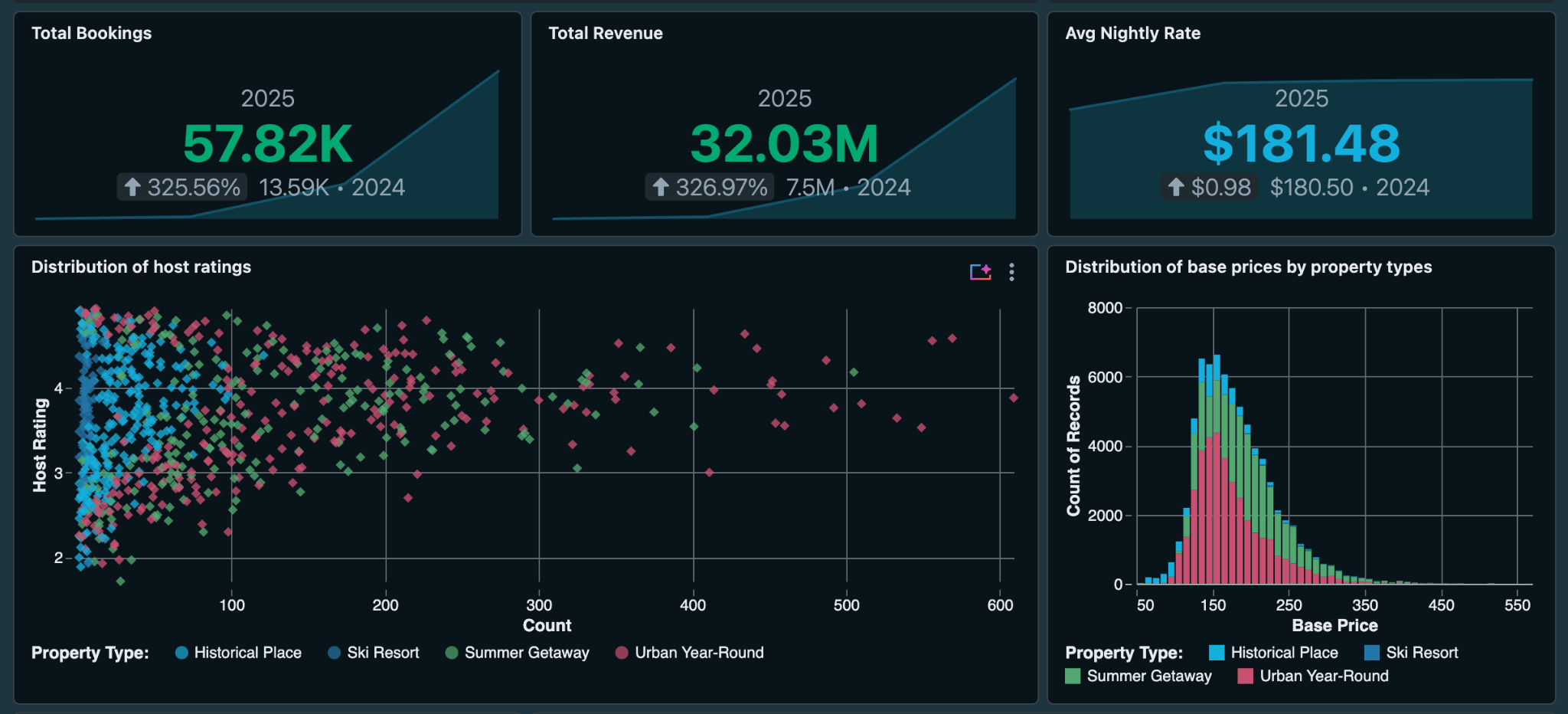
image14.png
Use the “Preview colors in” toggle to setup UI colors in both light and dark mode

Every AI/BI theme supports both light and dark mode. Setup both modes by switching the light/dark mode toggle. To set up light mode, you can use brand color for #1E343F for canvas background and #08141A for widget background. In light mode, the brighter color for the widget is usually recommended as it provides high contrast. For font color we will use #E8EFF1 to provide high legibility .

Try applying the 60-30-10 principle to the Wanderbricks dashboard. This prompt sets neutral canvas and widget backgrounds, hides borders by matching them to the widget color, and adds a complementary blue for interactive elements.
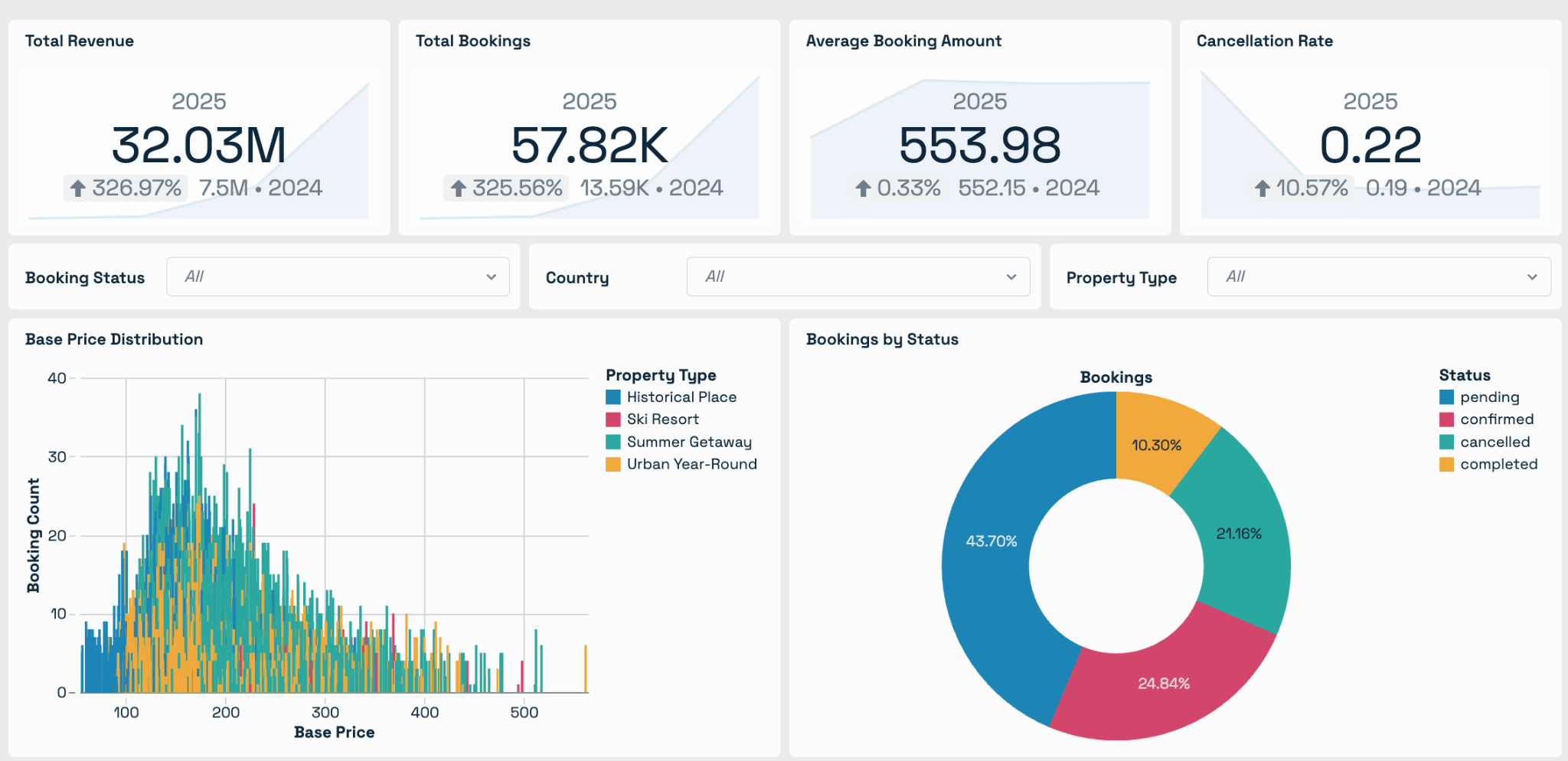
image15.png

#4 — Build a Visualization Palette That's Yours

With the interface colors established for both light and dark mode, the final step is selecting the visualization palette.

A well-balanced data visualization palette ties the whole dashboard together and brings it to life. The palette can include brand colors but will need adjustments as they may be unusable for visualizations. An estimated 4.5% of the global population experiences some form of color blindness, so it is important to design a palette that is color blind friendly. If you want to try out some industry standard palettes we recommend checking out colorbrewer. A few key things to consider when designing your own palette:

  1. Depending on the use case, a palette should have 5-9 colors. In this dashboard we will create a palette of 5 colors using Adobe Color.
  2. The colors should be distinguishable in both light and dark mode, so avoid extremely bright or extremely dark colors.
  3. Since red/green color blindness is common, avoid having those colors next to each other in the palette.
image11.png
Creating a palette using color harmonies

For our custom Databricks visualization palette, we start with our brand color (#15AFDD) in Adobe Color. Applying the “square” color harmony to derive 4 additional colors (#83DE14, #DE7914, #BE14DE, #3A7689) that are evenly spaced on the color wheel. From there in Adobe color, you may make a few more tweaks:

  • Shift hues by clicking on individual color hex and gradually move the hue slider.
  • Adjust brightness of colors in the palette by clicking on the color hex and update the brightness slider. The goal is to keep the colors distinct, especially adjacent pairs.
  • Try resulting colors in Adobe Color's color blindness checker to simulate how your palette appears across common conditions including Deuteranopia, Protanopia, and Tritanopia.
  • Test in AI/BI against real dashboards in both light and dark mode.

The final color palette we have are #15AFDD, #2375A8, #52A870, #C85070, #C89930.

image6.png

Once your palette passes the accessibility checks, apply it to see your charts come to life. This is the palette we landed on after running it through Adobe Color's color blindness simulator and testing in both light and dark mode.

image4.png

Conclusion

Design decisions that seem small in isolation add up quickly. A consistent font, an intentional color palette and a layout built to let viewers easily read. Together they transform a dashboard into something people trust. Workspace themes help scale that across your organization, so good design practice becomes the starting point for every dashboard.
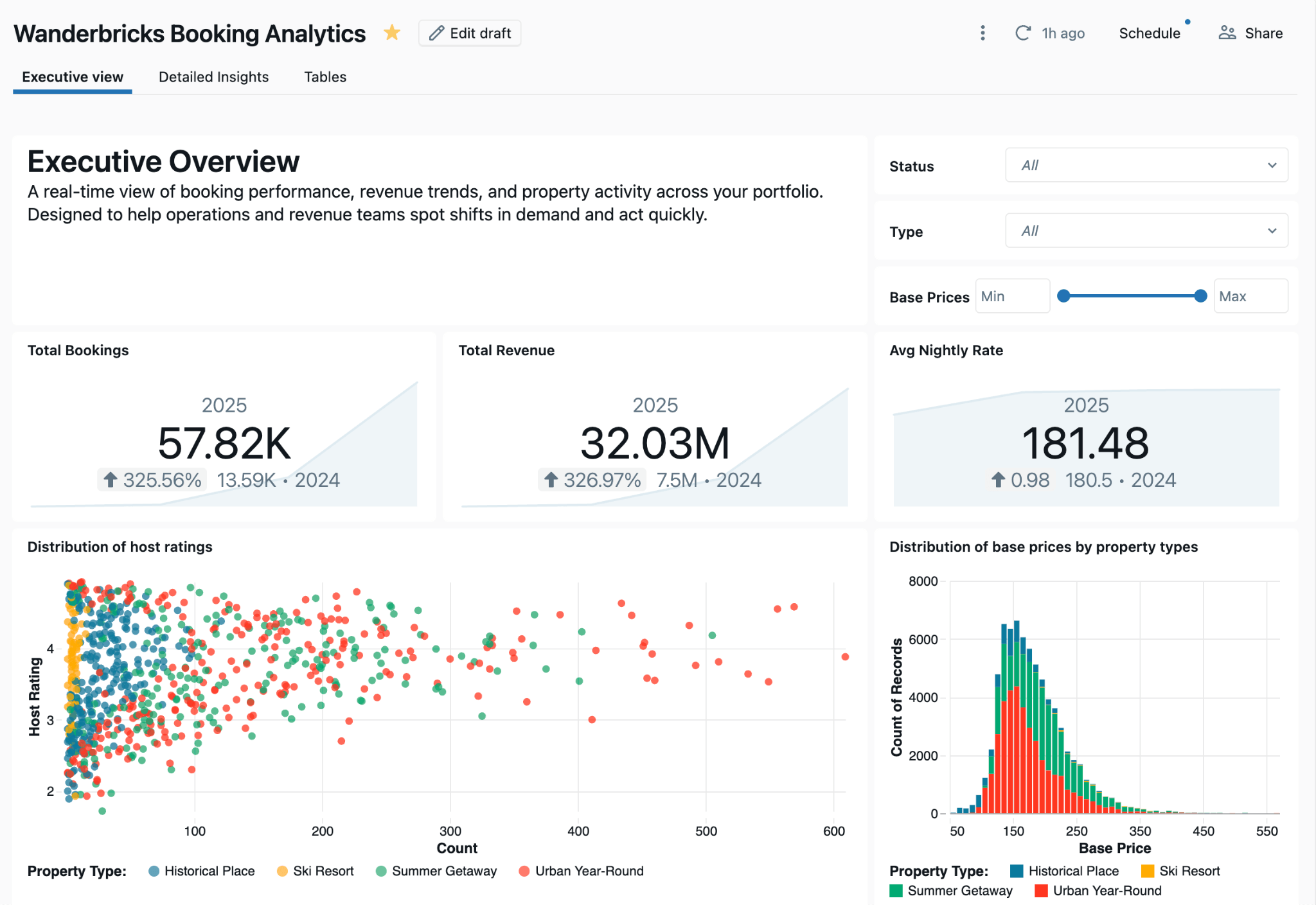
image1.png
Dashboard in default font & colors
image9.png
Dashboard in custom brand font & colors

The dashboard we walked through is available here if you want to explore it yourself. If you're not using AI/BI dashboards yet, we're natively built into Databricks.

Have ideas or feedback? Share them with us.

Download the dashboard to explore on your own