本文来自http://blog.csdn.net/hellogv/ ,引用必须注明出处!
上次介绍了Activity以及Intent的使用,这次就介绍Service,如果把Activity比喻为前台程序,那么Service就是后台程序,Service的整个生命周期都只会在后台执行。Service跟Activity一样也由Intent调用。在工程里想要添加一个Service,先新建继承Service的类,然后到AndroidManifest.xml -> Application ->Application Nodes中的Service标签中添加。
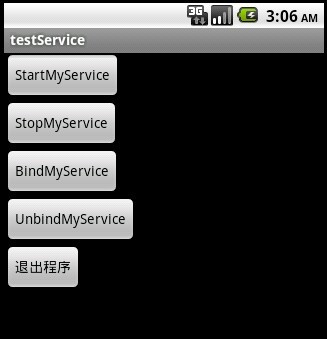
Service要由Activity通过startService 或者 bindService来启动,Intent负责传递参数。先贴出本文程序运行截图:
![]()
本文主要讲解Service的调用,以及其生命周期。
![]()
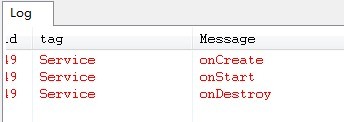
上图是startService之后再stopService的Service状态变化。
![]()
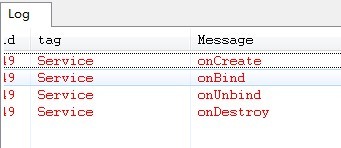
上图是bindService之后再unbindService的Service状态变化。
startService与bindService都可以启动Service,那么它们之间有什么区别呢?它们两者的区别就是使Service的周期改变。由startService启动的Service必须要有stopService来结束Service,不调用stopService则会造成Activity结束了而Service还运行着。bindService启动的Service可以由unbindService来结束,也可以在Activity结束之后(onDestroy)自动结束。
![]()
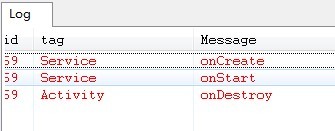
上图是startService之后再Activity.finish()的Service状态变化,Service还在跑着。
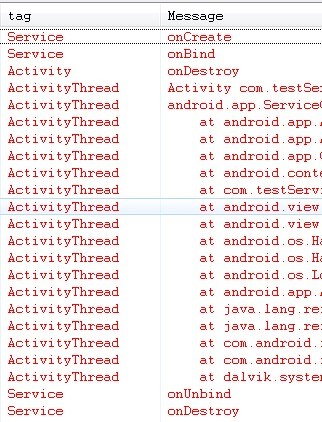
![]()
上图是bindService之后再Activity.finish()的Service状态变化,Service最后自动unbindService。
main.xml代码:
- <?xml version="1.0" encoding="utf-8"?>
- <LinearLayout xmlns:android="http://schemas.android.com/apk/res/android"
- android:orientation="vertical" android:layout_width="fill_parent"
- android:layout_height="fill_parent">
- <Button android:layout_width="wrap_content"
- android:layout_height="wrap_content" android:id="@+id/btnStartMyService"
- android:text="StartMyService"></Button>
- <Button android:layout_width="wrap_content"
- android:layout_height="wrap_content" android:id="@+id/btnStopMyService"
- android:text="StopMyService"></Button>
- <Button android:layout_width="wrap_content"
- android:layout_height="wrap_content" android:id="@+id/btnBindMyService"
- android:text="BindMyService"></Button>
- <Button android:layout_width="wrap_content"
- android:layout_height="wrap_content" android:id="@+id/btnUnbindMyService"
- android:text="UnbindMyService"></Button>
- <Button android:layout_width="wrap_content"
- android:layout_height="wrap_content" android:id="@+id/btnExit"
- android:text="退出程序"></Button>
- </LinearLayout>
testService.java的源码:
- package com.testService;
-
- import android.app.Activity;
- import android.app.Service;
- import android.content.ComponentName;
- import android.content.Intent;
- import android.content.ServiceConnection;
- import android.os.Bundle;
- import android.os.IBinder;
- import android.util.Log;
- import android.view.View;
- import android.widget.Button;
-
- public class testService extends Activity {
- Button btnStartMyService,btnStopMyService,btnBindMyService,btnUnbindMyService,btnExit;
- @Override
- public void onCreate(Bundle savedInstanceState) {
- super.onCreate(savedInstanceState);
- setContentView(R.layout.main);
- btnStartMyService=(Button)this.findViewById(R.id.btnStartMyService);
- btnStartMyService.setOnClickListener(new ClickEvent());
-
- btnStopMyService=(Button)this.findViewById(R.id.btnStopMyService);
- btnStopMyService.setOnClickListener(new ClickEvent());
-
- btnBindMyService=(Button)this.findViewById(R.id.btnBindMyService);
- btnBindMyService.setOnClickListener(new ClickEvent());
-
- btnUnbindMyService=(Button)this.findViewById(R.id.btnUnbindMyService);
- btnUnbindMyService.setOnClickListener(new ClickEvent());
-
- btnExit=(Button)this.findViewById(R.id.btnExit);
- btnExit.setOnClickListener(new ClickEvent());
- }
- @Override
- public void onDestroy()
- {
- super.onDestroy();
- Log.e("Activity","onDestroy");
- }
-
- private ServiceConnection _connection = new ServiceConnection() {
- @Override
- public void onServiceConnected(ComponentName arg0, IBinder arg1) {
-
- }
-
- @Override
- public void onServiceDisconnected(ComponentName name) {
-
- }
- };
- class ClickEvent implements View.OnClickListener{
-
- @Override
- public void onClick(View v) {
- Intent intent=new Intent(testService.this,MyService.class);
- if(v==btnStartMyService){
- testService.this.startService(intent);
- }
- else if(v==btnStopMyService){
- testService.this.stopService(intent);
- }
- else if(v==btnBindMyService){
- testService.this.bindService(intent, _connection, Service.BIND_AUTO_CREATE);
- }
- else if(v==btnUnbindMyService){
- if(MyService.ServiceState=="onBind")
- testService.this.unbindService(_connection);
- }
- else if(v==btnExit)
- {
- testService.this.finish();
- }
-
- }
-
- }
- }
MyService.java的源码:
- package com.testService;
-
- import android.app.Service;
- import android.content.Intent;
- import android.os.IBinder;
- import android.util.Log;
-
- public class MyService extends Service {
- static public String ServiceState="";
- @Override
- public IBinder onBind(Intent arg0) {
- Log.e("Service", "onBind");
- ServiceState="onBind";
- return null;
- }
- @Override
- public boolean onUnbind(Intent intent){
- super.onUnbind(intent);
- Log.e("Service", "onUnbind");
- ServiceState="onUnbind";
- return false;
-
- }
- @Override
- public void onCreate(){
- super.onCreate();
- Log.e("Service", "onCreate");
- ServiceState="onCreate";
- }
- @Override
- public void onDestroy(){
- super.onDestroy();
- Log.e("Service", "onDestroy");
- ServiceState="onDestroy";
- }
- @Override
- public void onStart(Intent intent,int startid){
- super.onStart(intent, startid);
- Log.e("Service", "onStart");
- ServiceState="onStart";
- }
-
- }