本文来自http://blog.csdn.net/hellogv/ ,引用必须注明出处!
介绍过AlertDialog之后,接下来就介绍一下PopupWindow这种对话框。PopupWindow是阻塞对话框,只有在外部线程 或者 PopupWindow本身做退出操作才行。PopupWindow完全依赖Layout做外观,在常见的开发中,PopupWindow应该会与AlertDialog常混用。
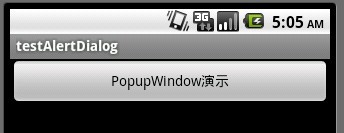
贴出本例中运行的结果图:
![]()
main.xml的源码如下:
- <?xml version="1.0" encoding="utf-8"?>
- <LinearLayout xmlns:android="http://schemas.android.com/apk/res/android"
- android:orientation="vertical"
- android:layout_width="fill_parent"
- android:layout_height="fill_parent"
- >
- <Button android:id="@+id/Button01" android:layout_height="wrap_content" android:layout_width="fill_parent" android:text="PopupWindow演示"></Button>
- </LinearLayout>
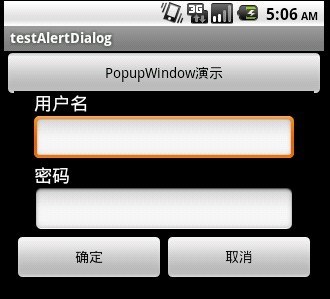
下图是PopupWindow弹出的截图,这里的PopupWindow是个登录框,点“确定”则自动填写,点“取消”则关闭PopupWindow。
![]()
popupwindow.xml的源码:
- <?xml version="1.0" encoding="utf-8"?>
-
- <LinearLayout xmlns:android="http://schemas.android.com/apk/res/android"
- android:layout_width="fill_parent" android:layout_height="wrap_content"
- android:orientation="vertical" android:background="#000000">
-
- <TextView android:id="@+id/username_view"
- android:layout_height="wrap_content"
- android:layout_marginLeft="20dip"
- android:layout_marginRight="20dip" android:text="用户名"
- android:textAppearance="?android:attr/textAppearanceMedium" android:layout_width="fill_parent"/>
-
- <EditText android:id="@+id/username_edit"
- android:layout_height="wrap_content"
- android:layout_width="fill_parent" android:layout_marginLeft="20dip"
- android:layout_marginRight="20dip" android:capitalize="none"
- android:textAppearance="?android:attr/textAppearanceMedium" />
-
- <TextView android:id="@+id/password_view"
- android:layout_height="wrap_content"
- android:layout_marginLeft="20dip"
- android:layout_marginRight="20dip" android:text="密码"
- android:textAppearance="?android:attr/textAppearanceMedium" android:layout_width="fill_parent"/>
-
- <EditText android:id="@+id/password_edit"
- android:layout_height="wrap_content"
- android:layout_width="fill_parent" android:layout_marginLeft="20dip"
- android:layout_marginRight="20dip" android:capitalize="none"
- android:password="true"
- android:textAppearance="?android:attr/textAppearanceMedium" />
-
- <LinearLayout android:id="@+id/LinearLayout01" android:layout_height="wrap_content" android:layout_width="fill_parent" android:gravity="center"><Button android:layout_width="wrap_content" android:layout_height="wrap_content" android:id="@+id/BtnOK" android:layout_weight="100" android:text="确定"></Button><Button android:layout_width="wrap_content" android:layout_height="wrap_content" android:layout_weight="100" android:text="取消" android:id="@+id/BtnCancel"></Button></LinearLayout>
- </LinearLayout>
接下来是程序源码:
- package com.testAlertDialog;
-
- import android.app.Activity;
- import android.app.AlertDialog;
- import android.content.Context;
- import android.content.DialogInterface;
- import android.os.Bundle;
- import android.text.Editable;
- import android.view.Gravity;
- import android.view.LayoutInflater;
- import android.view.View;
- import android.view.View.OnClickListener;
- import android.widget.Button;
- import android.widget.EditText;
- import android.widget.PopupWindow;
-
-
- public class testAlertDialog extends Activity {
- Button btnPopupWindow;
-
- @Override
- public void onCreate(Bundle savedInstanceState) {
- super.onCreate(savedInstanceState);
- setContentView(R.layout.main);
-
- btnPopupWindow=(Button)this.findViewById(R.id.Button01);
- btnPopupWindow.setOnClickListener(new ClickEvent());
- }
-
-
-
- class ClickEvent implements OnClickListener{
-
- @Override
- public void onClick(View v) {
-
- if(v==btnPopupWindow)
- {
- showPopupWindow(testAlertDialog.this,
- testAlertDialog.this.findViewById(R.id.Button01));
- }
- }
- }
-
- public void showPopupWindow(Context context,View parent){
- LayoutInflater inflater = (LayoutInflater)
- context.getSystemService(Context.LAYOUT_INFLATER_SERVICE);
- final View vPopupWindow=inflater.inflate(R.layout.popupwindow, null, false);
- final PopupWindow pw= new PopupWindow(vPopupWindow,300,300,true);
-
-
- Button btnOK=(Button)vPopupWindow.findViewById(R.id.BtnOK);
- btnOK.setOnClickListener(new OnClickListener(){
- @Override
- public void onClick(View v) {
-
- EditText edtUsername=(EditText)vPopupWindow.findViewById(R.id.username_edit);
- edtUsername.setText("username");
- EditText edtPassword=(EditText)vPopupWindow.findViewById(R.id.password_edit);
- edtPassword.setText("password");
- }
- });
-
-
- Button btnCancel=(Button)vPopupWindow.findViewById(R.id.BtnCancel);
- btnCancel.setOnClickListener(new OnClickListener(){
- @Override
- public void onClick(View v) {
- pw.dismiss();
- }
- });
-
- pw.showAtLocation(parent, Gravity.CENTER, 0, 0);
- }
-
- }