本文来自http://blog.csdn.net/hellogv/ ,引用必须注明出处!
Android包含了常用于嵌入式系统的SQLite,免去了开发者自己移植安装的功夫。SQLite 支持多数 SQL92 标准,很多常用的SQL命令都能在SQLite上面使用,除此之外Android还提供了一系列自定义的方法去简化对SQLite数据库的操作。不过有跨平台需求的程序就建议使用标准的SQL语句,毕竟这样容易在多个平台之间移植。
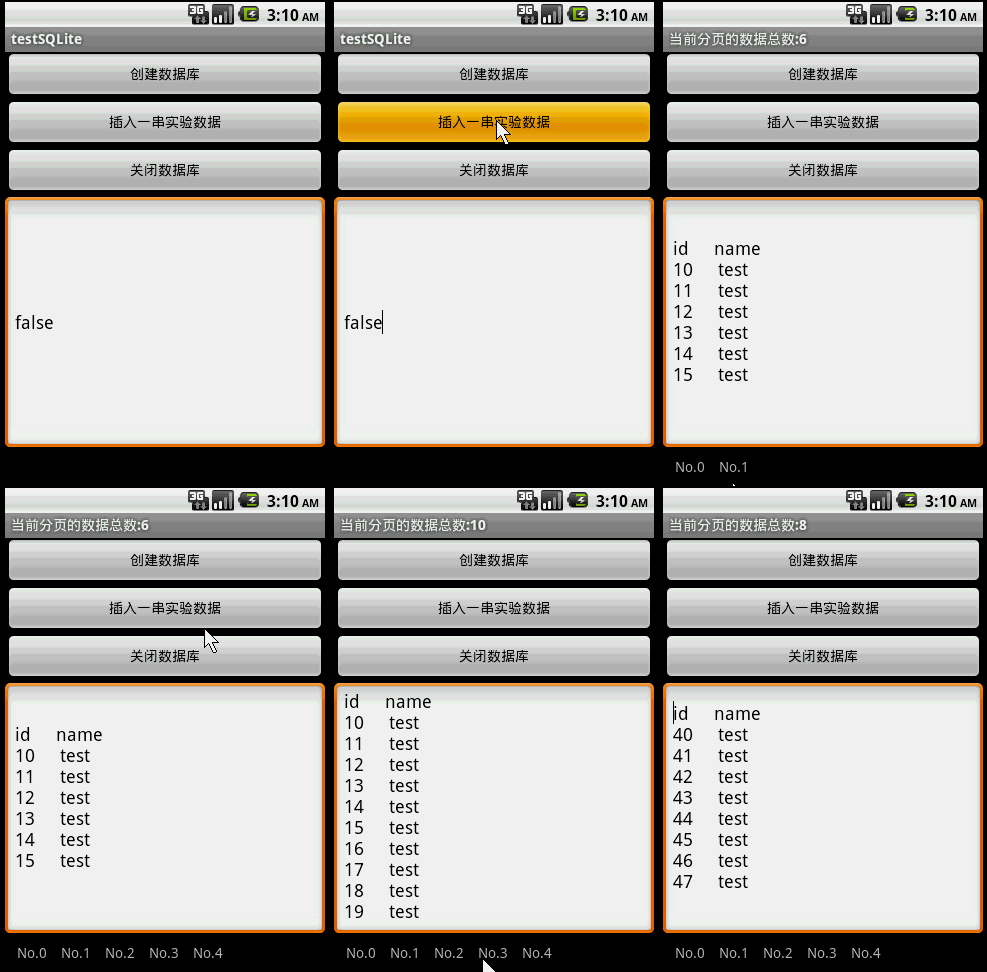
先贴出本文程序运行的结果:
![]()
本文主要讲解了SQLite的基本用法,如:创建数据库,使用SQL命令查询数据表、插入数据,关闭数据库,以及使用GridView实现了一个分页栏(关于GridView的用法),用于把数据分页显示。
分页栏的pagebuttons.xml的源码如下:
- <?xml version="1.0" encoding="utf-8"?>
- <RelativeLayout xmlns:android="http://schemas.android.com/apk/res/android"
- android:layout_height="wrap_content" android:paddingBottom="4dip"
- android:layout_width="fill_parent">
- <TextView android:layout_width="wrap_content"
- android:layout_below="@+id/ItemImage" android:layout_height="wrap_content"
- android:text="TextView01" android:layout_centerHorizontal="true"
- android:id="@+id/ItemText">
- </TextView>
- </RelativeLayout>
main.xml的源码如下:
- <?xml version="1.0" encoding="utf-8"?>
- <LinearLayout xmlns:android="http://schemas.android.com/apk/res/android"
- android:orientation="vertical" android:layout_width="fill_parent"
- android:layout_height="fill_parent">
- <Button android:layout_height="wrap_content"
- android:layout_width="fill_parent" android:id="@+id/btnCreateDB"
- android:text="创建数据库"></Button>
- <Button android:layout_height="wrap_content"
- android:layout_width="fill_parent" android:text="插入一串实验数据" android:id="@+id/btnInsertRec"></Button>
- <Button android:layout_height="wrap_content" android:id="@+id/btnClose"
- android:text="关闭数据库" android:layout_width="fill_parent"></Button>
- <EditText android:text="@+id/EditText01" android:id="@+id/EditText01"
- android:layout_width="fill_parent" android:layout_height="256dip"></EditText>
- <GridView android:id="@+id/gridview" android:layout_width="fill_parent"
- android:layout_height="32dip" android:numColumns="auto_fit"
- android:columnWidth="40dip"></GridView>
- </LinearLayout>
本文程序源码如下:
- package com.testSQLite;
-
- import java.util.ArrayList;
- import java.util.HashMap;
- import android.app.Activity;
- import android.database.Cursor;
- import android.database.SQLException;
- import android.database.sqlite.SQLiteDatabase;
- import android.os.Bundle;
- import android.util.Log;
- import android.view.View;
- import android.widget.AdapterView;
- import android.widget.AdapterView.OnItemClickListener;
- import android.widget.Button;
- import android.widget.EditText;
- import android.widget.GridView;
- import android.widget.SimpleAdapter;
-
- public class testSQLite extends Activity {
-
- Button btnCreateDB, btnInsert, btnClose;
- EditText edtSQL;
- SQLiteDatabase db;
- int id;
- static final int PageSize=10;
- private static final String TABLE_NAME = "stu";
- private static final String ID = "id";
- private static final String NAME = "name";
-
- SimpleAdapter saPageID;
- ArrayList<HashMap<String, String>> lstPageID;
-
- @Override
- public void onCreate(Bundle savedInstanceState) {
- super.onCreate(savedInstanceState);
- setContentView(R.layout.main);
- btnCreateDB = (Button) this.findViewById(R.id.btnCreateDB);
- btnCreateDB.setOnClickListener(new ClickEvent());
-
- btnInsert = (Button) this.findViewById(R.id.btnInsertRec);
- btnInsert.setOnClickListener(new ClickEvent());
-
- btnClose = (Button) this.findViewById(R.id.btnClose);
- btnClose.setOnClickListener(new ClickEvent());
-
- edtSQL=(EditText)this.findViewById(R.id.EditText01);
-
- GridView gridview = (GridView) findViewById(R.id.gridview);
-
- lstPageID = new ArrayList<HashMap<String, String>>();
-
-
- saPageID = new SimpleAdapter(testSQLite.this,
- lstPageID,
- R.layout.pagebuttons,
- new String[] { "ItemText" },
- new int[] { R.id.ItemText });
-
-
- gridview.setAdapter(saPageID);
-
- gridview.setOnItemClickListener(new OnItemClickListener(){
-
- @Override
- public void onItemClick(AdapterView<?> arg0, View arg1, int arg2,
- long arg3) {
- LoadPage(arg2);
- }
- });
-
- }
-
-
- class ClickEvent implements View.OnClickListener {
-
- @Override
- public void onClick(View v) {
- if (v == btnCreateDB) {
- CreateDB();
- } else if (v == btnInsert) {
- InsertRecord(16);
- RefreshPage();
- }else if (v == btnClose) {
- db.close();
- }
- }
-
- }
-
-
-
-
-
-
-
- void LoadPage(int pageID)
- {
- String sql= "select * from " + TABLE_NAME +
- " Limit "+String.valueOf(PageSize)+ " Offset " +String.valueOf(pageID*PageSize);
- Cursor rec = db.rawQuery(sql, null);
-
- setTitle("当前分页的数据总数:"+String.valueOf(rec.getCount()));
-
-
- String title = "";
- int colCount = rec.getColumnCount();
- for (int i = 0; i < colCount; i++)
- title = title + rec.getColumnName(i) + " ";
-
-
-
- String content="";
- int recCount=rec.getCount();
- for (int i = 0; i < recCount; i++) {
- rec.moveToPosition(i);
- for(int ii=0;ii<colCount;ii++)
- {
- content=content+rec.getString(ii)+" ";
- }
- content=content+"/r/n";
- }
-
- edtSQL.setText(title+"/r/n"+content);
- rec.close();
- }
-
-
-
-
- void CreateDB() {
-
- db = SQLiteDatabase.create(null);
- Log.e("DB Path", db.getPath());
- String amount = String.valueOf(databaseList().length);
- Log.e("DB amount", amount);
-
- String sql = "CREATE TABLE " + TABLE_NAME + " (" + ID
- + " text not null, " + NAME + " text not null " + ");";
- try {
- db.execSQL("DROP TABLE IF EXISTS " + TABLE_NAME);
- db.execSQL(sql);
- } catch (SQLException e) {}
- }
-
-
-
-
- void InsertRecord(int n) {
- int total = id + n;
- for (; id < total; id++) {
- String sql = "insert into " + TABLE_NAME + " (" + ID + ", " + NAME
- + ") values('" + String.valueOf(id) + "', 'test');";
- try {
- db.execSQL(sql);
- } catch (SQLException e) {
- }
- }
- }
-
-
-
-
- void RefreshPage()
- {
- String sql = "select count(*) from " + TABLE_NAME;
- Cursor rec = db.rawQuery(sql, null);
- rec.moveToLast();
- long recSize=rec.getLong(0);
- rec.close();
- int pageNum=(int)(recSize/PageSize) + 1;
-
- lstPageID.clear();
- for (int i = 0; i < pageNum; i++) {
- HashMap<String, String> map = new HashMap<String, String>();
- map.put("ItemText", "No." + String.valueOf(i));
-
- lstPageID.add(map);
- }
- saPageID.notifyDataSetChanged();
- }
- }