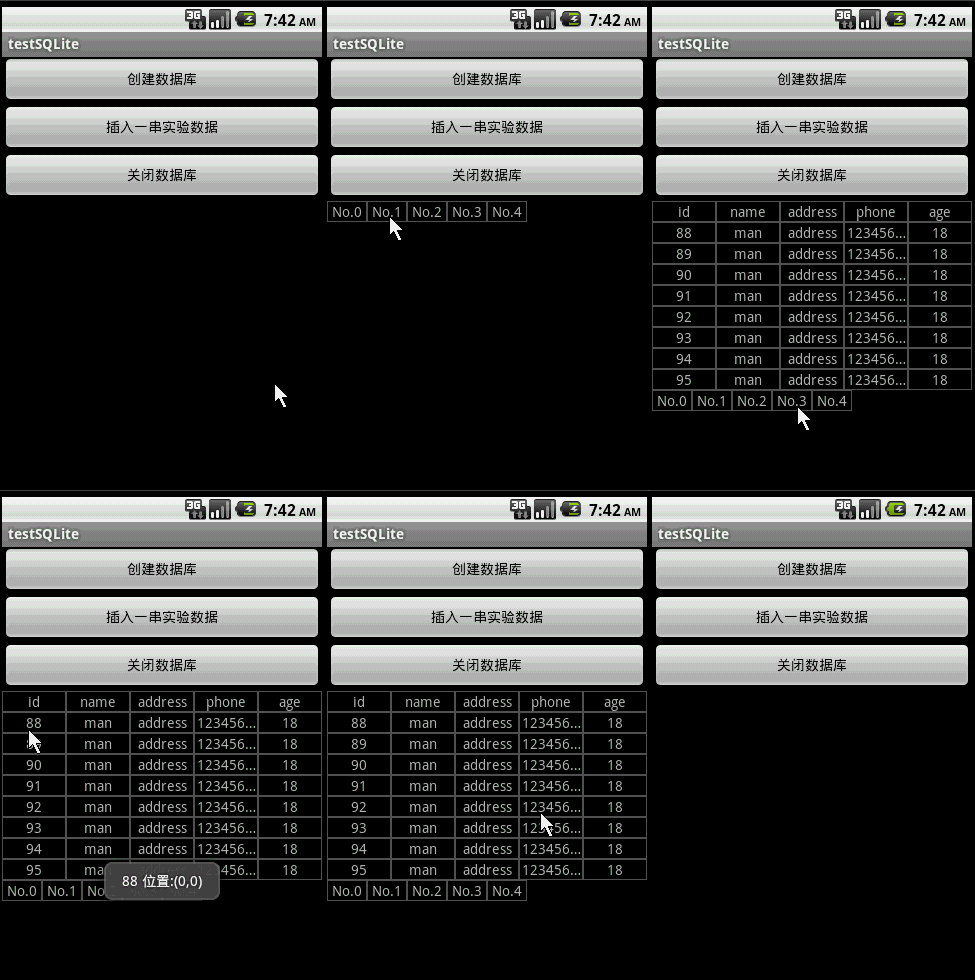
上次讲的Android上的SQLite分页读取,只用文本框显示数据而已,这次就讲得更加深入些,实现并封装一个SQL分页表格控件,不仅支持分页还是以表格的形式展示数据。先来看看本文程序运行的动画:
![]()
这个SQL分页表格控件主要分为“表格区”和“分页栏”这两部分,这两部分都是基于GridView实现的。网上介绍Android上实现表格的DEMO一般都用ListView。ListView与GridView对比,ListView最大的优势是格单元的大小可以自定义,可以某单元长某单元短,但是难于实现自适应数据表的结构;而GridView最大的优势就是自适应数据表的结构,但是格单元统一大小。。。对于数据表结构多变的情况,建议使用GridView实现表格。
本文实现的SQL分页表格控件有以下特点:
1.自适应数据表结构,但是格单元统一大小;
2.支持分页;
3.“表格区”有按键事件回调处理,“分页栏”有分页切换事件回调处理。
本文程序代码较多,可以到这里下载整个工程的源码:http://www.rayfile.com/files/72e78b68-f2e5-11df-8469-0015c55db73d/
items.xml的代码如下,它是“表格区”和“分页栏”的格单元实现:
- <?xml version="1.0" encoding="utf-8"?>
- <LinearLayout android:id="@+id/LinearLayout01"
- xmlns:android="http://schemas.android.com/apk/res/android"
- android:layout_width="fill_parent" android:background="#555555"
- android:layout_height="wrap_content">
- <TextView android:layout_below="@+id/ItemImage" android:text="TextView01"
- android:id="@+id/ItemText" android:bufferType="normal"
- android:singleLine="true" android:background="#000000"
- android:layout_width="fill_parent" android:gravity="center"
- android:layout_margin="1dip" android:layout_gravity="center"
- android:layout_height="wrap_content">
- </TextView>
- </LinearLayout>
main.xml的代码如下:
- <?xml version="1.0" encoding="utf-8"?>
- <LinearLayout xmlns:android="http://schemas.android.com/apk/res/android"
- android:orientation="vertical" android:layout_width="fill_parent"
- android:layout_height="fill_parent" android:id="@+id/MainLinearLayout">
- <Button android:layout_height="wrap_content"
- android:layout_width="fill_parent" android:id="@+id/btnCreateDB"
- android:text="创建数据库"></Button>
- <Button android:layout_height="wrap_content"
- android:layout_width="fill_parent" android:text="插入一串实验数据" android:id="@+id/btnInsertRec"></Button>
- <Button android:layout_height="wrap_content" android:id="@+id/btnClose"
- android:text="关闭数据库" android:layout_width="fill_parent"></Button>
- </LinearLayout>
演示程序testSQLite.java的源码:
- package com.testSQLite;
- import android.app.Activity;
- import android.database.Cursor;
- import android.database.SQLException;
- import android.database.sqlite.SQLiteDatabase;
- import android.os.Bundle;
- import android.util.Log;
- import android.view.View;
- import android.widget.Button;
- import android.widget.LinearLayout;
- import android.widget.Toast;
- public class testSQLite extends Activity {
- GVTable table;
- Button btnCreateDB, btnInsert, btnClose;
- SQLiteDatabase db;
- int id;
- private static final String TABLE_NAME = "stu";
- private static final String ID = "id";
- private static final String NAME = "name";
- private static final String PHONE = "phone";
- private static final String ADDRESS = "address";
- private static final String AGE = "age";
-
- @Override
- public void onCreate(Bundle savedInstanceState) {
- super.onCreate(savedInstanceState);
- setContentView(R.layout.main);
- btnCreateDB = (Button) this.findViewById(R.id.btnCreateDB);
- btnCreateDB.setOnClickListener(new ClickEvent());
- btnInsert = (Button) this.findViewById(R.id.btnInsertRec);
- btnInsert.setOnClickListener(new ClickEvent());
- btnClose = (Button) this.findViewById(R.id.btnClose);
- btnClose.setOnClickListener(new ClickEvent());
- table=new GVTable(this);
- table.gvSetTableRowCount(8);
- LinearLayout ly = (LinearLayout) findViewById(R.id.MainLinearLayout);
- table.setTableOnClickListener(new GVTable.OnTableClickListener() {
- @Override
- public void onTableClickListener(int x,int y,Cursor c) {
- c.moveToPosition(y);
- String str=c.getString(x)+" 位置:("+String.valueOf(x)+","+String.valueOf(y)+")";
- Toast.makeText(testSQLite.this, str, 1000).show();
- }
- });
- table.setOnPageSwitchListener(new GVTable.OnPageSwitchListener() {
-
- @Override
- public void onPageSwitchListener(int pageID,int pageCount) {
- String str="共有"+String.valueOf(pageCount)+
- " 当前第"+String.valueOf(pageID)+"页";
- Toast.makeText(testSQLite.this, str, 1000).show();
- }
- });
-
- ly.addView(table);
- }
- class ClickEvent implements View.OnClickListener {
- @Override
- public void onClick(View v) {
- if (v == btnCreateDB) {
- CreateDB();
- } else if (v == btnInsert) {
- InsertRecord(16);
- table.gvUpdatePageBar("select count(*) from " + TABLE_NAME,db);
- table.gvReadyTable("select * from " + TABLE_NAME,db);
- }else if (v == btnClose) {
- table.gvRemoveAll();
- db.close();
-
- }
- }
- }
-
-
-
-
- void CreateDB() {
-
- db = SQLiteDatabase.create(null);
- Log.e("DB Path", db.getPath());
- String amount = String.valueOf(databaseList().length);
- Log.e("DB amount", amount);
-
- String sql = "CREATE TABLE " + TABLE_NAME + " (" +
- ID + " text not null, " + NAME + " text not null," +
- ADDRESS + " text not null, " + PHONE + " text not null," +
- AGE + " text not null "+");";
- try {
- db.execSQL("DROP TABLE IF EXISTS " + TABLE_NAME);
- db.execSQL(sql);
- } catch (SQLException e) {}
- }
-
-
-
- void InsertRecord(int n) {
- int total = id + n;
- for (; id < total; id++) {
- String sql = "insert into " + TABLE_NAME + " (" +
- ID + ", " + NAME+", " + ADDRESS+", " + PHONE+", "+AGE
- + ") values('" + String.valueOf(id) + "', 'man','address','123456789','18');";
- try {
- db.execSQL(sql);
- } catch (SQLException e) {
- }
- }
- }
-
-
- }
分页表格控件GVTable.java的源码:
- package com.testSQLite;
- import java.util.ArrayList;
- import java.util.HashMap;
- import android.content.Context;
- import android.database.Cursor;
- import android.database.sqlite.SQLiteDatabase;
- import android.view.View;
- import android.widget.AdapterView;
- import android.widget.GridView;
- import android.widget.LinearLayout;
- import android.widget.SimpleAdapter;
- import android.widget.AdapterView.OnItemClickListener;
- public class GVTable extends LinearLayout {
- protected GridView gvTable,gvPage;
- protected SimpleAdapter saPageID,saTable;
- protected ArrayList<HashMap<String, String>> srcPageID,srcTable;
-
- protected int TableRowCount=10;
- protected int TableColCount=0;
- protected SQLiteDatabase db;
- protected String rawSQL="";
- protected Cursor curTable;
- protected OnTableClickListener clickListener;
- protected OnPageSwitchListener switchListener;
-
- public GVTable(Context context) {
- super(context);
- this.setOrientation(VERTICAL);
-
- gvTable=new GridView(context);
- addView(gvTable, new LinearLayout.LayoutParams(LayoutParams.FILL_PARENT,
- LayoutParams.WRAP_CONTENT));
-
- srcTable = new ArrayList<HashMap<String, String>>();
- saTable = new SimpleAdapter(context,
- srcTable,
- R.layout.items,
- new String[] { "ItemText" },
- new int[] { R.id.ItemText });
-
- gvTable.setAdapter(saTable);
- gvTable.setOnItemClickListener(new OnItemClickListener(){
- @Override
- public void onItemClick(AdapterView<?> arg0, View arg1, int arg2,
- long arg3) {
- int y=arg2/curTable.getColumnCount()-1;
- int x=arg2 % curTable.getColumnCount();
- if (clickListener != null
- && y!=-1) {
- clickListener.onTableClickListener(x,y,curTable);
- }
- }
- });
-
-
- gvPage=new GridView(context);
- gvPage.setColumnWidth(40);
- gvPage.setNumColumns(GridView.AUTO_FIT);
- addView(gvPage, new LinearLayout.LayoutParams(LayoutParams.FILL_PARENT,
- LayoutParams.WRAP_CONTENT));
- srcPageID = new ArrayList<HashMap<String, String>>();
- saPageID = new SimpleAdapter(context,
- srcPageID,
- R.layout.items,
- new String[] { "ItemText" },
- new int[] { R.id.ItemText });
-
- gvPage.setAdapter(saPageID);
-
- gvPage.setOnItemClickListener(new OnItemClickListener(){
- @Override
- public void onItemClick(AdapterView<?> arg0, View arg1, int arg2,
- long arg3) {
- LoadTable(arg2);
- if(switchListener!=null){
- switchListener.onPageSwitchListener(arg2,srcPageID.size());
- }
- }
- });
- }
-
-
-
- public void gvRemoveAll()
- {
- if(this.curTable!=null)
- curTable.close();
- srcTable.clear();
- saTable.notifyDataSetChanged();
-
- srcPageID.clear();
- saPageID.notifyDataSetChanged();
-
- }
-
-
-
-
-
-
- protected void LoadTable(int pageID)
- {
- if(curTable!=null)
- curTable.close();
-
- String sql= rawSQL+" Limit "+String.valueOf(TableRowCount)+ " Offset " +String.valueOf(pageID*TableRowCount);
- curTable = db.rawQuery(sql, null);
-
- gvTable.setNumColumns(curTable.getColumnCount());
- TableColCount=curTable.getColumnCount();
- srcTable.clear();
-
- int colCount = curTable.getColumnCount();
- for (int i = 0; i < colCount; i++) {
- HashMap<String, String> map = new HashMap<String, String>();
- map.put("ItemText", curTable.getColumnName(i));
- srcTable.add(map);
- }
-
-
- int recCount=curTable.getCount();
- for (int i = 0; i < recCount; i++) {
- curTable.moveToPosition(i);
- for(int ii=0;ii<colCount;ii++)
- {
- HashMap<String, String> map = new HashMap<String, String>();
- map.put("ItemText", curTable.getString(ii));
- srcTable.add(map);
- }
- }
-
- saTable.notifyDataSetChanged();
- }
-
-
-
-
- public void gvSetTableRowCount(int row)
- {
- TableRowCount=row;
- }
-
-
-
-
-
- public int gvGetTableRowCount()
- {
- return TableRowCount;
- }
-
-
-
-
-
- public Cursor gvGetCurrentTable()
- {
- return curTable;
- }
-
-
-
-
-
-
- public void gvReadyTable(String rawSQL,SQLiteDatabase db)
- {
- this.rawSQL=rawSQL;
- this.db=db;
- }
-
-
-
-
-
-
- public void gvUpdatePageBar(String sql,SQLiteDatabase db)
- {
- Cursor rec = db.rawQuery(sql, null);
- rec.moveToLast();
- long recSize=rec.getLong(0);
- rec.close();
- int pageNum=(int)(recSize/TableRowCount) + 1;
-
- srcPageID.clear();
- for (int i = 0; i < pageNum; i++) {
- HashMap<String, String> map = new HashMap<String, String>();
- map.put("ItemText", "No." + String.valueOf(i));
- srcPageID.add(map);
- }
- saPageID.notifyDataSetChanged();
- }
-
-
-
-
- public void setTableOnClickListener(OnTableClickListener click) {
- this.clickListener = click;
- }
-
- public interface OnTableClickListener {
- public void onTableClickListener(int x,int y,Cursor c);
- }
-
-
-
-
- public void setOnPageSwitchListener(OnPageSwitchListener pageSwitch) {
- this.switchListener = pageSwitch;
- }
- public interface OnPageSwitchListener {
- public void onPageSwitchListener(int pageID,int pageCount);
- }
- }