本文来自http://blog.csdn.net/hellogv/ ,引用必须注明出处!
时隔一年,又要准备做Android的开发了,最近复习和整理一下Android的知识。这次要说的是AlertDialog,这种对话框会经常遇到。AlertDialog跟WIN32开发中的Dialog不一样,AlertDialog是非阻塞的,而阻塞的对话框用的是PopupWindow。
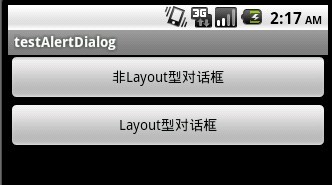
先贴出程序运行的截图:
![]()
main.xml的源码:
- <?xml version="1.0" encoding="utf-8"?>
- <LinearLayout xmlns:android="http://schemas.android.com/apk/res/android"
- android:orientation="vertical"
- android:layout_width="fill_parent"
- android:layout_height="fill_parent"
- >
-
- <Button android:id="@+id/Button01" android:layout_height="wrap_content" android:text="非Layout型对话框" android:layout_width="fill_parent"></Button>
- <Button android:id="@+id/Button02" android:layout_height="wrap_content" android:text="Layout型对话框" android:layout_width="fill_parent"></Button><View android:id="@+id/View01" android:layout_width="wrap_content" android:layout_height="wrap_content"></View>
-
- </LinearLayout>
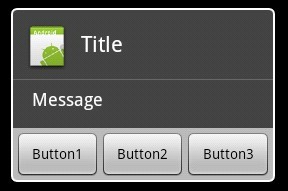
下图是非Layout型对话框,直接使用AlertDialog
![]()
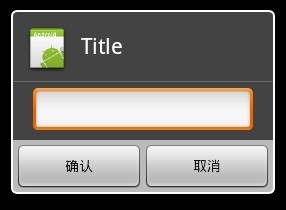
下图是使用了Layout的对话框,可以自定义控件,实现更复杂的对话框
![]()
dialoglayout.xml的源码:
- <?xml version="1.0" encoding="utf-8"?>
-
- <LinearLayout xmlns:android="http://schemas.android.com/apk/res/android"
- android:layout_width="fill_parent" android:layout_height="wrap_content"
- android:orientation="vertical">
- <EditText android:layout_height="wrap_content"
- android:layout_width="fill_parent" android:layout_marginLeft="20dip"
- android:layout_marginRight="20dip" android:textAppearance="?android:attr/textAppearanceMedium" android:id="@+id/edtInput"/>
- </LinearLayout>
程序源码:
- package com.testAlertDialog;
-
- import android.app.Activity;
- import android.app.AlertDialog;
- import android.content.Context;
- import android.content.DialogInterface;
- import android.os.Bundle;
- import android.view.Gravity;
- import android.view.LayoutInflater;
- import android.view.View;
- import android.view.View.OnClickListener;
- import android.widget.Button;
- import android.widget.EditText;
- import android.widget.PopupWindow;
-
-
- public class testAlertDialog extends Activity {
- Button btnShowDialog;
- Button btnShowDialog_Layout;
-
- @Override
- public void onCreate(Bundle savedInstanceState) {
- super.onCreate(savedInstanceState);
- setContentView(R.layout.main);
-
- btnShowDialog=(Button)this.findViewById(R.id.Button01);
- btnShowDialog.setOnClickListener(new ClickEvent());
- btnShowDialog_Layout=(Button)this.findViewById(R.id.Button02);
- btnShowDialog_Layout.setOnClickListener(new ClickEvent());
- }
-
-
-
- class ClickEvent implements OnClickListener{
-
- @Override
- public void onClick(View v) {
-
- if(v==btnShowDialog)
- showDialog(testAlertDialog.this);
-
- else if(v==btnShowDialog_Layout)
- showDialog_Layout(testAlertDialog.this);
-
- }
-
- }
-
-
- private void showDialog(Context context) {
- AlertDialog.Builder builder = new AlertDialog.Builder(context);
- builder.setIcon(R.drawable.icon);
- builder.setTitle("Title");
- builder.setMessage("Message");
- builder.setPositiveButton("Button1",
- new DialogInterface.OnClickListener() {
- public void onClick(DialogInterface dialog, int whichButton) {
- setTitle("点击了对话框上的Button1");
- }
- });
- builder.setNeutralButton("Button2",
- new DialogInterface.OnClickListener() {
- public void onClick(DialogInterface dialog, int whichButton) {
- setTitle("点击了对话框上的Button2");
- }
- });
- builder.setNegativeButton("Button3",
- new DialogInterface.OnClickListener() {
- public void onClick(DialogInterface dialog, int whichButton) {
- setTitle("点击了对话框上的Button3");
- }
- });
- builder.show();
- }
-
-
-
- private void showDialog_Layout(Context context) {
- LayoutInflater inflater = LayoutInflater.from(this);
- final View textEntryView = inflater.inflate(
- R.layout.dialoglayout, null);
- final EditText edtInput=(EditText)textEntryView.findViewById(R.id.edtInput);
- final AlertDialog.Builder builder = new AlertDialog.Builder(context);
- builder.setCancelable(false);
- builder.setIcon(R.drawable.icon);
- builder.setTitle("Title");
- builder.setView(textEntryView);
- builder.setPositiveButton("确认",
- new DialogInterface.OnClickListener() {
- public void onClick(DialogInterface dialog, int whichButton) {
- setTitle(edtInput.getText());
- }
- });
- builder.setNegativeButton("取消",
- new DialogInterface.OnClickListener() {
- public void onClick(DialogInterface dialog, int whichButton) {
- setTitle("");
- }
- });
- builder.show();
- }
- }