

惯性聚合 高效追踪和阅读你感兴趣的博客、新闻、科技资讯
阅读原文 在惯性聚合中打开

推荐订阅源

酷 壳 – CoolShell
酷 壳 – CoolShell
H
Hacker News: Front Page
P
Palo Alto Networks Blog
T
ThreatConnect
Apple Machine Learning Research
博客园_首页
T
True Tiger Recordings
P
Privacy & Cybersecurity Law Blog
B
Blog
IT之家
IT之家
Last Week in AI
Last Week in AI
F
Full Disclosure
Hacker News: Ask HN
Hacker News: Ask HN
C
Comments on: Blog
Microsoft Azure Blog
C
Cybersecurity and Infrastructure Security Agency CISA
Microsoft Security Blog
博客园 - 【当耐特】
N
News and Events Feed by Topic
NISL@THU
NISL@THU
腾讯CDC
雷峰网
雷峰网
Security Latest
Security Latest
李成银的技术随笔
M
Microsoft Research Blog - Microsoft Research
L
LangChain Blog
L
Lohrmann on Cybersecurity
cs.CL updates on arXiv.org
C
Check Point Blog
Y
Y Combinator Blog
Recent Announcements
博客园 - Franky
N
News | PayPal Newsroom
V
V2EX
A
About on SuperTechFans
The Register - Security
月光博客
月光博客
奇客Solidot–传递最新科技情报
奇客Solidot–传递最新科技情报
Google Online Security Blog
MyScale Blog
MyScale Blog
Cisco Talos Blog
Cisco Talos Blog
Vercel News
Vercel News
WordPress大学
WordPress大学
C
Cyber Attacks, Cyber Crime and Cyber Security
The Hacker News
The Hacker News
IntelliJ IDEA : IntelliJ IDEA – the Leading IDE for Professional Development in Java and Kotlin | The JetBrains Blog
爱范儿
爱范儿
A
Arctic Wolf
L
LINUX DO - 最新话题
freeCodeCamp Programming Tutorials: Python, JavaScript, Git & More

博客园 - 生如夏花之灿烂

本人讲课时录制的Android应用开发技术教学视频 jsoup使用样式class抓取数据时空格的处理 我的第一款anroid软件作品--短信精灵1.0 (原创)Android入门教程(三十六)------实现手机联系人的全选 Android入门教程(三十五)------在Android上使用ZXing识别条形码/二维码(转) - 生如夏花之灿烂 Android入门教程(三十四)------之多级树形菜单的实现 (转) Android入门教程(三十三)------之ListView自适应实现表格(转) Android入门教程(三十二)------之SQLite分页表格(转) Android入门教程(三十一)------SQLite分页读取(转) Android入门教程(三十)------之XML解析与生成(转) - 生如夏花之灿烂 Android入门教程(二十九)------之BroadcastReceiver (转) Android入门教程(二十八)------之Service(转) Android入门教程(二十六)------之ActivityGroup + GridView 实现Tab分页标签(转) Android入门教程(二十五)------之画图(转) Android入门教程(二十四)------之Gallery + ImageSwitcher(转) Android入门教程(二十三)------之Gallery(转) Android入门教程(二十二)------之TabHost,TabWidget(转) Android入门教程(二十一)------之PopupWindow (转) Android入门教程(二十)之--之AlertDialog(转)
Android入门教程(二十七)------之Style与Theme (转)
生如夏花之灿烂 · 2011-08-11 · via 博客园 - 生如夏花之灿烂

 本文来自http://blog.csdn.net/hellogv/ ,引用必须注明出处!

       越来越多互联网企业都在Android平台上部署其客户端,为了提升用户体验,这些客户端都做得布局合理而且美观.......Android的Style设计就是提升用户体验的关键之一。Android上的Style分为了两个方面:

  1. Theme是针对窗体级别的,改变窗体样式;

  2. Style是针对窗体元素级别的,改变指定控件或者Layout的样式。

Android系统的themes.xml和style.xml(位于/base/core/res/res/values/)包含了很多系统定义好的style,建议在里面挑个合适的,然后再继承修改。以下属性是在Themes中比较常见的,源自Android系统本身的themes.xml:

  1.   
  2. <item name="windowBackground">@android:drawable/screen_background_dark</item>  
  3. <item name="windowFrame">@null</item>  
  4. <item name="windowNoTitle">false</item>  
  5. <item name="windowFullscreen">false</item>  
  6. <item name="windowIsFloating">false</item>  
  7. <item name="windowContentOverlay">@android:drawable/title_bar_shadow</item>  
  8. <item name="windowTitleStyle">@android:style/WindowTitle</item>  
  9. <item name="windowTitleSize">25dip</item>  
  10. <item name="windowTitleBackgroundStyle">@android:style/WindowTitleBackground</item>  
  11. <item name="android:windowAnimationStyle">@android:style/Animation.Activity</item>  

至于控件的Style设计就范围大多了,看看Eclipse的Android控件属性编辑器[Properties]就大概知道有哪些条目,而Android内置的style.xml也只是定义每个控件的默认样式而已....不过控件的style不建议大改,耐看的style更能让用户长时间使用软件。另外,控件的Style在很多情况下都用到9.png,学习9.png就必须到/base/core/res/res/drawable-hdpi里面看看,里面有很多系统内置的9.png。

PS:为了研究Android的Style和Theme,强烈建议下载Android的base.git!

接下来看看本文程序的效果图:
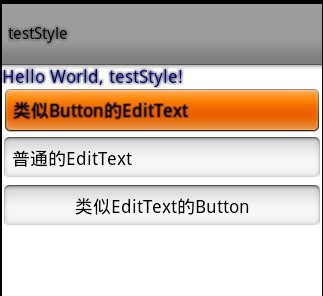
本文程序的themes.xml代码如下,自定义了WindowTitle,:

<?xml version="1.0" encoding="UTF-8"?>
<resources>
 <!--继承Android内置的Theme.Light,位于/base/core/res/res/values/themes.xml -->
 <style name="Theme" parent="android:Theme.Light">
  <item name="android:windowFullscreen">true</item>
  <item name="android:windowTitleSize">60dip</item>
  <item name="android:windowTitleStyle">@style/WindowTitle</item>
 </style>

 <style name="WindowTitle" parent="android:WindowTitle">
  <item name="android:singleLine">true</item>
  <item name="android:shadowColor">#BB000000</item>
  <item name="android:shadowRadius">2.75</item>
 </style>
</resources>

要为Activity使用theme,要么使用代码 setTheme(R.style.Theme),要么在Application Manifest里面设置
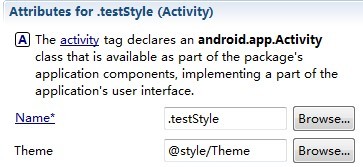
本文程序的styles.xml代码如下,background默认使用的是9.png,xml定义在/base/core/res/res/drawable/之下:

<?xml version="1.0" encoding="UTF-8"?>
<resources>
 <style name="TextView">
  <item name="android:textSize">18sp</item>
  <item name="android:textColor">#008</item>
  <item name="android:shadowColor">@android:color/black</item>
  <item name="android:shadowRadius">2.0</item>
 </style>

 <style name="EditText">
  <item name="android:shadowColor">@android:color/black</item>
  <item name="android:shadowRadius">1.0</item>
  <item name="android:background">@android:drawable/btn_default</item>
  <item name="android:textAppearance">?android:attr/textAppearanceMedium</item>
 </style>

    <style name="Button">
        <item name="android:background">@android:drawable/edit_text</item>
        <item name="android:textAppearance">?android:attr/textAppearanceMedium</item>
    </style>
</resources>

main.xml代码如下:

  1. <?xml version="1.0" encoding="utf-8"?>  
  2. <LinearLayout xmlns:android="http://schemas.android.com/apk/res/android"  
  3.     android:orientation="vertical" android:layout_width="fill_parent"  
  4.     android:layout_height="fill_parent">  
  5.     <TextView android:layout_width="fill_parent"  
  6.         android:layout_height="wrap_content" android:text="@string/hello"  
  7.         style="@style/TextView" />  
  8.     <EditText android:id="@+id/EditText01" android:layout_height="wrap_content"  
  9.         style="@style/EditText" android:layout_width="fill_parent"  
  10.         android:text="类似Button的EditText"></EditText>  
  11.     <EditText android:id="@+id/EditText02" android:layout_height="wrap_content"  
  12.         android:layout_width="fill_parent" android:text="普通的EditText"></EditText>  
  13.     <Button android:id="@+id/Button01" android:layout_height="wrap_content"  
  14.         style="@style/Button" android:layout_width="fill_parent" android:text="类似EditText的Button"></Button>  
  15. </LinearLayout>