本文来自http://blog.csdn.net/hellogv/ ,引用必须注明出处!
上次介绍了使用GridView实现表格,这次就说说如何用ListView实现自适应的表格。GridView比ListView更容易实现自适应的表格,但是GridView每个格单元的大小固定,而ListView实现的表格可以自定义每个格单元的大小,但因此实现自适应表格也会复杂些(格单元大小不一)。另外,GridView实现的表格可以定位在具体某个格单元,而ListView实现的表格则只能定位在表格行。因此还是那句老话:根据具体的使用环境而选择GridView 或者 ListView实现表格。
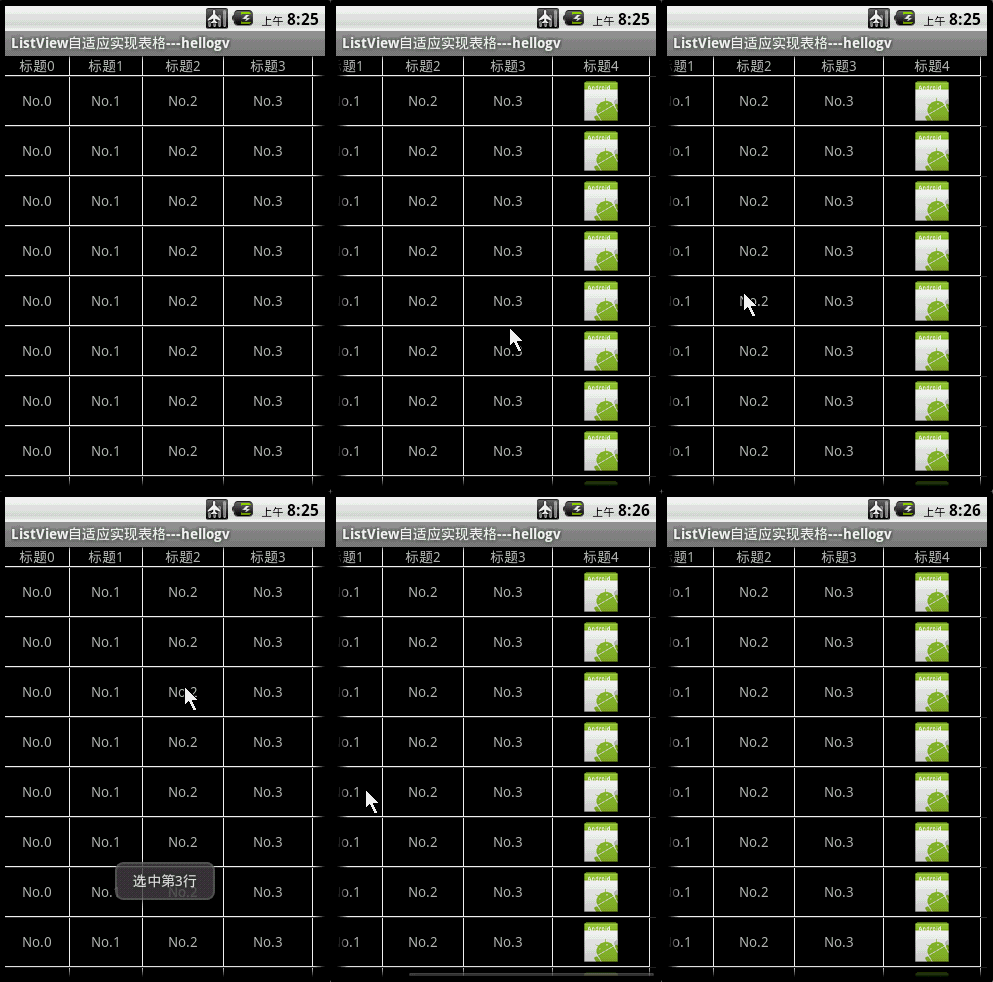
先贴出本文程序运行的效果图:
![]()
本文实现的ListView表格,可以每个格单元大小不一,文本(TextView)或图片(ImageView)做格单元的数据,不需要预先定义XML实现样式(自适应的根本目标)。由于ListView置于HorizontalScrollView中,因此对于列比较多/列数据比较长的数据表也能很好地适应其宽度。
main.xml源码如下:
- <?xml version="1.0" encoding="utf-8"?>
- <LinearLayout xmlns:android="http://schemas.android.com/apk/res/android"
- android:orientation="vertical" android:layout_width="fill_parent"
- android:layout_height="fill_parent">
- <HorizontalScrollView android:id="@+id/HorizontalScrollView01"
- android:layout_height="fill_parent" android:layout_width="fill_parent">
- <ListView android:id="@+id/ListView01" android:layout_height="wrap_content"
- android:layout_width="wrap_content"></ListView>
- </HorizontalScrollView>
- </LinearLayout>
主类testMyListView.java的源码如下:
- package com.testMyListView;
- import java.util.ArrayList;
- import com.testMyListView.TableAdapter.TableCell;
- import com.testMyListView.TableAdapter.TableRow;
- import android.app.Activity;
- import android.os.Bundle;
- import android.view.View;
- import android.widget.AdapterView;
- import android.widget.ListView;
- import android.widget.LinearLayout.LayoutParams;
- import android.widget.Toast;
-
-
-
- public class testMyListView extends Activity {
-
- ListView lv;
- @Override
- public void onCreate(Bundle savedInstanceState) {
- super.onCreate(savedInstanceState);
- setContentView(R.layout.main);
- this.setTitle("ListView自适应实现表格---hellogv");
- lv = (ListView) this.findViewById(R.id.ListView01);
- ArrayList<TableRow> table = new ArrayList<TableRow>();
- TableCell[] titles = new TableCell[5];
- int width = this.getWindowManager().getDefaultDisplay().getWidth()/titles.length;
-
- for (int i = 0; i < titles.length; i++) {
- titles[i] = new TableCell("标题" + String.valueOf(i),
- width + 8 * i,
- LayoutParams.FILL_PARENT,
- TableCell.STRING);
- }
- table.add(new TableRow(titles));
-
- TableCell[] cells = new TableCell[5];
- for (int i = 0; i < cells.length - 1; i++) {
- cells[i] = new TableCell("No." + String.valueOf(i),
- titles[i].width,
- LayoutParams.FILL_PARENT,
- TableCell.STRING);
- }
- cells[cells.length - 1] = new TableCell(R.drawable.icon,
- titles[cells.length - 1].width,
- LayoutParams.WRAP_CONTENT,
- TableCell.IMAGE);
-
- for (int i = 0; i < 12; i++)
- table.add(new TableRow(cells));
- TableAdapter tableAdapter = new TableAdapter(this, table);
- lv.setAdapter(tableAdapter);
- lv.setOnItemClickListener(new ItemClickEvent());
- }
- class ItemClickEvent implements AdapterView.OnItemClickListener {
- @Override
- public void onItemClick(AdapterView<?> arg0, View arg1, int arg2,
- long arg3) {
- Toast.makeText(testMyListView.this, "选中第"+String.valueOf(arg2)+"行", 500).show();
- }
- }
- }
ListView自适应实现Table的类TableAdapter.java代码如下:
PS:TableCell是格单元的类,TableRow是表格行的类,TableRowView是实现表格行的组件。实现步骤:TableCell --> TableRow(TableRowView)-->ListView
- package com.testMyListView;
- import java.util.List;
- import android.content.Context;
- import android.graphics.Color;
- import android.view.Gravity;
- import android.view.View;
- import android.view.ViewGroup;
- import android.widget.BaseAdapter;
- import android.widget.ImageView;
- import android.widget.LinearLayout;
- import android.widget.TextView;
- public class TableAdapter extends BaseAdapter {
- private Context context;
- private List<TableRow> table;
- public TableAdapter(Context context, List<TableRow> table) {
- this.context = context;
- this.table = table;
- }
- @Override
- public int getCount() {
- return table.size();
- }
- @Override
- public long getItemId(int position) {
- return position;
- }
- public TableRow getItem(int position) {
- return table.get(position);
- }
- public View getView(int position, View convertView, ViewGroup parent) {
- TableRow tableRow = table.get(position);
- return new TableRowView(this.context, tableRow);
- }
-
-
-
-
- class TableRowView extends LinearLayout {
- public TableRowView(Context context, TableRow tableRow) {
- super(context);
-
- this.setOrientation(LinearLayout.HORIZONTAL);
- for (int i = 0; i < tableRow.getSize(); i++) {
- TableCell tableCell = tableRow.getCellValue(i);
- LinearLayout.LayoutParams layoutParams = new LinearLayout.LayoutParams(
- tableCell.width, tableCell.height);
- layoutParams.setMargins(0, 0, 1, 1);
- if (tableCell.type == TableCell.STRING) {
- TextView textCell = new TextView(context);
- textCell.setLines(1);
- textCell.setGravity(Gravity.CENTER);
- textCell.setBackgroundColor(Color.BLACK);
- textCell.setText(String.valueOf(tableCell.value));
- addView(textCell, layoutParams);
- } else if (tableCell.type == TableCell.IMAGE) {
- ImageView imgCell = new ImageView(context);
- imgCell.setBackgroundColor(Color.BLACK);
- imgCell.setImageResource((Integer) tableCell.value);
- addView(imgCell, layoutParams);
- }
- }
- this.setBackgroundColor(Color.WHITE);
- }
- }
-
-
-
-
- static public class TableRow {
- private TableCell[] cell;
- public TableRow(TableCell[] cell) {
- this.cell = cell;
- }
- public int getSize() {
- return cell.length;
- }
- public TableCell getCellValue(int index) {
- if (index >= cell.length)
- return null;
- return cell[index];
- }
- }
-
-
-
-
- static public class TableCell {
- static public final int STRING = 0;
- static public final int IMAGE = 1;
- public Object value;
- public int width;
- public int height;
- private int type;
- public TableCell(Object value, int width, int height, int type) {
- this.value = value;
- this.width = width;
- this.height = height;
- this.type = type;
- }
- }
- }