惯性聚合 高效追踪和阅读你感兴趣的博客、新闻、科技资讯
阅读原文 在惯性聚合中打开

推荐订阅源

T
The Blog of Author Tim Ferriss
freeCodeCamp Programming Tutorials: Python, JavaScript, Git & More
MongoDB | Blog
MongoDB | Blog
cs.AI updates on arXiv.org
AI
AI
NISL@THU
NISL@THU
AWS News Blog
AWS News Blog
V
Visual Studio Blog
博客园 - 三生石上(FineUI控件)
C
Cyber Attacks, Cyber Crime and Cyber Security
P
Privacy & Cybersecurity Law Blog
S
Schneier on Security
PCI Perspectives
PCI Perspectives
H
Hackread – Cybersecurity News, Data Breaches, AI and More
T
Troy Hunt's Blog
云风的 BLOG
云风的 BLOG
N
News and Events Feed by Topic
Know Your Adversary
Know Your Adversary
F
Fortinet All Blogs
Spread Privacy
Spread Privacy
P
Proofpoint News Feed
Jina AI
Jina AI
cs.CV updates on arXiv.org
WordPress大学
WordPress大学
奇客Solidot–传递最新科技情报
奇客Solidot–传递最新科技情报
V
Vulnerabilities – Threatpost
P
Privacy International News Feed
T
Tor Project blog
S
Security Affairs
S
Securelist
F
Full Disclosure
D
Docker
酷 壳 – CoolShell
酷 壳 – CoolShell
Martin Fowler
Martin Fowler
CTFtime.org: upcoming CTF events
SecWiki News
SecWiki News
P
Palo Alto Networks Blog
Apple Machine Learning Research
N
News and Events Feed by Topic
Recorded Future
Recorded Future
The Hacker News
The Hacker News
Google Online Security Blog
Stack Overflow Blog
Stack Overflow Blog
Application and Cybersecurity Blog
I
Intezer
Security Latest
Security Latest
Scott Helme
Scott Helme
U
Unit 42
Y
Y Combinator Blog
The GitHub Blog
The GitHub Blog

Todyl Blog

CyberChef: How to Decode & Decrypt Malicious Scripts (Step-by-Step Guide) Achieving Zero Trust with SASE: A Practical Roadmap for Modern Network Securityso like MSP Security Maturity Assessment: Why 79% of MSPs Are Stuck in 2025 The Rising Threat of Malicious AI: What Every Organization Needs to Know Iran Cyber Threat 2026: What SMBs and MSPs Need to Know The OneStart AI Browser Deception Cyber Insurance Requirements Based on Industry Why Third-Party Security Certification Is Your MSP's Competitive Edge Why Cyber Insurance Carriers Are Shifting to Security Assurance Iran Conflict and Cyber Risk: What North American Organizations Need to Know ‍ Why Cyber Resilience Requires Security, Compliance, and Insurance MSP Security Services: How to Position Identity Protection as Competitive Advantage Identity Security Gap Assessment: A Step-by-Step Guide for MSPs How Credential Theft Attacks Are Costing MSP Clients Millions Do I Need Cyber Insurance as a Small Business? Advanced Persistent Threats (APTs) Explained Preparing for CMMC Level 1: What Your Organization Needs to Do The Real Cost of Doing Nothing in Cybersecurity MSP Security: Build vs Buy SOC The Rise of a Cybercrime Alliance: What LockBit, Qilin, and DragonForce Mean for Business Risk Cyber Threat Recovery Strategies for MSPs What MSPs Need to Know about CIRCIA Final Rule ClickFix: The Evolution of Copy-Paste Social Engineering Akira Ransomware: Threat Assessment of a Scalable RaaS Operation The Dos and Don’ts of Applying for a Cyber Insurance Policy What Is Threat Hunting? A Practical Guide for MSPs and SMBs The Business Case for Cyber Threat Management Evaluating Free and Open Source SIEM Tools in 2026 How organizations can combat BEC Using SASE to help meet cyber insurance requirements Introducing the Anomaly Framework Stopping Identity Threats with ITDR through MXDR Security Operations Over Tools Beyond Tools: A Strategic Approach to Data Security Cyber Threat Response Strategies for MSPs Threat Advisory: Email Account Compromise BECs In the Wild: When Millions of People Are Expecting the Same Email Michigan and Wisconsin Proposed Age Verification Bills and the Impact on VPNs and SASE: What You Need to Know Cyber Threat Detection Strategies for MSPs Cyber Threat Prevention Strategies for MSPs Simplifying CMMC Level 1 with Todyl GRC How to Complete Your CMMC Level 1 Self-Assessment: A Step-by-Step Walkthrough Cyber Threats Don't Take Time Off How MSPs Build Lasting Client Relationships Through Proactive Operations Risk Management for MSPs: Why Business Context Changes Everything 5 Pillars for Security Program Growth in 2025 One Action MSPs can take to Address Risk and Secure Clients Building Resilience in a Perimeter-less World with Defense-in-Depth Aligning Technology Implementation to Business Outcomes Top 5 Myths about Cybersecurity How Conditional Access Transforms Your Cybersecurity Program Why MSPs need to embrace a prescriptive model How Texas SB 2610 Positions MSPs as Strategic Risk Advisors Simplifying cybersecurity maturity with managed cloud SIEM Addressing firewall vulnerabilities Understanding the Pitfalls of RDP MSP Zero-Day Response Plan: When Security Tools Can't Help You Old is Gold: Tackling Persistent Vulnerabilities How MXDR drives operational efficiencies Using SASE for secure remote access How to find the best endpoint security solution The Cyber Insurance Crisis: Why MSPs and Their Clients Are Struggling What to ask of a prospective endpoint security vendor Thinking Red, Acting Blue: Turning Attack Tactics in Your Favor Zero-Day Attacks and False Alarms: Lessons for MSPs Dissecting the Recent Rise in 2025 Zero Days MSP Security Monitoring Strategy: Identity and Cloud Blind Spots Introducing the Todyl Community: A Collaborative Platform for MSPs Threat Advisory: PDFast Freeware Compromise Navigating Today’s Cybersecurity Threat Landscape: Where MSPs Should Start Threat Advisory: Understanding the Recent SonicWall SSL VPN Vulnerability and How to Protect Your Clients Partner Spotlight: GoTech IT Solutions Threat Advisory: SQL Injection in FortiClient CVE-2023-48788 The Importance of SSL Inspection Navigating Compliance Frameworks: Common Challenges and Effective Solutions Making the most of SASE Web Filtering Iran & Middle-East Geopolitical Shifts: Emerging Cyber Risks for SMBs MSP Security KPIs That Matter: Beyond Vanity Metrics to Business Outcomes MSP Challenges Looking into 2025 Combining EDR and NGAV for Defense-in-Depth Starting Your Security Framework Journey: A Practical Implementation Guide Cyber Insurance vs. Warranties: Key Risk Management Elements Akira Ransomware: A Persistent Threat to MSP Operations Transforming Cyber Insurance for MSPs and Their Clients Two Truths, Double Whammy: Why Vulnerability Remediation Needs a Rethink Using LAN ZeroTrust for segmentation The role of SIEM in incident response Partner Spotlight: 917 Solutions Threat Advisory: Business Email Compromise Campaign using OVPN for Obfuscation Beyond Implementation: Creating an Ongoing Security Framework Program ClickFix: Fake Captcha Leads to Real Damage Streamlining Security and Compliance Information Gathering with Assessments EpiBrowser: A Sophisticated PUP Masquerading as Chromium Partner Spotlight: AnchorSix Tips to Help MSPs Set Goals for the New Year How SIEM helps detect insider threats Massive Wave of Network Security Vulnerabilities Demands Immediate Action FortiJump: The FortiManager Zero-Day Vulnerability Explained Use cases of SASE: Software-defined perimeter Why MSPs Must Prioritize CIS Critical Security Controls v8.1 for Client Success
Threat Advisory: LightPerlGirl Malware
Nicholas Koken · 2026-01-09 · via Todyl Blog

6/16/25 7:00 AM MDT: This investigation is ongoing. More updates pending.

Quick Facts on LightPerlGirl

  • What is LightPerlGirl? LightPerlGirl is a malware strain that’s being propagated through ClickFix fake CAPTCHA pop-up windows. Its name derives from the copyright signature within the malware itself (Copyright (c) LightPerlGirl 2025), which also features strings written in Russian. The actual origin and full extent of the campaign, however, are unknown at this time.
  • What did Todyl find? Todyl uncovered the malware after detecting anomalous PowerShell scripts running on a partner’s client user’s device which indicated compromise. Our Threat Research, Detection Engineering, and MXDR teams, namely analysts Earnest V and David L, coordinated a response effort to investigate the attack in a controlled setting to determine its effects.
  • How did Todyl prevent the threat? Unfortunately, the affected partner did not have Endpoint Security rolled out to the affected device, which would have prevented the malicious PowerShell script from running. Thanks to Todyl SIEM, however, the MXDR team was able to investigate the attack through PowerShell Script Block logs and promptly isolate the host.

Attack Chain

  1. Initial Compromise: Clickfix Attack
    1. User visits legitimate WordPress website that had previously been compromised, resulting in a drive-by exploit:
      1. This site serves JavaScript to the user that is socially engineered to look like a legitimate security check from services like Cloudflare
      2. The user’s browser executes the JavaScript payload and presents a fake security dialog, falsely claiming to be verifying the user's browser or protecting against DDoS attacks.
    2. Fake CAPTCHA popup tricks user into executing Stage 1 PowerShell command via run window  
    3. User executes obfuscated PowerShell command via Run dialog
  1. Stage 1: Initial PowerShell Execution
    1. Obfuscated PowerShell makes request to C2 server (cmbkz8kz1000108k2carjewzf[.]info)
    2. The PowerShell command uses string splitting to evade detection
    3. Downloads Stage 2 PowerShell script (HelpIO function and related code) from C2 server
    4. Executes downloaded PowerShell script in memory
  1. Stage 2: Multi-Part PowerShell Malware Execution
    1. Part 1: Administrative Access (HelpIO Function)
      1. Attempts to gain administrative privileges through UAC prompt
      2. Creates Windows Defender exclusion for C:\Windows\Temp
      3. Upon success, triggers the next stages (Urex and ExWpL functions)
      4. Launches another PowerShell instance with elevated privileges
    2. Part 2: Persistence Establishment (Urex Function)
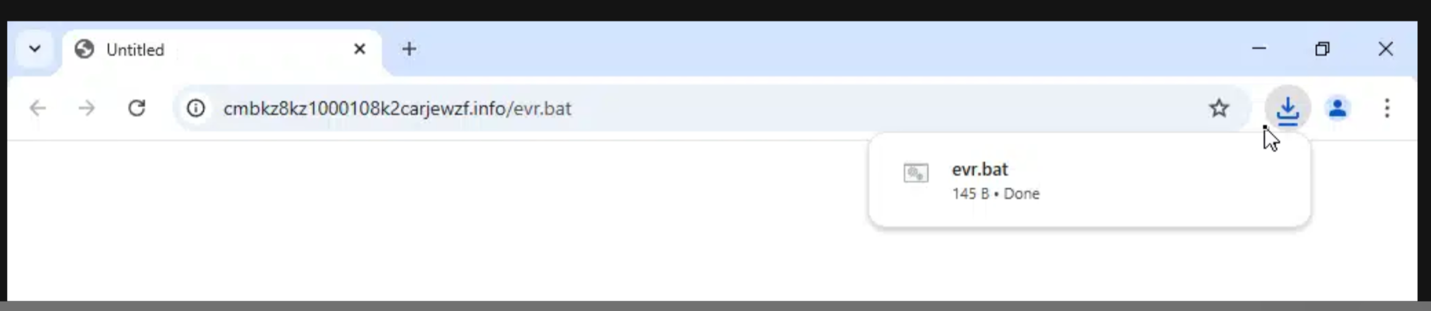
      1. Downloads secondary payload (evr.bat) from C2 server
      2. Saves payload to C:\Windows\Temp\LixPay.bat
      3. Creates persistence via shortcut in user's Startup folder
      4. Ensures malware survives system reboots
    3. Part 3: Fileless Payload Execution (ExWpL Function)
      1. Decodes base64-encoded .NET assembly
      2. Uses System.Reflection.Assembly.Load() to load assembly into memory
      3. Gets the assembly's EntryPoint
      4. Executes the malware directly in memory using Reflection
      5. No files written to disk during this process
  1. Post-Exploitation
    1. Loaded malware executes its malicious functionality
    2. Batch file (evr.bat) maintains persistent C2 connection
    3. Attacker has established foothold with persistence and defense evasion

Analysis

A user at a Todyl partner was browsing the Internet, arriving at a specific travel website. Upon entering the site, the user was greeted with a pop-up CAPTCHA window prompting the user to copy a command into their device to verify themselves.
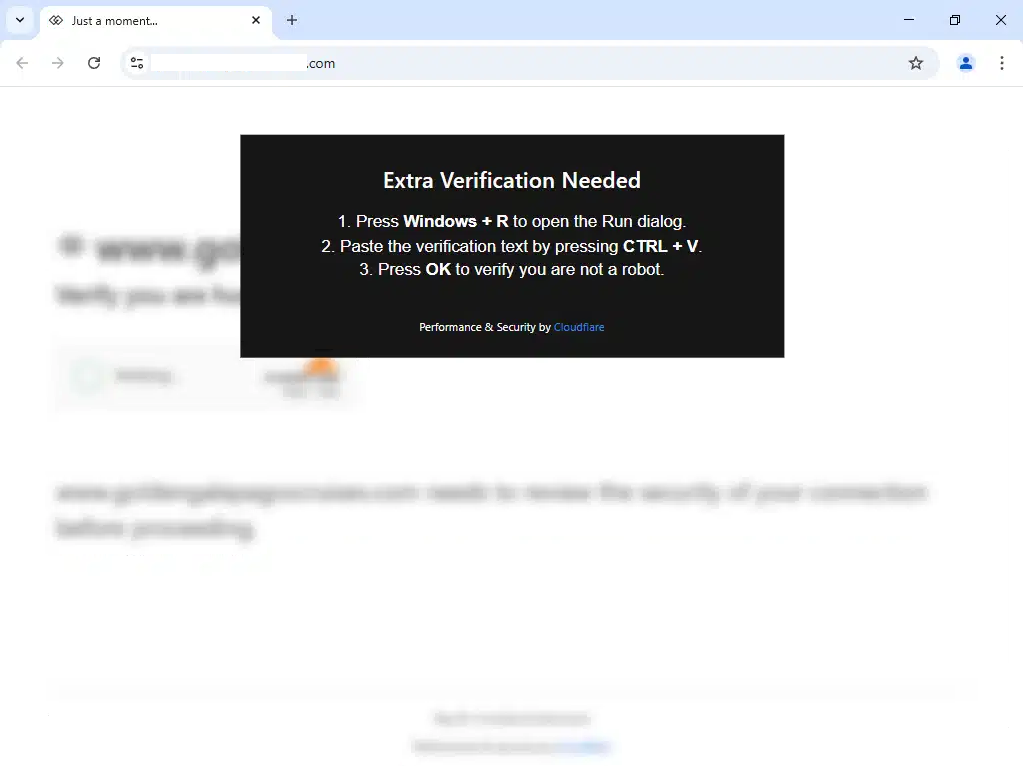
This CAPTCHA was, in fact, a fake ClickFix popup, which led the user to run a PowerShell command on their machine.  
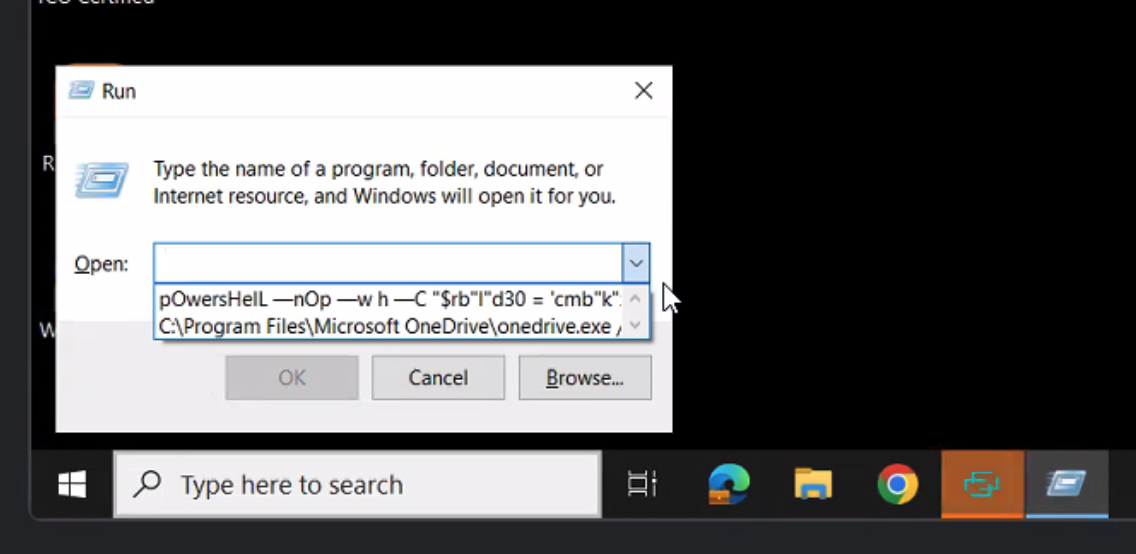
A screenshot of a computerAI-generated content may be incorrect., Picture

The below PowerShell command is the first PowerShell command that is run on the host. It came from the above ClickFix attack, where the user manually executed it. As you can see, it is currently obfuscated.  

After getting rid of the obfuscation, it is easier to see what the PowerShell command is doing.

The PowerShell command will perform Invoke-RestMethod to go to the C2 domain cmbkz8kz1000108k2carjewzf[.]info. Whatever response the host gets back from the C2 server will then be executed via the PowerShell Invoke-Expression. We can see below, in the very large code block, that this was what was returned for the host to execute next

This is the next stage PowerShell script executed on the host.  

PowerShell Function: HelpIO

The main function in the powershell script is called HelpIO. This function does three things.

  • Function HelpIO: Serves as the entry point and attempts to bypass Windows security
  • Function Urex: Establishes persistence and downloads additional payloads
  • Function ExWpL: Loads and executes the fileless malware component

The first part is as follows:

This part of the script starts off by trying to make an exclusion path for Windows Defender in 'C:\Windows\Temp'. This way Windows Defender won't scan or detect any malicious files in that path.

Next, it starts a new PowerShell process with elevated administrator privileges ('RunAs'). It will then wait for the process that adds the exclusion to complete.

Next up, if the previous command was successful, ExitCode 0 means success, it will wait 5 seconds before moving on to the next two steps which are functions Urex and ExWpL. If it failed (e.g., user clicked "No" on the UAC prompt), the loop continues, and it will try again.

The second part is as follows:

The first thing this function will do is set the variable with the URL path to use, which will download a batch file.

Then it sets the variable for the download path where it will be saved on the system. Notice the file is saved in the 'C:\Windows\Temp' folder from up above so it will not be detected.

Now it will set the next variable with the path for a shortcut file in the current user's startup folder. This is so that whenever the user logs in, the shortcut runs and executes the LixPay.bat file.

Then we have the Invoke-WebRequest command where it first downloads the evr.bat file that is mentioned above and saves it as LixPay.bat in the Temp folder that was excluded from Windows Defender.

This part of the function creates the content for a .url shortcut file. This shortcut will point to and execute the downloaded LixPay.bat file.

The last step for function Urex is that it writes the shortcut content to the LixPay.url file in the Startup folder. This makes the malware persistent across reboots. It uses ASCII encoding to help with compatibility.

Finally, we come to the third part, the function ExWpL. This function has been shortened some because the base64 encoded content was around 5MB long.

This function is a little bit easier to see, and we can walk through it pretty easily.

The main part of what we want to focus on is the variable $riok which gets called at the end via the Invoke-Expression.

A simple replacement of each part of the function and we are now looking at $riok being the command below. But first we need to break down what this command will do.

For parts 1 and 2 we have the encoded base64 string being set to $local.

Then in parts 3 and 4 it decodes the base64 string into a byte array.

With parts 5 and 6 it will load the decoded bytes as a .NET assembly directly into memory, using .NET Reflection to dynamically load and execute the code.

Next, it gets the entry point ("Main" method) of the loaded assembly.

Then the final part will call the entrypoint method.

Execution Flow

When executed, the script follows this sequence:
  • HelpIO function runs in a loop that:
    • Attempts to gain administrative privileges
    • Creates a Windows Defender exclusion for C:\Windows\Temp
    • Once successful, calls the Urex and ExWpL functions
    • Urex function:
      • Downloads a batch file from an external C2 server (cmbkz8kz1000108k2carjewzf.info/evr.bat)
      • Saves it to C:\Windows\Temp\LixPay.bat
      • Creates a shortcut in the Windows Startup folder to ensure persistence
    • ExWpL function:
      • Constructs a malicious PowerShell command through string concatenation
      • Decodes a base64-encoded .NET assembly
      • Loads the assembly directly into memory
      • Executes the assembly's entry point without writing to disk
    • Secondary Payload (evr.bat):
      • Runs PowerShell in hidden mode
      • Contacts the C2 server (cmbkz8kz1000108k2carjewzf.info/?x)
      • Downloads and executes additional commands directly in memory

A screenshot of a computerAI-generated content may be incorrect., Picture

A screenshot of a computerAI-generated content may be incorrect., Picture

A screenshot of a computerAI-generated content may be incorrect., Picture

Translation: 
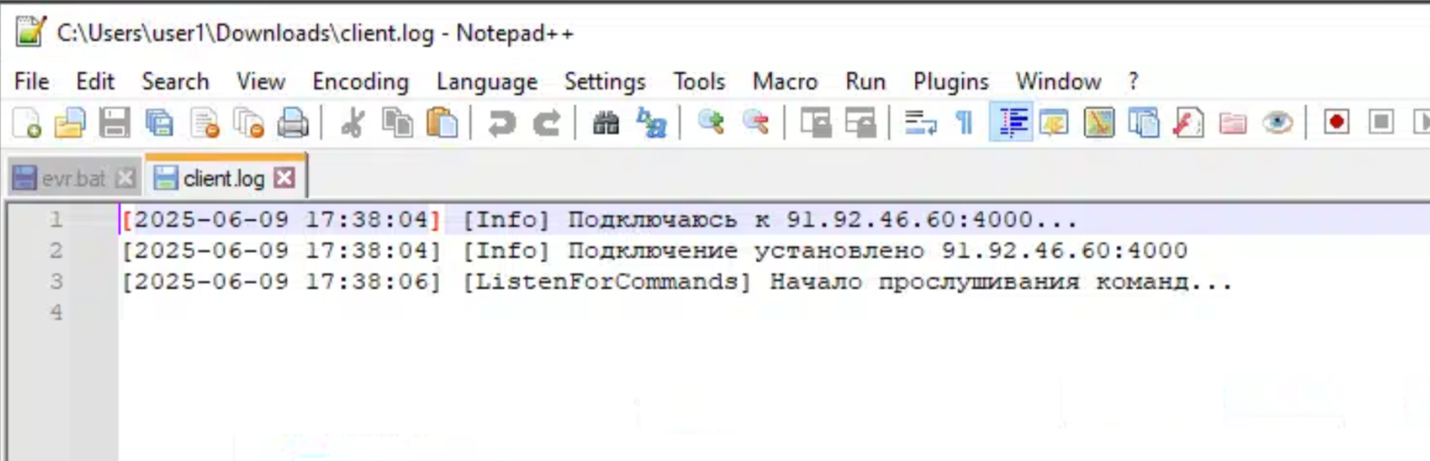
[2025-06-09 17:38:04] [Info] Connecting to 91.92.46.60:4000…
[2025-06-09 17:38:04] [Info] Connection established 91.92.46.60:4000  
[2025-06-09 17:38:06] [ListenForCommands] Starting listening for commands…

How to Address LightPerlGirl

  • NEVER trust a “CAPTCHA” popup asking you to paste anything onto your machine.
  • Todyl recommends adding Endpoint Security to all devices to prevent malicious PowerShell scripts like the one used in this campaign from running on your end user devices.
  • Use the queries, IOCs, etc. below to assist in your own threat hunting efforts.

Hunt queries, IOCs, and more

Hunt Queries

Network Connections

  • source.ip: 146.70.115.0/24 or destination.ip: 146.70.115.0/24
  • source.ip: 91.92.46.0/24 or destination.ip: 91.92.46.0/24  
  • source.ip: 94.74.164.0/24 or destination.ip: 94.74.164.0/24  
  • dns.question.name : "cmbkz8kz1000108k2carjewzf.info”

Powershell Script Execution Logs  

  • event.code : “4104”

Powershell/CMD/Bash Execution Logs  

  • process.name: (powershell.exe or cmd.exe or bash)

IOCs

  • "$env:APPDATA\Microsoft\Windows\Start Menu\Programs\Startup\LixPay.url"
  • "C:\Windows\Temp\LixPay.bat"

The Todyl team is working to reverse the malware, as well as other elements of the campaign. We will be detailing the findings in our next blog.

About Nicholas Koken

Nick is Todyl's Director of Advanced Threat Operations. After 5 years of working with the NSA, Space Force, and US Army Cyber, Nick made the switch to bring his expertise to the private sector at Todyl. With his experiences in cyber red teams, Nick has forged that mentality into his approach for defending Todyl partners from today's advanced threats. When he's not keeping Todyl partners safe, he enjoys building and racing motorcycles.