




c# 5的语法(.net framework 4.5+ 版本)引入了 async await的概念,再加上前端开发也经常出现这个概念。用的少,理解也不深,看到了一篇很容易入门的文章,所以在此写一些自己的理解:
本文来源于知乎的一篇文章,但是添加了一些自己的测试代码。知乎文章的链接如下
https://zhuanlan.zhihu.com/p/138805565
先来看一下顺序执行的例子
        internal static void Test()
        {
            Stopwatch sw = new Stopwatch();
            sw.Start();
            Task task = new Task(CallMethod);
            //Task task = new Task(CallMethodAsync);
            task.Start();
            task.Wait();


            sw.Stop();
            Console.WriteLine("程序运行共 耗时:" + sw.ElapsedMilliseconds);
            Console.ReadLine();
        }

        static async void CallMethod()
        {
            Console.WriteLine(" Other Work 1111");
            string filePath = "d:\\sampleFile.txt";
            int a = ReadFile(filePath);

            Console.WriteLine(" Other Work 1");
            Thread.Sleep(1000);
            Console.WriteLine(" Other Work 2");
            Thread.Sleep(1000);
            Console.WriteLine(" Other Work 3");

            int length = a;
            Console.WriteLine(" Total length: " + length);

            Console.WriteLine(" After work 1");
            Console.WriteLine(" After work 2");
        }


        static int ReadFile(string file)
        {
            int length = 0;

            Console.WriteLine(" File reading is stating");
            using (StreamReader reader = new StreamReader(file))
            {
                // Reads all characters from the current position to the end of the stream asynchronously
                // and returns them as one string.
                string s = reader.ReadToEnd();

                length = s.Length;
            }
            Thread.Sleep(2000);
            //Console.WriteLine("Hello world");
            Console.WriteLine(" File reading is completed");
            return length;
        }
程序执行以后,输出如下:
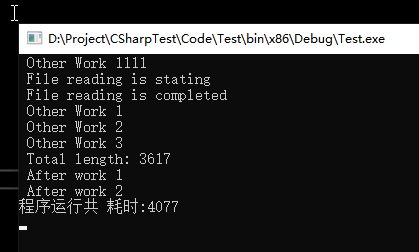
可以看到,因为我在ReadFile 里面进行了延时,所以ReadFile内的函数耗时 + 函数外的耗时 = 4秒 左右
再看一下使用async await异步执行的例子
        internal static void Test()
        {
            Stopwatch sw = new Stopwatch();
            sw.Start();
            //Task task = new Task(CallMethod);
            Task task = new Task(CallMethodAsync);
            task.Start();
            task.Wait();


            sw.Stop();
            Console.WriteLine("程序运行共 耗时:" + sw.ElapsedMilliseconds);
            Console.ReadLine();
        }

        static async void CallMethodAsync()
        {
            Console.WriteLine(" Other Work 1111");
            string filePath = "d:\\sampleFile.txt";
            Task<int> task = ReadFileAsync(filePath);

            Console.WriteLine(" Other Work 1");
            Thread.Sleep(1000);
            Console.WriteLine(" Other Work 2");
            Thread.Sleep(1000);
            Console.WriteLine(" Other Work 3");

            int length = await task;
            Console.WriteLine(" Total length: " + length);

            Console.WriteLine(" After work 1");
            Console.WriteLine(" After work 2");
        }


        static async Task<int> ReadFileAsync(string file)
        {
            int length = 0;

            Console.WriteLine(" File reading is stating");
            using (StreamReader reader = new StreamReader(file))
            {
                // Reads all characters from the current position to the end of the stream asynchronously
                // and returns them as one string.
                string s = await reader.ReadToEndAsync();

                length = s.Length;
            }
            Thread.Sleep(2000);
            Console.WriteLine(" File reading is completed");
            return length;
        }
程序输出的结果如下:
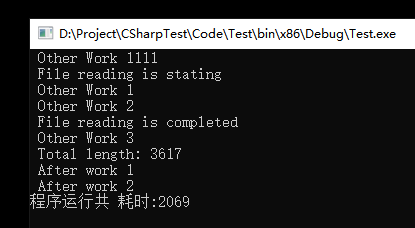
可以看到,使用 async await 的异步执行,只花费了2秒左右的时间。
这是为什么呢? 因为使用异步执行时,函数内部已经开启独立的Task 去执行了。所以函数主体依然能够一直运行,直至
这一步的时候,因为内外层都是2秒左右的延时,所以无需等待时间,极大地缩短了运行时间。
如果我们把 ReadFileAsync 的Sleep时间修改成三秒会发现输出更有意思了
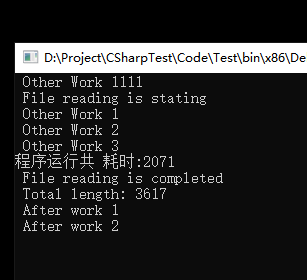
咦? 这里2秒,程序都跑完了,怎么才输出 Total length 以及结束的内容呢?这里就是异步编程的强大之处
如果使用传统的编程,那么这里 2 + 3 =5 秒程序才会结束
而如果使用异步编辑, 2< 3 = 3 秒程序实际就可以结束
这样子相比传统顺序执行的编程,那岂不是会有一个问题?函数主体都已经返回了,我却拿不到返回值,这咋整?
其实在ReadFile里面已经提供了范例: 如果要等 CallMethodAsync 的所有异步都结束再退出,可以将CallMethodAsync 改为 ReadFileAsync 的形式,在外层调用
修改之后得到的输出为:
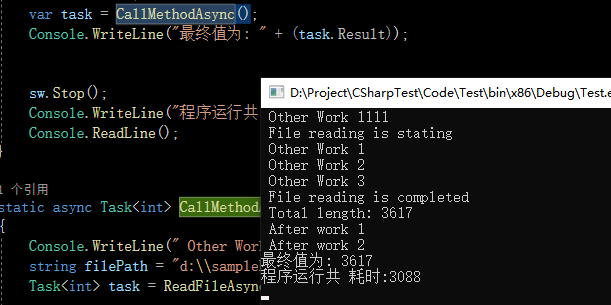
如果不使用以上的方式,使用传统的编程方式,如何才能缩短执行时间呢?目前我是没想到更好,更优雅的方式……
此内容由惯性聚合(RSS阅读器)自动聚合整理,仅供阅读参考。 原文来自 — 版权归原作者所有。