











提前讲解决方式: python版本不对,使用了不同本机CPU型号的版本
因为项目升级,所以切换了node环境,升级node环境以后老的项目(带有node-sass的项目)运行后,就报错
 path E:\Bitsmelody\AIOScreening\Code\Vue\node_modules\node-sass
npm ERR! command failed
npm ERR! command C:\Windows\system32\cmd.exe /d /s /c node scripts/build.js
npm ERR! Building: C:\Program Files\nodejs\node.exe E:\Bitsmelody\AIOScreening\Code\Vue\node_modules\node-gyp\bin\node-gyp.js rebuild --verbose --libsass_ext= --libsass_cflags= --libsass_ldflags= --libsass_library=
npm ERR! gyp info it worked if it ends with ok
npm ERR! gyp verb cli [
npm ERR! gyp verb cli   'C:\\Program Files\\nodejs\\node.exe',
npm ERR! gyp verb cli   'E:\\Bitsmelody\\AIOScreening\\Code\\Vue\\node_modules\\node-gyp\\bin\\node-gyp.js',
npm ERR! gyp verb cli   'rebuild',
npm ERR! gyp verb cli   '--verbose',
npm ERR! gyp verb cli   '--libsass_ext=',
npm ERR! gyp verb cli   '--libsass_cflags=',
npm ERR! gyp verb cli   '--libsass_ldflags=',
npm ERR! gyp verb cli   '--libsass_library='
npm ERR! gyp verb cli ]
npm ERR! gyp info using node-gyp@3.8.0
npm ERR! gyp info using node@16.14.2 | win32 | x64
npm ERR! gyp verb command rebuild []
npm ERR! gyp verb command clean []
npm ERR! gyp verb clean removing "build" directory
npm ERR! gyp verb command configure []
npm ERR! gyp verb check python checking for Python executable "python2" in the PATH
npm ERR! gyp verb `which` failed Error: not found: python2
npm ERR! gyp verb `which` failed     at getNotFoundError (E:\Bitsmelody\AIOScreening\Code\Vue\node_modules\which\which.js:13:12)
然后我查过各个博客,左思右想,我本地是有python环境的呀。 输入 python --version 也能正常显示python版本。
后面经过反复的查看,我才发现是我本地python版本安装有问题。
python安装包有 amd版本 和 通用版本,针对不同CPU型号的。我本地是 intel-core 的,而我同事是 amd 的,所以他的电脑使用我的环境能正常跑。
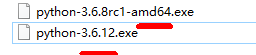
但是我本地就跑不起来
重新安装正确的python版本以后,node-sass编译的问题得到解决
(后面我追忆了一下,因为有一次跟同事调试python程序,为了跟他版本一致,重装python环境的时候出现的这个问题。但是当时没有写前端代码,python调试也一切正常,时间久了没有向这方面排查)
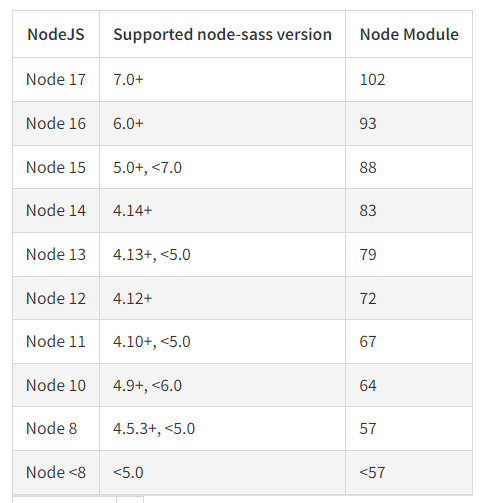
如果上述不行,还要注意node js 对应的 node-sass版本
这个是node-sass官方的版本,要注意版本对应就不会有问题了
202-03-20
最近发现上述方案虽然可以解决问题,但是如果其它电脑再安装项目难免还会遇到同样的情况,搞环境配置确实有些恶心。
最简单的方法就是 去掉 "node-sass" 的依赖,修改依赖包为 "sass"
具体的原因可以参考下述两个issue:
https://github.com/PanJiaChen/vue-element-admin/issues/25
https://github.com/PanJiaChen/vue-element-admin/issues/24
此内容由惯性聚合(RSS阅读器)自动聚合整理,仅供阅读参考。 原文来自 — 版权归原作者所有。