惯性聚合 高效追踪和阅读你感兴趣的博客、新闻、科技资讯
阅读原文 在惯性聚合中打开

推荐订阅源

freeCodeCamp Programming Tutorials: Python, JavaScript, Git & More
腾讯CDC
cs.AI updates on arXiv.org
L
LINUX DO - 热门话题
D
Darknet – Hacking Tools, Hacker News & Cyber Security
Project Zero
Project Zero
V
Vulnerabilities – Threatpost
Cisco Talos Blog
Cisco Talos Blog
P
Palo Alto Networks Blog
C
Cisco Blogs
A
Arctic Wolf
月光博客
月光博客
The GitHub Blog
The GitHub Blog
T
The Blog of Author Tim Ferriss
量子位
小众软件
小众软件
Latest news
Latest news
OSCHINA 社区最新新闻
OSCHINA 社区最新新闻
Microsoft Security Blog
T
The Exploit Database - CXSecurity.com
Security Latest
Security Latest
N
Netflix TechBlog - Medium
K
Kaspersky official blog
人人都是产品经理
人人都是产品经理
Cyber Security Advisories - MS-ISAC
博客园_首页
Y
Y Combinator Blog
P
Proofpoint News Feed
H
Hackread – Cybersecurity News, Data Breaches, AI and More
M
MIT News - Artificial intelligence
T
Threat Research - Cisco Blogs
S
Schneier on Security
D
Docker
Scott Helme
Scott Helme
MyScale Blog
MyScale Blog
Spread Privacy
Spread Privacy
cs.CL updates on arXiv.org
Threat Intelligence Blog | Flashpoint
GbyAI
GbyAI
有赞技术团队
有赞技术团队
Google DeepMind News
The Hacker News
The Hacker News
H
Help Net Security
Simon Willison's Weblog
J
Java Code Geeks
C
Cyber Attacks, Cyber Crime and Cyber Security
T
Tenable Blog
B
Blog
Know Your Adversary
Know Your Adversary
IT之家
IT之家

博客园 - midhillzhou

windows 11关闭防火墙 以使得 外部的开发板可以主动发起ping通电脑 uboot中调试景略以太网phy JL3111A2-NA windows上excel运行macro之后出现错误 在linux上移植sgdisk 在linux上移植phytool + 调试tja1103 以太网phy 使用gdb调试user程序 之 某个线程的调用栈 在uboot中修改tja 1103以太网phy from slave to master porting perf性能观测工具 porting 开源memtester ubi文件系统的 制作 + 挂载 + 若干问题 i2c指令使用 + 仿照开源i2ctransfer实现的自己的i2ctransfer windows下outlook 撤回邮件 安装repo 使用lauterbach debug uboot之重定位 uboot中各种memory读写命令 uboot nand flash dump 环境变量 + 制作环境变量分区 + 代码结构详解 uboot bootm代码详解图 Beyond Compare 进行二进制文档的比对时,怎么去对齐(转载) notepad++分析log小技巧 使用继电器控制开发板上下电 uboot debug小技巧
uboot 2020版本下gpio命令的使用 + linux下的libgpiod lib库的移植使用
midhillzhou · 2025-10-05 · via 博客园 - midhillzhou

第一大部分 uboot下的gpio

1.在uboot命令行中想要支持gpio的命令,需要打开如下宏

2.选用gpio引脚,作为测试引脚

2.1 查看电路原理图,选用那种soc不和mcu连接的pin,这样可以避免mcu的干扰。

2.2 查看pinmux的配置文件pinmux.h,选用目前已经被复用为gpio的pin管脚。

0x049BC418, 0x00060094,  /* PadName = I2C9_SDA             Fuction = GPIO0_A29 */
0x049BC80C, 0x00060094,  /* PadName = SDIO_DAT3            Fuction = GPIO0_A14 */
0x049BC818, 0x00060094,  /* PadName = SDIO_DAT2            Fuction = GPIO0_A13 */

目前ball name SDIO_DAT2,SDIO_DAT3,I2C9_SDA已经被pinmux成gpio管脚,也就是说 这几个ball管脚已经被内部连接到gpio controller模块。

我们就以这三个管脚为例,进行实验。

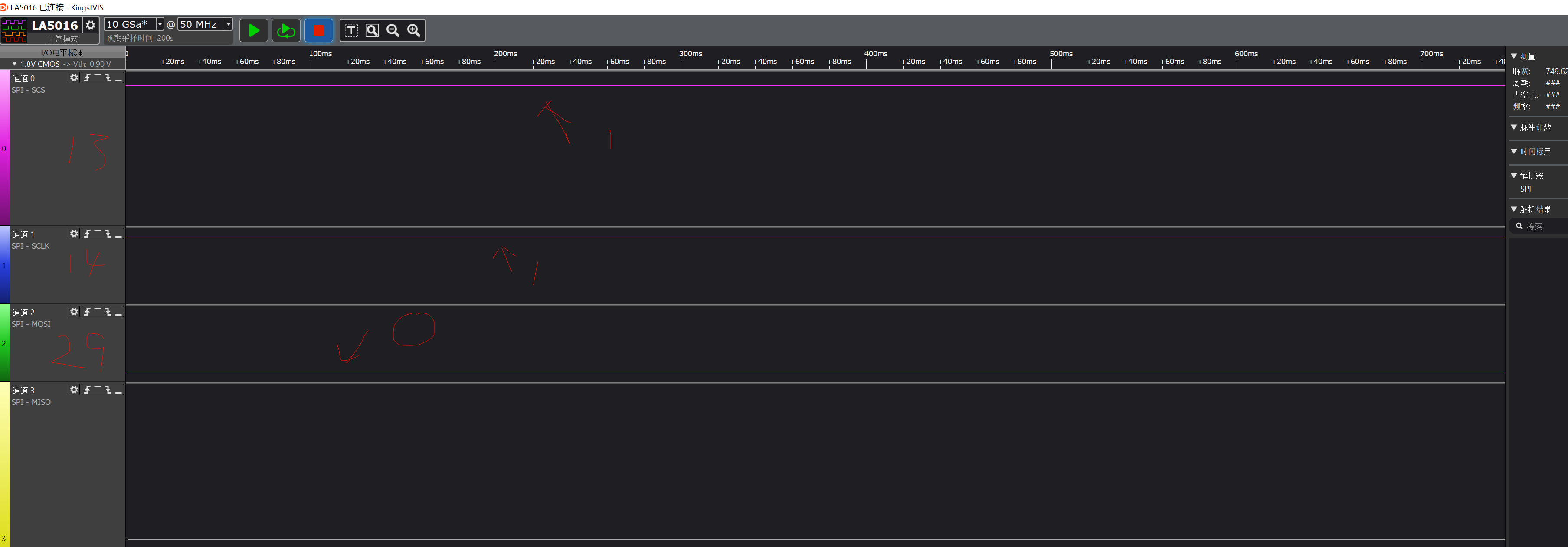
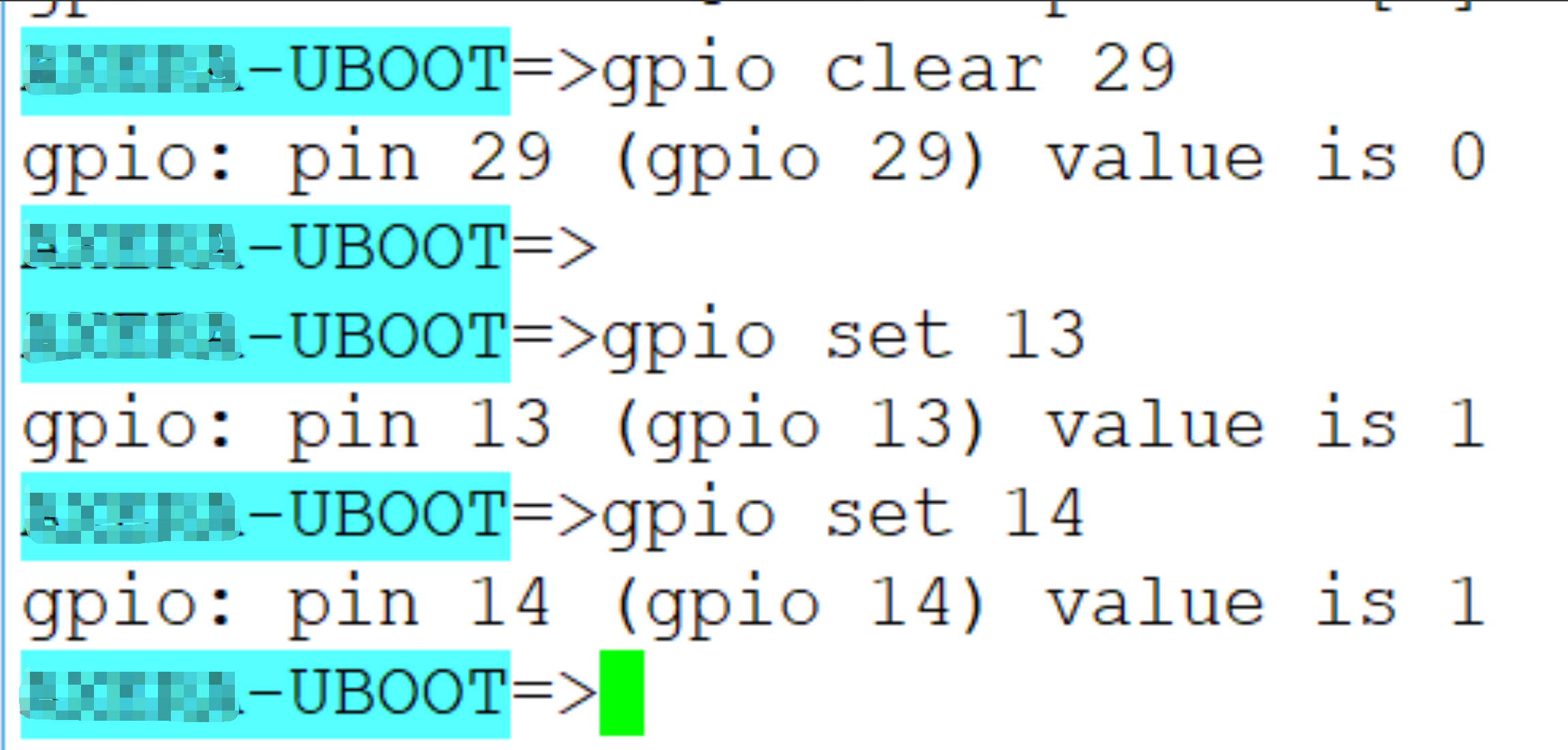
3.在uboot command中设置管脚输出高/低,并用逻辑分析仪进行查看

在本soc中gpio分为0、1、2三组,每组有32个gpio,做如下约定N为gpio的编号,p为组号取值范围为0、1、2,可以得到 N=p*32+offset。以GPIO0_29为例计算gpio的编号,可以知道

p=0, offset为29,N=0*32+29=29.
image

image

4.根据uboot command gpio命令,我们可以追踪到源码,发现其核心的实现是基于如下几个函数

gpio_request

gpio_direction_output

gpio_get_value

附录1:即使是配置成输出模式,也是可以通过gpio_get_value获取现在的值是多少。

我曾经做过如下实验,

将某个gpio设置成输出,并设置成输出逻辑1,由于我在外围电路上强制将其硬线连接到GND地,所以uboot gpio command会告诉我设置失败。

设置输出为0或者1的逻辑是 先设置并获取其值,如果不一致,就通过打印 报 错误信息。

附录2:通过研究步骤4中函数的代码实现,最终就是 设置gpio controller对应的寄存器。

所以  我们应该是也可以通过uboot中md和mw命令来读写寄存器直接进行设定。由于时间关系,目前尚未验证。

 第二大部分 linux下的libgpiod

1.移植的版本

https://git.kernel.org/pub/scm/libs/libgpiod/libgpiod.git/snapshot/libgpiod-v1.6.x.tar.gz

2.编译方法

./autogen.sh --enable-tools=yes --host=arm-linux-gnueabihf --prefix=/home/zhongshan/zhongshan_test/libgpiod_install_path

3.查看编译出来的工具集合gpiodetect依赖的库,以及库本身所依赖的库。确认板子上目前是否有这些被依赖的库。

image

 4.执行如下命令,并通过mcu输出方波到soc的GPIO2_A8,观察如下打印

gpiomon --num-events=3 --rising-edge gpiochip2 8
event:  RISING EDGE offset: 8 timestamp: [949336016.966726520]
event:  RISING EDGE offset: 8 timestamp: [949336018.966762854]
event:  RISING EDGE offset: 8 timestamp: [949336020.966797355]

总结:在uboot下是用一个总的N, number号来指明是哪个gpio管脚,需要转换

           而下linux下是用 哪个group 哪个脚,不需要进行转换。