





1.按byte写ddr memory
mw.b 0x42000000 0x00 0x80000 //从ddr地址0x42000000开始,填充0x00, 写的长度是0x80000
0x42000000: ddr地址 0x00:填充的内容 0x80000:填充的长度
2.按byte读ddr memory
md.b 0x42000000 0x80000 //从ddr地址0x42000000开始,dump内容到串口,dump的长度为0x80000
0x42000000: ddr地址 0x80000:dump的长度
3.将mtd分区读取到ddr
mtd read spl 0x42000000 将分区spl从nand flash读取到ddr地址0x42000000
4.nand 读(nand flash->ddr)
nand read 0x42000000 0x00100000 0x00400000
0x42000000:放到的ddr地址 0x00100000:nand flash中的偏移 0x00400000:大小
5.nand读(nand flash->直接打印到串口)
nand dump 0x00100000 0x10
0x00100000:nand flash中的偏移 0x10:大小
注意这个命令只会dump出来所在的page的整个内容
6.tftpput传输到电脑上
tftpput 0x42000000 0x80000 dump.bin //从ddr地址0x42000000开始,通过tftpput将文件传输到pc,传输的长度为0x80000
如果tftpput命令不支持,需要打开宏
CONFIG_NET_TFTP_VARS=y
CONFIG_CMD_TFTPPUT=y
然后重启编译uboot
7.怎么在ddr里面寻找一块可以存放nand flash里面读取的内容的地址,即上面的0x42000000
一方面:先通过bdinfo得到ddr所占据的地址空间
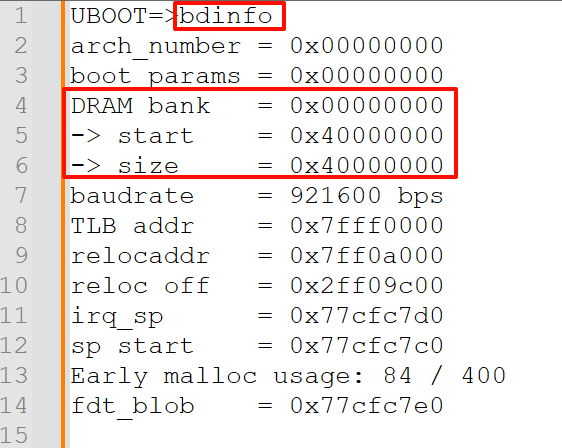
另一方面:在启动过程中会把kernel和dtb放到ddr,比如下,所以我们可以临时先用这一部分
tftpboot 0x41000000 os_kernel
tftpboot 0x42000000 os.dtb
或者
boot cmd is :bootm 0x40008400 - 0x48008400
注:三个使用实例如下
注1:通过mtd将某个分区读取出来,并通过tftp传输到电脑
mw.b 0x42000000 0x00 0x80000 从ddr地址0x42000000开始,填充0x00, 写的长度是0x80000
mtd read spl 0x42000000 将分区spl从nand flash读取到ddr地址0x42000000
tftpput 0x42000000 0x80000 dump.bin 从ddr地址0x42000000开始,通过tftpput将文件传输到pc,传输的长度为0x80000
注2:上面是通过mtd读出来,这里通过更底层的nand接口读出来,交叉验证,读出来的结果
nand read 0x100000000 0x500000 0x800
md.b 0x100000000 0x800
注3:由于这两者都是把nand flash的先读取到ddr, ddr的地址可能会选择的不太对, 不太对是指被其他程序使用了,所以也可以先直接dump个header出来看看,交叉验证注1,注2
如果头是不一致的,建议更换注1,注2中的ddr地址
nand dump 0x500000 0x48
此内容由惯性聚合(RSS阅读器)自动聚合整理,仅供阅读参考。 原文来自 — 版权归原作者所有。