惯性聚合 高效追踪和阅读你感兴趣的博客、新闻、科技资讯
阅读原文 在惯性聚合中打开

推荐订阅源

Spread Privacy
Spread Privacy
S
Schneier on Security
博客园 - 【当耐特】
Cyber Security Advisories - MS-ISAC
美团技术团队
Application and Cybersecurity Blog
MongoDB | Blog
MongoDB | Blog
NISL@THU
NISL@THU
N
Netflix TechBlog - Medium
Exploit-DB.com RSS Feed
Webroot Blog
Webroot Blog
月光博客
月光博客
T
The Exploit Database - CXSecurity.com
Forbes - Security
Forbes - Security
freeCodeCamp Programming Tutorials: Python, JavaScript, Git & More
博客园 - 叶小钗
Recent Announcements
IT之家
IT之家
B
Blog
C
CERT Recently Published Vulnerability Notes
S
SegmentFault 最新的问题
Recent Commits to openclaw:main
F
Fortinet All Blogs
Martin Fowler
Martin Fowler
Know Your Adversary
Know Your Adversary
Security Latest
Security Latest
cs.CL updates on arXiv.org
T
Troy Hunt's Blog
O
OpenAI News
D
Darknet – Hacking Tools, Hacker News & Cyber Security
C
CXSECURITY Database RSS Feed - CXSecurity.com
V2EX - 技术
V2EX - 技术
L
Lohrmann on Cybersecurity
C
Cyber Attacks, Cyber Crime and Cyber Security
H
Help Net Security
让小产品的独立变现更简单 - ezindie.com
cs.AI updates on arXiv.org
Last Week in AI
Last Week in AI
Help Net Security
Help Net Security
Hacker News: Ask HN
Hacker News: Ask HN
A
About on SuperTechFans
Y
Y Combinator Blog
Hacker News - Newest:
Hacker News - Newest: "LLM"
Engineering at Meta
Engineering at Meta
T
Threat Research - Cisco Blogs
Vercel News
Vercel News
K
KPMG report finds enterprise disconnect between AI and its ROI | CIO
Recorded Future
Recorded Future
C
Cisco Blogs
Project Zero
Project Zero

博客园 - FredGrit

WPF ContentControl Template WPF DatagridTemplate Binding DataTemplate WPF TreeView explicitly given key name to HierarchicalDataTemplate WPF, parse XMlDocument as List WPF two separated datagrid scroll synchronously both in horizontal and vertical via behavior WPF ContentControl Template is ControlTemplate, ContentTemplate is DataTemplate and must assign value to Content explicitly WPF TreeView show WCF config file WPF itemscontrol loaded downloaded data from WCF via httpclient WPF TreeView HierarchicalDataTemplate DataTemplate, Enum get enum name WPF consume xml generated by WCF , C# deserialize xml to List WPF implemented ICommand and IDisposable WPF ContextMenu,MenuItem command can binding to datacontext's command directly WPF usercontrol pass contextmenu command via implemented Freezable class which does not attach on Visual tree, then invoked in caller MVVM WPF consume data generate by WCF and save via ContextMenu Command in MVVM C# export List<T> to excel file via EPPlus WPF ContextMenu does not rely on host visual tree, the Freezable can exist independently, convey dependency property in usercontrol to caller C# JsonConvert DeserializeObject MissingMemberHandling.Ignore when the source model is completed and the required is partial Freezable objects do not require attachment to the WPF visual tree, maintain a persistent lifetime, and serve as a reliable binding relay between a detached ContextMenu and its parent host control. C# run httplistener to act as service application asynchronously in console, semaphoreslim allow the max concurrent number WPF Microsoft.Xaml.Behaviors.WPF, EventTrigger EventName="PreviewMouseDown" the tunnel event, while the MouseDown can't trigger the command because it was swallowed WPF customize command implemented ICommand, volatile read method is thread safe, preventing cpu and comipler reorder and optimization. WPF ItemsControl load huge 50M+ data WPF consume data generated by WCF periodically in json format WPF customize command based on ICommand and manually trigger WPF consume data generated by grpc services C# produce and consume data via Google.Protobuf WCF produce message and WPF consume periodically via DispatcherTimer WCF deconstruct WebConfig includes bindings, behaviors, service, endpoint ,serviceHostingEnvironment C# insert data into SQLite in batch periodically WPF SQLite SQLiteStudio WPF customize MultiSelectComboBox based on combobox WPF DataGrid Context menu binding command and commandparameter to datacontext WCF set fixed port as http://localhost:8888/ via Project /Properties/web/project url to create virtual directory WPF customize datagrid behavior based on behavior&lt;datagrid&gt; with command and command parameter WPF Microsoft Visual Studio XAML designer is busy WCF WebHttpBinding support both http and https WCF support basicHttpBinding and webHttpBinding - FredGrit WCF TestClient set fixed configuration file WPF consume http json and update periodically via DispatcherTimer WPF Prism.Core version 9.0.537 implemented navigation register singleton with splash screen, pass global variable via RegisterSingleton method WPF render periodically via DispatcherTimer, customize behavior - FredGrit Python cosume WCF service via requests in json format WPF call webHttpBinding from WCF WCF binding webHttpBinding is used to web browser in json format both in request and response WPF invoke WCF dll periodically via DispatcherTimer WCF webHttpBinding is open for web browser and wpf WPF DataTemplateSelector WPF DataGrid customize behavior with multiple commands and command parameters then invoke in mvvm WPF DataGrid behavior customize command and command parameter then invoke and implemented in MVVM WPF ItemsControl customize behavior and save all items WCF service can be accessed by browser WPF WCF produce data as service and WPF consume data as client periodically WPF GRPC and Probuf generated data as service then consume by wpf periodically WPF customize behavior based on Microsoft.Xaml.Behaviors.Wpf with command and commandparameter WPF call data from CPP wrapper dll via CLI\CLR - FredGrit WPF customize behavior WPF get gpu information via System.Management WPF ItemsControl IsItemsHost=True C# Serilog, Serilog.Sinks.Console, Serilog.Sinks.File C# Serilog both in file and console Windows powershell view huge file via command C# serialize huge data more than 100M via splitting into batch and concatenating as one big json file WPF WeakReference C# serialize datetime then deserialize, print lose precision. resolve by ToString(&quot;o&quot;) C# produce data and send via WebSocket as service, Python,Flask,HTML as consumer invoke periodically C# write generated data service and sent via websocket, then consume by python periodically C# DateTime print precision to microseconds C# WebSocket console as service provide data, another console as client,send request periodically C# WebAPI [HttpGet(&quot;{cnt}&quot;] pass argument WPF implement ICommand with async execute WPF ListBox control virtualization in mvvm WPF Data Source invoke from web api C# WebAPI
WPF Customize behavior and dependency property command
FredGrit · 2026-04-05 · via 博客园 - FredGrit
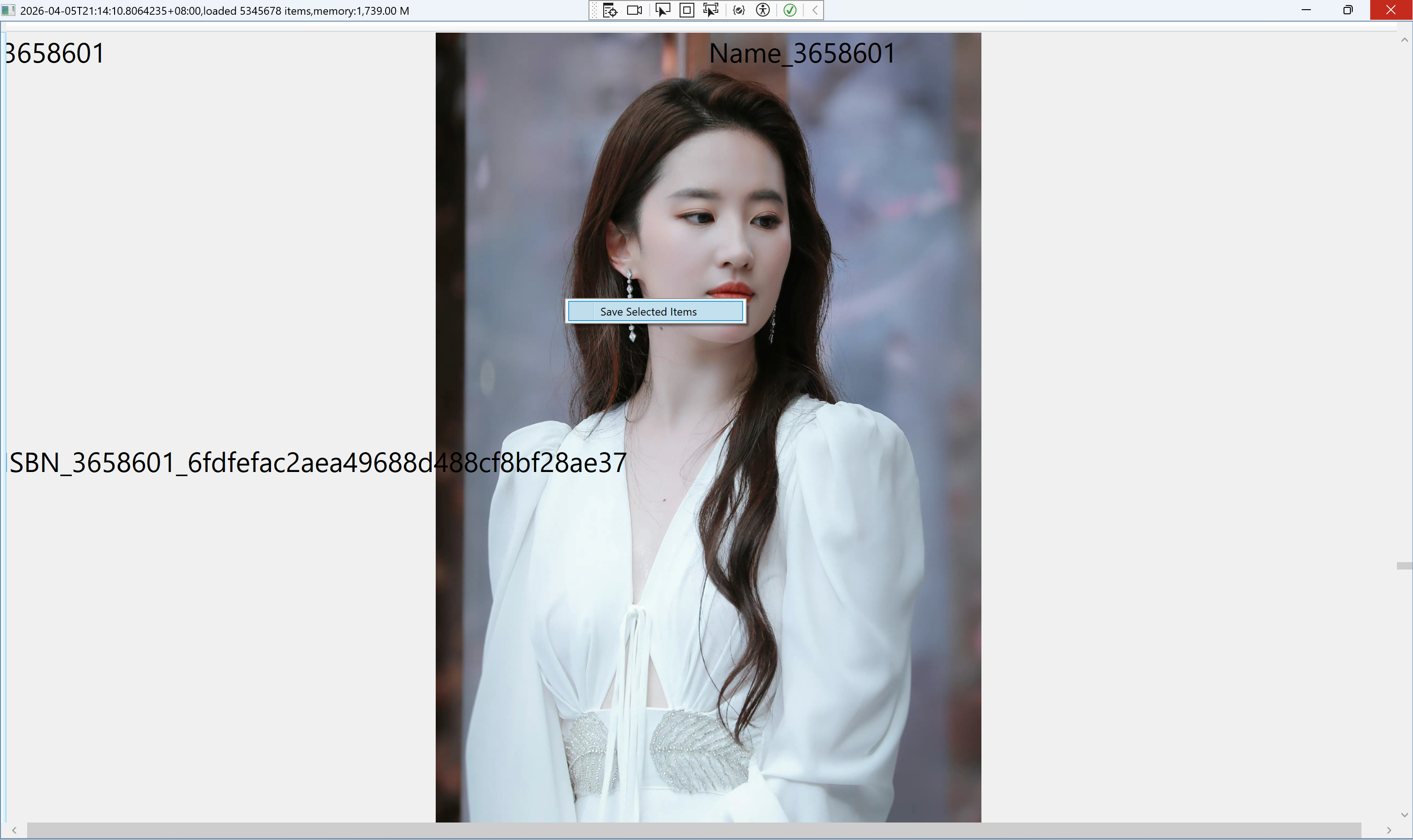
public class DataGridRightClickBehavior : Behavior<DataGrid>
{
    public ICommand SaveSelectedCommand
    {
        get { return (ICommand)GetValue(SaveSelectedCommandProperty); }
        set { SetValue(SaveSelectedCommandProperty, value); }
    }

    // Using a DependencyProperty as the backing store for SaveSelectedCommandProperty.  This enables animation, styling, binding, etc...
    public static readonly DependencyProperty SaveSelectedCommandProperty =
        DependencyProperty.Register("SaveSelectedCommand", typeof(ICommand),
            typeof(DataGridRightClickBehavior), new PropertyMetadata(null));

    private ContextMenu contextMenu;

    protected override void OnAttached()
    {
        base.OnAttached();
        contextMenu = new ContextMenu();
        var menuItem = new MenuItem
        {
            Header = "Save Selected Items"
        };
        menuItem.Click += MenuItem_Click;
        contextMenu.Items.Add(menuItem);

        AssociatedObject.ContextMenu = contextMenu;
    }

    private void MenuItem_Click(object sender, RoutedEventArgs e)
    {
        SaveSelectedCommand?.Execute(null);
    }

    protected override void OnDetaching()
    {
        base.OnDetaching();

        if (contextMenu != null)
        {
            contextMenu.Items.Clear();
            contextMenu = null;
        }
    }
}
Install-Package Microsoft.Xaml.Behaviors.Wpf
Install-Package Newtonsoft.Json
<Window x:Class="WpfApp11.MainWindow"
        xmlns="http://schemas.microsoft.com/winfx/2006/xaml/presentation"
        xmlns:x="http://schemas.microsoft.com/winfx/2006/xaml"
        xmlns:d="http://schemas.microsoft.com/expression/blend/2008"
        xmlns:mc="http://schemas.openxmlformats.org/markup-compatibility/2006"
        xmlns:behavior="http://schemas.microsoft.com/xaml/behaviors"
        xmlns:local="clr-namespace:WpfApp11"
        mc:Ignorable="d"
        WindowState="Maximized"
        Title="{Binding MainTitle}">
    <Window.DataContext>
        <local:MainVM/>
    </Window.DataContext>
    <Window.Resources>
        <local:ImgConverter x:Key="ImgConverter"/>
    </Window.Resources>
    <Grid>
        <DataGrid ItemsSource="{Binding BooksCollection}"
                  SelectionMode="Extended"
                  IsReadOnly="True"
                  CanUserAddRows="True"
                  AutoGenerateColumns="False"
                  VirtualizingPanel.IsVirtualizing="True"
                  VirtualizingPanel.VirtualizationMode="Recycling"
                  VirtualizingPanel.CacheLength="3,3"
                  VirtualizingPanel.CacheLengthUnit="Item"
                  ScrollViewer.CanContentScroll="True"
                  ScrollViewer.IsDeferredScrollingEnabled="True"
                  EnableRowVirtualization="True"
                  EnableColumnVirtualization="True"
                  UseLayoutRounding="True"
                  SnapsToDevicePixels="True">
            <behavior:Interaction.Triggers>
                <behavior:EventTrigger EventName="SelectionChanged">
                    <behavior:InvokeCommandAction Command="{Binding SelectedBooksCommand}"
                                                  CommandParameter="{Binding SelectedItems,RelativeSource={RelativeSource Mode=FindAncestor,AncestorType={x:Type DataGrid}}}">
                    </behavior:InvokeCommandAction>
                </behavior:EventTrigger>
            </behavior:Interaction.Triggers>

            <behavior:Interaction.Behaviors>
                <local:DataGridRightClickBehavior SaveSelectedCommand="{Binding SaveSelectedItemsCommand}"/>
            </behavior:Interaction.Behaviors>
            <DataGrid.Columns>
                <DataGridTemplateColumn>
                    <DataGridTemplateColumn.CellTemplate>
                        <DataTemplate>
                            <Grid Width="{x:Static SystemParameters.FullPrimaryScreenWidth}" 
                                  Height="{x:Static SystemParameters.FullPrimaryScreenHeight}">
                                <Grid.Resources>
                                    <Style TargetType="TextBlock">
                                        <Setter Property="FontSize" Value="30"/>
                                        <Style.Triggers>
                                            <Trigger Property="IsMouseOver" Value="True">
                                                <Setter Property="FontSize" Value="50"/>
                                                <Setter Property="Foreground" Value="Red"/>
                                            </Trigger>
                                        </Style.Triggers>
                                    </Style>
                                </Grid.Resources>
                                <Grid.Background>
                                    <ImageBrush ImageSource="{Binding ImgUrl,Converter={StaticResource ImgConverter}}"
                     Stretch="Uniform"/>
                                </Grid.Background>
                                <Grid.RowDefinitions>
                                    <RowDefinition/>
                                    <RowDefinition/>
                                </Grid.RowDefinitions>
                                <Grid.ColumnDefinitions>
                                    <ColumnDefinition/>
                                    <ColumnDefinition/>
                                </Grid.ColumnDefinitions>
                                <TextBlock Text="{Binding Id}" Grid.Row="0" Grid.Column="0"/>
                                <TextBlock Text="{Binding Name}" Grid.Row="0" Grid.Column="1"/>
                                <TextBlock Text="{Binding ISBN}" Grid.Row="1" Grid.Column="0" Grid.ColumnSpan="2"/>
                            </Grid>
                        </DataTemplate>
                    </DataGridTemplateColumn.CellTemplate>
                </DataGridTemplateColumn>
            </DataGrid.Columns>
        </DataGrid>
    </Grid>
</Window>
using Microsoft.Xaml.Behaviors;
using Newtonsoft.Json;
using System.Collections.ObjectModel;
using System.ComponentModel;
using System.Diagnostics;
using System.Globalization;
using System.IO;
using System.Runtime.CompilerServices;
using System.Runtime.Intrinsics.X86;
using System.Text;
using System.Windows;
using System.Windows.Controls;
using System.Windows.Data;
using System.Windows.Documents;
using System.Windows.Input;
using System.Windows.Media;
using System.Windows.Media.Imaging;
using System.Windows.Navigation;
using System.Windows.Shapes;
using System.Xml;
using Formatting = Newtonsoft.Json.Formatting;

namespace WpfApp11
{
    /// <summary>
    /// Interaction logic for MainWindow.xaml
    /// </summary>
    public partial class MainWindow : Window
    {
        public MainWindow()
        {
            InitializeComponent();
            this.Loaded += async (s, e) =>
            {
                var vm = this.DataContext as MainVM;
                if (vm != null)
                {
                    await vm.InitBooksCollection(5345678);
                }
            };
        }
    }

    public class MainVM : INotifyPropertyChanged
    {
        public MainVM()
        {
            //Task.Run(async () =>
            //{
            //    await InitBooksCollection(15000008);
            //});
            InitCommands();
        }

        private void InitCommands()
        {
            SelectedBooksCommand = new DelCommand(SelectedBooksCommandExecuted);
            SaveSelectedItemsCommand = new DelCommand(SaveSelectedItemsCommandExecuted);
        }

        private void SaveSelectedItemsCommandExecuted(object? obj)
        {
            Task.Run(() =>
            {
                if (selectedBooksList.Any())
                {
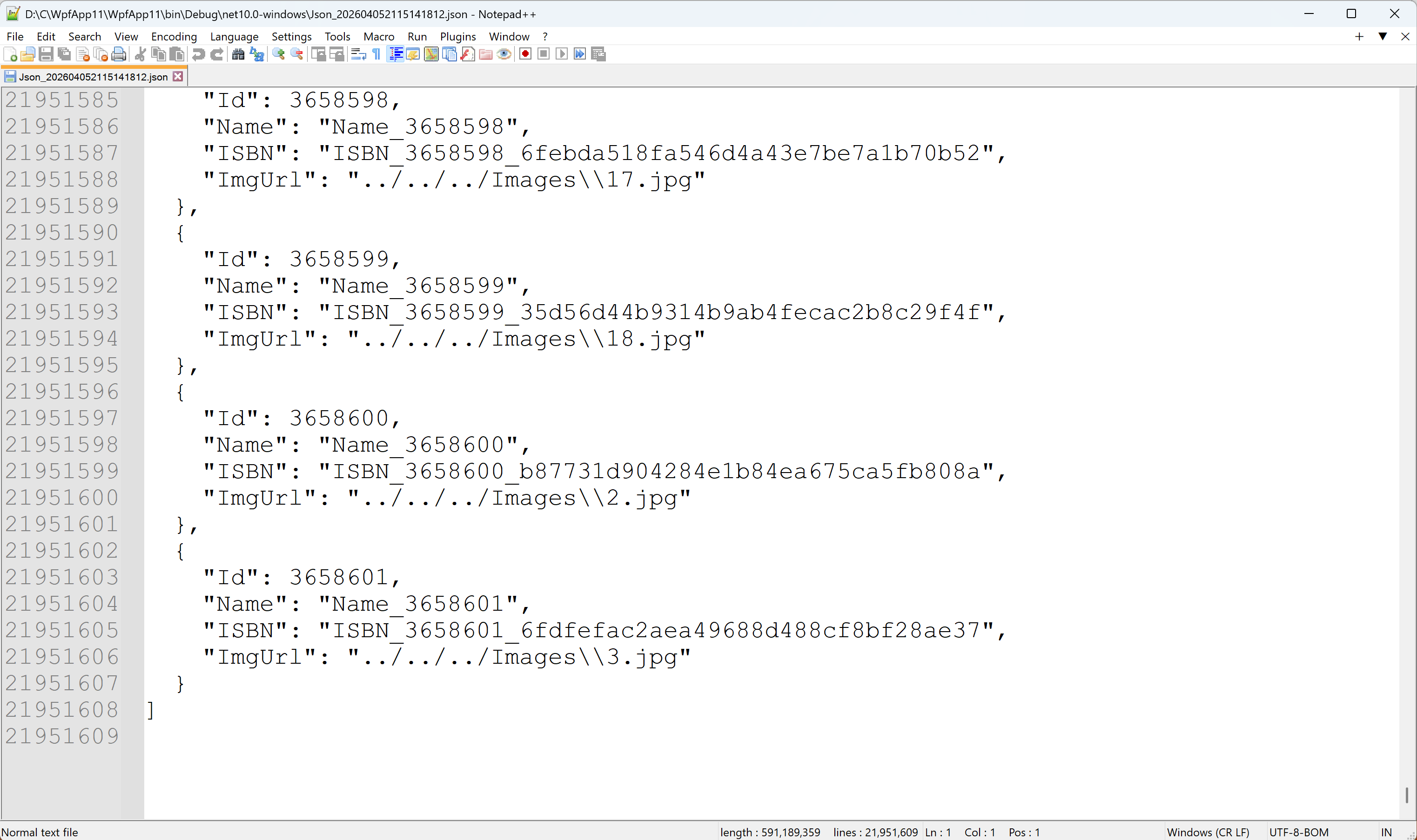
                    var jsonStr = JsonConvert.SerializeObject(selectedBooksList, Formatting.Indented);
                    var jsonFile = $"Json_{DateTime.Now.ToString("yyyyMMddHHmmssffff")}.json";
                    using (StreamWriter jsonWriter = new StreamWriter(jsonFile, false, Encoding.UTF8))
                    {
                        jsonWriter.WriteLine(jsonStr);
                        System.Diagnostics.Debug.WriteLine($"{DateTime.Now}\nSaved {selectedBooksList.Count} items to {jsonFile}");
                    }
                }
            });
        }

        private void SelectedBooksCommandExecuted(object? obj)
        {
            Task.Run(() =>
            {
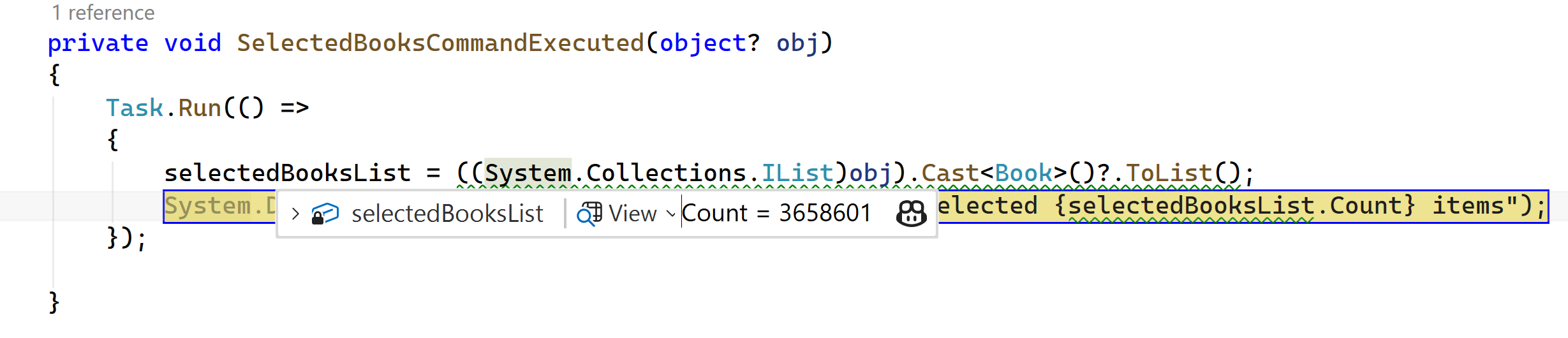
                selectedBooksList = ((System.Collections.IList)obj).Cast<Book>()?.ToList();
                System.Diagnostics.Debug.WriteLine($"{DateTime.Now},Selected {selectedBooksList.Count} items");
            });

        }

        private List<Book> selectedBooksList = new List<Book>();

        public ICommand SelectedBooksCommand { get; set; }
        public ICommand SaveSelectedItemsCommand { get; set; }

        public async Task InitBooksCollection(int cnt)
        {
            var imgDir = @"../../../Images";
            if (!Directory.Exists(imgDir))
            {
                return;
            }
            var imgs = Directory.GetFiles(imgDir);
            if (imgs == null || !imgs.Any())
            {
                return;
            }

            int imgsCount = imgs.Count();
            BooksCollection = new ObservableCollection<Book>();
            List<Book> bksList = new List<Book>();
            for (int i = 1; i < cnt + 1; i++)
            {
                bksList.Add(new Book()
                {
                    Id = i,
                    ImgUrl = imgs[i % imgsCount],
                    ISBN = $"ISBN_{i}_{Guid.NewGuid():N}",
                    Name = $"Name_{i}"
                });

                if (i % 500000 == 0)
                {
                    await PopulateBooksCollectionAsync(bksList);
                }
            }

            if (bksList.Any())
            {
                await PopulateBooksCollectionAsync(bksList);
            }
        }

        private async Task PopulateBooksCollectionAsync(List<Book> bksList)
        {
            var tempList = bksList.ToList();
            await Application.Current.Dispatcher.InvokeAsync(() =>
            {
                foreach (var bk in tempList)
                {
                    BooksCollection.Add(bk);
                }
                MainTitle = $"{DateTime.Now.ToString("O")},loaded {BooksCollection.Count} items,memory:{GetMem()}";
                bksList.Clear();
            }, System.Windows.Threading.DispatcherPriority.Background);
        }

        private string GetMem()
        {
            return $"{Process.GetCurrentProcess().PrivateMemorySize64 / 1024 / 1024:N2} M";
        }

        private string mainTitle="";
        public string MainTitle
        {
            get
            {
                return mainTitle;
            }
            set
            {
                if (value != mainTitle)
                {
                    mainTitle = value;
                    OnPropertyChanged();
                }
            }
        }

        private ObservableCollection<Book> booksCollection;
        public ObservableCollection<Book> BooksCollection
        {
            get
            {
                return booksCollection;
            }
            set
            {
                if (value != booksCollection)
                {
                    booksCollection = value;
                    OnPropertyChanged();
                }
            }
        }

        public event PropertyChangedEventHandler? PropertyChanged;
        private void OnPropertyChanged([CallerMemberName] string propertyName = "")
        {
            var handler = PropertyChanged;
            handler?.Invoke(this, new PropertyChangedEventArgs(propertyName));
        }
    }

    public class ImgConverter : IValueConverter
    {
        private readonly Dictionary<string, ImageSource> imgCache = new Dictionary<string, ImageSource>();
        private object lockObj = new object();
        public object Convert(object value, Type targetType, object parameter, CultureInfo culture)
        {
            try
            {
                var imgUrl = value as string;
                if (string.IsNullOrEmpty(imgUrl) || !File.Exists(imgUrl))
                {
                    return null;
                }

                lock (lockObj)
                {
                    if (imgCache.TryGetValue(imgUrl, out ImageSource img))
                    {
                        return img;
                    }
                }

                using (var fs = new FileStream(imgUrl, FileMode.Open, FileAccess.Read, FileShare.Read))
                {
                    var bmp = new BitmapImage();
                    bmp.BeginInit();
                    bmp.StreamSource = fs;
                    bmp.CacheOption = BitmapCacheOption.OnLoad;
                    bmp.EndInit();

                    if(bmp.CanFreeze)
                    {
                        bmp.Freeze();
                    }

                    lock(lockObj)
                    {
                        if(!imgCache.ContainsKey(imgUrl))
                        {
                            imgCache.Add(imgUrl, bmp);
                        }
                    }
                    return bmp;
                }

            }
            catch (Exception ex)
            {
                System.Diagnostics.Debug.WriteLine($"{ex.Message}", $"{DateTime.Now.ToString("O")}");
            }
            return null;
        }

        public object ConvertBack(object value, Type targetType, object parameter, CultureInfo culture)
        {
            return DependencyProperty.UnsetValue;
        }
    }

    public class DelCommand : ICommand
    {
        private Action<object?>? execute;
        private Predicate<object?>? canExecute;
        public DelCommand(Action<object?>? executeValue, Predicate<object?>? canExecuteValue = null)
        {
            execute = executeValue;
            canExecute = canExecuteValue;
        }

        public event EventHandler? CanExecuteChanged
        {
            add
            {
                CommandManager.RequerySuggested += value;
            }
            remove
            {
                CommandManager.RequerySuggested -= value;
            }
        }

        public bool CanExecute(object? parameter)
        {
            return canExecute == null ? true : canExecute(parameter);
        }

        public void Execute(object? parameter)
        {
            execute?.Invoke(parameter);
        }
    }

    public class DataGridRightClickBehavior : Behavior<DataGrid>
    {
        public ICommand SaveSelectedCommand
        {
            get { return (ICommand)GetValue(SaveSelectedCommandProperty); }
            set { SetValue(SaveSelectedCommandProperty, value); }
        }

        // Using a DependencyProperty as the backing store for SaveSelectedCommandProperty.  This enables animation, styling, binding, etc...
        public static readonly DependencyProperty SaveSelectedCommandProperty =
            DependencyProperty.Register("SaveSelectedCommand", typeof(ICommand),
                typeof(DataGridRightClickBehavior), new PropertyMetadata(null));

        private ContextMenu contextMenu;

        protected override void OnAttached()
        {
            base.OnAttached();
            contextMenu = new ContextMenu();
            var menuItem = new MenuItem
            {
                Header = "Save Selected Items"
            };
            menuItem.Click += MenuItem_Click;
            contextMenu.Items.Add(menuItem);

            AssociatedObject.ContextMenu = contextMenu;
        }

        private void MenuItem_Click(object sender, RoutedEventArgs e)
        {
            SaveSelectedCommand?.Execute(null);
        }

        protected override void OnDetaching()
        {
            base.OnDetaching();

            if (contextMenu != null)
            {
                contextMenu.Items.Clear();
                contextMenu = null;
            }
        }
    }

    public class Book
    {
        public int Id { get; set; }
        public string Name { get; set; }
        public string ISBN { get; set; }
        public string ImgUrl { get; set; }
    }
}
image

image

image

image