



惯性聚合 高效追踪和阅读你感兴趣的博客、新闻、科技资讯
阅读原文 在惯性聚合中打开

推荐订阅源

酷 壳 – CoolShell
酷 壳 – CoolShell
H
Hacker News: Front Page
P
Palo Alto Networks Blog
T
ThreatConnect
Apple Machine Learning Research
博客园_首页
T
True Tiger Recordings
P
Privacy & Cybersecurity Law Blog
B
Blog
IT之家
IT之家
Last Week in AI
Last Week in AI
F
Full Disclosure
Hacker News: Ask HN
Hacker News: Ask HN
C
Comments on: Blog
Microsoft Azure Blog
C
Cybersecurity and Infrastructure Security Agency CISA
Microsoft Security Blog
博客园 - 【当耐特】
N
News and Events Feed by Topic
NISL@THU
NISL@THU
腾讯CDC
雷峰网
雷峰网
Security Latest
Security Latest
李成银的技术随笔
M
Microsoft Research Blog - Microsoft Research
L
LangChain Blog
L
Lohrmann on Cybersecurity
cs.CL updates on arXiv.org
C
Check Point Blog
Y
Y Combinator Blog
Recent Announcements
博客园 - Franky
N
News | PayPal Newsroom
V
V2EX
A
About on SuperTechFans
The Register - Security
月光博客
月光博客
奇客Solidot–传递最新科技情报
奇客Solidot–传递最新科技情报
Google Online Security Blog
MyScale Blog
MyScale Blog
Cisco Talos Blog
Cisco Talos Blog
Vercel News
Vercel News
WordPress大学
WordPress大学
C
Cyber Attacks, Cyber Crime and Cyber Security
The Hacker News
The Hacker News
IntelliJ IDEA : IntelliJ IDEA – the Leading IDE for Professional Development in Java and Kotlin | The JetBrains Blog
爱范儿
爱范儿
A
Arctic Wolf
L
LINUX DO - 最新话题
freeCodeCamp Programming Tutorials: Python, JavaScript, Git & More

博客园 - 人生为卒

CAD缺失字体如何处理 Excel 快速拖动公式的方法 微信小程序隐私审核 微信小程序创建流程 mysql 查询数据库的所有表格字段 CAD二次开发入门:WPF类库 Excel 根据单元格值设置行颜色 cmd安装Windows服务 log4.config MySq 表内存占用情况 C# 检测并重启windows服务,IIS应用池 redis 服务安装 Windows系统下本地MQTT服务器搭建,及开机自启 Navicat设置备份文件存储路径 Windows自动录屏功能 spring中常用注解 解决不能访问GitHub的问题 Java 打包到部署子工程出错 Java-Maven基础
Windows系统 nacos 部署
人生为卒 · 2023-11-18 · via 博客园 - 人生为卒

转载:https://www.cnblogs.com/simon-xie/p/15730368.html   Windows系统 

Nacos安装及部署

一、下载地址

https://github.com/alibaba/nacos

二、新建数据库

新建一个实例名为nacos的数据库,并执行nacos/conf下的nacos-mysql.sql文件创建表

三、修改配置

打开conf下的application.properties文件,

修改ip和port:

nacos.inetutils.ip-address=192.168.1.199
server.port=8848
#*************** Spring Boot Related Configurations ***************#
### Default web context path:
server.servlet.contextPath=/nacos
### Include message field
server.error.include-message=ALWAYS
### Default web server port:
server.port=8848 

#*************** Network Related Configurations ***************#
### If prefer hostname over ip for Nacos server addresses in cluster.conf:
# nacos.inetutils.prefer-hostname-over-ip=false

### Specify local server's IP:
nacos.inetutils.ip-address=192.168.1.199

修改数据库连接

 db.url.0=jdbc:mysql://127.0.0.1:3306/nacos?characterEncoding=utf8&connectTimeout=1000&socketTimeout=3000&autoReconnect=true&useUnicode=true&useSSL=false&serverTimezone=UTC
 db.user.0=root
 db.password.0=root

四、单机模式

1、直接修改配置文件

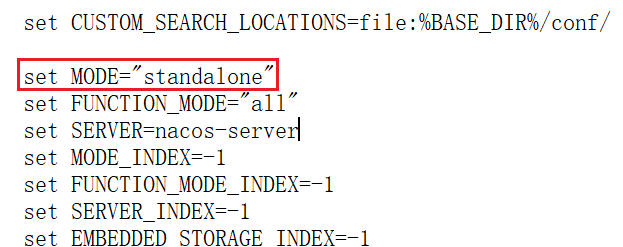
打开bin/startup.cmd 文件,将MODE从cluster改为 standalone,如下:
 2、执行startup.cmd时追加standalone参数: ./startup.sh -m standalone &

五、将Nacos加入windows服务

1、从https://github.com/winsw/winsw/releases下载 WINSW.NET4.exe 和 sample-minimal.xml

2、把WINSW.NET4.exe 和 sample-minimal.xml的名字修改为相同的名字并放到nacos的bin目录下,如nacosService.exe和nacosService.xml

3、配置修改名称后的sample-minimal.xml

复制代码

1 <service>
2   <id>nacos-id-000001</id>
3   <name>Nacos</name>
4   <description>Nacos2</description>
5   <executable>%BASE%\startup.cmd</executable>
6   <arguments>-m standalone</arguments>
7   <logpath>%BASE%\serviceLogs</logpath>
8 </service>

复制代码

4、bin目录下:安装和卸载服务

 .\nacosService.exe install    生成windows服务
 nacosService.exe uninstall    卸载windows服务

六、访问Nacos

访问http://localhost:8848/nacos/index.html,用户名和口令均为nacos

要修改nacos默认的登陆密码,可以进入mysql数据库,打开users表进行新用户的添加,密码采用的是BCrypt加密,把加密后的密码存到数据库中即可。

Bcrypt密码在线生成计算器 http://www.ab126.com/goju/10822.html

添加后要重启Nacos服务