惯性聚合 高效追踪和阅读你感兴趣的博客、新闻、科技资讯
阅读原文 在惯性聚合中打开

推荐订阅源

酷 壳 – CoolShell
酷 壳 – CoolShell
H
Hacker News: Front Page
P
Palo Alto Networks Blog
T
ThreatConnect
Apple Machine Learning Research
博客园_首页
T
True Tiger Recordings
P
Privacy & Cybersecurity Law Blog
B
Blog
IT之家
IT之家
Last Week in AI
Last Week in AI
F
Full Disclosure
Hacker News: Ask HN
Hacker News: Ask HN
C
Comments on: Blog
Microsoft Azure Blog
C
Cybersecurity and Infrastructure Security Agency CISA
Microsoft Security Blog
博客园 - 【当耐特】
N
News and Events Feed by Topic
NISL@THU
NISL@THU
腾讯CDC
雷峰网
雷峰网
Security Latest
Security Latest
李成银的技术随笔
M
Microsoft Research Blog - Microsoft Research
L
LangChain Blog
L
Lohrmann on Cybersecurity
cs.CL updates on arXiv.org
C
Check Point Blog
Y
Y Combinator Blog
Recent Announcements
博客园 - Franky
N
News | PayPal Newsroom
V
V2EX
A
About on SuperTechFans
The Register - Security
月光博客
月光博客
奇客Solidot–传递最新科技情报
奇客Solidot–传递最新科技情报
Google Online Security Blog
MyScale Blog
MyScale Blog
Cisco Talos Blog
Cisco Talos Blog
Vercel News
Vercel News
WordPress大学
WordPress大学
C
Cyber Attacks, Cyber Crime and Cyber Security
The Hacker News
The Hacker News
IntelliJ IDEA : IntelliJ IDEA – the Leading IDE for Professional Development in Java and Kotlin | The JetBrains Blog
爱范儿
爱范儿
A
Arctic Wolf
L
LINUX DO - 最新话题
freeCodeCamp Programming Tutorials: Python, JavaScript, Git & More

博客园 - 衡子

Ubuntu24.04更改SSH端口 记录安装过程 - 衡子 Azure CLI创建管理员用户 创建VMSS中的instance 创建不带公网IP的VM Azure LSv3系列VM 自动挂载NVMe本地磁盘 Azure AD访问Azure Storage Azure Linux VM使用Managed Identity获取Key-vault的Secret Azure AD SSO with Google Cloud Identity 通过VM SWAP OS DISK升级VM 通过API获取Azure KeyVault Securet Azure Front Door添加自定义域名 VM间网络PPS和带宽测试 Azure获取access token的方法 VM间记录时延 Windows Terminal的一些配置 安装hping Azure解除不再使用Directory的关联 Azure AKS容器网络详解
使用VSCode Remote Containers功能实现开发环境统一
衡子 · 2021-11-28 · via 博客园 - 衡子

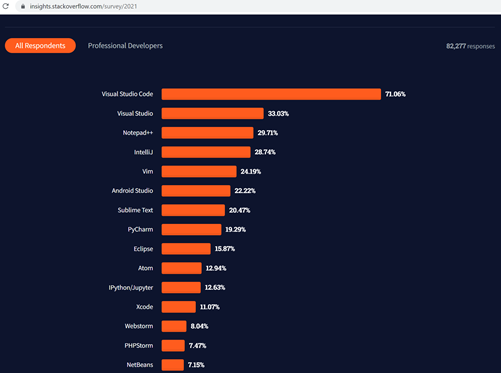
VSCode自从2015年面世以来,经过6年多的发展,成为最流行的开发工具。根据Stackoverflow在2021年的统计, VSCode是目前最流行的开发工具,超过70%的开发者会使用VSCode,远远领先其他的开发工具:
在企业的开发中,如何让众多开发者保持一致的开发环境,减少业务上线时的故障和复杂性,有各种解决方案。其中容器解决方案是目前大家常用的一种方式。

这里将介绍在VSCode中的Visual Studio Code remote Development,它允许您使用容器、远程计算机或适用于 Linux 的 Windows 子系统 (WSL) 作为开发环境。通过这个功能可以实现:

  • 在统一的操作系统上进行开发,或者在更大、更专业的硬件上进行开发
  • 本地环境和开发环境分离,避免因开发环境影响本地机器
  • 让新开发者更容易上手,并使每个开发者都处于一致的环境中
  • 使用本地不支持的操作系统或运行环境,甚至可以在本地支持多个版本
  • 在Windows中使用WSL实现Linux的开发环境
  • 从多台机器或位置访问现有的统一开发环境
  • 调试在客户站点或云中运行的应用程序

我们这里介绍通过容器的方式实现开发环境的统一的方法。

一 创建Docker镜像

本例子中创建一个带有Flask的Python3.8环境的Docker Image,作为开发环境的模板。

1 编写Dockerfile

创建一个无限循环的python程序,app.py:

import time

while True:

time.sleep(100)

创建如下的Dockerfile,采用python的官方镜像,安装Flask包,再将app.py复制到工作目录中,运行:

FROM python:3.8-slim

RUN pip install Flask

WORKDIR /app

ADD . /app

CMD ["python", "app.py"]

2 build模板镜像

运行docker build,创建名字为python-flask的镜像:

docker build . -t python-flask

二 在本机运行docker程序

在本机运行docker程序,采用的是刚刚创建好的镜像。同时把docker的工作目录,mount到本机的工作目录上:

docker run -d --name vsc01 \

-v /mnt/c/newfolder:/root/newfolder \

python-flask

可以看到运行中的容器:

三 通过VSCode连接到container中进行开发

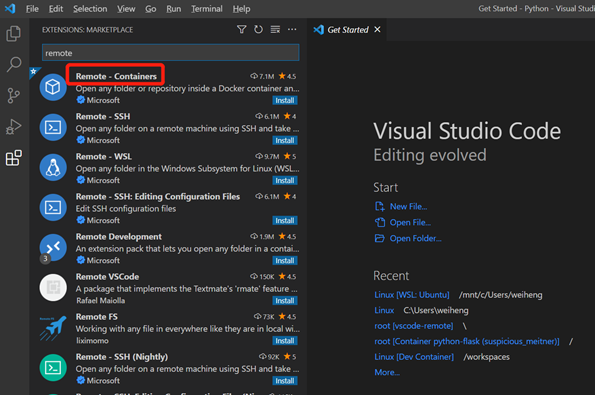
1 安装remote – container插件

在VSCode中,查找并安装remote – container插件:

选择Remote – Containers,点击安装:
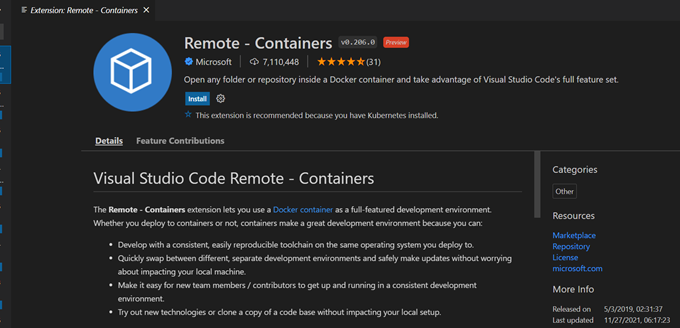
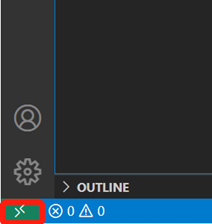
安装完成后,在VSCode的左下角出现一个绿色的按钮:
2 连接到container中

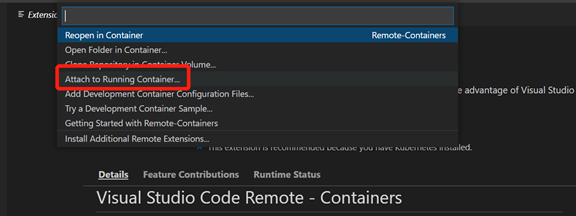
在VSCode中,点击左下角的绿色按钮:

点击attach to Running Container…

Attach到container以后,可以看到内部的文件系统:

3 调试程序

在VSCode中创建一个简单的index.py的程序

from flask import Flask

app = Flask(__name__)

@app.route("/")

def hello():

    html = '<h1 style="color:DodgerBlue;"> Hello world!' + "</h1></br>"

    return html

if __name__ == "__main__":

  app.run(host='0.0.0.0', port=80)

可以看到,在本机的C盘newfolder下创建了index.py程序:

为方便调试,在VSCode中安装code runner:
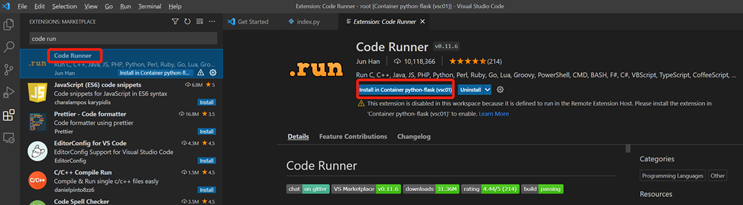
安装完成后,在右上角出现运行的按钮:
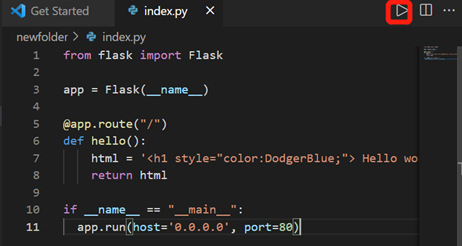
点击运行,出现提示,
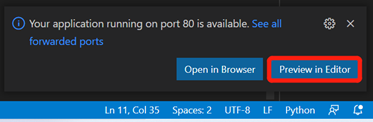
可以看到代码的实际效果:

四 总结

在VSCode中安装Remote – Container插件,结合自己创建的统一容器镜像,可以非常方便的实现统一的开发环境。