惯性聚合 高效追踪和阅读你感兴趣的博客、新闻、科技资讯
阅读原文 在惯性聚合中打开

推荐订阅源

酷 壳 – CoolShell
酷 壳 – CoolShell
H
Hacker News: Front Page
P
Palo Alto Networks Blog
T
ThreatConnect
Apple Machine Learning Research
博客园_首页
T
True Tiger Recordings
P
Privacy & Cybersecurity Law Blog
B
Blog
IT之家
IT之家
Last Week in AI
Last Week in AI
F
Full Disclosure
Hacker News: Ask HN
Hacker News: Ask HN
C
Comments on: Blog
Microsoft Azure Blog
C
Cybersecurity and Infrastructure Security Agency CISA
Microsoft Security Blog
博客园 - 【当耐特】
N
News and Events Feed by Topic
NISL@THU
NISL@THU
腾讯CDC
雷峰网
雷峰网
Security Latest
Security Latest
李成银的技术随笔
M
Microsoft Research Blog - Microsoft Research
L
LangChain Blog
L
Lohrmann on Cybersecurity
cs.CL updates on arXiv.org
C
Check Point Blog
Y
Y Combinator Blog
Recent Announcements
博客园 - Franky
N
News | PayPal Newsroom
V
V2EX
A
About on SuperTechFans
The Register - Security
月光博客
月光博客
奇客Solidot–传递最新科技情报
奇客Solidot–传递最新科技情报
Google Online Security Blog
MyScale Blog
MyScale Blog
Cisco Talos Blog
Cisco Talos Blog
Vercel News
Vercel News
WordPress大学
WordPress大学
C
Cyber Attacks, Cyber Crime and Cyber Security
The Hacker News
The Hacker News
IntelliJ IDEA : IntelliJ IDEA – the Leading IDE for Professional Development in Java and Kotlin | The JetBrains Blog
爱范儿
爱范儿
A
Arctic Wolf
L
LINUX DO - 最新话题
freeCodeCamp Programming Tutorials: Python, JavaScript, Git & More

博客园 - 衡子

Ubuntu24.04更改SSH端口 记录安装过程 - 衡子 Azure CLI创建管理员用户 创建VMSS中的instance 创建不带公网IP的VM Azure LSv3系列VM 自动挂载NVMe本地磁盘 Azure AD访问Azure Storage Azure Linux VM使用Managed Identity获取Key-vault的Secret Azure AD SSO with Google Cloud Identity 通过VM SWAP OS DISK升级VM 通过API获取Azure KeyVault Securet Azure Front Door添加自定义域名 Azure获取access token的方法 VM间记录时延 Windows Terminal的一些配置 安装hping Azure解除不再使用Directory的关联 使用VSCode Remote Containers功能实现开发环境统一 Azure AKS容器网络详解
VM间网络PPS和带宽测试
衡子 · 2021-12-28 · via 博客园 - 衡子

VM间的网络PPS能力测试一般采用netperf/iperf或ntttcp这些工具实现。监控端一般采用nmon和nload这些工具。

1 pps测试

这个测试中采用netperf ,netperf的安装如下:

wget https://github.com/vtrocelab/./netperf-2.7.0/raw/master/./netperf-2.7.0.tar.gz                                                                                                            tar.gz
tar xzvf ./netperf-2.7.0.tar.gz
cd ./netperf-2.7.0
apt-get install gawk
apt-get install gcc
apt-get install make
./configure
make && make install

安装nmon:

apt install nmon

开启netperf服务端:

netserver

开启netperf客户端:

cat nettest.sh 
#!/bin/bash
netperf -H 10.148.0.2  -t UDP_STREAM -l 300 -- -m 1 -R 1 &
...
netperf -H 10.148.0.2  -t UDP_STREAM -l 300 -- -m 1 -R 1 &

起多个netperf的客户端进程进行测试。

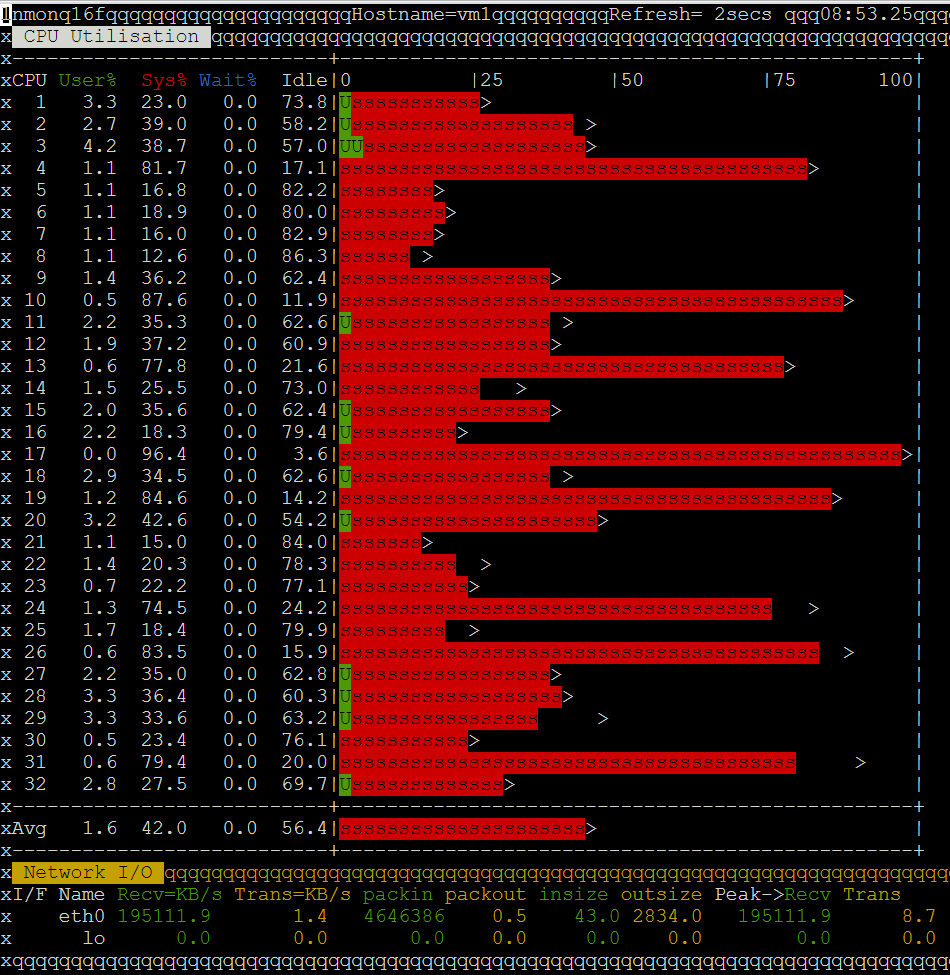
在服务端开启nmon,n键网络,c键CPU使用情况:

nmon

可以看到网络的pps和网络带宽:

pps为4.6Mpps,带宽为195111*8=1.56Gbps

 2 带宽测试

带宽测试可以采用ntttcp或iperf实现。

ntttcp安装:

apt-get -y install build-essential  
apt-get -y  install git
git clone https://github.com/Microsoft/ntttcp-for-linux
ntttcp-for-linux/src/
make & make install

ntttcp服务端:

ntttcp -r -t 300 &

ntttcp客户端:

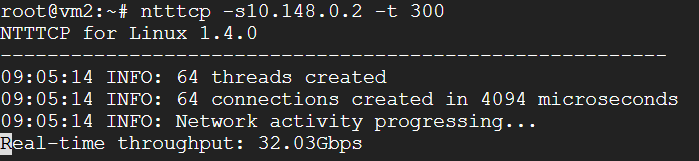
ntttcp -s10.148.0.2 -t 300

测试结果如下:
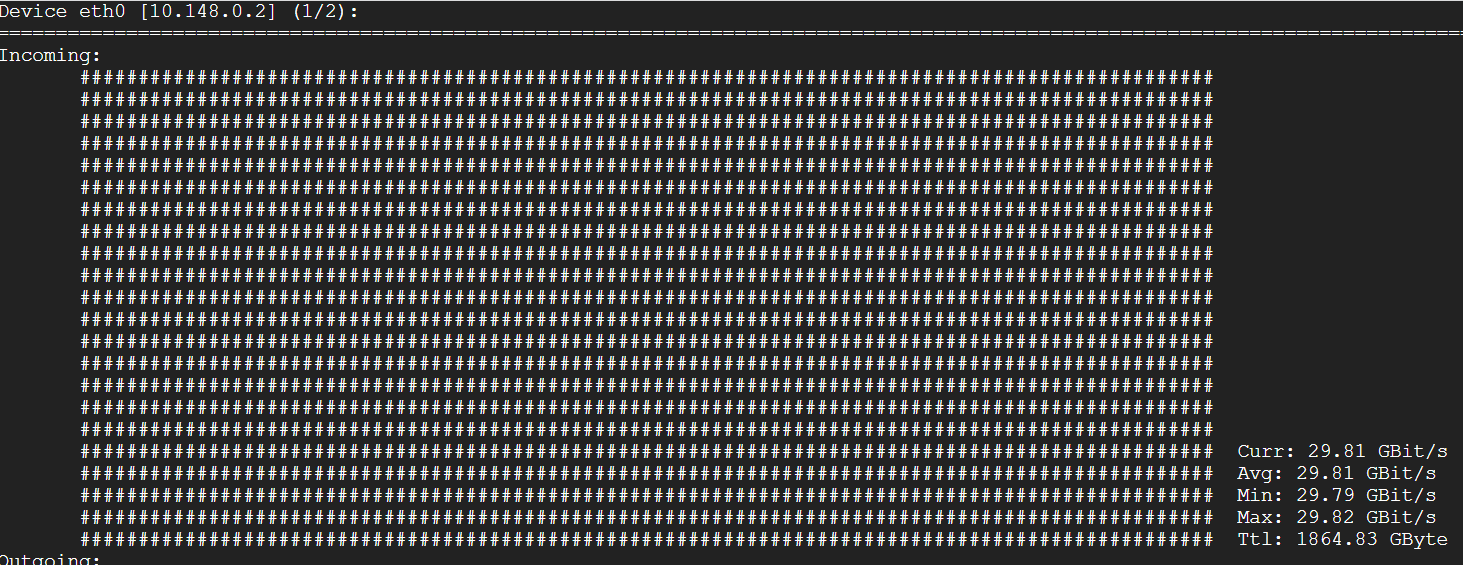
用nload也可以查看,但数值略小:
通过iperf也可以测试带宽,iperf安装:

apt-get install -y iperf

iperf服务端:

iperf -s

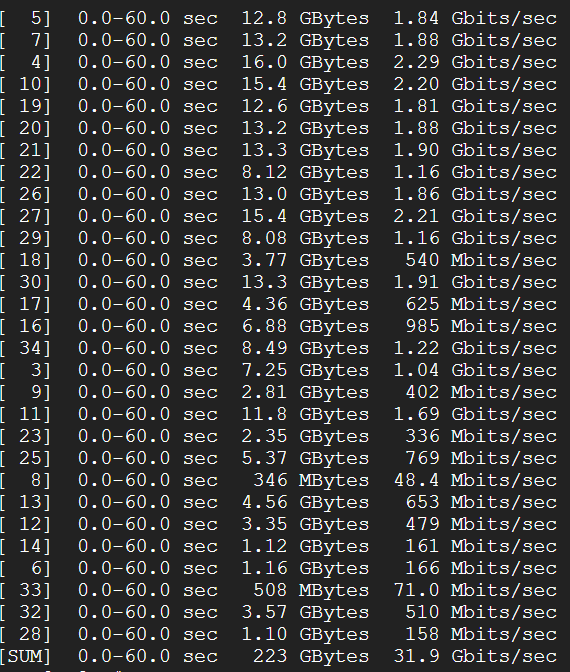
iperf客户端,32个进程跑60秒:

iperf -c 10.148.0.2 -P 32 -t 60

跑完后,可以看到带宽总结:
通过网络相关工具,可以方便的测试VM间的各种网络指标。