








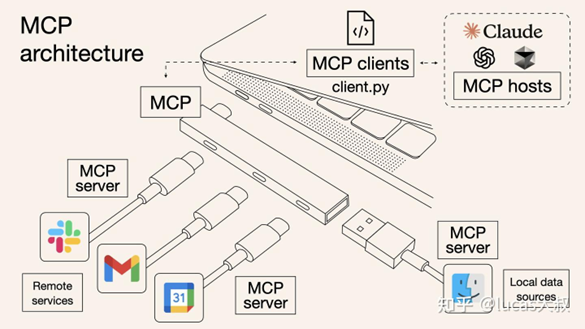
电脑硬件接口为类比的MCP架构示意图
参考自:MCP 核心架构解析(TYPESCRIPT实现)
MCP采用经典的客户端-服务器架构模型,包含三个主要角色:
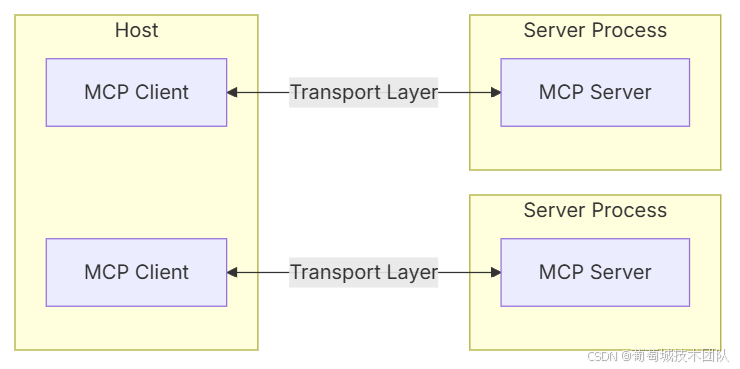
这种分层架构设计使得MCP能够灵活适应不同的应用场景,同时保持高效的通信性能。
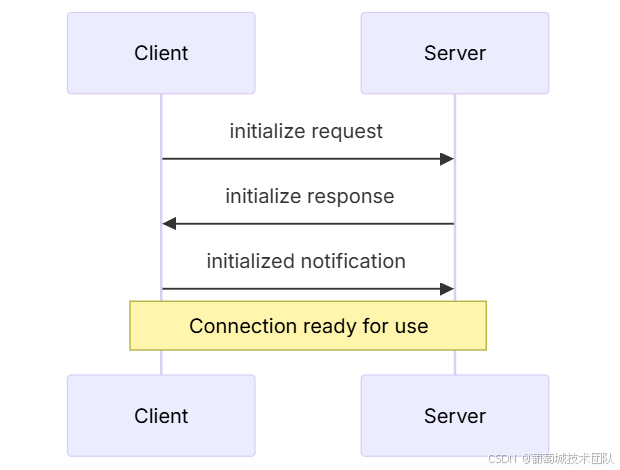
支持两种基本模式:
连接可通过以下方式终止:
实现一个 C++ MCP 服务器需要以下关键技术:
nlohmann/json: 功能强大,易用,头文件仅依赖。rapidjson: 高性能,内存占用低。std::cin 和 std::cout。cpp-httplib: 轻量级,头文件仅依赖的 HTTP 服务器/客户端库。Boost.Beast: 基于 Boost.Asio,功能全面,性能高。<thread>, <mutex>, <future> 或 std::async。CMake 是管理 C++ 项目依赖和构建过程的行业标准。MCP 消息基于 JSON-RPC 2.0 格式。在 C++ 中,可以使用 nlohmann::json 对象作为所有消息的通用容器,或定义结构体/类。
#include <nlohmann/json.hpp>
using json = nlohmann::json;

// --- 1. 请求 (Request) ---
struct Request {
    std::string method; // 方法名,如 "listResources"
    json params;        // 可选参数对象
    std::string id;     // 请求ID,用于匹配响应 (JSON-RPC 2.0 规范)
    // 构造函数、序列化/反序列化方法 (to_json, from_json) 可省略,直接用 json 对象操作
};

// --- 2. 结果/响应 (Result) ---
// Result 是对成功请求的响应,其结构由具体 method 决定。
// 例如,listResources 的响应可能如下:
struct ListResourcesResult {
    std::vector<Resource> resources; // Resource 包含 uri, name 等字段
};

// --- 3. 错误 (Error) ---
struct Error {
    int code;           // 错误码 (参考 ErrorCode 枚举)
    std::string message; // 错误描述
    json data;          // 可选的附加数据
};

// --- 4. 通知 (Notification) ---
// 与 Request 结构相同,但没有 'id' 字段。
struct Notification {
    std::string method;
    json params;
};

// --- 标准错误码 (参考原文) ---
enum class ErrorCode {
    ParseError = -32700,
    InvalidRequest = -32600,
    MethodNotFound = -32601,
    InvalidParams = -32602,
    InternalError = -32603,
    // 自定义错误码范围: -32000 到 -32768
};Stdio 传输简单高效,适合本地集成。
class StdioTransport {
public:
    // 从标准输入读取一行 JSON 消息
    bool readMessage(json& message) {
        std::string line;
        if (std::getline(std::cin, line)) {
            try {
                message = json::parse(line);
                return true;
            } catch (const json::parse_error& e) {
                // 发送 ParseError
                sendError(ErrorCode::ParseError, "Invalid JSON", e.what());
                return false;
            }
        }
        return false; // EOF or error
    }

    // 将 JSON 消息写入标准输出
    void sendMessage(const json& message) {
        std::cout << message.dump() << std::endl; // dump() 转为字符串,endl 发送
        std::cout.flush(); // 确保立即输出
    }

private:
    void sendError(ErrorCode code, const std::string& message, const std::string& data = "") {
        json errorJson = {
            {"jsonrpc", "2.0"},
            {"error", {
                {"code", static_cast<int>(code)},
                {"message", message},
                {"data", data}
            }}
            // 注意:如果是对请求的错误响应,需要包含 'id'
        };
        sendMessage(errorJson);
    }
};实现一个 MCP Server 类,管理连接、消息路由和请求处理。
class MCPServer {
private:
    std::unique_ptr<Transport> transport; // 可以是 StdioTransport 或 HTTPTransport
    std::map<std::string, std::function<json(const json&)>> requestHandlers;
    std::map<std::string, std::function<void(const json&)>> notificationHandlers;
    bool initialized = false;

public:
    MCPServer(std::unique_ptr<Transport> trans) : transport(std::move(trans)) {}

    // 注册请求处理函数
    template<typename Handler>
    void setRequestHandler(const std::string& method, Handler&& handler) {
        requestHandlers[method] = std::function<json(const json&)>(handler);
    }

    // 注册通知处理函数
    template<typename Handler>
    void setNotificationHandler(const std::string& method, Handler&& handler) {
        notificationHandlers[method] = std::function<void(const json&)>(handler);
    }

    // 启动服务器主循环
    void run() {
        json message;
        while (transport->readMessage(message)) {
            try {
                handleMessage(message);
            } catch (const std::exception& e) {
                // 记录日志,避免因单个消息导致服务器崩溃
                std::cerr << "Error handling message: " << e.what() << std::endl;
            }
        }
        // 读取结束 (EOF),正常退出
    }

private:
    void handleMessage(const json& message) {
        // 检查是否为通知 (无 'id' 字段)
        if (message.find("id") == message.end()) {
            handleNotification(message);
            return;
        }

        // 处理请求
        handleRequest(message);
    }

    void handleNotification(const json& notification) {
        std::string method = notification.value("method", "");
        auto it = notificationHandlers.find(method);
        if (it != notificationHandlers.end()) {
            it->second(notification.value("params", json{}));
        } else {
            // MethodNotFound 通常只对请求返回,通知可忽略或记录日志
            std::cerr << "Notification method not found: " << method << std::endl;
        }
    }

    void handleRequest(const json& request) {
        std::string method = request.value("method", "");
        json params = request.value("params", json{});
        std::string id = request.value("id", ""); // 必须存在

        auto it = requestHandlers.find(method);
        if (it != requestHandlers.end()) {
            try {
                json result = it->second(params);
                // 构造成功响应
                json response = {
                    {"jsonrpc", "2.0"},
                    {"id", id},
                    {"result", result}
                };
                transport->sendMessage(response);
            } catch (const std::exception& e) {
                // 构造错误响应
                json response = {
                    {"jsonrpc", "2.0"},
                    {"id", id},
                    {"error", {
                        {"code", static_cast<int>(ErrorCode::InternalError)},
                        {"message", "Request handler error"},
                        {"data", e.what()}
                    }}
                };
                transport->sendMessage(response);
            }
        } else {
            // 方法未找到
            json response = {
                {"jsonrpc", "2.0"},
                {"id", id},
                {"error", {
                    {"code", static_cast<int>(ErrorCode::MethodNotFound)},
                    {"message", "Method not found: " + method}
                }}
            };
            transport->sendMessage(response);
        }
    }
};遵循原文描述的初始化流程:
MCPServer 对象并绑定 StdioTransport。initialize 请求,包含其能力(capabilities)。initialize 请求,配置自身,然后发送包含自身能力的 initialize 响应。initialized 通知,表示初始化完成。request 和 notification 消息。transport->readMessage() 返回 false (EOF) 或收到特定关闭通知时,服务器优雅退出。int main() {
// 1. 创建传输层
auto transport = std::make_unique<StdioTransport>();
MCPServer server(std::move(transport));
// 2. 注册处理函数 (示例)
server.setRequestHandler("listResources", [](const json& params) -> json {
// 模拟返回资源列表
return json::array({
{{"uri", "file:///home/user/docs"}, {"name", "Documents"}},
{{"uri", "file:///home/user/code"}, {"name", "Code"}}
});
});
server.setNotificationHandler("exit", [](const json& params) {
// 收到 exit 通知,可以执行清理并退出
std::exit(0);
});
// ... 注册其他处理函数 (如 initialize)
// 3. 启动主循环
server.run();
return 0;
}params 的结构和类型,防止注入攻击。transport->sendMessage() 是线程安全的。使用 C++ 实现 MCP 协议,关键在于:
通过这种方式,您可以创建高性能、可集成的 C++ MCP 服务器,将本地工具、系统功能或专用库安全地暴露给 LLM 应用。
此内容由惯性聚合(RSS阅读器)自动聚合整理,仅供阅读参考。 原文来自 — 版权归原作者所有。