


惯性聚合 高效追踪和阅读你感兴趣的博客、新闻、科技资讯
阅读原文 在惯性聚合中打开

推荐订阅源

T
The Blog of Author Tim Ferriss
S
Securelist
D
Docker
The Register - Security
GbyAI
GbyAI
Recorded Future
Recorded Future
Engineering at Meta
Engineering at Meta
Stack Overflow Blog
Stack Overflow Blog
云风的 BLOG
云风的 BLOG
P
Proofpoint News Feed
罗磊的独立博客
博客园 - 【当耐特】
F
Full Disclosure
WordPress大学
WordPress大学
腾讯CDC
小众软件
小众软件
大猫的无限游戏
大猫的无限游戏
D
DataBreaches.Net
SecWiki News
SecWiki News
L
Lohrmann on Cybersecurity
I
InfoQ
MyScale Blog
MyScale Blog
量子位
Cyberwarzone
Cyberwarzone
博客园 - 三生石上(FineUI控件)
The Hacker News
The Hacker News
F
Fortinet All Blogs
freeCodeCamp Programming Tutorials: Python, JavaScript, Git & More
Jina AI
Jina AI
博客园_首页
H
Help Net Security
K
Kaspersky official blog
酷 壳 – CoolShell
酷 壳 – CoolShell
Threat Intelligence Blog | Flashpoint
www.infosecurity-magazine.com
Webroot Blog
Webroot Blog
Blog — PlanetScale
Blog — PlanetScale
V
Vulnerabilities – Threatpost
Y
Y Combinator Blog
The Cloudflare Blog
P
Proofpoint News Feed
V
Visual Studio Blog
C
Cyber Attacks, Cyber Crime and Cyber Security
T
Tailwind CSS Blog
爱范儿
爱范儿
P
Privacy International News Feed
Security Archives - TechRepublic
The GitHub Blog
The GitHub Blog
C
Cybersecurity and Infrastructure Security Agency CISA
B
Blog RSS Feed

博客园 - danzhang

Azure DevOps Server:2026年6月份补丁(无法移除用户) 在Github的企业Enterprise中开通Copilot 在Azure DevOps Server中实现用户端原地址透传(X-Forwarded-For) Azure DevOps Server:2026年4月份补丁(安装详细步骤) Azure DevOps:应用远程MCP服务器,提升工作效率 Azure DevOps Server:2026年3月份补丁 Azure DevOps Server:扩充数据库服务器的磁盘 Azure DevOps Server:使用团队日历 Azure DevOps Server:2026年二月补丁(Patch 8) Azure DevOps:迭代看板简洁视图 Azure DevOps:移除TFVC中过时的签入策略 Azure DevOps Server 正式版本发布 Azure DevOps Server:复制markdown文档中的代码块 Azure DevOps Server:允许讨论但不允许修改工作项 Azure DevOps Server 2022.2 补丁(Patch 7) 在Azure DevOps Server中分析Git代码库的健康状况 Azure DevOps Server 25H2 安装手册 Azure DevOps Server 25H2 最新版本发布 使用Azure DevOps MCP和Playwriht,将功能测试用例转换为自动化测试用例 使用Azure DevOps MCP服务器,在开发过程中应用GitHub Copilot人工智能 在VS Code中使用Playwright实现自动化测试(UI测试) Azure DevOps Server 2022.2 补丁(Patch 6)
在Azure DevOps的工作项中使用markdown
danzhang · 2025-07-25 · via 博客园 - danzhang

Contents

  • 1. 概述
  • 2. 操作方法
    • 2.1 手动更新工作项
    • 2.2 使用接口更新工作项
  • 3. 备注

1. 概述

Markdown 是一种轻量级的 标记语言(markup language),用于快速格式化纯文本,使其转换为结构化的 HTML 或其他富文本格式。它的设计初衷是让写作更简单、更易读,同时能轻松转换为网页内容。

在Azure DevOps中,工作项作为一种表单形式的内容管理工具,记录了大量开发过程数据。其中富文本使用图文并茂的方式存储了类似需求说明、重现过程等内容。
在之前的版本(默认设置)中,使用HTML作为富文本的语言载体,渲染富文本中的图片、表格、列表等复杂的展现形式。由于HTML是一种标记语言,在编写、识别和兼容性等方面,相对比较复杂;非技术开发人员短时间内很难掌握HTML语言。

与此对照,markdown语言具有明显的优势,它容易读写,它专注于内容、而非样式;它具有更好的兼容性,在第三方系统中能够非车容易被识别;它很容易形成版本管理、用于比对前后的差异。

由于存在这些明显的优势,在新版的Azure DevOps中,用户可以选择markdown作为富文本的记录方式;本文将为你介绍如何使用这个新的功能。

2. 操作方法

2.1 手动更新工作项

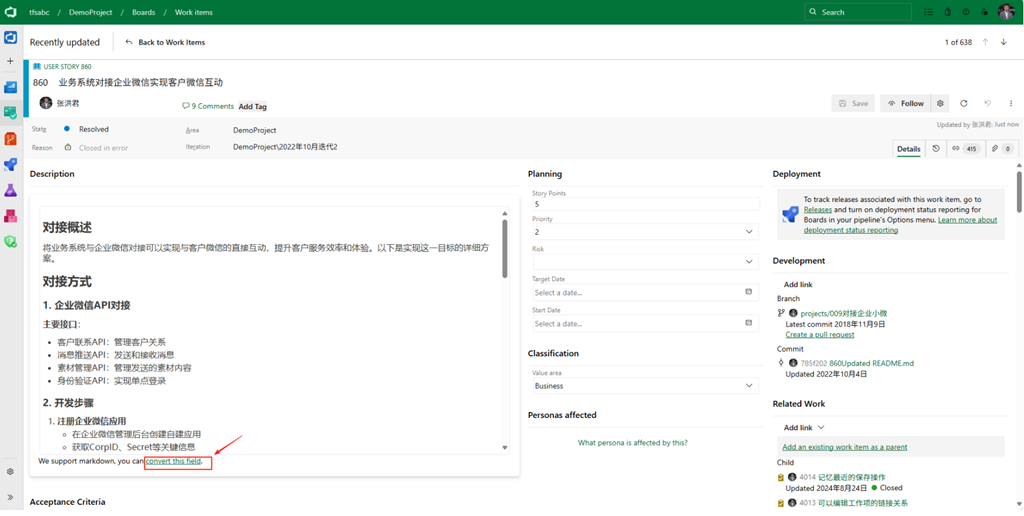
  • 默认情况下,在Azure DevOps中的所有富文本字段,都用HTML类型的语言存储;例如,下图中的需求工作项的描述字段,就是使用HTML存储,你可以使用HTML的编辑器编辑所见即所得的内容。
    在最新版本的Azure DevOps中,在富文本框的下方,你可以看到将HTML转换为Markdown语言的按钮,点击这个按钮,系统将为你把HTML转换为Markdown语言。
    image

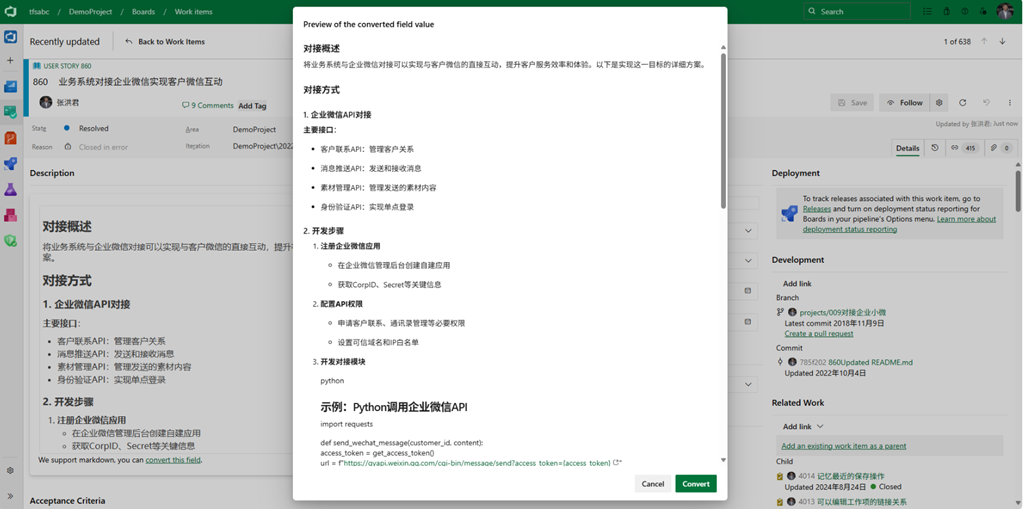
  • 在弹出的窗口中,我们可以看到系统自动将HTML转换为Markdown语言,你可以在页面中预览markdown语言渲染的显示效果;
    image

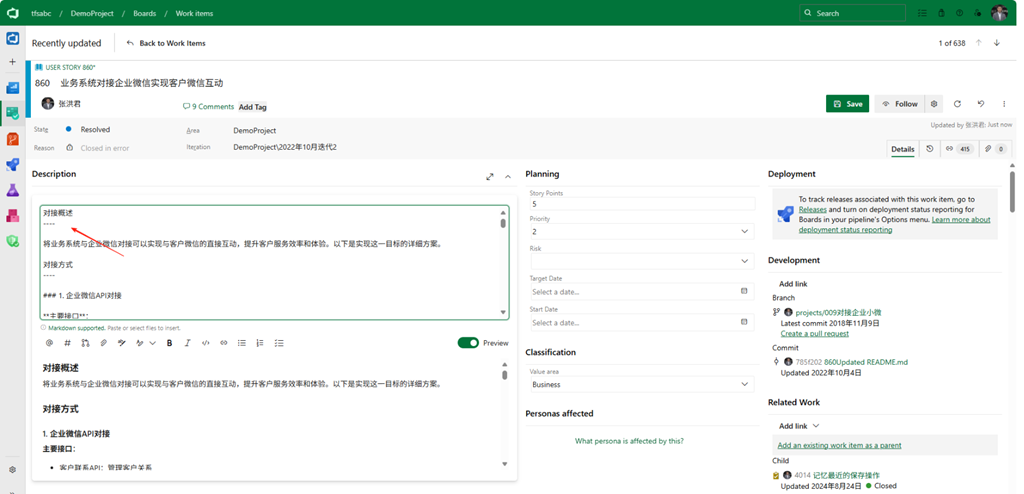
  • 点击上图中的转换按钮(Convert),富文本框中的描述就会被替换为markdown语言编写的内容;同时,富文本编辑器也会切换为mardown语言编辑器。
    保持工作项后,这个字段的markdown内容就会存储到服务器中。
    image

2.2 使用接口更新工作项

当我们使用REST Api接口来更新工作项的富文本字段时,默认语言也是HTML;
当你在调用接口的报文中添加特定的内容,就可以将HTML语言转换为Markdown,下面是一个简单的例子:

{ 
  "op": "add",
  "path": "/fields/System.Description",
  "value": "# some markdown text"
},
{ 
  "op": "add",
  "path": "/multilineFieldsFormat/System.Description",
  "value": "Markdown"
},

在上面的例子中,multilineFieldsFormat用于设定描述字段(System.Description)的存储格式为Markdown语言。

3. 备注

    1. 特别复杂格式的富文本
      对于特别复杂格式的富文本内容,建议保留HTML语言,因为Markdown语言并不能全部的网页展现形式;例如,如浮动元素、多列排版、自定义样式、按钮、表单、嵌入 iframe 或脚本等。
    1. 不能转回HTML
      当某个特定工作项中的富文本字段转换为Markdown语言后,你不能再次转回HTML;当然,并不影响其他工作项中的富文本字段类型,其他工作项仍然可以使用HTML语言存储富文本。
    1. 只能用于富文本字段
      Markdown语言只能用于存储富文本的字段(例如描述、重新步骤、验收标准等),不能用于当行文本类型的字符字段。

https://www.cnblogs.com/danzhang
Azure DevOps MVP 张洪君

image