


Enterprise storage migrations are rarely just about copying data. They are about protecting business continuity, maintaining performance, managing cost, and giving teams confidence when terabytes or petabytes of data sit at the heart of critical applications.
That confidence is difficult to build when migration planning is fragmented. Many organizations still rely on a patchwork of scripts, third-party tools, and disconnected processes to: assess environments, move data, and keep systems aligned during transition. The result can be delayed timelines, avoidable disruption, and teams struggling to keep critical workloads running.
A successful migration strategy starts with understanding that different data requires different approaches:
In this blog, we’ll walk through how to approach Azure Storage migration from planning to execution:
Azure Migrate: Centralized hub for migration discovery, assessment, and planning.
Azure Copilot Migration Agent: AI-powered extension for Azure Migrate, streamlining storage migration decisions (preview).
Azure Storage Mover: Free, managed online migration and synchronization tool for file/object data.
Azure Data Box: Secure offline transfer solution for large-scale or bandwidth-constrained datasets.
Before organizations select a migration tool, they need to understand what they are moving, how systems are connected, which workloads carry the most risk, and what the destination architecture needs to support.
Azure Migrate provides a centralized hub for migration discovery, assessment, business case development, dependency analysis, and planning. It helps teams discover infrastructure and workloads, assess Azure readiness, evaluate cost considerations, understand dependencies, and organize migration activity across on-premises and multicloud environments. For customers moving servers, applications, databases, or dependent workloads to Azure, this creates the planning foundation needed to make informed migration decisions before execution begins.
To help close the gap between planning and action, Azure Copilot Migration Agent is extending Azure Migrate with new Azure Storage integration, now available in preview. Instead of leaving teams to interpret assessment outputs and manually map them to a storage migration approach, this guided, AI-powered experience uses Azure Migrate project data to help evaluate storage options, align workloads to the right Azure storage services, and identify the most appropriate execution tool, whether that is Azure Storage Move, Azure Data Box, or another Azure storage migration approach. The result is a faster, more connected path from discovery to decision, helping teams reduce uncertainty and move into execution with greater confidence.
From there, teams need to make storage-specific decisions. Azure Storage migration guidance follows a phased approach:
This sequence matters because the right tool should follow the data requirements and destination architecture, not the other way around.
The goal is not to force every migration through a single path. It is to use the right Microsoft solution at the right stage of the journey.
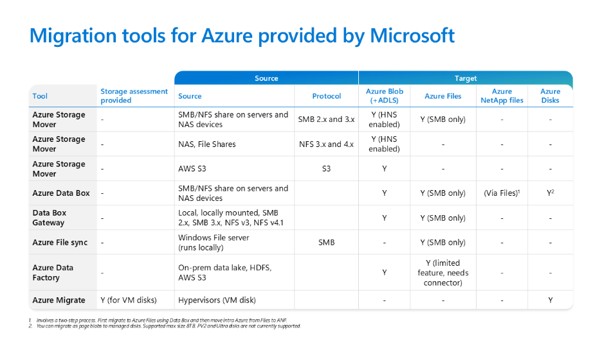
Optimally, tool selection comes after assessment, target selection, and migration strategy. At this stage, organizations should understand what they are moving, where it needs to land, and how it needs to move. The decision should be guided by data volume, network capacity, downtime tolerance, synchronization needs, application dependencies, and whether the migration is online, offline, or phased.
Azure Storage Mover supports managed online data movement and synchronization for file and object data for free. It is well suited for large-scale, repeatable migrations where data needs to move over the network with orchestration, monitoring, and control, including on-premises data estates and cloud-to-cloud transfers such as AWS S3 to Azure Blob Storage.
Azure Storage Mover is best suited for:
As organizations evaluate cost, performance, and flexibility across cloud environments, the ability to move data between providers becomes more than a technical capability. It becomes a strategic advantage. Azure Storage Mover helps teams replatform data estates from AWS S3 to Azure Blob Storage without unnecessarily disrupting access or rebuilding the migration process from the ground up.
While Storage Mover helps with seamless, large- scale data migrations from AWS S3, customers often also need to migrate and modernize applications accessing that data. To address this, we now offer a new Copilot skill (in preview) that supports application migration, delivering a more complete end-to-end migration experience.
If you’re interested in trying the S3 app migration skill alongside your data migration, write to us at AzStorageMigration@microsoft.com.
All current Azure Storage Mover capabilities are available at no cost. Standard storage, transaction, and networking charges apply.
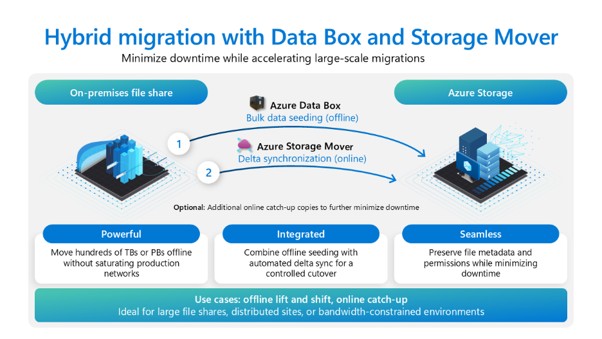
Azure Data Box supports offline transfer for large-scale or bandwidth-constrained datasets. It is especially useful when network capacity or operational constraints make online transfer impractical, or when organizations need to accelerate initial bulk movement before later synchronization or cutover.
Azure Data Box 120 and Azure Data Box 525 are now available with no service fees and no Microsoft-managed shipping fees.
Azure Data Box is best suited for:
Data Box enables high throughput transfer directly to Azure datacenters, reducing dependency on network performance and helping teams meet migration timelines when bandwidth is limited. It can also be used as part of a phased strategy, with Data Box handling the initial bulk transfer and online tools supporting later synchronization or cutover.
Most migration efforts involve more than one constraint. Teams may need to manage scale, connectivity, regulatory requirements, downtime windows, cost targets, and modernization goals at the same time. The value of Azure’s approach is realized when these solutions are used together.
For datacenter exits and hybrid cloud expansion, organizations often need to move large, heterogeneous environments under strict timelines with minimal tolerance for disruption. Azure Migrate can help identify dependencies and sequence workloads. Azure Data Box can accelerate bulk transfers independent of network constraints. Azure Storage Mover can support synchronization and final cutover. This allows teams to execute phased migrations, validate workloads before cutover, and decommission infrastructure on schedule.
The success of datacenter exits is reflected in customer migrations already executed at scale. For example, Copeland used Azure Data Box to migrate more than 300 terabytes of data to Azure during a time-sensitive datacenter transition while maintaining business continuity.
For AI and machine learning readiness, organizations need large volumes of high-quality data to be centralized, accessible, and continuously updated. Azure Data Box can support rapid ingestion of massive training datasets, research archives, or historical data. Azure Storage Mover can support ongoing synchronization and pipeline updates, helping data remain current for model training, experimentation, analytics, and AI development.
For backup, media archives, and long-term retention, organizations often need to move large volumes of infrequently accessed data while maintaining durability, accessibility, and cost efficiency. Azure Data Box can support efficient transfer of large archival datasets, while Azure Storage tiers help optimize cost over time. Azure Storage Mover can support post-migration workflows where ongoing access or updates are required.
This approach is reflected in how The WNET Group modernized its media archive. Using Azure Data Box, WNET migrated approximately 3.6 petabytes of content, representing more than 800,000 hours of media, to Azure. The move enabled a datacenter exit while maintaining continuous broadcast operations, reduced asset retrieval times from up to 24 hours to under four hours and positioned the organization to apply machine learning for metadata enrichment and content discovery.
For healthcare, regulated, and mission-critical systems, migration must balance security, compliance, governance, and operational continuity. Azure Migrate can help assess dependencies and support controlled sequencing. Azure Data Box can enable offline transfer for large sensitive datasets. Azure Storage Mover can support incremental updates where ongoing synchronization is required.
Astellas Pharma used Azure Data Box to transfer a 500-terabyte local file share to Azure and meet a six-month migration timeline that enabled the closure of six global datacenters. For regulated industries, this shows how offline transfer can help organizations move quickly while maintaining continuity and control over critical data.
Migration is not the objective, it is the enabling step.
Once data is established in Azure, organizations can extend into analytics, artificial intelligence, and cloud-native architecture.
By aligning Azure Migrate, Azure Storage Mover, and Azure Data Box, organizations gain a migration strategy that reflects real-world conditions while positioning data for long-term value.
Explore Azure Storage and data migration solutions and begin building a migration strategy aligned to your environment, your timelines, and your modernization goals.
此内容由惯性聚合(RSS阅读器)自动聚合整理,仅供阅读参考。 原文来自 — 版权归原作者所有。