
惯性聚合 高效追踪和阅读你感兴趣的博客、新闻、科技资讯
阅读原文 在惯性聚合中打开

推荐订阅源

奇客Solidot–传递最新科技情报
奇客Solidot–传递最新科技情报
Stack Overflow Blog
Stack Overflow Blog
cs.AI updates on arXiv.org
钛媒体:引领未来商业与生活新知
钛媒体:引领未来商业与生活新知
T
The Exploit Database - CXSecurity.com
美团技术团队
P
Proofpoint News Feed
S
Schneier on Security
P
Privacy International News Feed
Last Week in AI
Last Week in AI
Scott Helme
Scott Helme
V
Vulnerabilities – Threatpost
freeCodeCamp Programming Tutorials: Python, JavaScript, Git & More
T
Tor Project blog
S
SegmentFault 最新的问题
Security Latest
Security Latest
月光博客
月光博客
A
About on SuperTechFans
Martin Fowler
Martin Fowler
A
Arctic Wolf
C
Cyber Attacks, Cyber Crime and Cyber Security
腾讯CDC
Schneier on Security
H
Hacker News: Front Page
TaoSecurity Blog
TaoSecurity Blog
NISL@THU
NISL@THU
B
Blog RSS Feed
C
Cybersecurity and Infrastructure Security Agency CISA
Cyberwarzone
Cyberwarzone
V2EX - 技术
V2EX - 技术
Hacker News - Newest:
Hacker News - Newest: "LLM"
OSCHINA 社区最新新闻
OSCHINA 社区最新新闻
W
WeLiveSecurity
Cisco Talos Blog
Cisco Talos Blog
MyScale Blog
MyScale Blog
M
MIT News - Artificial intelligence
K
KPMG report finds enterprise disconnect between AI and its ROI | CIO
P
Proofpoint News Feed
F
Fortinet All Blogs
aimingoo的专栏
aimingoo的专栏
N
News and Events Feed by Topic
The Last Watchdog
The Last Watchdog
Engineering at Meta
Engineering at Meta
博客园 - 叶小钗
T
Tenable Blog
H
Hackread – Cybersecurity News, Data Breaches, AI and More
L
LINUX DO - 热门话题
Help Net Security
Help Net Security
让小产品的独立变现更简单 - ezindie.com
G
Google Developers Blog

Microsoft Azure Blog

Azure Databricks delivers proven business value | Microsoft Azure Blog Frontier models and production agents: Advancing Microsoft Foundry for the agentic era | Microsoft Azure Blog Built to bounce back: How Azure resiliency evolved | Microsoft Azure Blog External key management for Azure Managed HSM Meet Brain: The AI system behind Azure reliability | Microsoft Azure Blog Proving application resilience on Azure with Chaos Studio | Microsoft Azure Blog How to design, build, and optimize cloud infrastructure for long-term efficiency Claude in Microsoft Foundry is now generally available | Microsoft Azure Blog The 2026 Agent Confidence Index: Where 300 builders see real momentum | The Microsoft Cloud Blog Accelerate modern Linux workloads with Azure Files | Microsoft Azure Blog Optimizing PostgreSQL on Azure directly in Visual Studio Code From insight to action: The next phase of agentic cloud operations | Microsoft Azure Blog Modernize your data with Azure Storage: Plan and migrate with confidence | Microsoft Azure Blog 3 things leaders need to know from Microsoft Build 2026 | Microsoft Azure Blog Claude Fable 5 available today in Microsoft Foundry: Powering the next era of autonomous agents AI alone won’t change your business. The system running it will. Announcing Microsoft Discovery general availability and Microsoft Discovery app preview A Developer’s Guide to Managing Models, Cost and Quality in Microsoft Foundry Foundry IQ: Build smarter agents faster with unified knowledge and serverless retrieval Microsoft Build 2026: Building agentic apps with Microsoft Fabric and Microsoft Databases New Azure Cobalt 200 VMs deliver 50% performance improvement, fully optimized for modern agentic AI workloads Claude Opus 4.8 is now available in Microsoft Foundry Powering multi-cluster workloads with seamless cross‑cluster networking for Azure Kubernetes Fleet Manager Azure NetApp Files for EDA workloads: From revolution to breakthrough at scale Azure IaaS: Deploy high-performance workloads with a system-level approach Azure Files Entra-Only identities: Advancing cloud-native identity and security From commit to cloud: Powering what’s next for PostgreSQL Advancing enterprise AI: New SAP on Azure announcements from SAP Sapphire 2026 Red Hat Summit 2026: Platform modernization and AI on Microsoft Azure Red Hat OpenShift Build AI apps with Azure Cosmos DB: Key trends from Cosmos Conf 2026 Scaling cloud and AI: Microsoft Azure’s commitment to Europe’s digital future Azure IaaS: Defense in depth built on secure-by-design principles Enforcing trust and transparency: Open-sourcing the Azure Integrated HSM Microsoft named a Leader in the IDC MarketScape: Worldwide API Management 2026 Vendor Assessment OpenAI’s GPT-5.5 in Microsoft Foundry: Frontier intelligence on an enterprise ready platform Microsoft Discovery: Advancing agentic R&D at scale Introducing Azure Accelerate for Databases: Modernize your data for AI with experts and investments Cloud Cost Optimization: Principles that still matter Optimize object storage costs automatically with smart tier—now generally available Microsoft named a Leader in The Forrester Wave™ for Sovereign Cloud Platforms Cloud Cost Optimization: How to maximize ROI from AI, manage costs, and unlock real business value Azure IaaS: Keep critical applications running with built-in resiliency at scale Building sovereign AI at the edge: Microsoft and Armada collaborate to deliver Azure Local on Galleon modular datacenters Navigating digital sovereignty at the frontier of transformation Microsoft named a Leader in 2026 Gartner® Magic Quadrant™ for Integration Platform as a Service AI for nuclear energy: Powering an intelligent, resilient future | The Microsoft Cloud Blog What’s new with Microsoft in open-source and Kubernetes at KubeCon + CloudNativeCon Europe 2026 Advancing agentic AI with Microsoft databases across a unified data estate FabCon and SQLCon 2026: Unifying databases and Fabric on a single data platform Microsoft at NVIDIA GTC: New solutions for Microsoft Foundry, Azure AI infrastructure and Physical AI From legacy to leadership: How PostgreSQL on Azure powers enterprise agility and innovation
How Drasi used GitHub Copilot to find documentation bugs
2026-04-09 · via Microsoft Azure Blog

For early-stage open-source projects, the “Getting started” guide is often the first real interaction a developer has with the project. If a command fails, an output doesn’t match, or a step is unclear, most users won’t file a bug report, they will just move on.

Drasi, a CNCF sandbox project that detects changes in your data and triggers immediate reactions, is supported by our small team of four engineers in Microsoft Azure’s Office of the Chief Technology Officer. We have comprehensive tutorials, but we are shipping code faster than we can manually test them.

The team didn’t realize how big this gap was until late 2025, when GitHub updated its Dev Container infrastructure, bumping the minimum Docker version. The update broke the Docker daemon connection, and every single tutorial stopped working. Because we relied on manual testing, we didn’t immediately know the extent of the damage. Any developer trying Drasi during that window would have hit a wall.

This incident forced a realization: with advanced AI coding assistants, documentation testing can be converted to a monitoring problem.

The problem: Why does documentation break?

Documentation usually breaks for two reasons:

1. The curse of knowledge

Experienced developers write documentation with implicit context. When we write “wait for the query to bootstrap,” we know to run `drasi list query` and watch for the `Running` status, or even better to run the `drasi wait` command. A new user has no such context. Neither does an AI agent. They read the instructions literally and don’t know what to do. They get stuck on the “how,” while we only document the “what.”

2. Silent drift

Documentation doesn’t fail loudly like code does. When you rename a configuration file in your codebase, the build fails immediately. But when your documentation still references the old filename, nothing happens. The drift accumulates silently until a user reports confusion.

This is compounded for tutorials like ours, which spin up sandbox environments with Docker, k3d, and sample databases. When any upstream dependency changes—a deprecated flag, a bumped version, or a new default—our tutorials can break silently.

The solution: Agents as synthetic users

To solve this, we treated tutorial testing as a simulation problem. We built an AI agent that acts as a “synthetic new user.”

This agent has three critical characteristics:

  1. It is naïve: It has no prior knowledge of Drasi—it knows only what is explicitly written in the tutorial.
  2. It is literal: It executes every command exactly as written. If a step is missing, it fails.
  3. It is unforgiving: It verifies every expected output. If the doc says, “You should see ‘Success’”, and the command line interface (CLI) just returns silently, the agent flags it and fails fast.

The stack: GitHub Copilot CLI and Dev Containers

We built a solution using GitHub Actions, Dev Containers, Playwright, and the GitHub Copilot CLI.

Our tutorials require heavy infrastructure:

  • A full Kubernetes cluster (k3d)
  • Docker-in-Docker
  • Real databases (such as PostgreSQL and MySQL)

We needed an environment that exactly matches what our human users experience. If users run in a specific Dev Container on GitHub Codespaces, our test must run in that same Dev Container.

The architecture

Inside the container, we invoke the Copilot CLI with a specialized system prompt (view the full prompt here):
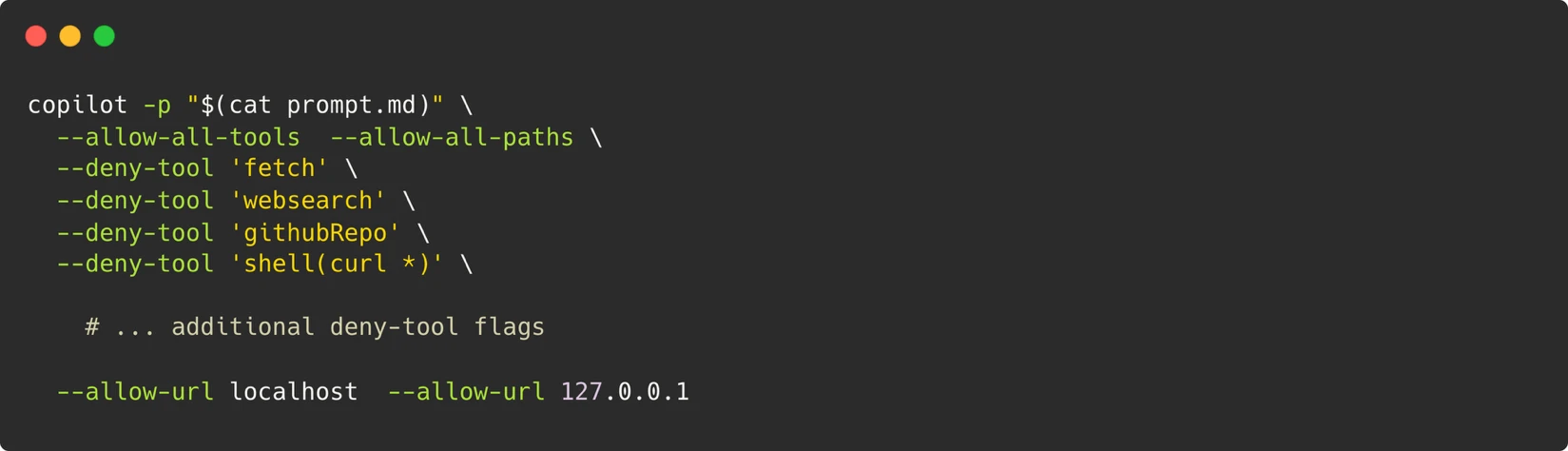
A screen shot of a computer terminal:

bash 
 

copilot -p "$(cat prompt.md)" \ 
  --allow-all-tools \ 
  --allow-all-paths \ 
  --deny-tool 'fetch' \ 
  --deny-tool 'websearch' \ 
  --deny-tool 'githubRepo' \ 
  --deny-tool 'shell(curl *)' \ 
 

    # ... additional deny-tool flags 
 
  --allow-url localhost \ 
  --allow-url 127.0.0.1

This prompt using the prompt mode (-p) of the CLI agent gives us an agent that can execute terminal commands, write files, and run browser scripts—just like a human developer sitting at their terminal. For the agent to simulate a real user, it needs these capabilities.

To enable the agents to open webpages and interact with them as any human following the tutorial steps would, we also install Playwright on the Dev Container. The agent also takes screenshots which it then compares against those provided in the documentation.

Security model

Our security model is built around one principle: the container is the boundary.

Rather than trying to restrict individual commands (a losing game when the agent needs to run arbitrary node scripts for Playwright), we treat the entire Dev Container as an isolated sandbox and control what crosses its boundaries: no outbound network access beyond localhost, a Personal Access Token (PAT) with only “Copilot Requests” permission, ephemeral containers destroyed after each run, and a maintainer-approval gate for triggering workflows.

Dealing with non-determinism

One of the biggest challenges with AI-based testing is non-determinism. Large language models (LLMs) are probabilistic—sometimes the agent retries a command; other times it gives up.

We handled this with a three-stage retry with model escalation (start with Gemini-Pro, on failure try with Claude Opus), semantic comparison for screenshots instead of pixel-matching, and verification of core-data fields rather than volatile values.

We also have a list of tight constraints in our prompts that prevent the agent from going on a debugging journey, directives to control the structure of the final report, and also skip directives that tell the agent to bypass optional tutorial sections like setting up external services.

Artifacts for debugging

When a run fails, we need to know why. Since the agent is running in a transient container, we can’t just Secure Shell (SSH) in and look around.

So, our agent preserves evidence of every run, screenshots of web UIs, terminal output of critical commands, and a final markdown report detailing its reasoning like shown here:
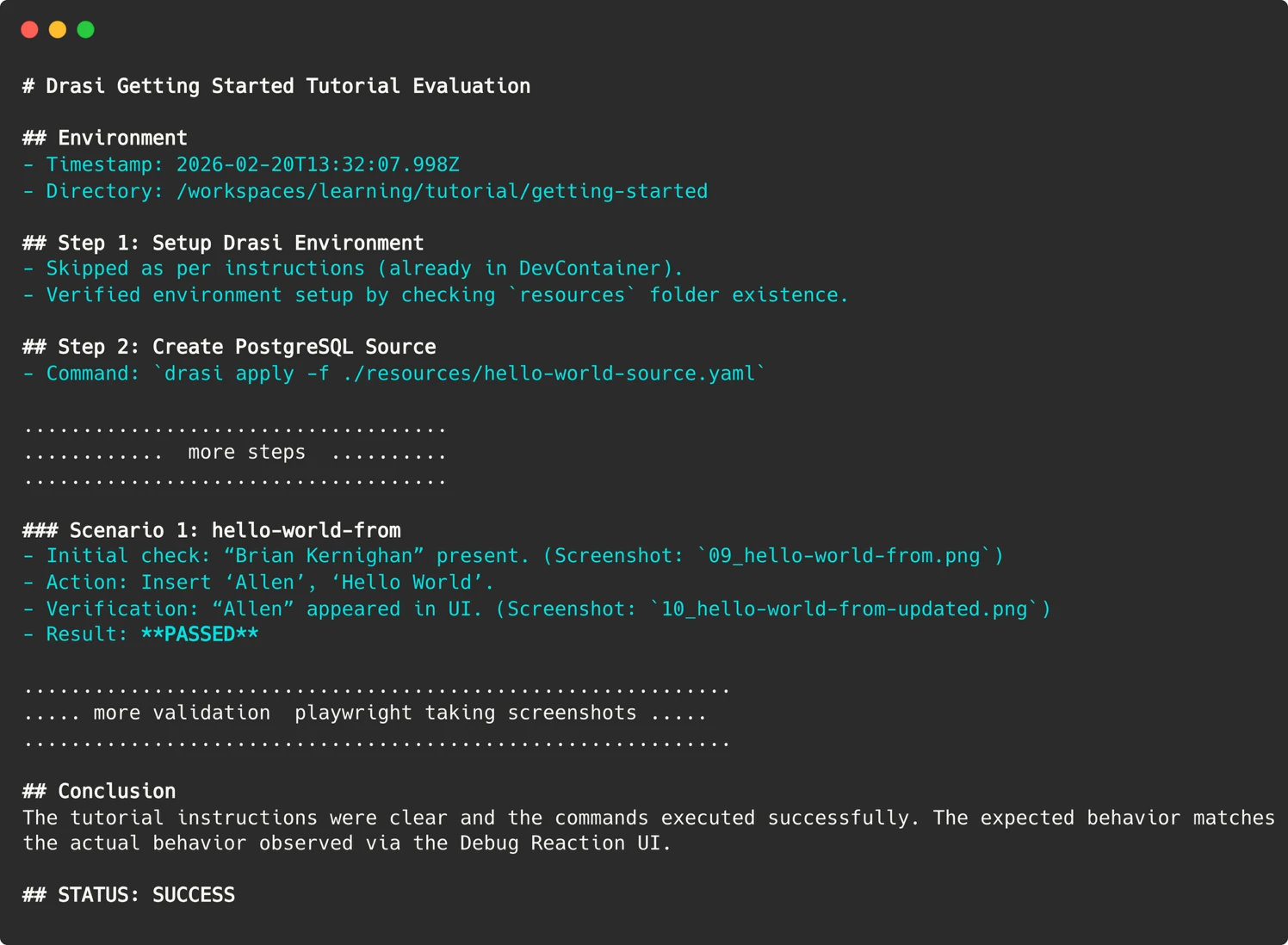
# Drasi Getting Started Tutorial Evaluation 

## Environment 
- Timestamp: 2026-02-20T13:32:07.998Z 
- Directory: /workspaces/learning/tutorial/getting-started 

## Step 1: Setup Drasi Environment 
- Skipped as per instructions (already in DevContainer). 
- Verified environment setup by checking `resources` folder existence. 

## Step 2: Create PostgreSQL Source 
- Command: `drasi apply -f ./resources/hello-world-source.yaml`

.................................... 
............  more steps  .......... 
.................................... 

### Scenario 1: hello-world-from 
- Initial check: “Brian Kernighan” present. (Screenshot: `09_hello-world-from.png`) 
- Action: Insert ‘Allen’, ‘Hello World’. 
- Verification: “Allen” appeared in UI. (Screenshot: `10_hello-world-from-updated.png`) 
- Result: **PASSED** 

............................................................ 
..... more validation by playwright taking screenshots ..... 
............................................................ 

## Conclusion 
The tutorial instructions were clear and the commands executed successfully. The expected behavior matches the actual behavior observed via the Debug Reaction UI. 

## STATUS: SUCCESS

These artifacts are uploaded to the GitHub Action run summary, allowing us to “time travel” back to the exact moment of failure and see what the agent saw.
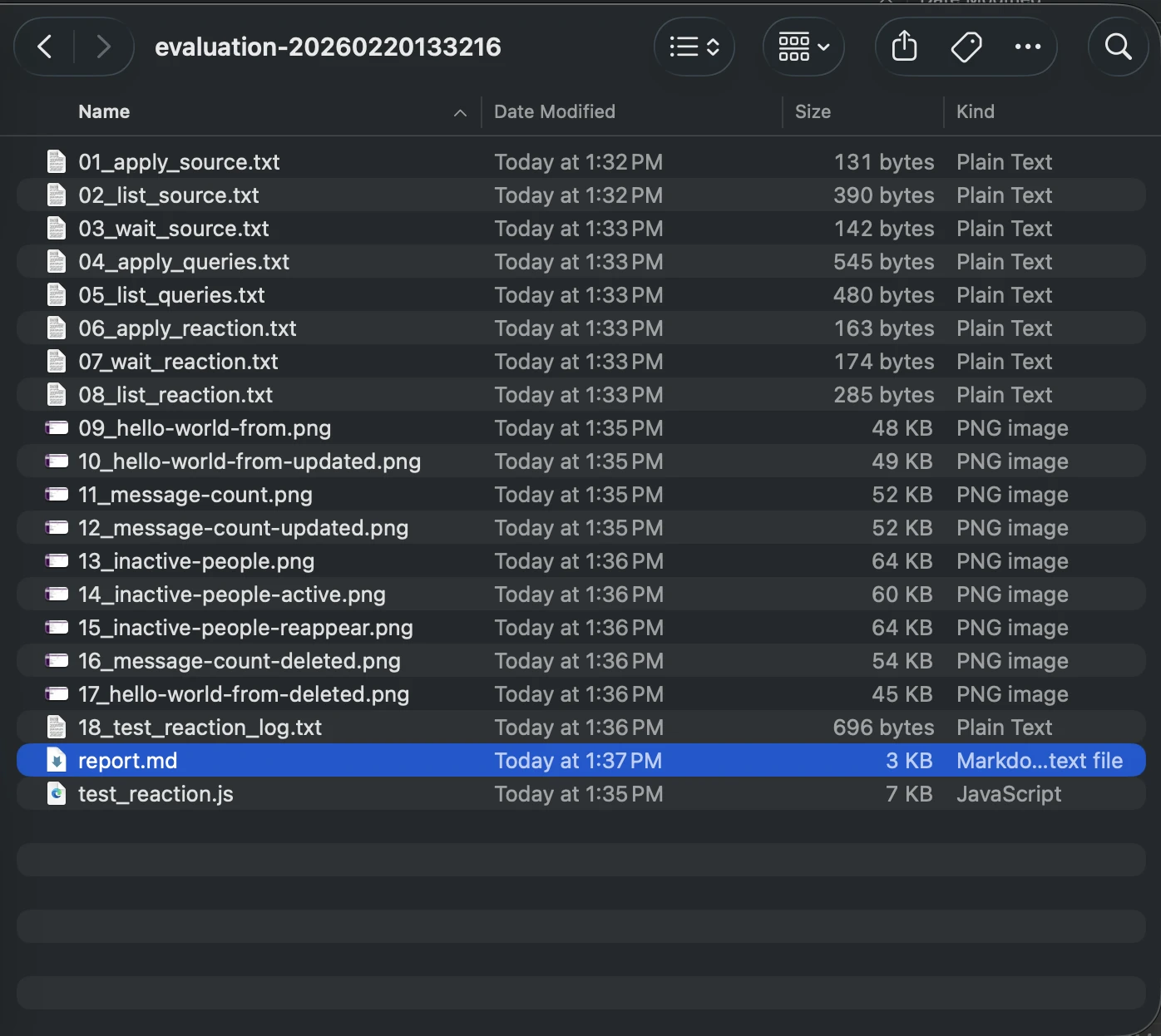
Screenshot of Agents report output in a folder with other files.

Parsing the agent’s report

With LLMs, getting a definitive “Pass/Fail” signal that a machine can understand can be challenging. An agent might write a long, nuanced conclusion like:

To make this actionable in a CI/CD pipeline, we had to do some prompt engineering. We explicitly instructed the agent:

In our GitHub Action, we then simply grep for this specific string to set the exit code of the workflow.
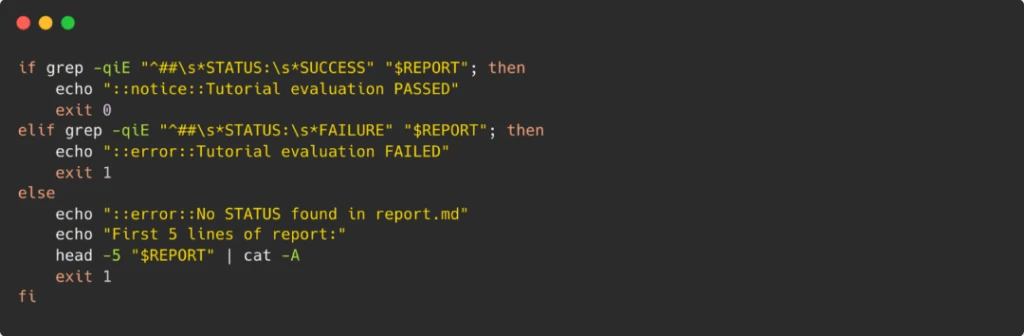
Simple techniques like this bridge the gap between AI’s fuzzy, probabilistic outputs and CI’s binary pass/fail expectations.

Automation

We now have an automated version of the workflow which runs weekly. This version evaluates all our tutorials every week in parallel—each tutorial gets its own sandbox container and a fresh perspective from the agent acting as a synthetic user. If any of the tutorial evaluation fails, the workflow is configured to file an issue on our GitHub repo.

This workflow can optionally also be run on pull-requests, but to prevent attacks we have added a maintainer-approval requirement and a `pull_request_target` trigger, which means that even on pull-requests by external contributors, the workflow that executes will be the one in our main branch.

Running the Copilot CLI requires a PAT token which is stored in the environment secrets for our repo. To make sure this does not leak, each run requires maintainer approval—except the automated weekly run which only runs on the `main` branch of our repo.

What we found: Bugs that matter

Since implementing this system, we have run over 200 “synthetic user” sessions. The agent identified 18 distinct issues including some serious environment issues and other documentation issues like these. Fixing them improved the docs for everyone, not just the bot.

  • Implicit dependencies: In one tutorial, we instructed users to create a tunnel to a service. The agent ran the command, and then—following the next instruction—killed the process to run the next command.
    The fix: We realized we hadn’t told the user to keep that terminal open. We added a warning: “This command blocks. Open a new terminal for subsequent steps.”
  • Missing verification steps: We wrote: “Verify the query is running.” The agent got stuck: “How, exactly?”
    The fix: We replaced the vague instruction with an explicit command: `drasi wait -f query.yaml`.
  • Format drift: Our CLI output had evolved. New columns were added; older fields were deprecated. The documentation screenshots still showed the 2024 version of the interface. A human tester might gloss over this (“it looks mostly right”). The agent flagged every mismatch, forcing us to keep our examples up to date.

AI as a force multiplier

We often hear about AI replacing humans, but in this case, the AI is providing us with a workforce we never had.

To replicate what our system does—running six tutorials across fresh environments every week—we would need a dedicated QA resource or a significant budget for manual testing. For a four-person team, that is impossible. By deploying these Synthetic Users, we have effectively hired a tireless QA engineer who works nights, weekends, and holidays.

Our tutorials are now validated weekly by synthetic users. try the Getting Started guide yourself and see the results firsthand. And if you’re facing the same documentation drift in your own project, consider GitHub Copilot CLI not just as a coding assistant, but as an agent—give it a prompt, a container, and a goal—and let it do the work a human doesn’t have time for.