惯性聚合 高效追踪和阅读你感兴趣的博客、新闻、科技资讯
阅读原文 在惯性聚合中打开

推荐订阅源

钛媒体:引领未来商业与生活新知
钛媒体:引领未来商业与生活新知
美团技术团队
Last Week in AI
Last Week in AI
WordPress大学
WordPress大学
博客园 - 三生石上(FineUI控件)
博客园 - 聂微东
雷峰网
雷峰网
阮一峰的网络日志
阮一峰的网络日志
博客园 - 叶小钗
IT之家
IT之家
Google DeepMind News
D
Docker
J
Java Code Geeks
让小产品的独立变现更简单 - ezindie.com
Apple Machine Learning Research
博客园 - 【当耐特】
V
V2EX
Hugging Face - Blog
Hugging Face - Blog
博客园 - Franky
月光博客
月光博客
宝玉的分享
宝玉的分享
酷 壳 – CoolShell
酷 壳 – CoolShell
aimingoo的专栏
aimingoo的专栏
freeCodeCamp Programming Tutorials: Python, JavaScript, Git & More

The GitHub Blog

How to bring your software delivery workflow into GitHub with agent apps Your guide to GitHub Universe 2026 is here: The schedule just launched! What 50 open source projects taught us about security in the AI era GitHub availability report: July 2026 Write your first prompt with the GitHub Copilot app Your contributors are AI-first now. Is your project? From coder to orchestrator: How agents shift the role of a developer Using the GitHub Copilot SDK for Java A guide to slash commands in the GitHub Copilot app How we took malware advisories beyond npm How the GitHub legal team used Copilot CLI to streamline their workflows Turn one giant AI-generated pull request to a reviewable stack Don't stop early: Case-folding source code at memory speed Stacked sessions and pull requests in the GitHub Copilot app Tame Dependabot: Group your updates, slow the cadence, keep security fast Disrupting supply chain attacks on npm and GitHub Actions The harness is all you need (mostly) The harness is all you need (mostly) GitHub Copilot app for Beginners: Getting started The case for a cooldown: Why Dependabot now waits before issuing version updates Copilot vs. raw API access: What are you actually paying for? Next chapter: Restructuring GitHub's bug bounty program How to build interactive experiences with canvases $100 million for open source: A milestone built by the community The cost of saying yes has changed GitHub for Beginners: Your roadmap to mastering the GitHub essentials Better tools made Copilot code review worse. Here's how we actually improved it. How GitHub gave every repository a durable owner Automating cross-repo documentation with GitHub Agentic Workflows GitHub availability report: June 2026
Building an emoji list generator with the GitHub Copilot CLI
Cassidy Williams · 2026-04-18 · via The GitHub Blog

Every week, the GitHub team runs a stream called Rubber Duck Thursdays, where we build projects live, cowork with our community, and answer questions!

This week, we built a very fun project together using the GitHub Copilot CLI! Let me tell you about it.

💡 New to GitHub Copilot CLI? Here’s how to get started.

What is it?

In a lot of social media tweets and launches, you often see accounts post things like:

We shipped the most amazing emoji list generator ever. It:

💻 Works in the CLI
🤖 Uses the Copilot SDK to intelligently convert your bullet points to relevent emoji
📋 Copies the result to the clipboard

It’s beautiful. But coming up with the perfect emoji is far too slow for me in this “move fast and break things” world. I have projects to build! Repos to vibe! Pull requests to merge! I can’t be thinking about emojis!

And thus, on the stream, we build an emoji list generator (very descriptively called Emoji List Generator) that:

🖥️ Runs in the terminal
📋 You paste or write a list
⌨️ You hit Ctrl + S
📎 You get the list on your clipboard

(Can you tell I’m dogfooding the product here?)

How we built it

We used a few cool technologies for this project:

🖥️ @opentui/corefor the terminal UI
🤖 @github/copilot-sdkfor the AI brain
📋 clipboardyfor clipboard access

To start the project off, we opened up the GitHub Copilot CLI.

In plan mode using Claude Sonnet 4.6, we wrote:

I want to create an AI-powered markdown emoji list generator. Where, in this CLI app, if I paste in or write in some bullet points, it will replace those bullet points with relevant emojis to the given point in that list, and copies it to my clipboard. I'd like it to use GitHub Copilot SDK for the AI juiciness.

Copilot asked me a bunch of clarifying questions, for example around the tech stack and what libraries we should use (shoutout to Gabor in the chat for suggesting OpenTUI), and from there, we had a fully thought-out plan.mdfile for me to review and use!

We implemented the plan using Claude Opus 4.7 (which was recently released!) and a few minutes later, voilà, we had a fun little terminal UI to work with!

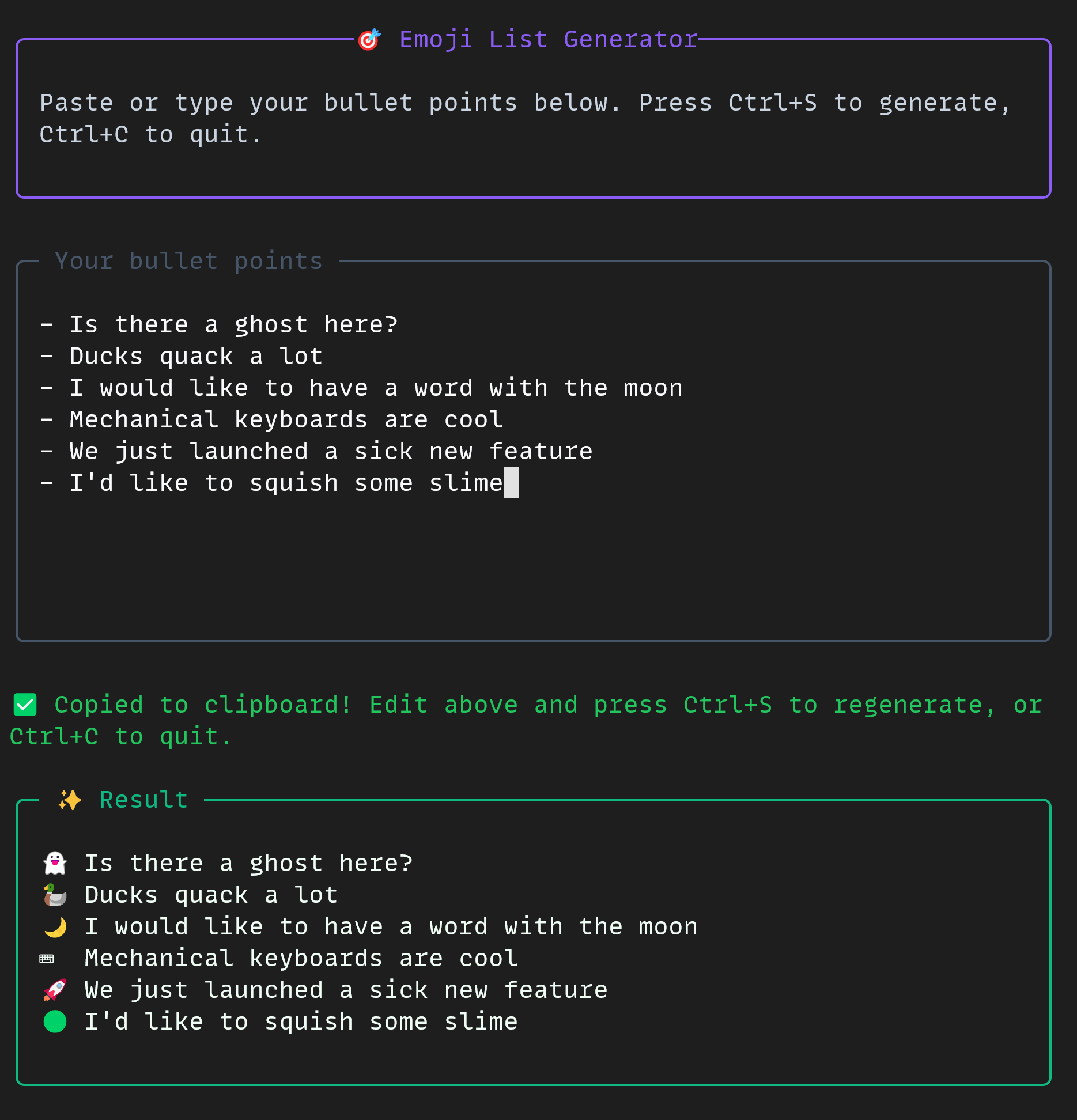
Screenshot of the 'Emoji List Generator.' Paste or type your bullet points below. Press CTRL + S to generate, CTRL + C to quit.

Your bullet points
- Is there a ghost here?
- Ducks quack a lot
- I would like to have a word with the moon
- Mechanical keyboards are cool
- We just launched a sick new feature
- I'd like to squish some slime

Followed by the same list, with appropriate emojis.

The project was small but mighty. In the CLI, we used some really cool tools all together:

📋 Plan mode
🤖 Autopilot mode
🔀 Multi-model workflow
🚩 The allow-alltools flag
🐙 The GitHub MCP server

If you’d like to build a project like this yourself, you can check out the docs for the GitHub Copilot CLI and the GitHub Copilot SDK today!

The emoji list generator is free and open source, just for you.

Happy building!

Written by

Cassidy Williams

Cassidy is senior director for developer advocacy here at GitHub. She enjoys building software, advising startups, and teaching developers how to build better. She has a weekly newsletter at cassidoo.co/newsletter where you can get her updates, practice coding problems, and a joke in your inbox!

Related posts

Explore more from GitHub

Docs

Docs

Everything you need to master GitHub, all in one place.

Go to Docs

GitHub

GitHub

Build what’s next on GitHub, the place for anyone from anywhere to build anything.

Start building

Customer stories

Customer stories

Meet the companies and engineering teams that build with GitHub.

Learn more

The GitHub Podcast

The GitHub Podcast

Catch up on the GitHub podcast, a show dedicated to the topics, trends, stories and culture in and around the open source developer community on GitHub.

Listen now