惯性聚合 高效追踪和阅读你感兴趣的博客、新闻、科技资讯
阅读原文 在惯性聚合中打开

推荐订阅源

Threat Intelligence Blog | Flashpoint
博客园_首页
钛媒体:引领未来商业与生活新知
钛媒体:引领未来商业与生活新知
博客园 - 叶小钗
A
About on SuperTechFans
量子位
G
Google Developers Blog
云风的 BLOG
云风的 BLOG
T
Threat Research - Cisco Blogs
Spread Privacy
Spread Privacy
Hacker News - Newest:
Hacker News - Newest: "LLM"
N
News and Events Feed by Topic
C
Cybersecurity and Infrastructure Security Agency CISA
cs.AI updates on arXiv.org
T
Tenable Blog
V
V2EX
月光博客
月光博客
L
Lohrmann on Cybersecurity
W
WeLiveSecurity
Webroot Blog
Webroot Blog
H
Hacker News: Front Page
酷 壳 – CoolShell
酷 壳 – CoolShell
T
The Exploit Database - CXSecurity.com
freeCodeCamp Programming Tutorials: Python, JavaScript, Git & More
博客园 - 三生石上(FineUI控件)
T
Troy Hunt's Blog
Google Online Security Blog
AI
AI
腾讯CDC
Recent Commits to openclaw:main
Google DeepMind News
CTFtime.org: upcoming CTF events
V2EX - 技术
V2EX - 技术
Martin Fowler
Martin Fowler
博客园 - Franky
I
Intezer
Project Zero
Project Zero
I
InfoQ
P
Privacy International News Feed
C
Check Point Blog
T
The Blog of Author Tim Ferriss
P
Palo Alto Networks Blog
L
LINUX DO - 最新话题
有赞技术团队
有赞技术团队
Cloudbric
Cloudbric
人人都是产品经理
人人都是产品经理
cs.CL updates on arXiv.org
S
SegmentFault 最新的问题
Latest news
Latest news
小众软件
小众软件

The GitHub Blog

The cost of saying yes has changed GitHub for Beginners: Your roadmap to mastering the GitHub essentials Better tools made Copilot code review worse. Here's how we actually improved it. How GitHub gave every repository a durable owner Automating cross-repo documentation with GitHub Agentic Workflows GitHub availability report: June 2026 How GitHub Copilot enables zero DNS configuration for GitHub Pages Q1 2026 Innovation Graph update: Open source collaboration is accelerating worldwide How GitHub used secret scanning to reach inbox zero 6 security settings every GitHub maintainer should enable this week How GitHub maintains compliance for open source dependencies Highlights from Git 2.55 Inside the Advisory Database and what happens when vulnerability volume breaks records GitHub and UNDP team up to advance development priorities in Ghana with open source Transitioning as a Hubber I automated my job (and it made me a better leader) GitHub joins coalition advocating for fixes to California AI Transparency Act to protect open source From pledge to practice: Building a more inclusive open source ecosystem How we built an internal data analytics agent How pull request limits are cutting down the noise Getting more from each token: How Copilot improves context handling and model routing What are git worktrees, and why should I use them? GitHub Copilot CLI for Beginners: Overview of common slash commands Accelerating researchers and developers building multilingual AI with a new open dataset How we made GitHub Copilot CLI more selective about delegation GitHub availability report: May 2026 Making secret scanning more trustworthy: Reducing false positives at scale Give GitHub Copilot CLI real code intelligence with language servers From one-off prompts to workflows: How to use custom agents in GitHub Copilot CLI GitHub for Beginners: Answers to some common questions GitHub Universe is back: All together now, in the agentic era GitHub Copilot app: The agent-native desktop experience Still a developer. Just outside. Our latest GitHub Shop collection is here. GitHub for Beginners: Getting started with Git and GitHub in VS Code GitHub recognized as a Leader in the Gartner® Magic Quadrant™ for Enterprise AI Coding Agents for the third year in a row Beyond the engine: 10 open source projects shaping how games actually get made Building GitHub’s next chapter in accessibility Investigation update: GitHub Enterprise Server signing key rotation Take your local GitHub sessions anywhere Building a general-purpose accessibility agent—and what we learned in the process Raising the bar: Quality, shared responsibility, and the future of GitHub’s bug bounty program GitHub availability report: April 2026 From latency to instant: Modernizing GitHub Issues navigation performance Dungeons & Desktops: 10 roguelikes that never die (because their communities won’t let them) GitHub Copilot individual plans: Introducing flex allotments in Pro and Pro+, and a new Max plan Dungeons & Desktops: Building a procedurally generated roguelike with GitHub Copilot CLI GitHub for Beginners: Getting started with OSS contributions Why age assurance laws matter for developers How researchers are using GitHub Innovation Graph data to reveal the “digital complexity” of nations Improving token efficiency in GitHub Agentic Workflows Agent pull requests are everywhere. Here’s how to review them. Validating agentic behavior when “correct” isn’t deterministic Welcome to Maintainer Month: Celebrating the people behind the code Register now for OpenClaw: After Hours @ GitHub GitHub Copilot CLI for Beginners: Interactive v. non-interactive mode GitHub for Beginners: Getting started with Markdown Securing the git push pipeline: Responding to a critical remote code execution vulnerability Highlights from Git 2.54 Building an emoji list generator with the GitHub Copilot CLI Bringing more transparency to GitHub’s status page How GitHub uses eBPF to improve deployment safety Build a personal organization command center with GitHub Copilot CLI Developer policy update: Intermediary liability, copyright, and transparency Hack the AI agent: Build agentic AI security skills with the GitHub Secure Code Game How exposed is your code? Find out in minutes—for free GitHub for Beginners: Getting started with GitHub Pages GitHub Copilot CLI for Beginners: Getting started with GitHub Copilot CLI GitHub availability report: March 2026 GitHub Universe is back: We want you to take the stage GitHub Copilot CLI combines model families for a second opinion The uphill climb of making diff lines performant Securing the open source supply chain across GitHub Run multiple agents at once with /fleet in Copilot CLI Agent-driven development in Copilot Applied Science GitHub for Beginners: Getting started with GitHub security What’s coming to our GitHub Actions 2026 security roadmap
Evaluating performance and efficiency of the GitHub Copilot agentic harness across models and tasks
Shibani Basava · 2026-06-26 · via The GitHub Blog

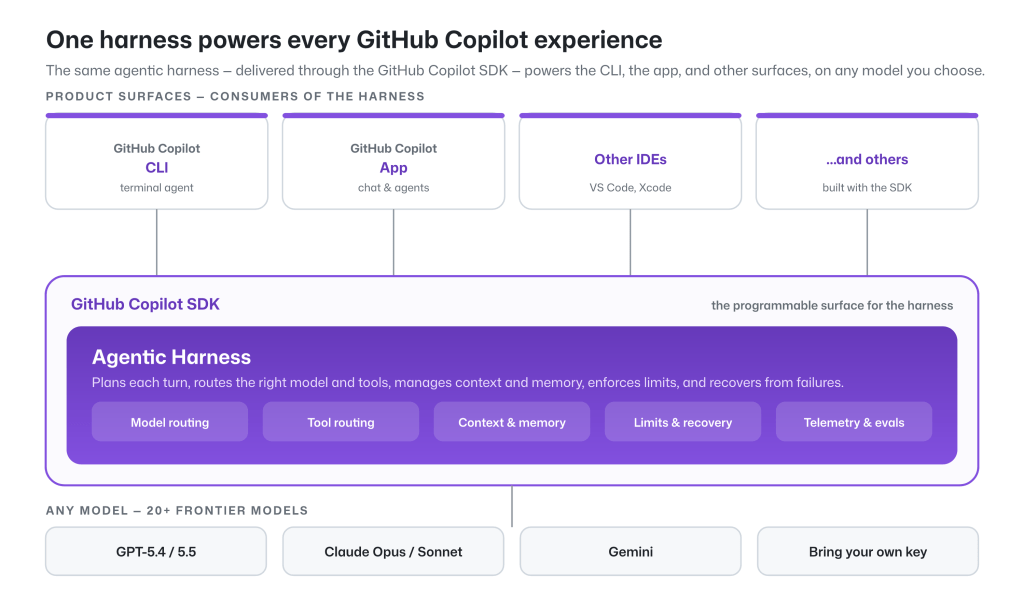
While the model provides the raw intelligence, the harness shapes how effectively that intelligence is applied. The GitHub Copilot agentic harness is a single shared component of the GitHub Copilot SDK, which powers the GitHub Copilot CLI, GitHub Copilot app, and Copilot code review, along with a wide variety of experiences across GitHub and Microsoft. Improve the harness, and every surface benefits.

Diagram showing the agentic harness powers the GitHub Copilot CLI, the GitHub Copilot app, other IDEs like VS Code and Xcode, and others built with the SDK.
The GitHub Copilot agentic harness powers GitHub Copilot experiences.

The tools, context, and workflow are orchestrated by the harness. A harness should be fast, token-efficient, and predictable for developers. That’s what we designed GitHub Copilot’s agentic harness to do.

In this post, we’ll present data showing the efficiency and performance of the GitHub Copilot agentic harness across a wide range of agentic software engineering tasks.

How we iterate with benchmarks

We continuously evaluate the capability and efficiency of the GitHub Copilot agentic harness through a combination of public and internally developed benchmarks. Our public benchmarks include industry standards, while several internal benchmarks are derived from large codebases inside GitHub and Microsoft. We complement this with real-world metrics and online experiments to ensure we understand the harness’s performance in controlled environments and its practical impact on agentic problem solving and task completion. 

We control as many variables as possible to evaluate the performance of GitHub Copilot’s harness compared to the model provider’s harness: use the same model, the same benchmark task, normalized on context window, reasoning efforts, tool selection, and MCP servers.

Below we report our latest results for a subset of the benchmarks we track, across four leading models: Claude Sonnet 4.6, Claude Opus 4.7, GPT‑5.4, and GPT‑5.5:

Benchmark Domain Purpose 
SWE-bench Verified 500 human-validated bug-fix tasks from open-source Python repositories Established industry-standard benchmark for coding agents 
SWE-bench Pro More difficult, multi-step engineering tasks requiring deeper reasoning and broader code changes Better reflects complex, real-world software engineering work 
SkillsBench How effectively an agent uses skills to solve tasks Evaluates extensibility and skill use and triggering capabilities 
TerminalBench Agent performance on terminal-based tasks Measures effectiveness in command-line workflows used by developers 
Win-Hill Internal benchmark for tasks running inside Windows containers Validates that performance generalizes across operating systems and environments 

Throughout, we compare GitHub Copilot CLI against the model-vendor harnesses that ship those models natively: Claude Code for Sonnet 4.6 and Opus 4.7, and Codex CLI for GPT‑5.4 and GPT‑5.5.

Token efficiency

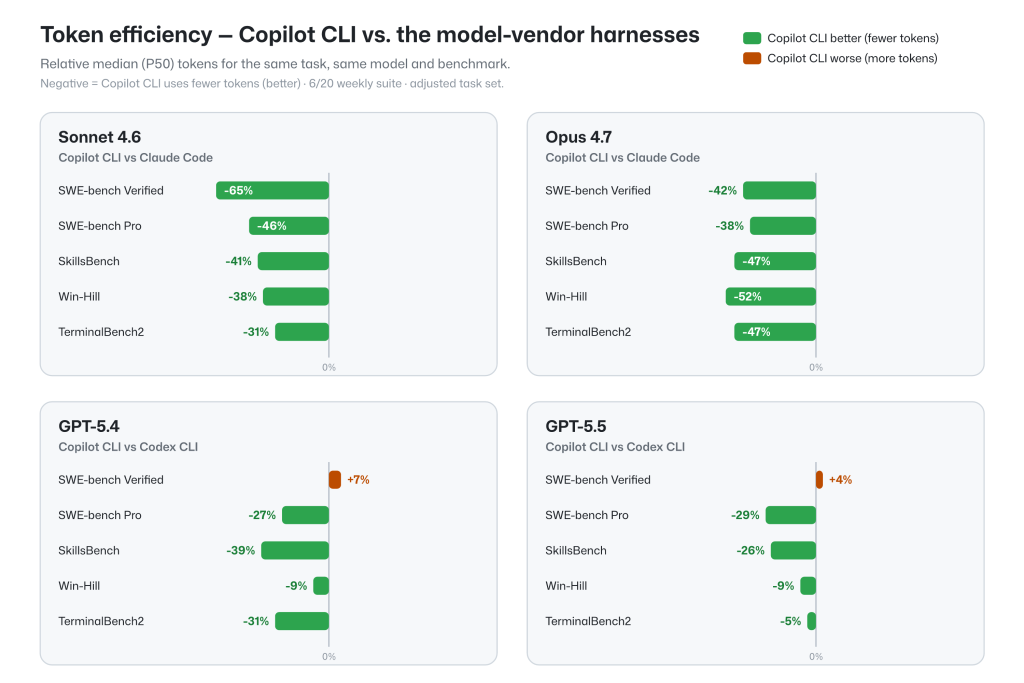
Holding the model and task fixed, across multiple benchmark results, the GitHub Copilot harness achieves task completion rates on par with other model-vendor harnesses, while showing lower token consumption across most configurations.

Chart showing Copilot CLI versus model-vendor harnesses using SWE-bench Verified, SWE-bench Pro, SkillsBench, Win-Hill, and TerminalBench2 tests. For Sonnet 4.6 and Opus 4.7, Copilot CLI performed better in all cases, using fewer tokens. For GPT 5.4 and GPT 5.5, CLI performed better in all cases except SWE-bench Verified, where it did 7% and 4% worse, respectively.
Token efficiency: GitHub Copilot CLI vs. other model-vendor harnesses

Task resolution

Token efficiency only matters if the work actually gets done.

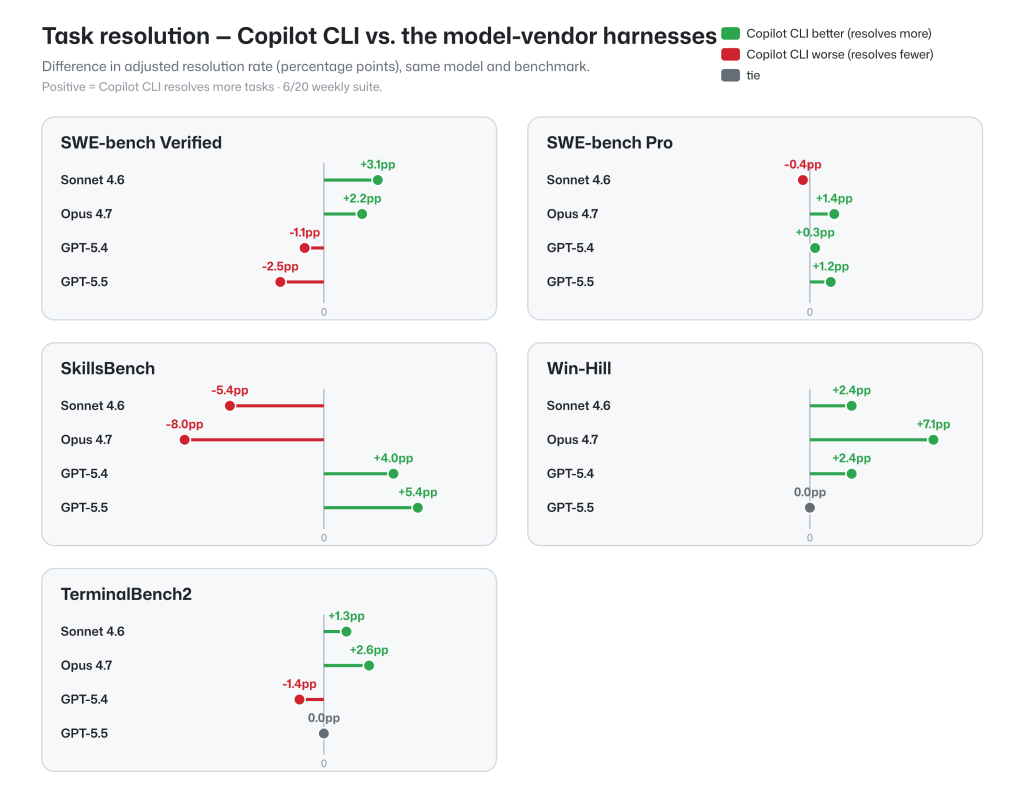
Task resolution rates for the GitHub Copilot agentic harness across these benchmarks are on-par with model-vendor harnesses when used with a fixed model and benchmark task. This ensures that the full potential of the underlying model is available, along with multi-model flexibility, token efficiency, and memory and context capabilities.

Task resolution benchmarking test results for Copilot CLI versus model-vendor harnesses. For SWE-bench Verified tests, Copilot CLI performed better with Sonnet 4.6 and Opus 4.7, but worse with GPT 5.4 and GPT 5.5. For SWE-bench Pro, Copilot CLI only performed slightly worse with Sonnet 4.6, and performed better for other models. For SkillsBench, Copilot CLI performed worse for Sonnet 4.6 and Opus 4.7, but better for GPT models. For Win-Hill, Copilot CLI performed equal or better for all models. For TerminalBench 2, Copilot CLI performed better for Sonnet 4.6 and Opus 4.7, equal for GPT 5.5, and worse for GPT 5.4.
Task resolution: GitHub Copilot CLI vs. the model-vendor harnesses

These results reflect effective parity, since the differences in either direction are within the variance due to the stochastic nature of the models, making the cross-harness performance on-par.

TerminalBench: Token efficiency, task completion, and variance

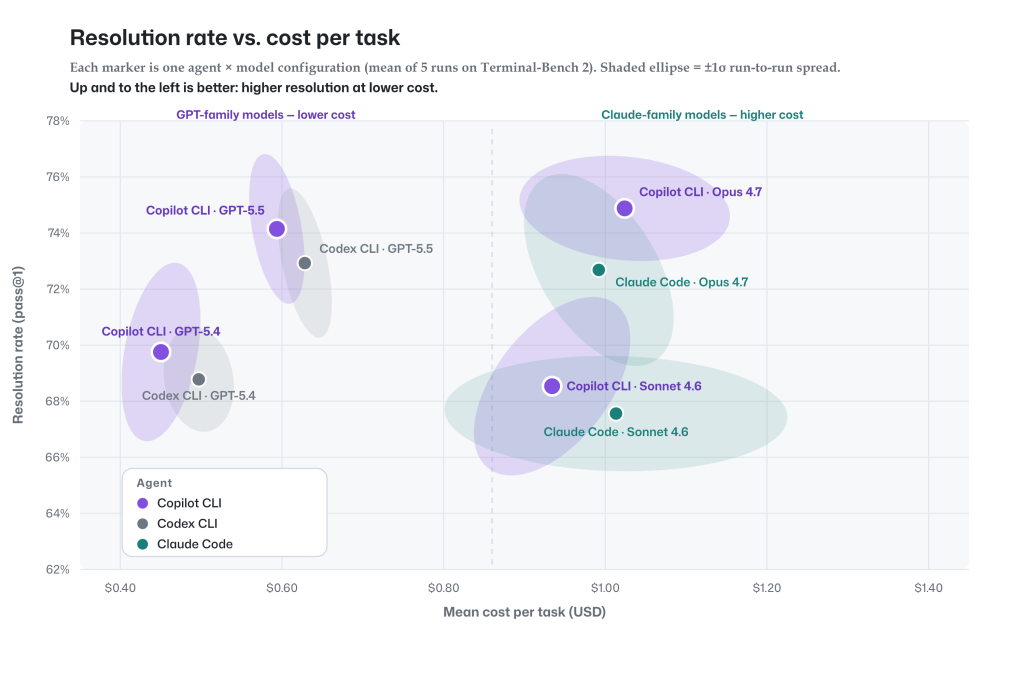
To continuously improve the GitHub Copilot agentic harness on task completion and token efficiency, we regularly perform thorough analyses across benchmarks. Below is an example of variance analysis on TerminalBench 2.0, which not only highlights GitHub Copilot’s strength on task completion and token efficiency, but also shows the run-to-run variance intrinsic to this kind of benchmark.

A diagram showing mean cost per task compared to the resolution rate. Copilot CLI performs equal to or better than model-vendor harnesses.
Resolution rate vs. cost per task. Up and to the left is better: solve more, spend less. 

Every marker is one agent-and-model configuration on TerminalBench 2.0, with resolution rate on the vertical axis and dollar cost per task on the horizontal axis. The shaded ellipse around each point shows the ±1σ run-to-run spread, displaying how much each configuration varies between runs.

Three things stand out:

  1. GitHub Copilot’s agentic harness is on par with or ahead of other agents on task completion and cost per task across the configurations we evaluated. Purple (Copilot) markers and their same-model competitors sit within overlapping ellipses on both axes for nearly every model—the differences are inside run-to-run variance. Copilot is never below a competitor on completion or to the right on cost.
  2. Run-to-run variability. We ran each agent-model combination at least five times. The ellipse marks the 1σ spread of those runs; a tighter ellipse in the chart means more reproducible results, while a wider one shows results swinging further from run to run on both cost and task completion.
  3. The benefit of GitHub Copilot’s model choice: The chart shows a real trade-off: GPT models (left) deliver the best value: strong resolution at the lowest cost. Claude Opus (upper right) reaches the highest resolution at a premium. GitHub Copilot puts both on the table, so you can pick efficiency or peak quality per task.

One harness, many models

The GitHub Copilot agentic harness supports 20+ frontier models across the GPT, Claude, Gemini, and MAI families, plus bring your own key for open‑source and local models. You can choose the right model for the capability and cost profile of each task, or let Auto model selection choose for you, balancing task intent and model health to optimize token efficiency.

A multi‑model architecture also unlocks harness‑level capabilities a model-vendor harness simply can’t offer. Rubber Duck, for example, uses cross‑model‑family critique, where one model reviews another’s work to improve outcomes beyond what any single model produces alone.

Conclusion

Benchmarks are just one signal among several. We are constantly working to improve quality across benchmarks, real-world usage metrics, and online experiments, while pushing to efficiently make the most out of every token.

GitHub Copilot delivers task‑resolution on par with leading model-vendor harnesses while using fewer tokens across several configurations, without locking you into a single model through its multi‑model architecture. For developers, this means you can get comparable task completion with lower token cost, while still choosing the model that best fits your task.

Try it yourself

Try GitHub Copilot with the model of your choice, compare approaches on the tasks you run every day, and see how different models and agent strategies perform in your environment.

Learn more about:

The same agentic harness powers these experience. We’re continuing to improve its quality, efficiency, and flexibility.

Methodology

To make the comparison as controlled and reproducible as possible, we run each agent with equivalent settings across models, tasks, and environments.

All runs have a two-hour timeout. All agents run non-interactively single-turn, with web-tools disabled, and all tools allowed.

TerminalBench2 analysis: Default settings enabled for agents with reasoning effort set to medium (e.g. tool search is enabled for Claude Code and Copilot CLI uses github-mcp-server). Codex and Claude Code use direct Anthropic and OpenAI endpoints. To ensure complete and reliable results, any missing data or infrastructure-related failures were re-run until all 89 TerminalBench2 tasks produced results. Model-generated errors were retained and not excluded from the analysis. Each model was evaluated across five independent runs, and Copilot was tested in two separate evaluation batches to enable comparison with Claude Code and Codex.

All benchmarks: All agent model pairs normalized to same context window size, same prompt token limits, reasoning effort (medium) and settings—no tool search, no MCP servers. Keeping the harness’s default built-in tools. Infrastructure-related anomalies and network-access effects are excluded across all agents for a benchmark to ensure fair comparisons. To reduce the impact of run-to-run variability on smaller benchmarks (<100 instances), five independent runs were conducted, and the best scored run is reported. All metrics are presented as pass@1. These normalizations mean results differ from public benchmark submissions, which typically use higher reasoning effort and other tuned settings.

Written by

Shibani Basava

Principal Software Engineer in CodeAI and Github Copilot Coding Agents

Carlos Castro

Partner Architect at GitHub Copilot

Explore more from GitHub

Docs

Docs

Everything you need to master GitHub, all in one place.

Go to Docs

GitHub

GitHub

Build what’s next on GitHub, the place for anyone from anywhere to build anything.

Start building

Customer stories

Customer stories

Meet the companies and engineering teams that build with GitHub.

Learn more

GitHub Universe 2026

GitHub Universe 2026

Join us October 28-29 in San Francisco or online for GitHub Universe, our flagship developer event uniting people, agents, and the world’s code.

Register now