








Phil has been a BHIS Security Consultant for 4 years. He currently serves in a development-focused role and enjoys building offensive security tools. Outside of work, Phil enjoys the arts (drumming & music, drawing & painting), as well as sports (golfing, bowling, and basketball).

A great place that can sometimes be overlooked on an internal penetration test are the secrets hidden in plain sight. That is, a place where no authentication is required in many circumstances throughout internal networks. I’m talking about source code management platforms, specifically Gitlab. Other self-hosted platforms are likely also susceptible to this unauthenticated technique as well, but we’ll be focusing on GitLab.
A sequence of words that I’ve heard:
Mr. Senior Developer – “If an attacker already has access to our internal network, we’ve got bigger problems.”
The biggest problem is this kind of thinking! Yes, a hacker inside your internal network is a problem that requires immediate attention, but the defensive measures you implement as an organization leading up to this kind of event are what really counts. It is a common misconception that once an adversary has gained initial access to an organization’s network, that it is already game over. Verily, I tell you, good neighbor, that this is not the case! There are many things that you can do to defend against attackers inside the internal network. For instance, security landmines at every turn via canary tokens and other awesome things. But in this blog post, we’ll be talking about attacking and defending (but mostly attacking) self-hosted GitLab instances.
I’ve come across internal GitLab instances in organizations’ internal networks countless times and many of them have one thing in common, many of their projects are set to “public.” One might think or blurt out, “Well, first you would need a valid account to log in to GitLab to access these projects,” and to that I say, with great vigor, “False!”
In GitLab, when a project scope is set to “public,” it is still accessible to anyone with network access. Better yet, it is discoverable via the GitLab projects API at the URL, https://<gitlab.example.com>/api/v4/projects.
Spoiler alert: The process of finding all public GitLab projects and downloading everything can be quickly automated with no authentication. On an amusing side-note anecdote, Nessus won’t tell you this, but your organization’s crown jewels are totally exposed! That’s because this is a feature, not a bug. But that’s not to say that Nessus isn’t totally barren of fruits altogether. Nessus will still identify all the GitLab instances for you, that is, if you’re using Nessus. Whether you’re using Nessus or not, we can still easily identify all the GitLab instances on an internal network using Nuclei, more specifically, a Nuclei GitLab workflow:
nuclei -l in-scope-cidrs-ips-hosts-urls-whatever.txt \

-w ~/nuclei-templates/workflows/gitlab-workflow.yaml \

-o gitlab-nuclei-workflow.log | tee gitlab-nuclei-workflow-color.log
The screenshot below shows a portion of the output from the command above.
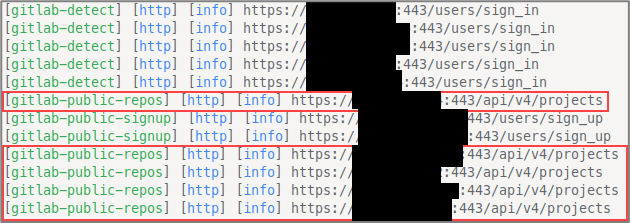
There are many code-secret scanning tools such as Trufflehog, Gitleaks, NoseyParker, and others. We’ll be utilizing Gitleaks for this blog post, but, as an exercise, I encourage you to use all three and compare your results. One downside of many of these tools at the time of writing is the reliance on authentication for mass automated scanning, but this can be done from an unauthenticated context too (when the GitLab public repos api is accessible). If you have come across GitLab instances on internal penetration tests but weren’t sure how to automate and achieve that sweet juicy pwnage, then this blog is for you.
As Pastor Manul Laphroaig would say, PoC || GTFO!
Forgive me, neighbors, if this feature already exists in any given open-source tool but indulge me in the discussion of automating this from scratch. We’ll be using a ragtag team of Python and Go.
This should ideally be included as a feature to some of these tools — or perhaps it already is — nonetheless, here’s a Python script to download every public repository to their appropriately named directory hierarchy:
#!/usr/bin/env python3

import requests
import json
import subprocess
import os

PWD = os.getcwd()

def get_repos_with_auth(projects_url, base_url, token):
    headers = {'Private-Token': token}
    repos = {}
    page = 1

    while True:
        response = requests.get(projects_url, headers=headers, verify=False, params={'per_page': 100, 'page': page})
        data = json.loads(response.text)
        if not data:
            break
        for repo in data:
            print(f"Repo {repo['http_url_to_repo']}")
            path = repo['path_with_namespace']
            repos[path] = f"{base_url}{path}.git"
        page += 1

    return repos

def get_repos(projects_url, base_url):
    repos = {}
    page = 1

    while True:
        response = requests.get(projects_url, verify=False, params={'per_page': 100, 'page': page})
        data = json.loads(response.text)
        if not data:
            break
        for repo in data:
            print(f"Repo {repo['http_url_to_repo']}")
            path = repo['path_with_namespace']
            repos[path] = f"{base_url}{path}.git"
        page += 1

    return repos

def run_command(command):
    try:
        subprocess.call(command, shell=True)
    except:
        print("Error executing command")

def clone_repos(repos: dict):
    for path, repo in repos.items():
        dirs = path.split("/")

        directory = "/".join(dirs[:-1])
        if not os.path.exists(directory):
            os.makedirs(directory)

        if os.path.exists(f"{PWD}/{directory}/{os.path.basename(repo).rstrip('.git')}"):
            continue

        os.chdir(directory)
        clone_cmd = f"git clone {repo}"
        print(clone_cmd)
        run_command(clone_cmd)
        os.chdir(PWD)

def main():
    # token = "CHANGETHIS" # CHANGETHIS if using auth_base_url
    # user_id = "CHANGETHIS" # CHANGETHIS if using auth_base_url
    projects_url = "https://<GITLAB.DOMAIN.COM>/api/v4/projects" # CHANGETHIS
    # auth_base_url = f"https://{user_id}:{token}@<GITLAB.DOMAIN.COM>/" # CHANGETHIS.
    unauth_base_url = f"https://<GITLAB.DOMAIN.COM>/" # CHANGETHIS.
    # repos = get_repos_with_auth(projects_url, auth_base_url, token)
    repos = get_repos(projects_url, unauth_base_url)
    print(f"Total Repos: {len(repos)}")
    clone_repos(repos)


if __name__ == "__main__":
    main()
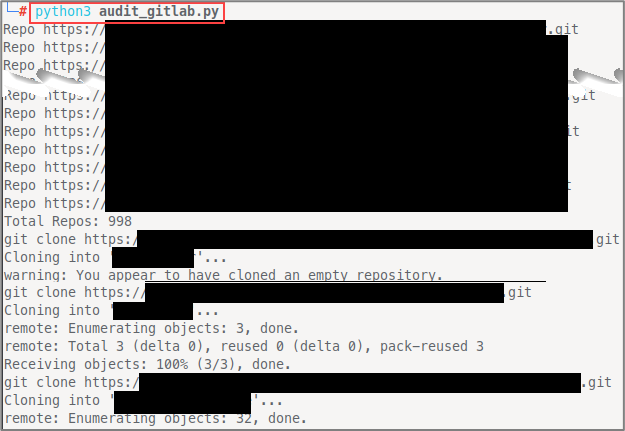
In the get_repos() function, we paginate through all the available repository data 100 items per page at a time until there is no remaining data. This script could (and probably should) take arguments or a config file for portability, but let’s bask in the ambiance of hard-coding things, i.e. credentials. Running the code above unauthenticated with updated values for projects_url and unauth_base_url looks something like this:
Next, we’ll use Gitleaks to scan everything. First, let’s clone the project so that we have the gitleaks.toml file, we could download this by itself but, who cares.
git clone https://github.com/gitleaks/gitleaks.git /opt/gitleaks
# download gitleaks binary, this assumes you have go installed and set your GOPATH...
# if not, here's how you can do that.
# install go..
# set your GOPATH in ~/.zshrc if you're using Bash, then change as needed to ~/.bash_profile or ~/.bashrc

[[ ! -d "${HOME}/go" ]] && mkdir "${HOME}/go"
if [[ -z "${GOPATH}" ]]; then
cat << 'EOF' >> "${HOME}/.zshrc"

# Add ~/go/bin to path
[[ ":$PATH:" != *":${HOME}/go/bin:"* ]] && export PATH="${PATH}:${HOME}/go/bin"
# Set GOPATH
if [[ -z "${GOPATH}" ]]; then export GOPATH="${HOME}/go"; fi
EOF
fi

# now that go is installed, we can install gitleaks binary to our PATH
go install github.com/zricethezav/gitleaks/v8@latest
First, we’ll add an extra rule for extra secrets. This rule is prone to false positives but is worth the extra noise when it catches things that would otherwise have been missed. Add the following to your /opt/gitleaks/config/gitleaks.toml file:
[[rules]]
id = "generic-password"
description = "Generic Password"
regex = '''(?i)password\s*[:=|>|<=|=>|:]\s*(?:'|"|\x60)([\w.-]+)(?:'|"|\x60)'''
tags = ["generic", "password"]
secretGroup = 1
To run Gitleaks against a single repository, you can use syntax such as:
# cd into a cloned repo
gitleaks detect . -v -r output.json -c /opt/gitleaks/config/gitleaks.toml
But we’re interested in mass testing for this sermon, so we can use another one-off Python script to do just that:
#!/usr/bin/env python3

import os
import subprocess

PWD = os.getcwd()
GITLEAKS_CONFIG_PATH = "/opt/gitleaks/config/gitleaks.toml" # CHANGETHIS if not using /opt/gitleaks/config/gitleaks.toml

def run_command(command):
    try:
        subprocess.call(command, shell=True)
    except:
        print("Error executing command")

def find_git_repos():
    repos = []
    for root, dirs, _ in os.walk('.'):
        if '.git' in dirs:
            git_dir = os.path.join(root, '.git')
            repo_dir = os.path.abspath(os.path.join(git_dir, '..'))
            repos.append(repo_dir)
    return repos

repo_dirs = find_git_repos()
for repo_dir in repo_dirs:
    repo_name = os.path.basename(repo_dir)
    if os.path.exists(f"/root/blog/loot/gitlab/{repo_name}.json"):  # CHANGETHIS if not using /root/bhisblog/loot/gitlab
        project_name = os.path.basename(os.path.dirname(repo_dir))
        repo_name = f"{project_name}_{repo_name}"
    os.chdir(repo_dir)
    cmd = f"gitleaks detect . -v -r /root/blog/loot/gitlab/{repo_name}.json -c {GITLEAKS_CONFIG_PATH}"  # CHANGEME if not using /root/blog/loot/gitlab
    print(cmd)
    run_command(cmd)
    os.chdir(PWD)
This script will run Gitleaks against each repository and write the resulting secrets to JSON output files. This is all fine and good, but we can do a little better (a lot better would be combining all this logic into a single tool or to fork and implement this feature to an existing tool). Here, we can see Gitleaks doing its thing.

Okay, so… Now, what??? Da funk am I supposed to do with all these JSON files? Let’s write another program, this time written in Go, to combine all the JSON output files into a single CSV file.
package main


import (

    "encoding/csv"

    "encoding/json"

    "fmt"

    "os"

    "path/filepath"

)


type Item struct {

    Description  string   `json:"Description"`

    StartLine    int      `json:"StartLine"`

    EndLine      int      `json:"EndLine"`

    StartColumn  int      `json:"StartColumn"`

    EndColumn    int      `json:"EndColumn"`

    Match        string   `json:"Match"`

    Secret       string   `json:"Secret"`

    File         string   `json:"File"`

    SymlinkFile  string   `json:"SymlinkFile"`

    Commit       string   `json:"Commit"`

    Entropy      float64  `json:"Entropy"`

    Author       string   `json:"Author"`

    Email        string   `json:"Email"`

    Date         string   `json:"Date"`

    Message      string   `json:"Message"`

    Tags         []string `json:"Tags"`

    RuleID       string   `json:"RuleID"`

    Fingerprint  string   `json:"Fingerprint"`

}


func main() {

    dirPath := "/root/work/loot/gitleaks" // CHANGE ME

    csvPath := "/root/work/loot/all_gitleaks.csv" // CHANGE ME


    items := make([]Item, 0)


    err := filepath.Walk(dirPath, func(path string, info os.FileInfo, err error) error {

        if err != nil {

            return err

        }

        if !info.IsDir() && filepath.Ext(path) == ".json" {

            file, err := os.ReadFile(path)

            if err != nil {

                return err

            }


            var data []Item

            err = json.Unmarshal(file, &data)

            if err != nil {

                fmt.Println(fmt.Errorf("error unmarshalling JSON file %s: %s", path, err))

            }


            items = append(items, data...)

        }

        return nil

    })

    if err != nil {

        panic(err)

    }


    file, err := os.Create(csvPath)

    if err != nil {

        panic(err)

    }

    defer file.Close()


    writer := csv.NewWriter(file)

    defer writer.Flush()


    headers := []string{"Description", "StartLine", "EndLine", "StartColumn", "EndColumn", "Match", "Secret", "File", "SymlinkFile", "Commit", "Entropy", "Author", "Email", "Date", "Message", "Tags", "RuleID", "Fingerprint"}

    err = writer.Write(headers)

    if err != nil {

        panic(err)

    }


    for _, item := range items {

        row := []string{

            item.Description,

            fmt.Sprintf("%d", item.StartLine),

            fmt.Sprintf("%d", item.EndLine),

            fmt.Sprintf("%d", item.StartColumn),

            fmt.Sprintf("%d", item.EndColumn),

            item.Match,

            item.Secret,

            item.File,

            item.SymlinkFile,

            item.Commit,

            fmt.Sprintf("%f", item.Entropy),

            item.Author,

            item.Email,

            item.Date,

            item.Message,

            fmt.Sprintf("%v", item.Tags),

            item.RuleID,

            item.Fingerprint,

        }

        err = writer.Write(row)

        if err != nil {

            panic(err)

        }

    }

} [Go Program to Combine JSON Files into a Single CSV File (main.go)]
To run the go program:
go run main.go Again, each of these one-off scripts and programs could (and should) be integrated into a tool such as Trufflehog, Gitleaks, Noseyparker, or combined to a single standalone script or tool. I’ll leave that up to you as an exercise in contributing to open source like a good neighbor should. Breaking each step down into individual scripts initially was the fastest way to prototype the process of plundering GitLab without credentials as an initial proof-of-concept.
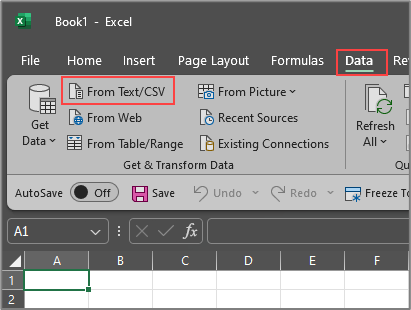
Importing the CSV file via Excel or Libre Open Office as a filter table can greatly assist us in our analysis with the quickness efforts.
The ability to filter by description or date will do us great justice.
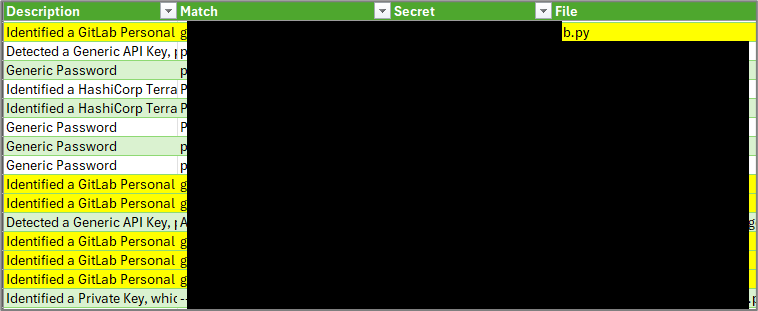
If you’re lucky enough to discover a GitLab personal access token that is enabled, you can update the first script with the user_id and personal access token, and run the script a second time.
Here is what you can do to make sure this kind of attack doesn’t happen to your organization:
Be on the lookout for GitLab instances with public projects and API access on your next internal network penetration test! You may be surprised at what you might find 😉 I hope this blog post has inspired you to contribute to open-source and to create your own tools. Part of the reason I did not write an open-source GitHub project for this was to draw attention to the logic at each individual step of this process. The same goes for forking an existing tool and making a pull request. I also discovered this tool https://github.com/punk-security/secret-magpie which aims to achieve what we have discussed in this blog post, but again, as far as I could tell by quickly looking through the source code, it didn’t look like it supported performing this technique from an unauthenticated context at the time of writing this blog.
For more information about Trufflehog, see:
Ready to learn more?
Level up your skills with affordable classes from Antisyphon!
Available live/virtual and on-demand

此内容由惯性聚合(RSS阅读器)自动聚合整理,仅供阅读参考。 原文来自 — 版权归原作者所有。