





UPDATES! October 30, 2023
There’s been an additional update for Sysmon! Event ID 29!
Another Event ID (EID) was added to the Sysmon service. This event ID followed the same incremental ID scheme and landed on EID29. Like the previous update, this update has been echo’d to the end of this article.
December 22, 2022
So – there have been some changes to Sysmon and this blog needed polishing. The latest Event IDs and descriptions are now included for Sysmon 26, File Delete Detected, Sysmon 27, File Block Executable, and Sysmon 28, File Block Shredding. All you have to do is keep scrolling; the new events have been added in this blog’s format under the event ID number’s heading and description.
This blog is being provided to demonstrate the capabilities of Sysmon logging broken down by event ID. The IDs will be captured in context and matched to their sysmon-modular configuration section for tuning opportunities.
Please allow me a shout out here to the author of the sysmon-modular repository on Github. Olaf has graciously provided the community one of the best tuning platforms and rapid configuration file deployment tools available for Sysmon (what this is will be explained). First tho:
github.com/olafhartong/sysmon-modular
So, what is a Sysmon configuration file? The config file (for short) provides the directives that govern exactly what Sysmon writes to logs. Take, for example, the following selection of the configuration file I built with sysmon-modular for this article.
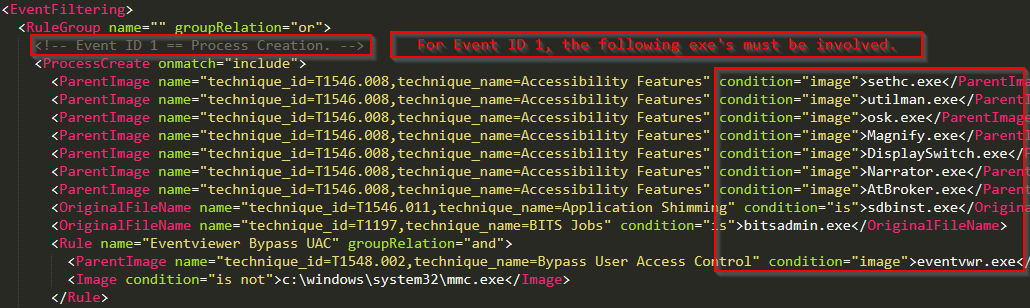
The previous configuration directive states that under Event ID 1, Process Creation, one of the listed images must be matched. This is not even close to the complete list of image names listed under modular’s Event ID 1 config block. The selection is intended to demonstrate the capability of sysmon modular. So, let’s install Sysmon and review.
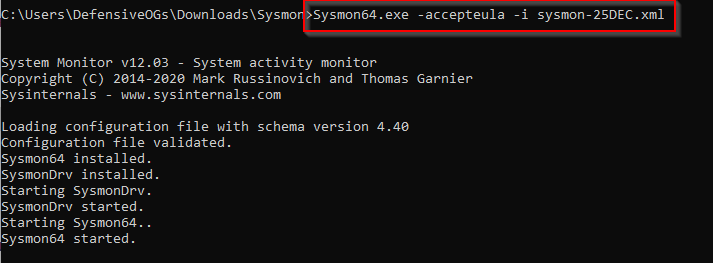
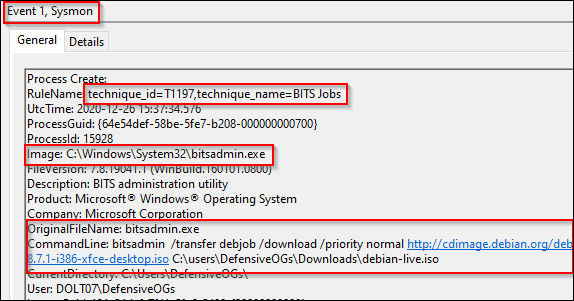
And let’s have bitsadmin attempt a file download for us.

The simple instantiation of a bitsadmin command caused the following match from the previous screenshot. If you take a moment and scroll back up to the modular configuration, you should notice another interesting tidbit. Each image’s configuration section includes a potential MITRE ATT&CK map. As shown below and matched above, use of the Bitsadmin.exe image matches against T1197, BITS jobs (https://attack.mitre.org/techniques/T1197/).
Event ID 2 has not been useful in my experience, though is probably useful for forensic investigators. The technique is called “Timestomping” and the articles listed below include the MITRE page and a SpectreOps article that has a PoC. The final item of note here is that the modular repo is referencing MITRE T1099, which has been deprecated in lieu of T1070.006. The parent technique is now “Indicator Removal on Host” with the sub-technique being “timestomp.” More on this another day in a different blog.
Links:
https://posts.specterops.io/revisiting-ttps-timestomper-622d4c28a655
https://attack.mitre.org/techniques/T1070/006/
Event ID 3s are for documenting network connections. The established image names and connection types from the modular configuration then result in mapped techniques. In the following screenshot, we can see an RDP connection from a workstation to another IP off-subnet. While this is a benign connection, we do see the MITRE ATT&CK technique mapped to T1021 (remote services).
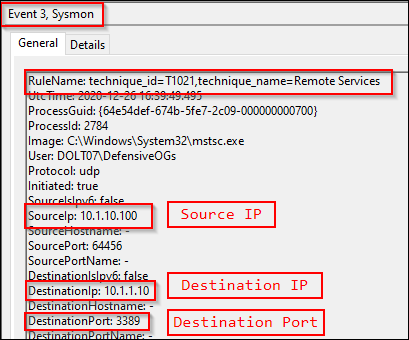
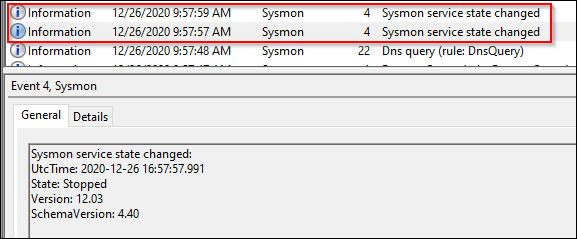
Event ID 4 is not filterable. This is reported in the event of a Sysmon service state change.
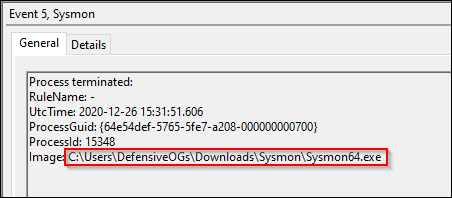
Sysmon event ID 5 appears to be a rare event. I was able to trigger this event by restarting the Sysmon service.
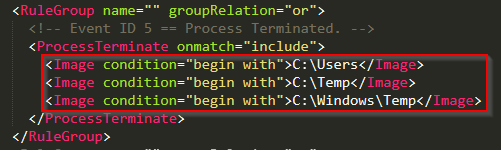
Based on a review of the modular configuration file, the images had to be loaded and unloaded from userland, temp, or \Windows\temp.
Event ID 6 was also rare. It is described as “Driver Loaded” and systems on this particular network had reported no Sysmon event ID 6’s in the last 24 hour period.
Event ID 7 covers image load operations and the processes that instantiate them.
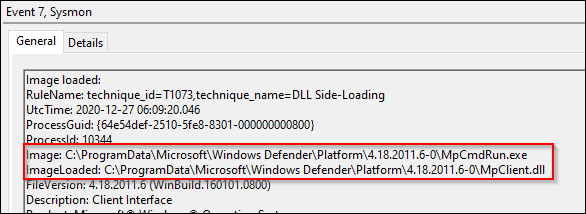
This event was mapped to T1073 (DLL Side-Loading), which has been deprecated in lieu of T1574.002. The parent technique in this instance is Hijack Execution Flow, with the sub-technique listed as DLL Side-Loading.
Link:
https://attack.mitre.org/techniques/T1574/002/
While technically MS Defender is “side-loading” a DLL, this is a great opportunity for introducing the theory of event tuning. In this situation, we should review the modular configuration directories, structure, and make sure we understand how sysmon-modular was designed to handle this exact situation. Take the following screenshot, which has both an exclude and an include statement – these must exist in separate RuleGroups.
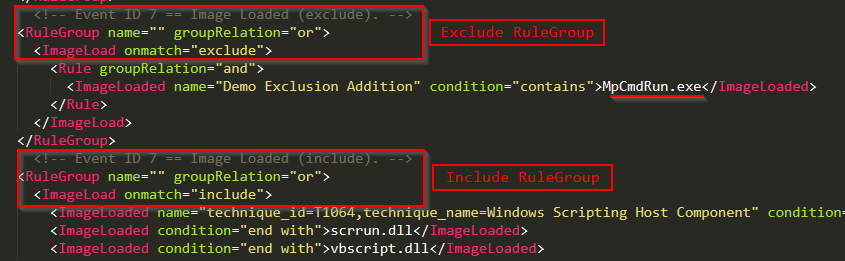
To exclude the MpCmdRun.exe image from the event ID 7 configuration block, we had to create a completely new RuleGroup, otherwise, on config file update, an error would be thrown. Another item of note is that there is no explicit “Event ID ##” configuration section, the rules are processed by the listings that we can match against the sysmon operational log (shown below).
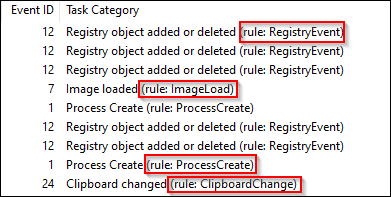
For example, to create new RuleGroups for the identified rules, we would use syntax similar to the following.
<RuleGroup name="" groupRelation="or">
  <ImageLoad onmatch=”exclude”>
    <!-- This section is for Event ID 7 exclusions -->
  </ImageLoad>
</RuleGroup>

<RuleGroup name="" groupRelation="or">
  <RegistryEvent onmatch=”include”>
    <!-- This section is for Event IDs 12,13,14 inclusions -->
  </RegistryEvent>
</RuleGroup>
Moving on now to event ID 8, CreateRemoteThread. This event ID was also rare but had occurred once each day on the system being analyzed for this blog. One of the events was a graphics driver.

The other event was worthy of investigation and appeared as follows.
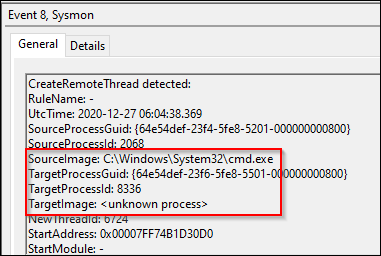
Event ID 9 is listed as RawAccessRead events. Randy Franklin Smith (ultimatewindowssecurity.com fame) describes this event as being reported when “a process conducts reading operations from the drive using the \\.\ denotation.” After further reading, this is what is listed on the Sysinternals site for sysmon as well. No event ID 9s had been reported by this system.
Links:
https://www.ultimatewindowssecurity.com/securitylog/encyclopedia/event.aspx?eventid=90009
https://docs.microsoft.com/en-us/sysinternals/downloads/sysmon
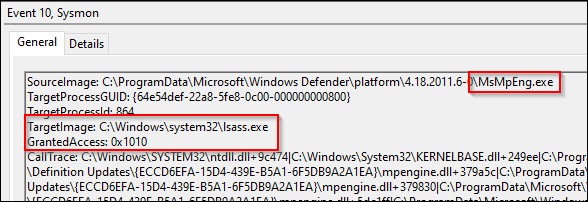
Event ID 10 is a very interesting event and is listed as ProcessAccess. This occurs when an image requests a “priv” to access another process. As shown in the next screenshot, MS Defender asked to take a quick peek at LSASS and the system granted the appropriate access.
Link:
https://cyberwardog.blogspot.com/2017/03/chronicles-of-threat-hunter-hunting-for_22.html
Event ID 11 covers file creation events. This can be very useful in detections, forensics, and investigations. With some basic creation rules in place, Sysmon EID11 can provide an early warning system for write operations in userland.
Quick stepback here to provide a definition for “userland.”
Userland or user space (noun):
In the context of computing, this can refer to all code that runs in low privilege processes, outside admin or kernel context. For restrictive environments, users should have limited privilege to write to a workstation’s disk, normally locations including C:\users\%username%\ or in some cases redirected user locations to network shares.
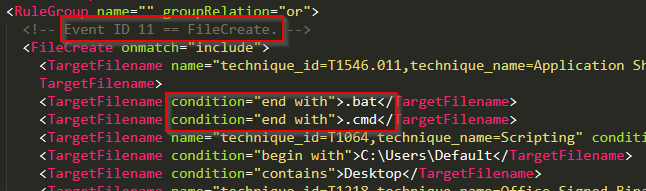
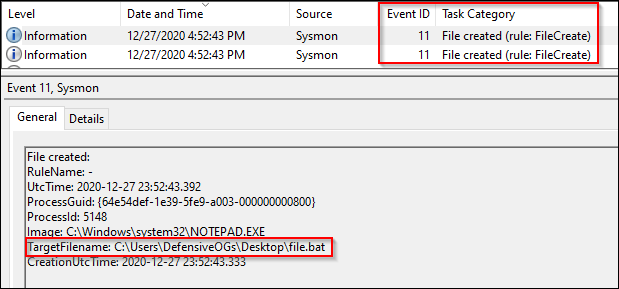
As shown in the next screenshot, .bat and .cmd file creation events are logged to disk.
The creation of both a .cmd and .bat file are then logged to disk.
These event IDs are related to registry events.
RegObject added/deleted (HKLM / HKU)
RegValue set (DWORD / QWORD additions)
RegObject renamed
A selection of the configuration parameters for the registry related events is shown below.
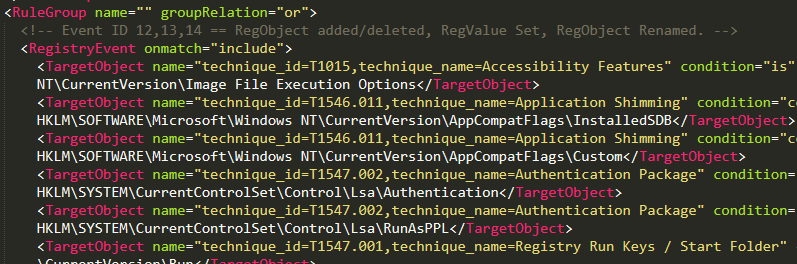
Event IDs 12 and 13 were relatively common and likely need some tuning. I did not see event ID 14 during the creation of this blog.
Event ID 15 covers events related to file streams, generally downloads via web browser. As shown below, we see chrome.exe download the build_collector.py file from the CrackMap archives. Note the zone.identifier file highlighted in the event content referred to in the Sysinternals page for sysmon as the “mark of the web.”
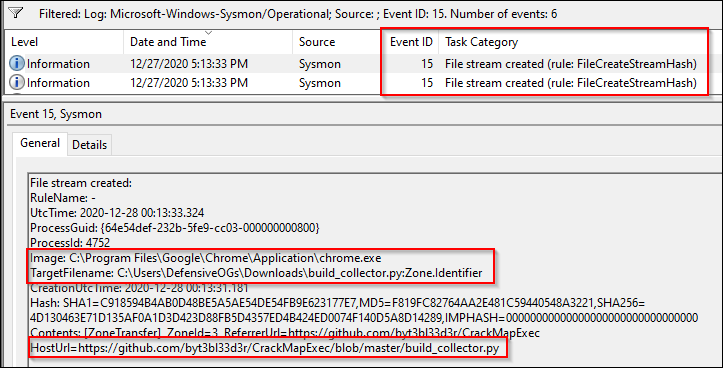
A PowerShell download was not caught with this particular event ID but could have been captured with Event ID 11 had the configuration file been properly tuned to catch .zip files.
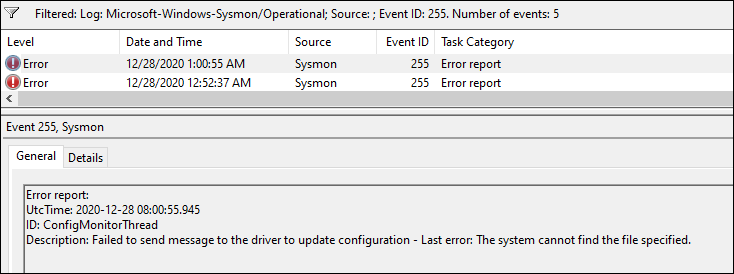
A very simple event ID to interpret is EID16: Sysmon Config Change.
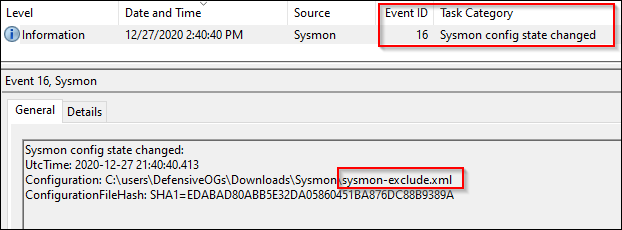
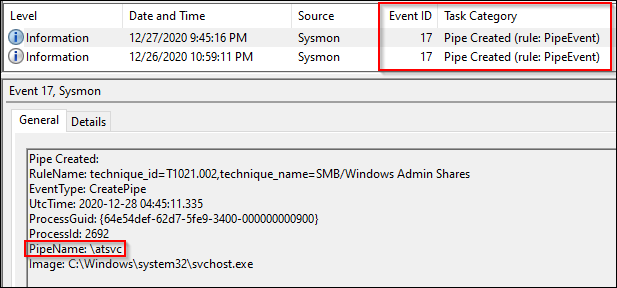
These event IDs are related to Pipe Events.
Event ID 17: Pipe Created
Event ID 18: Pipe Connected
Pentest tools, malware tools, and lots of other software often utilize the SMB protocol. Pipes are a means over which an SMB client can establish a connection to a remotely available process. There is clearly some value in monitoring these events.
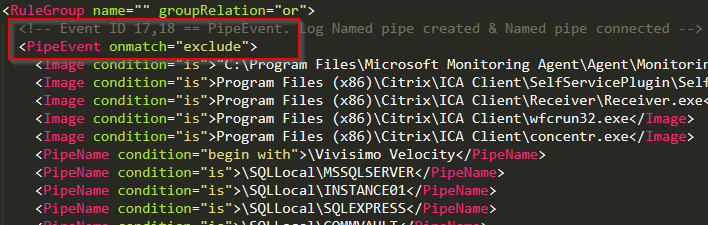
Sysmon modular’s configuration for these event IDs is an exclude first operation. Some common pipe event offenders are listed in the resultant config file, shown below.
Links:
https://book.hacktricks.xyz/pentesting/pentesting-smb
EID19 WMIEventFilters
EID20 WMIEventConsumer
EID21 WMIEventConsumertoFilter
WMI events can be noisy and will depend on the environment. Enabling full logging of WMI can cause a lot of logs. The default configuration parameters for modular are to include events where any of the EventFilters, EventConsumers, or EventConsumertoFilters are listed as created in the produced event content.
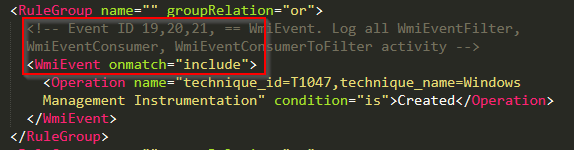
I was unable to generate a matching event using the command line in an attempt to have wmic open a command shell.
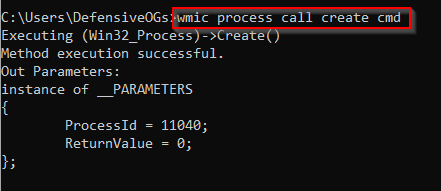
It is probable that Olaf has implemented the best possible solution for the noise of WMIC and related events. Additional investigations may be warranted, though at this time, capturing WMI events in this fashion is recommended.
Link:
https://redcanary.com/threat-detection-report/techniques/windows-management-instrumentation
DNS events are useful and when coupled with event ID 3, network connection and file write events can help produce a complete picture. However…….like a lot of things on a network, these can be very noisy. The modular approach to this has been to exclude known domains and log the rest.
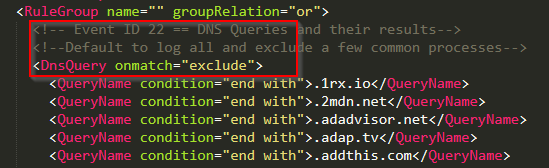
About 20% of the logged Sysmon events on this lab system were EID22, so clearly, this event is up for review as to its usefulness. In the grand scheme of logging, threat hunting, ETW, investigations, etc, I might err here on the side of relying on my resolver’s logs, proxy-based defenses, and its logging capabilities, rather than on the endpoint.

Another really cool addition to the Sysmon event family was this one! As a forensic investigator might say, “show me the malware.” A lot of hackers clean up after themselves and this tool allows us the opportunity to retain archival copies when files are created in defined spaces (userland) and are subsequently deleted, thus event ID 23 – FileDelete.
This event was harder to trigger than I’d imagined, prior to reviewing the structure of sysmon modular’s config. Let’s review, for example, the \Downloads\ section of the config.

I tried to create files that matched these extensions (caught by EID 11) and then delete them. This did not result in the expected events. After reviewing these groupRelation configuration parameters, it appeared that the logical “and” operator was the issue. After modifying the config file and updating the local operating installation, I was able to trigger EID23 under these defined conditions. As of December 28, 2020, the modular repo could use a pull request to fix this logical flaw. The fix appeared to be as simple as shown below (“or” not “and”).

A selection of the filtered event logs are shown below.
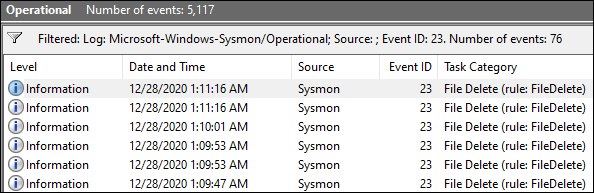
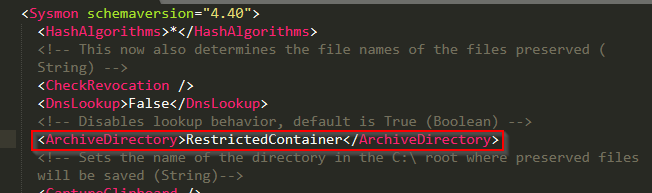
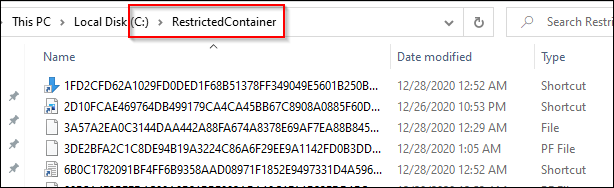
And finally, the files deleted from userland were copied to the RestrictedContainer as directed by the Sysmon configuration.
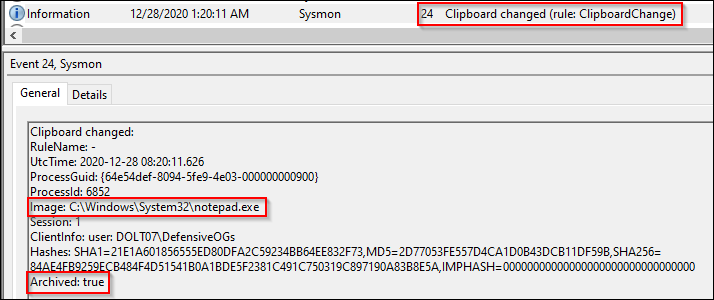
This event was initially reviewed with skepticism, since…well… copies of the contents of the clipboard may end up in another archive location. This content will include passwords and other sensitive materials, so caution should be taken to implement this.
Sysmon version 13 added process tampering to address Johnny Shaw’s process herpaderping technique (based on hollowing, etc). To confirm this would catch the technique, after compiling the project, I used the compiled ProcessHerpaderping.exe file and executed it.
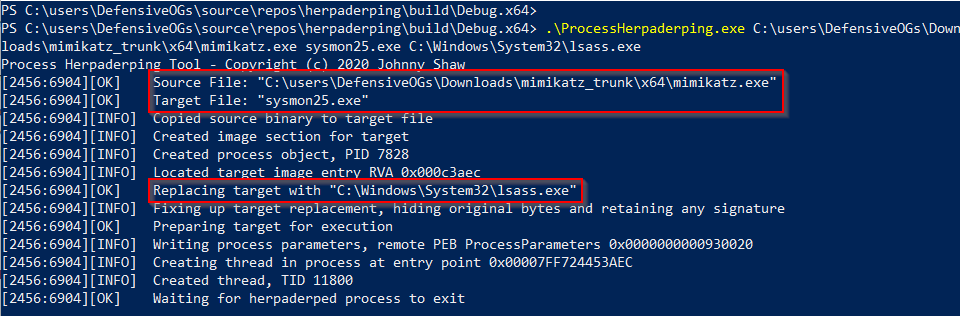
As shown in the previous screenshot, I used ProcessHerpaderping.exe with the mimikatz.exe to build a file called sysmon.exe stuffed with lsass.exe’s signature bits.
This results in capture!!!! We can all catch process tampering now.
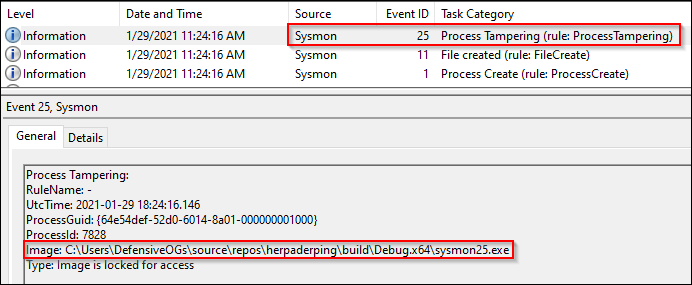
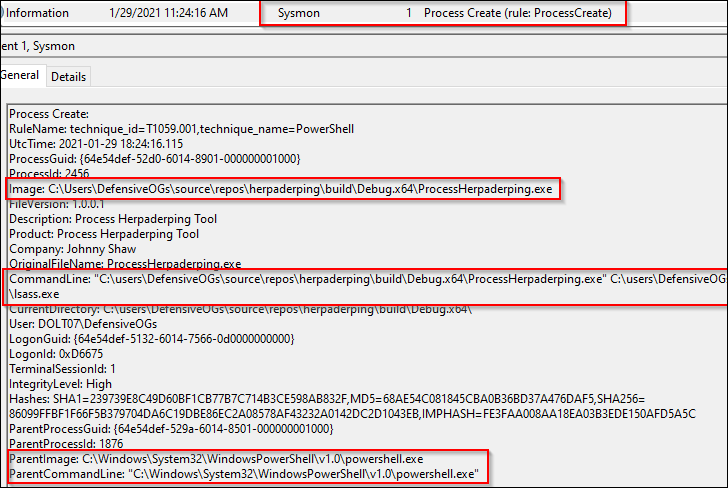
But, let’s take a quick look at the reverse of this process. First, we reviewed the Event ID 25, Process Tampering. But, the first event, Event ID 1, caught a process creation event. As shown below, we also see the partial command line. Possible IOC? Sorry about the next screenshot, for readability’s sake, I cropped it – but, whole command here:
.\ProcessHerpaderping.exe mimikatz.exe sysmon25.exe C:\Windows\System32\lsass.exe
We also see the .exe created by this process in the Event ID 11: File Creation.
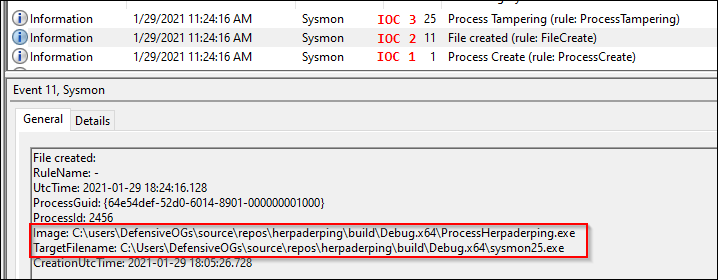
Looking at the event viewer, it is clear that some flags went off prior to execution, and at a minimum we should be able to help the forensics team sort out what happened.
Well, there is one more.
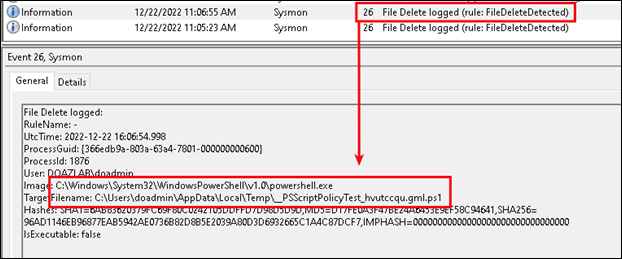
Let’s say the adversary wanted to cover their tracks by deleting their artifacts. This Event ID strikes me as an either/or EID23 (file delete archive) or EID26 (file delete). Really, you could grow your archive location to an obscene size if you are archiving everything. But maybe that is exactly what you want. If so, go with Event ID 23 and archive the deletions that match your config file’s logic. Otherwise, if all you want to know is when users delete matching files, go with Event ID 26.
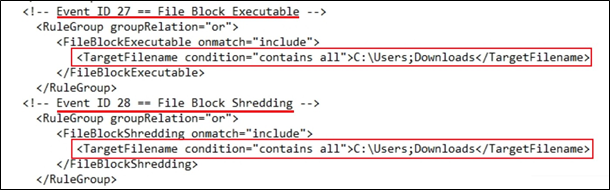
This is one of my favorite additions to the Sysmon engine. Incredibly articulate answer to a basic problem: We don’t want our users downloading exe’s from the Internet. The following config file chunk accomplishes blocking exe’s downloaded to c:\users\*\Downloads (thanks Olaf, H/T on the wildcard). Please note the config chunk below covers config changes necessary for EID 27 and EID 28.
Let’s assume I try to download a file from the Internet, like Chrome.exe. Denied. Game over. Easy peasy.
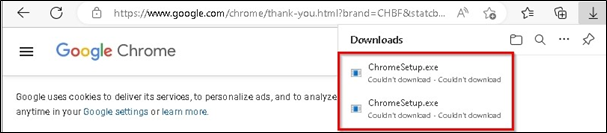
We have discussed userland and write permissions, administrative access, and lots of related topics. Let’s boil this down to this – users should have limited permissions to write to their local systems. The better your userland configuration is, the easier this protection will be to implement. By limiting write privileges on disk, you have also narrowed your optics focus in Sysmon. This demo relied entirely on the default browser configuration downloading the .exe to C:\users\someuser\Downloads\ and could be easily bypassed. Limit write access and configure those locations for denial with Sysmon.
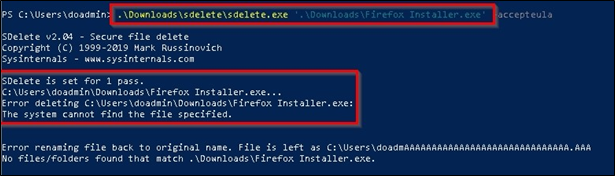
This is the latest event ID added to Sysmon and was designed to deny shredding tools like sdelete from thrashing files on disk. As an example shown below, we see the adversary trying to shred the malicious Firefox Installer.exe file from the downloads directory. Sysmon stepped in here and denied the operation.
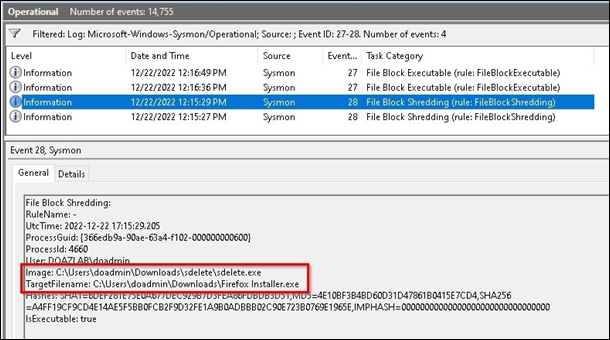
In event logs, we see the following. Sysmon blocked the shredding operation.
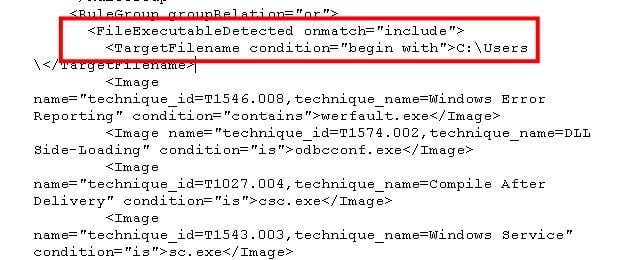
This event ID was designed to capture executables, specifically PE format type which includes EXE’s, DLL’s, and object code. The configuration file will also need to be updated and, as always, Olaf and Falcon Force have the bits needed to understand proper implementation. In testing, we had to add a chunk under the <include> bits to cover userland at c:\users\.
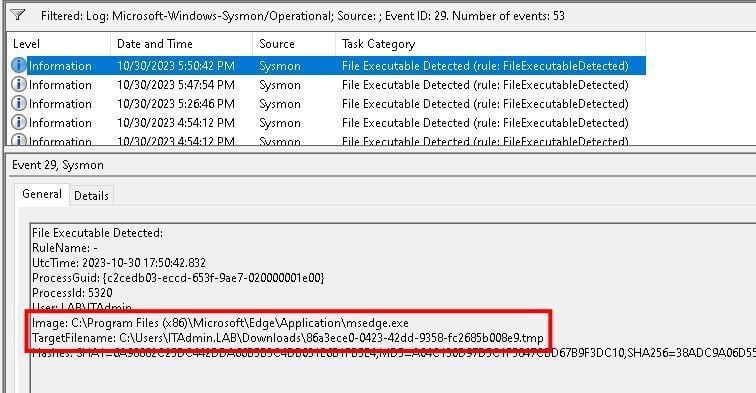
We tested three specific conditions. We tested a file download with Edge, which got caught.
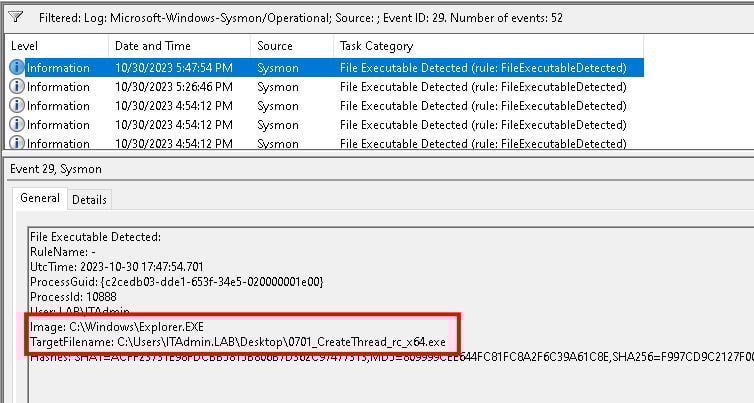
We tried to copy a file over an RDP session with Explorer and got caught.
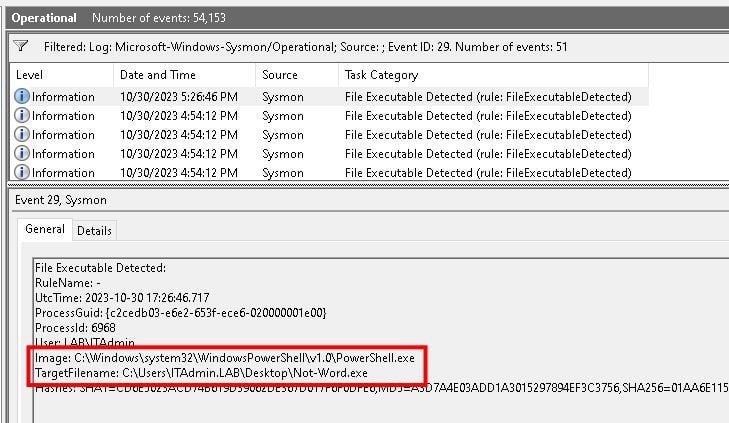
In summation, this addition will provide another opportunity for high-level visibility into the end user environment and what they might be up to at any given point. While noise was limited due to the amazing work implemented in the Sysmon Modular framework, our recommendation will remain implement first, and work through your log noise reduction strategies later.
Well, there is one more.
And that’s it. It was a long journey to get here and I’d like to thank a few folks who made this possible.
@bhinfosecurity for a platform
@strandjs for all the support
@olafhartong for modular
@markrussinovich for Sysmon
Happy hunting!
Want to learn more mad skills from the person who wrote this blog?
Check out these classes from Jordan and Kent:
此内容由惯性聚合(RSS阅读器)自动聚合整理,仅供阅读参考。 原文来自 — 版权归原作者所有。