







Chris has been working in security for 30 years, mainly doing penetration testing in both consulting and corporate environments. Chris is the author of the Nikto web scanner, founder of the RVAsec conference, and has been involved in many OSS projects and community efforts.

Dirsearch is an open-source multi-threaded “web path discovery” tool first released in 2014. The program, written in Python, is similar to other tools such as Dirbuster or Gobuster, and aims to quickly find hidden content on web sites. Dirsearch is still under active development, unlike Dirbuster (and possibly Gobuster), and is focused on path discovery unlike Gobuster.
It has several features to aid in discovery and can be easily customized to handle web servers which respond in unusual ways or require additional headers.
It operates by reading in a list of files and paths (a “wordlist”), optionally performing transformations on the list, making an HTTP request for each file, and reporting the results based on internal or user-defined rules.
Hidden (or unlinked, if you prefer) content on web sites can lead to security issues in multiple ways. This content could include administration panels, installation files, full applications, documentation, test programs, source code repositories, and neglected or forgotten content, among other things. Sometimes this leads to simple information disclosure, and other times can lead to full compromise.
No matter the type of test, knowledge of the full attack surface is critical to properly assessing it.
Dirsearch requires Python and can run on any platform which supports Python version 3.9 or higher. It can be installed with pip, manually via GitHub, many operating system package managers, or in Docker. This post details the GitHub installation method.
Git installation:
git clone https://github.com/maurosoria/dirsearch.git --depth 1For installation on some operating systems, such as Apple OS X, Python’s virtual environment must be used to properly install dependencies. This can be easily accomplished after the venv program is installed.
python3 -m venv venv_dirsearch
source venv_dirsearch/bin/activate
python3 -m pip install -r requirements.txt
Verify the installation is successful by checking the installed version.

See the project’s README document on GitHub for other installation options.
Dirsearch is only as good as the wordlist used. A wordlist is a simple text file with paths and/or filenames (with or without file extensions). Dirsearch reads this file, transforms each line if requested by the user, and then makes the HTTP request to look for the file.
Dirsearch includes a word list located at db/dicc.txt which includes nearly 10,000 files. Other wordlists can be obtained around the internet, for example from the Seclists repository. Some lists are product specific, such as Java Servlet names, and some are generic. Your selection may vary from website to website. A large and generic list, such as big.txt, is often a good place to start.
The default wordlist uses custom variables such as %EXT% to denote where the file extension should be placed. Only these variables will be replaced by default—other lines will not have file extensions. To force the use of extensions on every file, use the -f or —force flag.
Note that if you use a non-default wordlist with Dirsearch, you can override the default extensions in the wordlist with the --overwrite-extensions flag. For example, a wordlist with the file admin.php combined with the option --overwrite-extensions html,jsp will test for:
admin.html
admin.jspThe simplest way to use Dirsearch is to provide a URL with the -u flag. This will run the program with the default options using the built-in wordlist.
python3 dirsearch.py -u https://example.com/The program will report what is being tested in the initial output.
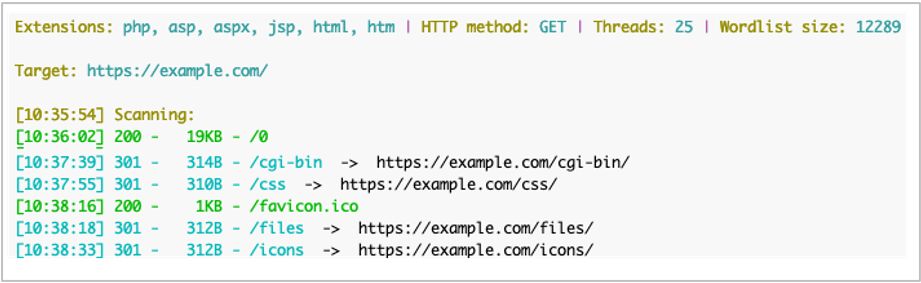
As seen in the screenshot above, the default output can be quite verbose and includes things you probably don’t care about. To change this, use the -x (—exclude) flag to stop reporting files which reported as “not found” with HTTP response code 404.
python3 dirsearch.py -u https://example.com/ -x 404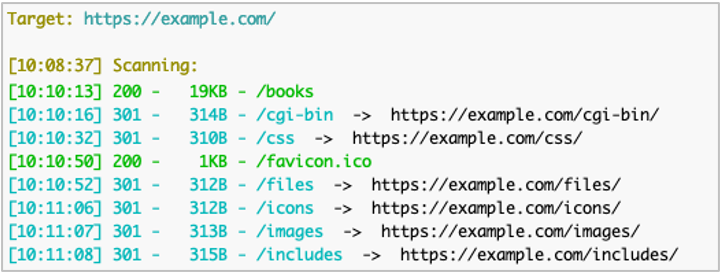
This output is more helpful, as we can see paths which are there (200 “OK”) and paths which redirect to someplace else (301 “Redirect”). However, we don’t want to have to load each of those paths in a web browser to see where they end up because we are lazy busy. To have Dirsearch do this for us, we can add the -F (--follow-redirects) option.
python3 dirsearch.py -u https://example.com/ -x 404 -F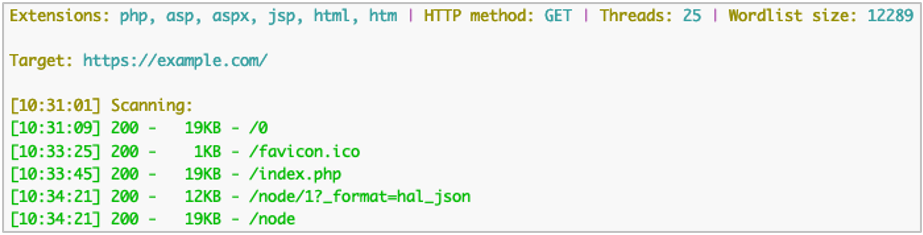
Now Dirsearch has followed redirects and is only reporting the ones which are not 404 “Not Found” afterwards.
Finally, we know the web application is built in PHP, so we will focus the scan and improve performance by only looking for files we think might be there. We can accomplish this with the -e (-extensions) option along with a list of file extensions.
python3 dirsearch.py -u https://example.com/ -x 404,403 -F -e php,htm,htm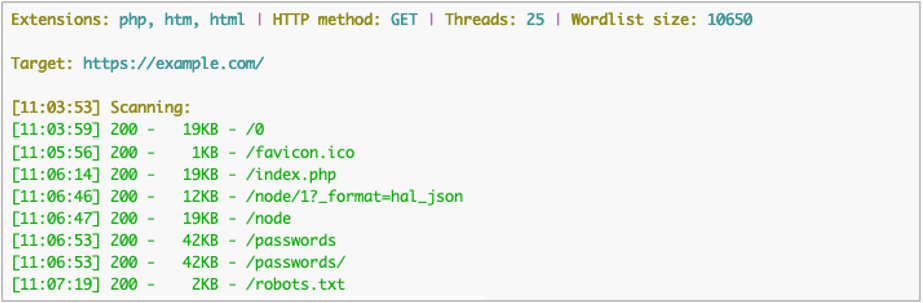
While the output does not appear different, fewer requests were made due to the limited file extensions.
The previous output example actually has a false positive result with the /passwords path. The target server answers 200 for this even though it’s not there, a common problem when scanning the web. The response body for the false positive page has the string F5 in it that we can use to filter out the incorrect results because it only appears in pages which aren’t found.
For this, we’ll use the --exclude-text option (other similar options include --exclude-regex and --exclude-size).
python3 dirsearch.py -u https://example.com/ -x 404,403 -F -e php,htm,html --exclude-text "F5"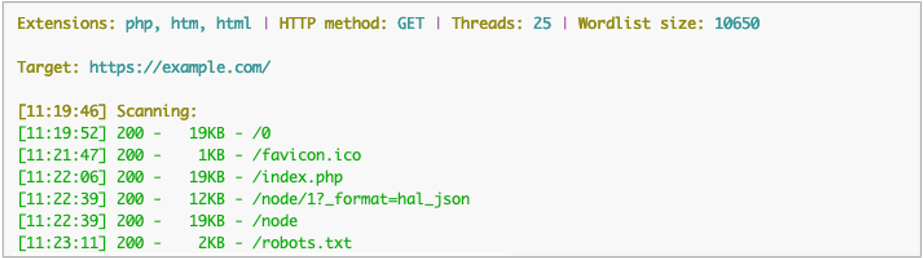
The program examined the response body, matched F5, and ignored the results.
Some scenarios may require additional headers, such as an access token or authorization header. This can be done with the -H (—header) option, for example:
python3 dirsearch.py -u https://example.com/ -x 404,403 -F -e php,htm,html --exclude-text "F5" -H "Authorization: Basic RnVubnk6WW91VGhvdWdodFRoaXNXYXNSZWFsCg=="This will send the Authorization header with each request.
If we want to dig into a web site even further and use the response body to find additional paths, we can sometimes get better results. To assist with this, Dirsearch has the --crawl option.
Compare the output from the following two commands.
python3 dirsearch.py -u https://www.google.com/ -x 301,302,400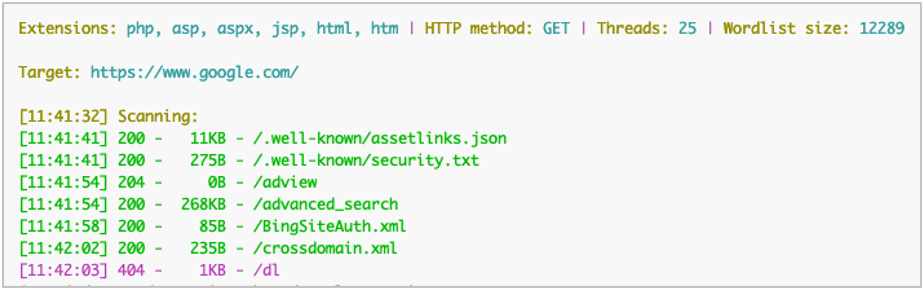
python3 dirsearch.py -u https://www.google.com/ -x 301,302,400 --crawl
In the output with --crawl, more paths were reported on the target server because it extracted them from the page’s response HTML. If this is combined with recursive scanning, (-r or --recursive) the scanner will continue to run against each path identified. While this can lead to better results, be aware that this can also generate a lot of requests and run for an extended time.
Finally, if we want to save the results, Dirsearch has extensive options including file and database types, including simple, plain, JSON, XML, Markdown, CSV, HTML, SQLite, MySQL SQL, and Postgres SQL. For these output formats, combine the -O (--output-format) and -o (--output-path) options, for example:
python3 dirsearch.py -u https://example.com/ -O xml -o results.xmlIt can also connect directly to Postgres and MySQL database with the --postgres-url and -–mysql-url options, respectively.
Finding a hidden file or admin panel can sometimes lead to a full compromise. Knowing your target’s attack surface as fully as possible will help lead you to the best results during a penetration test.
Dirsearch has many additional options that can influence both scanning and reporting to help you get there. As you become more familiar with the tool, explore these additional flags to find your most reliable scanning methods, even though it will likely vary from target to target.
Ready to learn more?
Level up your skills with affordable classes from Antisyphon!
Available live/virtual and on-demand

此内容由惯性聚合(RSS阅读器)自动聚合整理,仅供阅读参考。 原文来自 — 版权归原作者所有。