


Recently, a customer asked me if there was a way they could generate alerts from the new antivirus product they deployed without executing any actual malware on the system they were testing it on. The computer they wanted to test was an especially sensitive and business-critical system, so it was important that they perform the test without executing any third-party code. Additionally, I wouldn’t have direct access to the system they were testing (this question came up after their pentest was already complete), so the methods I shared with them needed to be easily communicated to a system administrator and not rely on any specialized “hacking tools” like Metasploit that might not be available inside the environment.
I thought this was an interesting scenario that other defenders might also face, so I decided to share some of my suggestions here on the BHIS blog. Keep in mind, this is by no means an exhaustive list of all the different tests that can be done of an antivirus product nor all the different ways that any given feature of an antivirus product can be tested. This is just a starting point for some relatively easy tests that can be performed without any third-party tools.
The EICAR test file was designed by the European Institute for Computer Antivirus Research (EICAR) and Computer Antivirus Research Organization (CARO) specifically for testing antivirus programs. It contains only the following ASCII text (along with some optional trailing whitespace), and can easily be created by pasting the text into a text editor and then saving the file to disk:
X5O!P%@AP[4\PZX54(P^)7CC)7}$EICAR-STANDARD-ANTIVIRUS-TEST-FILE!$H+H*
EICAR Test File Contents
The two screenshots below show a simple example of pasting the EICAR string into Windows Notepad and then saving it as a file with the “.EXE” extension.
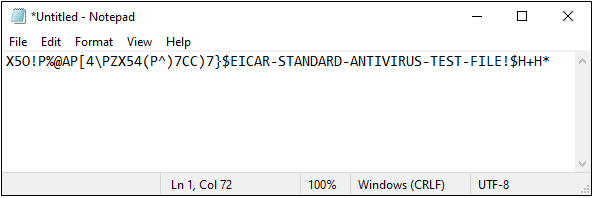
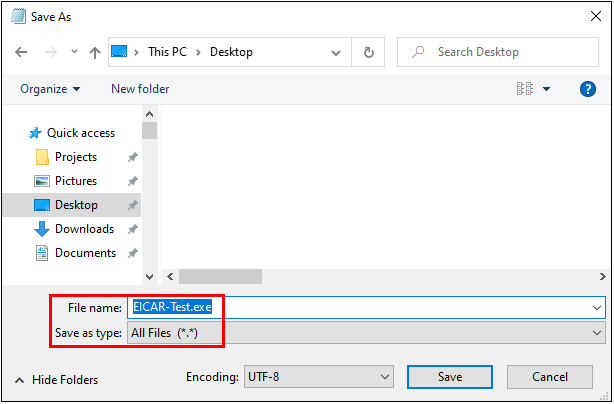
The file can also be downloaded directly from the EICAR website here: https://secure.eicar.org/eicar.com.txt
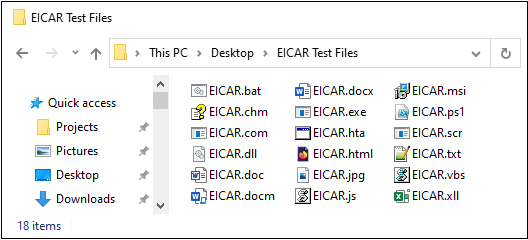
Once the EICAR file is saved to disk, it should generate an alert from any antivirus products installed on the computer. Some antivirus products limit automatic file scanning to only those files that have certain file name extensions (e.g., “.EXE”), so I recommend saving several copies of the file with different extensions that you want to test. If some of the files get detected and others don’t, you’ll know that your antivirus product doesn’t automatically scan certain file extensions. For example, you might notice that saving the file with a .TXT or .JPG extension doesn’t cause it to get detected while saving it as a .COM, .EXE, or .DOCM does.
Here’s an example that shows a folder where I saved multiple copies of the file under names with various file extensions:
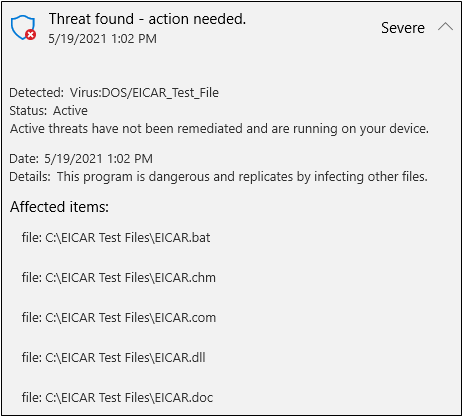
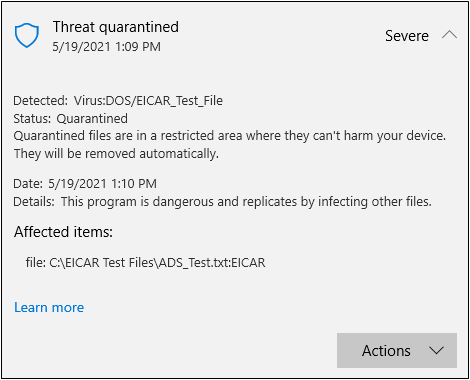
And here’s part of the alert that was shown when Windows Defender detected those files:
On computers that use the NTFS filesystem, malware can also be stored in a file’s Alternate Data Stream (ADS) rather than inside the file itself. This technique has been used by malware authors for years in attempts to hide malware on disk since some antivirus products may not check for malicious data stored inside Alternate Data Streams.
Using PowerShell, you can easily create an Alternate Data Stream that contains the EICAR test file and confirm whether your antivirus software scans for malware inside an ADS. The first PowerShell command below creates the file, “ADS_Test.txt”, which just contains the text string, “Nothing to see here.” This file doesn’t actually contain any malicious code, but the second command adds an Alternate Data Stream named “EICAR” to the file and stores the EICAR string inside the ADS.
set-content .\ADS_Test.txt “Nothing to see here.”
set-content .\ADS_Test.txt:EICAR ‘X5O!P%@AP[4\PZX54(P^)7CC)7}$EICAR-STANDARD-ANTIVIRUS-TEST-FILE!$H+H*’
PowerShell Commands for Creating an ADS Containing the EICAR String
The screenshot below shows execution of these two commands, along with a “Get-Content” command in between that just confirms the presence of the “ADS_Test.txt” file by displaying its contents.

Like the test files that were created in the last section, the “malicious” Alternate Data Stream was also detected by Windows Defender.
Similar to the EICAR string, Microsoft’s Antimalware Scan Interface (AMSI) has its own test string, shown below.
‘AMSI Test Sample: 7e72c3ce-861b-4339-8740-0ac1484c1386’
AMSI Test String
AMSI allows antivirus products to scan for malicious code inside of commands and scripts that are executed inside of PowerShell processes, Microsoft Office Macros, and Windows-supported scripting languages like VBScript and JavaScript. This functionality is critical in a defensive product since many payloads can be downloaded into memory and executed without ever being written to disk – thus preventing them from being detected by the traditional, file-scanning antivirus functions tested in the previous sections.
To test whether AMSI is enabled and detecting malware on your system, open a PowerShell or PowerShell ISE window, and paste in the test sample text, shown above. If AMSI is enabled and working on your system, you should see a message like the one shown below.
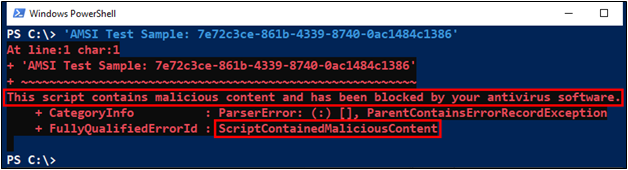
If, for some reason, the test string isn’t recognized as malicious, you can also try strings like the ones below that are present in well-known hacking tools.
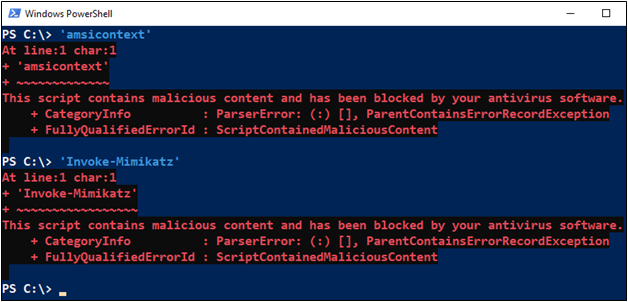
If you don’t have a solid understanding of PowerShell error messages, be sure you include the single-quote characters at the beginning and end of each string when performing these tests. The test strings aren’t valid PowerShell syntax by default, so if you run them without the quotes, other error messages will be displayed that could cause some confusion.
Successful detection of the malicious strings will generate an error that specifically states, “This script contains malicious content,” as opposed to more generic error text like “The term ‘…’ is not recognized…” or “ObjectNotFound”.
The last example I’ll demonstrate here simulates behavior that might occur after successful malware execution, rather than simulating the malware’s presence on disk or in memory. Behavior is less frequently detected by antivirus products than the presence of known malware data on disk or in memory, so depending on the product you’re using, you may need to supplement your antivirus with other endpoint detection and response (EDR) options to see a detection.
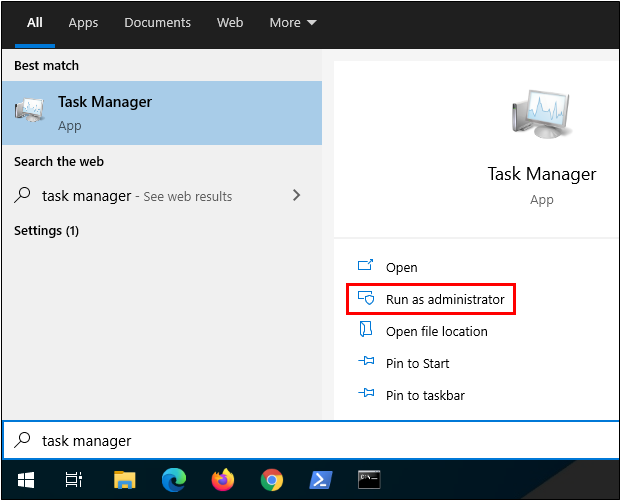
To perform this test, first execute Windows Task Manager with elevated, Administrator privileges.
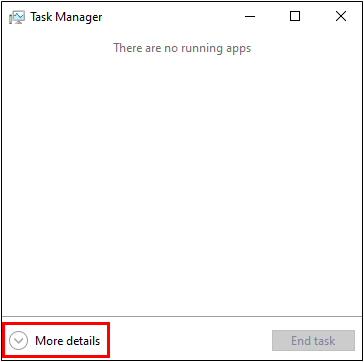
After you start Task Manager, click the “More details” button near the bottom of the window.
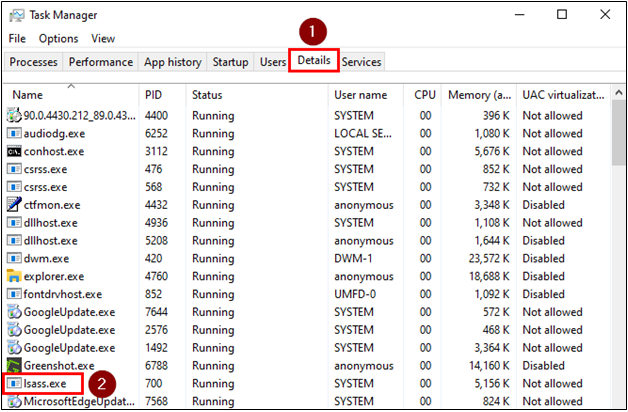
Then click the “Details” tab and scroll down in the list until you find the “lsass.exe” process.
Right-click on “lsass.exe”, and then click on “Create dump file” in the menu that appears.
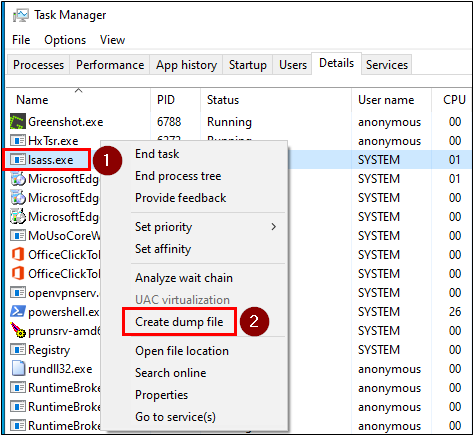
At this point, Task Manager will attempt to read the memory contents of the LSASS process and save the data to a file. The LSASS process memory is commonly targeted by attackers since it may contain login credentials or password hashes for users that have logged into the system. When this process begins, you’ll see a window appear like the one below.
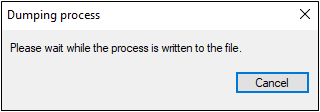
If your antivirus or other endpoint defense product detects the malicious behavior, the Task Manager window may close abruptly, or you may see a notification from the defensive software. If the behavior is not detected, on the other hand, the dump file will be created in the current user’s “Temp” directory, and you’ll see the following window appear:
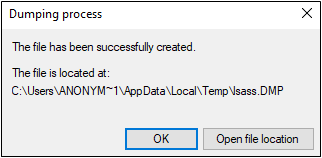
Double check the Temp directory to be sure that the file was created successfully – this will also confirm that the malicious behavior was not blocked. If the file exists, be sure to delete it when you’re done, since it’s likely to contain credentials or other information that would be useful to an attacker, should your system get breached.
Like I mentioned at the start of this article, this isn’t meant to be a perfect or complete test, but hopefully it will give you a starting point from which to tell if your antivirus software is working the way you expect it to – especially in environments where your ability to upload externally generated test files to systems may be limited.
Keep in mind that detection of the EICAR and AMSI test data doesn’t necessarily indicate that an antivirus product parses files of a given type successfully. After all, the test files created in this article only contain a single, well-known ASCII string – so they’re extremely easy to detect through basic means and may not necessarily represent properly formatted program executables or document files that might have malicious code stored in a macro, or at the very least, some place other than line one. ?
Detection of the EICAR test file does at least confirm that your antivirus product is scanning files though. The same is true if the AMSI test string is detected – at least you know that your antivirus product is hooking into AMSI, scanning code, and generating alerts.
Last, if you’re interested in a more thorough assessment of the endpoint security controls in use in your environment than just those I’ve described here, check out our Services page or Contact us for information about our Command & Control and Data Exfiltration Assessment service, and let us show you the blind spots your antivirus, EDR, and network security controls may miss.
Want more content from Michael? Why not take a class with him?
Available live/virtual and on-demand!
此内容由惯性聚合(RSS阅读器)自动聚合整理,仅供阅读参考。 原文来自 — 版权归原作者所有。