







Service Message Block (SMB) shares can represent a significant risk to an organization. Companies often lack a realistic understanding of the exposure that SMB shares represent. Effective management typically requires a sound information management program focused on identifying where critical information resides, actively controlling access to that information, and routinely auditing permissions and access patterns.

Often, when organizations are asked about discovery of sensitive data, administrators immediately indicate that mapped network drives are routinely audited for sensitive content and that permissions on those drives are rigorously guarded.

Unfortunately, mapped network drives are typically the tip of the iceberg when it comes to content exposure on any given network. In this post, we will walk through one method to identify potentially sensitive content exposure via SMB shares at scale. At the end of the post, strategies for reducing the amount of exposure present in an environment will be presented.
A favorite tool for SMB enumeration is the PowerSploit PowerView script. It has been ported to other languages and much of its functionality serves as the basis for the BloodHound project. Two functions are most valuable for performing discovery on a Windows Active Directory (AD) network. The first, Get-NetComputer, is used to collect target computer names so we can create triage lists for analysis of our network shares. The second, Invoke-ShareFinder, actually does the enumeration for us, dutifully asking each computer for a list of shares and checking to see if our selected user has access.
When performing this activity, it is useful to start with a user account that is a member of the ‘Domain Users’ group only. This will reduce the false positive rate on share exposure and identify the most egregious cases where the share is exposed to everyone on the domain. After identifying and mitigating worst cases, additional group memberships can be added to simulate what information is exposed to a typical user.

When assessing share content, I normally generate triage computer lists so I know exactly what I am looking at, what potential value it has for attack, and so I can potentially avoid pitfalls like honeypots that have incomplete Active Directory attribute information. This strategy also works from a defensive perspective. Generally, in modern Windows networks, more content is shared on data center resources than on workstation segments, enumeration of the data center resources may not appear anomalous, and older operating systems (like Windows Server 2003, Windows Server 2008, and Windows Server 2012 RTM) represent increased risk to the environment.
As an example, all of these operating systems have one characteristic in common, WDigest is enabled and that means potential for cleartext credentials in memory. Other issues like lack of support from Microsoft (Windows Server 2003 and Windows Server 2008) and age in the environment (it may be easier to escalate privileges due to configuration drift) also make them attractive from an attack perspective. As a defender, it is probably a good idea to address these hosts first.

To a lesser extent, the issues described above also exist in the workstation segment. However, we generally find administrative access in those environments more than sensitive content. Obviously, that is not a hard and fast rule, as one environment can differ significantly from another.
In order to generate the triage lists described above, we need to get our hands on PowerSploit PowerView or SharpView. Commands shown below are for PowerView 2.0 but they can be adapted to work with PowerView 3.0 and SharpView. I personally prefer PowerView 2.0 syntax, but similar analysis can be accomplished using Get-DomainComputer and Find-DomainShare in PowerView 3.0.
You may need to create an exception in your endpoint suite or Endpoint Detection and Response (EDR) tool for retrieval and execution to be successful. The script can be retrieved using a PowerShell download cradle, downloaded directly to disk, or copied and pasted (in raw form) into the PowerShell interpreter window or PowerShell Integrated Scripting Environment (ISE). The following commands will generate triage lists for all typical Windows operating systems. Remove the ones that do not exist in your environment.
PS C:\> iex(iwr “https://raw.githubusercontent.com/PowerShellEmpire/PowerTools/master/PowerView/powerview.ps1” -usebasicparsing)
PS C:\> Get-NetComputer –OperatingSystem *2003* | Out-File –Encoding ASCII Windows2003Hosts.txt
PS C:\> Get-NetComputer –OperatingSystem *2008* | Out-File –Encoding ASCII Windows2008Hosts.txt
PS C:\> Get-NetComputer –OperatingSystem *2012* | Out-File –Encoding ASCII Windows2012Hosts.txt
PS C:\> Get-NetComputer –OperatingSystem *2016* | Out-File –Encoding ASCII Windows2016Hosts.txt
PS C:\> Get-NetComputer –OperatingSystem *2019* | Out-File –Encoding ASCII Windows2019Hosts.txt
PS C:\> Get-NetComputer –OperatingSystem *XP* | Out-File –Encoding ASCII WindowsXPHosts.txt
PS C:\> Get-NetComputer –OperatingSystem *7* | Out-File –Encoding ASCII Windows7Hosts.txt
PS C:\> Get-NetComputer –OperatingSystem * 8* | Out-File –Encoding ASCII Windows8Hosts.txt
PS C:\> Get-NetComputer –OperatingSystem *10* | Out-File –Encoding ASCII Windows10Hosts.txt
If you have poor Active Directory hygiene (computer accounts exist for devices that no longer exist), it can be useful to also filter on the pwdLastSet attribute to remove devices with a high likelihood of being unresponsive. By default, in Active Directory, computers reset the password associated with their account every 30 days. Usually, I provide a grace period of about 6 months in customer environments for devices. Typically, this is not necessary unless you aim to try to avoid detection. Full enumeration is also likely to produce complete results (unless a device is turned off at the time of the activity.)
Next, the triage lists generated above are used as input for the Invoke-ShareFinder function. Invoke-ShareFinder simply requests a share listing from each asset in the list and, as we will configure it, will check to see if the identity we are using has access to the exposed shares. Commands for each triage list are shown below. The only variations are the actual input list and output file name.
PS C:\> Invoke-ShareFinder –ComputerFile Windows2003Hosts.txt -NoPing –ExcludeIPC –ExcludePrint –CheckShareAccess | Out-File –Encoding ASCII Windows2003Shares.txt
PS C:\> Invoke-ShareFinder –ComputerFile Windows2008Hosts.txt -NoPing –ExcludeIPC –ExcludePrint –CheckShareAccess | Out-File –Encoding ASCII Windows2008Shares.txt
PS C:\> Invoke-ShareFinder –ComputerFile Windows2012Hosts.txt -NoPing –ExcludeIPC –ExcludePrint –CheckShareAccess | Out-File –Encoding ASCII Windows2012Shares.txt
PS C:\> Invoke-ShareFinder –ComputerFile Windows2016Hosts.txt -NoPing –ExcludeIPC –ExcludePrint –CheckShareAccess | Out-File –Encoding ASCII Windows2016Shares.txt
PS C:\> Invoke-ShareFinder –ComputerFile Windows2019Hosts.txt -NoPing –ExcludeIPC –ExcludePrint –CheckShareAccess | Out-File –Encoding ASCII Windows2019Shares.txt
PS C:\> Invoke-ShareFinder –ComputerFile WindowsXPHosts.txt -NoPing –ExcludeIPC –ExcludePrint –CheckShareAccess | Out-File –Encoding ASCII WindowsXPShares.txt
PS C:\> Invoke-ShareFinder –ComputerFile Windows7Hosts.txt -NoPing –ExcludeIPC –ExcludePrint –CheckShareAccess | Out-File –Encoding ASCII Windows7Shares.txt
PS C:\> Invoke-ShareFinder –ComputerFile Windows8Hosts.txt -NoPing –ExcludeIPC –ExcludePrint –CheckShareAccess | Out-File –Encoding ASCII Windows8Shares.txt
PS C:\> Invoke-ShareFinder –ComputerFile Windows10Hosts.txt -NoPing –ExcludeIPC –ExcludePrint –CheckShareAccess | Out-File –Encoding ASCII Windows10Shares.txt
If you have a large environment, the above commands can be executed faster by adding the ‘threads’ parameter to the Invoke-ShareFinder portion of the command. Doing so allows the script to evaluate the elements of the computer listing in parallel fashion. The resulting output files, generated above, will serve as the source for our sensitive content discovery operation, described in the next section.
With our share lists generated, it’s time to find that buried treasure!!!

On a test, I would typically generate a single list at a time and search through the results individually to identify what a group of hosts running the same operating system might expose. However, for defensive purposes, it is useful to investigate the shares at scale. This can be most effectively accomplished using a tool that understands regular expressions and multi-file searching. Some of my favorite searches are demonstrated below using the Notepad++ text editor. Similar analysis can be accomplished in Linux using the cat, sort, and grep utilities.
First, select all of the files containing share information, right click, and select “Edit with Notepad++”.
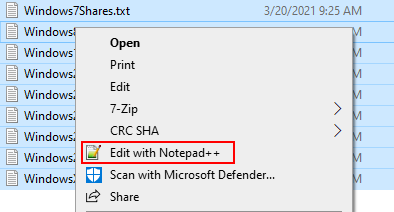
With all of the files open simultaneously, we will investigate some common exposures that pose risk to the organization. It’s likely that in a given environment, many more cases will be present. However, the analysis below simply serves to illustrate latent risk due to SMB share exposure.
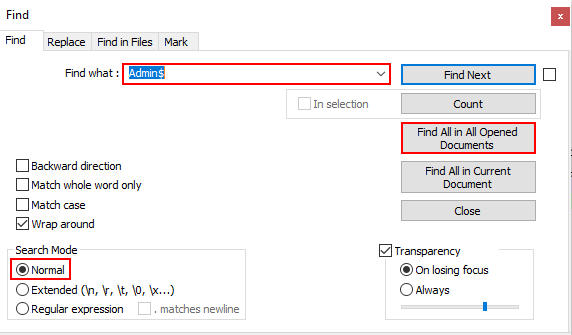
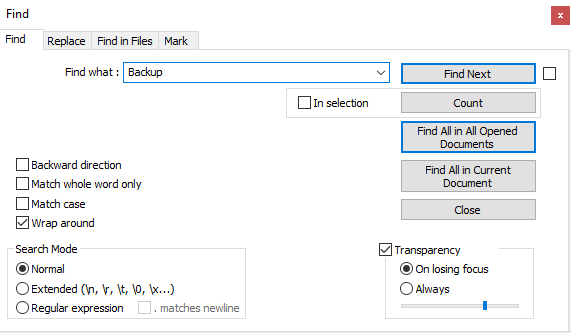
Probably the most notorious and useful shares that can be exposed in the context of an attack are the “C$” and “Admin$” shares. Discovery of these shares means that administrative access is extremely likely. To discover these shares, we can use the normal mode search feature in Notepad++ as shown below. Select the Search > Find… menu option or Ctrl+F to display this dialog.
Enter the text “Admin$” in the search bar, select the normal search mode, and click the “Find All in All Opened Documents” button.
The Notepad++ search results pane will identify all discovered instances across the group of open files. This situation can be a windfall for an attacker. Credential dumping via the registry or LSASS process may be possible.

Another favorite target is deployment shares. System Center Configuration Manager (SCCM), Windows Deployment Services (WDS), and the Microsoft Deployment Toolkit (MDT) are used to deploy new operating systems on the network in an automated fashion.
With the Find dialog open, enter the keyword ‘REMINST’, using normal search mode, and click the “Find All in All Opened Documents” button.

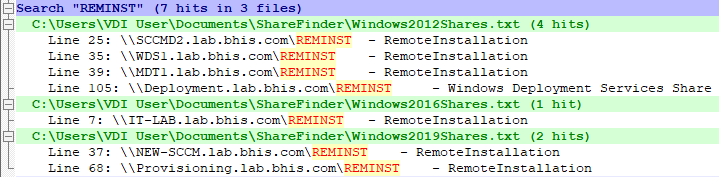
When folders in the shares exposed on these hosts are poorly protected, unattend.xml files and Windows Image (.wim) files may be accessible. Analysis on these resources often lead to discovery of valid local or domain credentials.
Administrators may share an entire drive on a given host. When this occurs, all of the accessible content on the drive is exposed to anyone with access to the share. Typically, the only locations that have significant restrictions with regard to read access, are the subfolders of the ‘C:\Users’ directory. By default, the system folder (C:\Windows), program files, and any other folders created in the root folder (C:\) can be inspected.
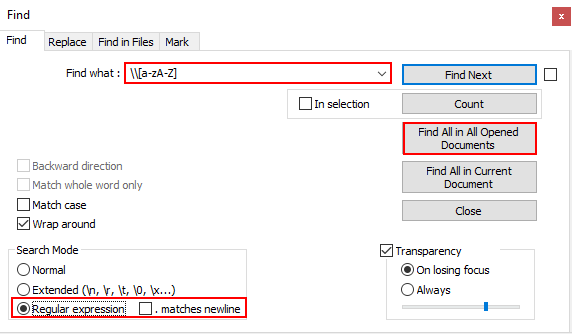
With the Find dialog open, enter the regular expression ‘\\[a-zA-Z] ’, using regular expression search mode, and click the “Find All in All Opened Documents” button. The regular expression above matches text that includes a backslash (two backslashes are used to escape the sequence) followed by a single letter (the text within the brackets is a character class definition set to match lower and upper-case alpha characters), followed by a space.
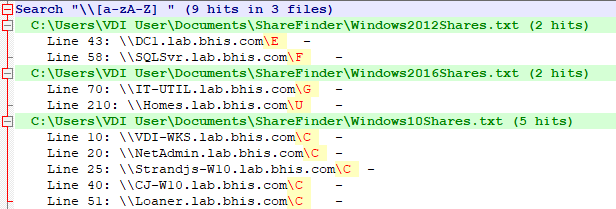
All of the shares listed in the search results are worth investigation. Older operating systems might have exposed unattend.xml files with credentials in them and root shares on servers might have very interesting content. In the above, why would a domain controller, SQL server, IT utility server, and file server containing home directories have the root of a drive shared out? Configuration files, scripts, and other content in these locations are likely to expose credentials.
Application developers often use SMB shares to publish changes to projects across the network. When those shares are not properly restricted, users on the network have access to browse source code of the application, at a minimum.
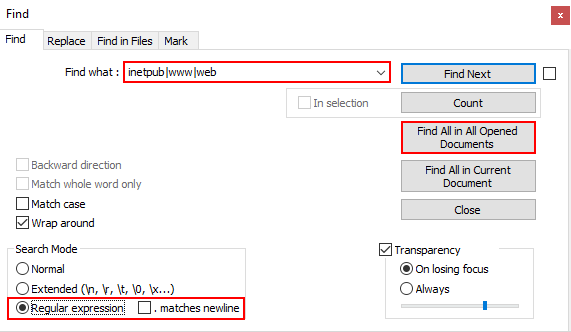
With the Find dialog open, enter the regular expression ‘inetpub|wwwr|web’, using regular expression search mode, and click the “Find All in All Opened Documents” button. The regular expression above serves as a multiple keyword search operation with the selected keywords separated by the pipe character (notice, no spaces between).
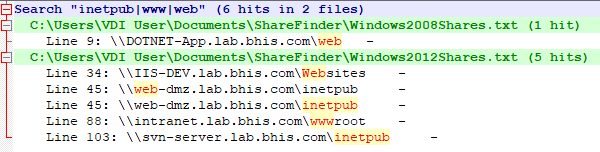
Shares that include custom application or web application source code are a serious issue. Where read access is possible, an attacker can investigate source code for programming issues, check configuration files for credentials, and is likely to have SQL access somewhere on the network as a result.
Where write access is possible, the situation gets much worse. If project files and source code are staged on the target share, an attacker can embed malicious code in the project file or source code of the application. When the project gets built or executed, the attacker gains access to the hosting server (or wherever the project is being built). On an application server, the attacker can also deploy malicious functionality, embedded in or disguised as legitimate functionality of the application. The Laudanum project is still one of my favorite web shells and is useful for executing commands in the context of the web application service account.
Backup shares are commonly observed in a target environment. Sometimes these shares are found to expose full digital backup storage. However, more commonly, the shares appear to be used by administrators to migrate databases and other resources to new platforms.
For this share, we return to normal search mode, enter the keyword ‘Backup’, and click the “Find All in All Opened Documents” button.
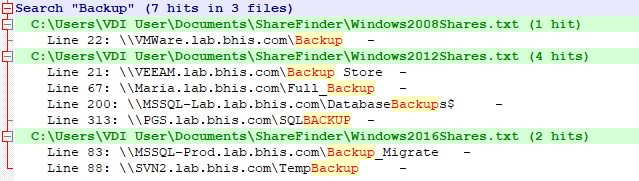
Backup shares can contain exceptionally dangerous content. Typically, in my experience, most of these shares contain backups for common SQL server implementations. However, on occasion, we discover some extremely interesting content.
The share on the ‘VMWare’ host is likely to contain Virtual Machine Disk (VMDK) files; potentially including those for domain controllers. VMDK files can be analyzed with tools like 7-zip without the need to actually install the software on a host. Even if the VMDK file for a domain controller is several years old, it is likely to include many valid and useful credentials. Consider the following questions as evidence that useful credentials would exist:
Believe it or not, we have found and exploited these conditions on several engagements.
The conditions presented above are only the tip of the iceberg. In your own environment, I’m sure that other opportunities will present themselves. Off the top of my head, I can think of a dozen additional searches that I like to conduct. However, the point of the exercise is not to comprehensively identify all the bad things we can find on SMB shares. It’s to get you thinking about what is being shared on your network and strategies you can used to mitigate the associated risk.
Administrators should review the list of shares to determine whether any given SMB share is necessary and appropriate given the context of the observed access. Any shares found to be unneeded should be disabled. Remaining shares should have permissions adjusted to address principle of least privilege and need to know requirements.

SMB shares incorporate two sets of permissions. The first is the actual NTFS permissions applied to the shared folder. The second are the share permissions assigned to the share itself. When a user browses to an SMB share, the server applies the most restrictive intersection of those two sets of permissions.
Where NTFS permissions are concerned, when an administrator does not make deliberate changes, the local ‘Users’ group on the system will have read access to all volumes. By default, on domain joined computers, the ‘Domain Users’ group is a member of the local ‘Users’ group. This means that any authenticated user can read the filesystem in a volume where those permissions are not changed.
With share permissions, unless the administrator explicitly creates the share and assigns a domain group as having permission to access the share, the default permissions are for the ‘Everyone’ group to have read access.
As you can probably already tell, shares created with default conditions in both cases, will typically allow any authenticated member of the ‘Domain Users’ group to read content on the share.

The second strategy is to correct these permissions across the breadth of shares identified by our earlier work. This can be a monumental undertaking depending on the scope and scale of the network under consideration.
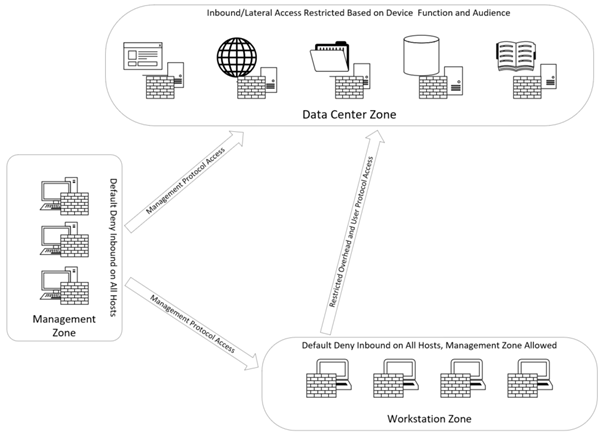
Segmentation is simply subdividing the target network into more manageable, and functional, chunks to ease the burden of administration. A segmentation project should always have the principal of least privilege and need to know (or access) concepts in mind during the design phase. The end goal is to create choke points on the network where only authorized individuals (or computers) and protocols are able to pass between network segments based on a functional need. As such, true segmentation always implies that appropriate Access Control Lists (ACLs) are implemented between segments.

On user segments, this strategy should be taken a step further to prevent workstation to workstation communication. On a Windows Active Directory (AD) network, workstation to workstation communication should be considered anomalous. Often, an attacker can exploit lateral communication within a workstation segment to accumulate privileges on route to full environmental takeover. By preventing this communication, the attacker is forced to directly attack data center (or other accessible) elements of the network.
In addition, the user segment should have the minimum access necessary into the data center (or other protected segments) and no more. Standard user workstations should not be able to directly access critical resources on the network using unauthorized protocols. For example, a standard user workstation should not be able to initiate an RDP session to a server (especially a Domain Controller). Web management consoles like VSphere, VEEAM, and other core services should equally not be accessible.
Administrators should have a dedicated workspace for their administrative accounts (physical workstation, jump host, VDI) that has no access to email or the internet. The administrative network segment should allow access to necessary resources that are restricted on workstation segments.
Implementation of the general guidelines above would make access to superfluous network shares impossible from the user workstation segment. Many options for effective segmentation exist including:
A simplified diagram of illustrating the described conditions is shown below.
UEBA does not directly mitigate exposure associated with SMB shares like the previous examples. However, it can be used to proactively identify when user activity deviates from an established baseline.

When a significant deviation occurs, an alert is generated to the information security team so an investigation into the activity can be initiated. A significant deviation is often defined in terms of thresholds in the UEBA platform. In our case, if a user interacts with computers or browses to more than 30 shares that have not been observed in the past 30 days, the alert condition is tripped.
UEBA is not foolproof. An attacker with persistent access may be able to fly below the radar by slowly expanding the population of hosts or shares that appear normal to the UEBA solution. The attacker would likely need evidence that UEBA is in place to take this action.
The attacker can also perform manual analysis to identify hosts that might be more valuable for sensitive data discovery. Contextual clues often appear in hostnames, groups assigned to users, descriptions on objects in Active Directory, and other locations that will aid the attacker in formulating a pecking order for resource analysis in the environment.
After you have taken steps to eliminate unnecessary SMB shares in your environment, you might want some additional assurance that sensitive content is no longer exposed to unauthorized parties.

One of our favorite tools for discovery of arbitrary sensitive content is Snaffler. Snaffler is capable of interrogating Active Directory to identify computer accounts, enumerating SMB shares on accessible hosts, and scouring those hosts for configurable file contents on the exposed share.
Once you have built configuration files to support your search scenarios, the tool can be used to periodically audit the environment for new sensitive data exposure. Runtime is directly correlated with the number and depth of shares exposed. So, ensure that you use one or more of the recommended share minimization steps above before attempting discovery at scale.
Organizations cannot afford to wait on an attacker to expose the sensitive content that exists within their own environments. It is in their own best interests to take a proactive stance and eliminate the risk associated with content discovery. In most cases, the information discovered on non-standard shares should not be exposed in the first place and can provide an easier path to environmental compromise than typical Active Directory attack paths. On many occasions, we have found ourselves with administrative access to critical resources as a direct result of content discovery.

Now go out and find the treasure that is hiding in your own environment!!!
Ready to learn more?
Level up your skills with affordable classes from Antisyphon!
Available live/virtual and on-demand

此内容由惯性聚合(RSS阅读器)自动聚合整理,仅供阅读参考。 原文来自 — 版权归原作者所有。