






Recently, as part of our ANTISOC Continuous Penetration Testing (CPT) service, I had an opportunity to investigate how attackers can leverage Slack in cyber-attacks, similar to how we frequently use Microsoft Teams to identify users and perform attacks during red team exercises (something Slack clearly makes an effort to prevent).
Targeting Slack is particularly interesting because, even if an organization does not have a Slack subscription, individual users within the organization may have Slack accounts linked to their work email address. They may also use the Slack app or web interface on their work devices. In fact, after running the enumeration attack described in this article against our Continuous Penetration Testing customers, some were surprised to learn that hundreds of their employees had active Slack accounts connected to their work email addresses, even though the organization did not have a Slack subscription or use Slack in any official capacity.
In today’s blog post, I’ll share my process for developing SlackEnum – a new tool that can enumerate a large quantity of users and collect their names and email addresses for further action, while bypassing Slack’s rate-limiting controls intended to prevent this abuse.
Note: To keep from doxing any real Slack users, I’ve replaced unredacted email addresses in this article with fictitious email addresses on the domain, “example.com”.
User enumeration is based on a simple premise: If a site behaves differently when an invalid user ID is entered, versus when a valid user ID is entered, then it’s possible to determine whether a given user ID is valid just by observing the website’s response. In Slack’s case, email addresses are that user ID — used to log into a user account, and used to identify other Slack users.
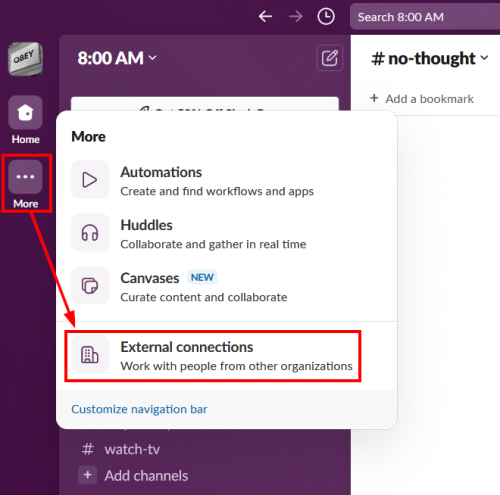
After logging into Slack, a user can search for other users by clicking on the “More” button on the main screen and then clicking the “External connections” item in the menu.
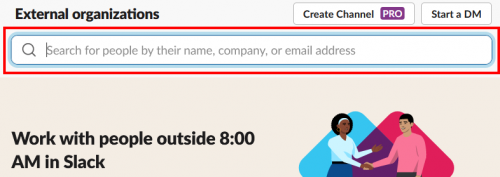
At the top of the resulting page is a search box that allows searching for other users by their email address.
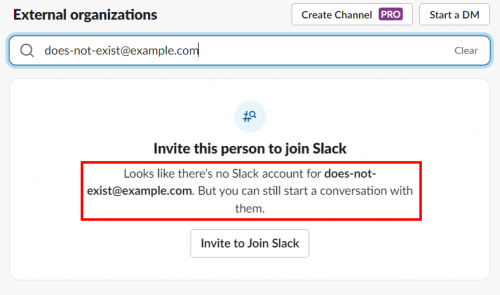
If you search for an email address that doesn’t have a Slack account, Slack will tell you that the account doesn’t exist.
But when you search for the email address of a valid Slack user, the user’s email will be shown on screen along with a button that can be clicked to start a conversation with them. In some cases, the user’s display name (usually their first and last name) is also displayed on screen.
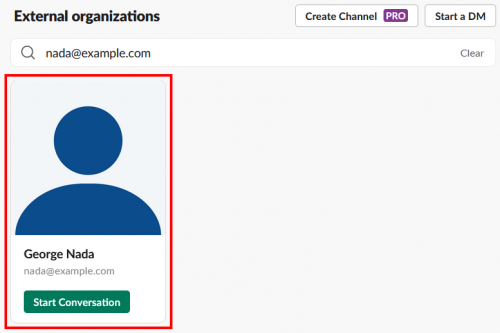
On Slack, this method of user enumeration appears to be intended functionality rather than an unintended side effect. This is further evidenced by the fact that users and business subscribers have the option to prevent others from finding them with this method by disabling the “Slack Connect discoverability” setting on their account. In both cases, however, discoverability is enabled by default, and I have yet to encounter an organization that has disabled discoverability across their entire user base.
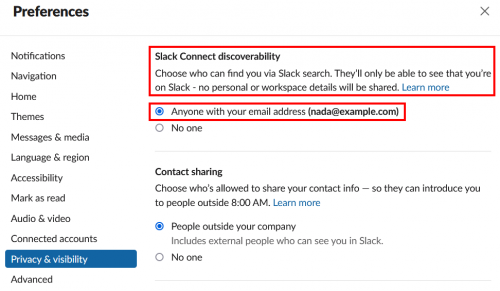
Even though user enumeration on Slack seems to be intended, attackers don’t care if user enumeration is the result of a bug or a feature. The benefit to attackers is the same either way. We can confirm that an email address exists, confirm that the owner has a Slack account, and sometimes get the full name of the account owner.
Slack seems to be aware of this, since enumerating more than about 10 users from a free account results in rate limiting. When this happens, the account isn’t allowed to lookup any other users until a cool-down period has passed.
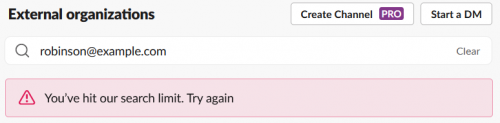
Despite the rate-limiting, I still wanted to abuse this feature to enumerate Slack accounts, and I wanted to do it in bulk so I could use it for identifying Slack users organization-wide for all of our CPT customers.
Since this user enumeration method was only possible while I was logged in, changing IP addresses alone would not get around the rate limit because it was my user account and not my IP address that had been rate limited.
But that gave me an idea:
If I spread the requests out over multiple Slack accounts, the request rate per account might be slow enough to keep from triggering the rate limit. This is similar to how the gatling gun could fire a barrage of bullets at a very high rate, but the barrel of the gun would not overheat because the bullets were fired from multiple, cycling barrels. After the first barrel fired, the other barrels continued firing, giving the first barrel time to cool down before another bullet was fired through it again. By spreading the workload across multiple barrels in this way, no barrel ever became hot enough to overheat.

With this concept in mind, I went to work automating the user enumeration process.
Using Burp Suite, I captured browser requests and server responses for each of the three scenarios I observed when interacting with the user search function through the web interface:
First, there was the current search query, whose response indicated that my account was rate limited. Examining this request provided me with the path, “/api/connectableContacts.lookup”, where my searches were being submitted; and the “error”:”ratelimited” text in the response provided a clear indicator that rate limiting had been triggered.
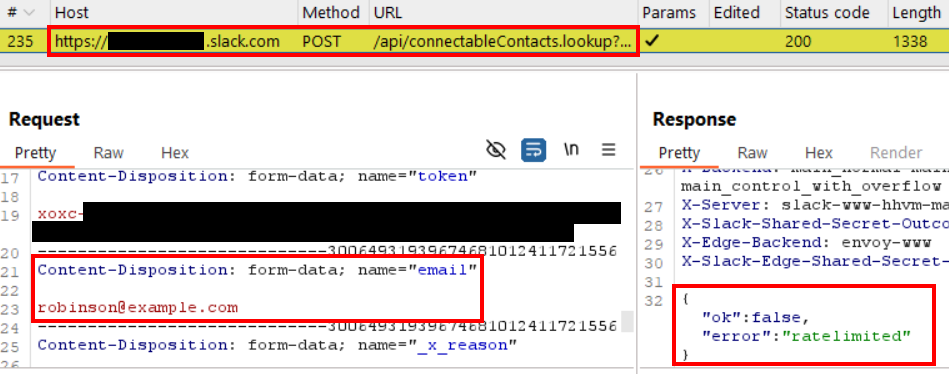
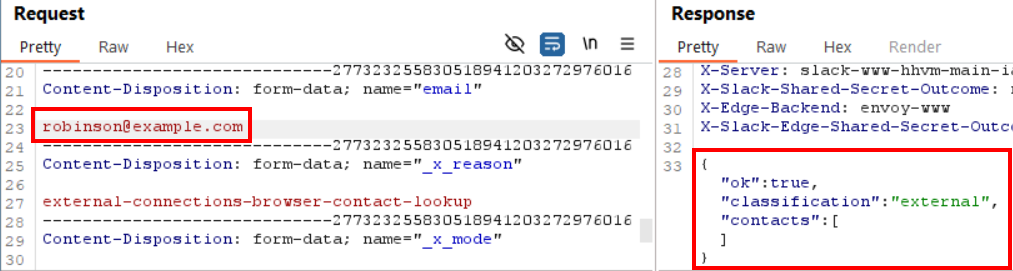
After the cool-down period had passed and my user account was no longer rate limited, I used Burp Repeater to replay the same request. I searched for the same email address, which did not have a matching Slack account. This let me capture the response for a non-existent account.
Then I modified the email address in the request and issued it through Burp Repeater again. This time I searched for the email address of an account that I knew existed, which let me see both the server’s response for a valid account and how the response data was formatted so I could extract the user’s name when it was present.
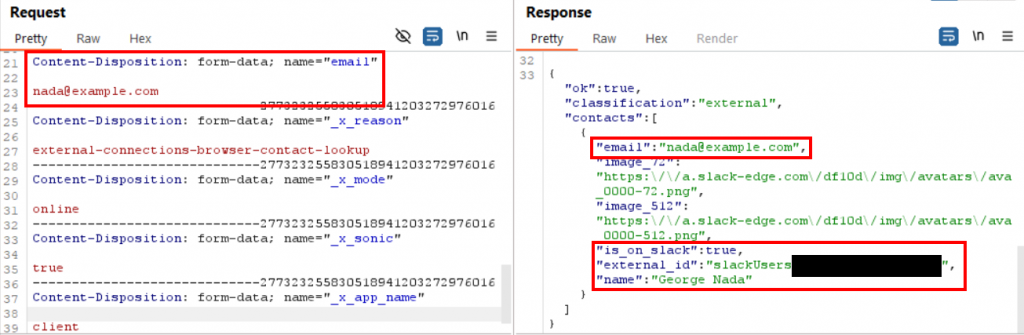
I repeated this process of modifying the email address and reissuing the request a few more times to confirm that the responses continued to match the same JSON data structure. Manually modifying and replaying the same requests several times also confirmed that no single-use tokens (e.g., CSRF tokens) were required to make a successful search request.
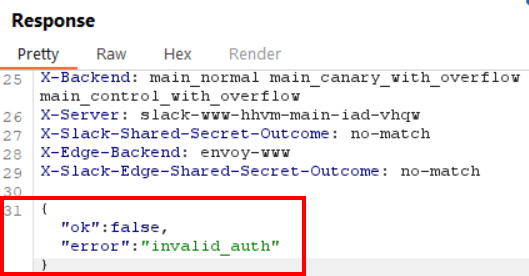
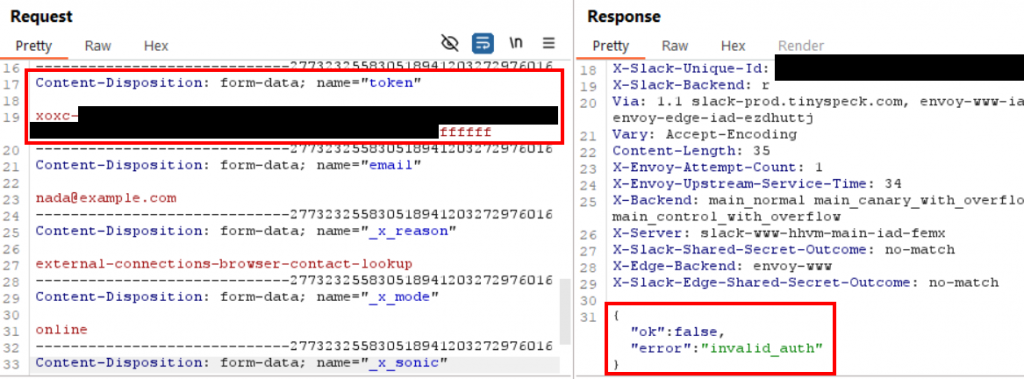
The last step in analyzing the search API was to determine whether any other parameters were required when performing a search. First, I removed all the cookies from my request and replayed it again, just to be sure unauthenticated search queries were not allowed. As expected, this request failed, and I received an “invalid_auth” error.
I restored the cookies so that the request worked as normal again and then took a look at the POST parameters. The only POST parameter that looked like it might be unique to my user account was the “token” parameter, whose value started with “xoxc-“.
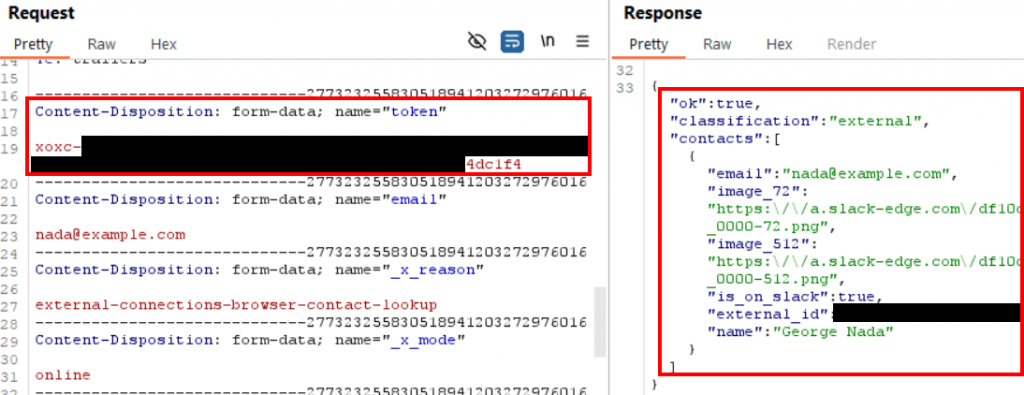
I modified the last few bytes of the token value and reissued the same request. Again, I got the same “invalid_auth” error as when I removed the cookies before, and this confirmed that a valid token value was required to make the search request.
I used Burp Proxy to search for the token value in all previous requests and responses generated while I was using Slack in my web browser. The first mention of the token value was in a response from “/ssb/redirect”, where the Slack API issued the token value to my browser alongside the key name “api_token”.
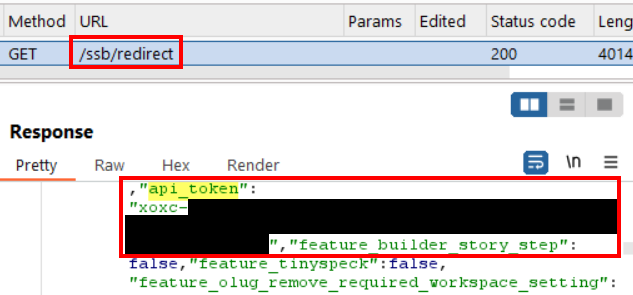
I replayed the request to “/ssb/redirect” a few times in Burp Repeater to confirm that the “api_token” value appeared in the response every time I made the request, which it did.
At this point, I was pretty sure I had everything I needed to make a basic user enumeration script for Slack. I just had to automate each individual step of the user enumeration process I just walked through, and then wrap the whole thing in cycle that would fire requests from multiple Slack accounts in sequence like the barrels of a gatling gun. That, and I needed a whole bunch of user accounts to act as those barrels.
Because I could only make around 10 search requests in a short time before one user account got rate limited, I needed to create a lot more user accounts, so that the time between repeat requests from the same account would be as great as possible.
So, I created one hundred Slack user accounts, all joined to the same workspace.

This was by far the longest, most tedious part of this whole project. 😅
It reminded me of a time I hiked up the stairs from ground level to the 50th floor to break into the CEO’s office during an on-site red team. The security guards in the building were taking the elevators as they made their rounds on each floor, because obviously no one was dumb enough to climb all the way to the top of a 50-story building up the stairs. Sometimes it’s not anything technical or fancy that gets the win. Sometimes it’s just doing something uncomfortable for longer than your opponent thinks any reasonable person would.
To be honest, I would have preferred climbing the stairs again to sitting here at my computer making 100 accounts. Fortunately, at least, Slack accounts can be created much faster than user accounts on a lot of other services, and I got it done in a couple hours.
If you want to use SlackEnum, you’ll unfortunately have to pay a similar price, since multiple user accounts are required to get around the rate limit. So, here’s the process I used to create a bunch of Slack accounts and join them to the same workspace in as few clicks and keypresses as possible:
for n in {01..99} ; do echo [email protected] ; done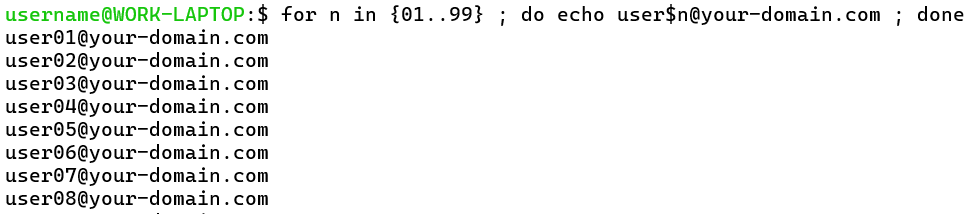
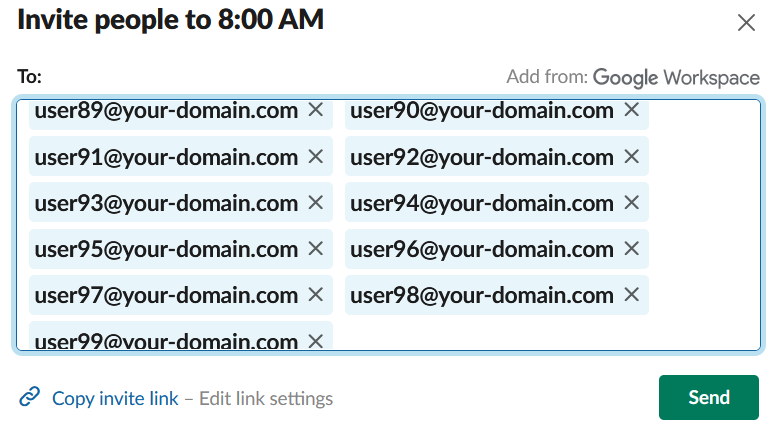
4. In your Slack account, click on “Invite Coworkers” and paste the list of all the email addresses you just generated.
To handle multiple Slack accounts, I initially wrote a function to parse raw HTTP requests saved from Burp Suite. Since I had been using Burp to do all the initial testing, that seemed convenient at the time. But, like I mentioned in the last section, after I started creating and logging into multiple Slack accounts, I found that it was faster to just export the cookies with CookieBro. So, the result is that SlackEnum accepts Slack accounts in two different formats: either raw HTTP requests copied and saved from Burp or CookieBro-exported JSON files containing all the user’s cookies.
Within SlackEnum, I refer to these attacker-controlled Slack accounts as “Slack identities” or “Slack IDs” to give them a clear name that’s separate from the accounts that are targeted for enumeration.
The Slack IDs are saved to two, user-configurable folders – one for Burp requests and one for CookieBro files – and all the files from those folders are loaded and parsed by the script when it’s launched. Since the CookieBro files only contain cookies, the Slack workspace hostname and browser user agent string are hardcoded into SlackEnum in the “Settings” section at the very top of “slackenum.py”. Therefore, all Slack IDs imported from CookieBro files must be joined to the same Slack workspace, and that workspace hostname must be configured in the “default_host” setting at the top of the script.
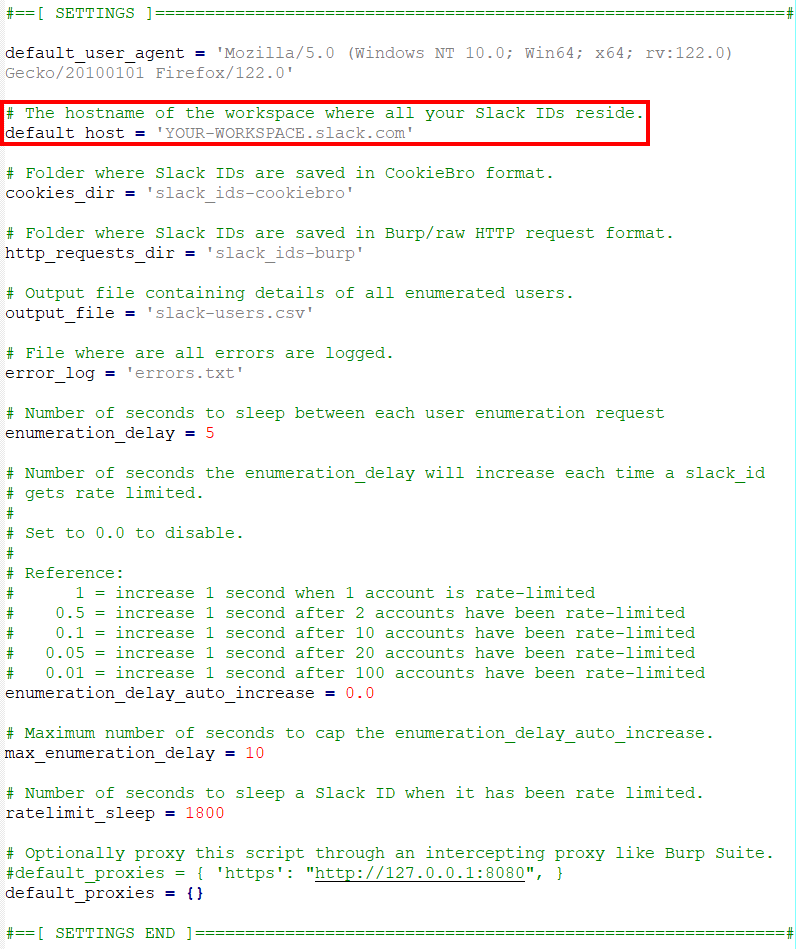
After the first part of the script is executed to handle the Slack identities, the gatling gun cycle is kicked off to enumerate users.

The entire process executed by SlackEnum is roughly:
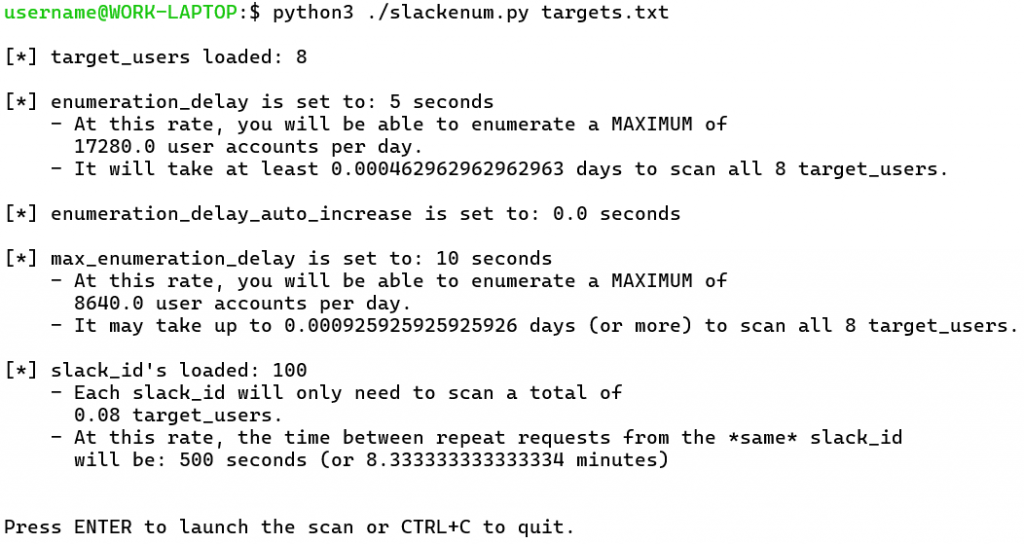
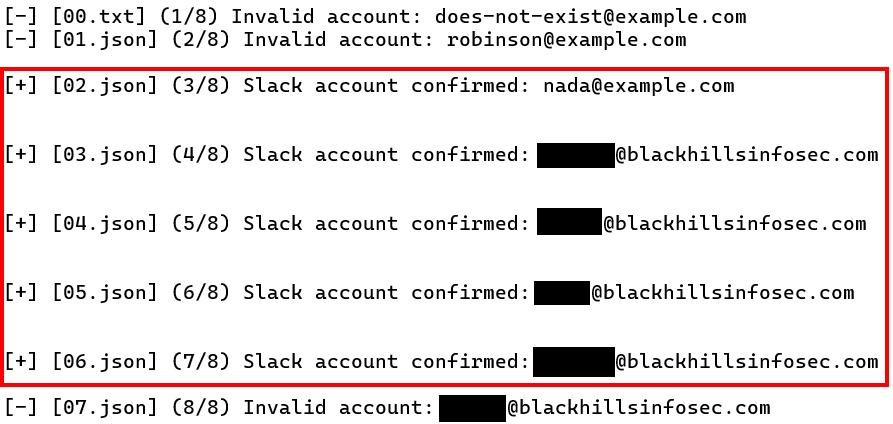
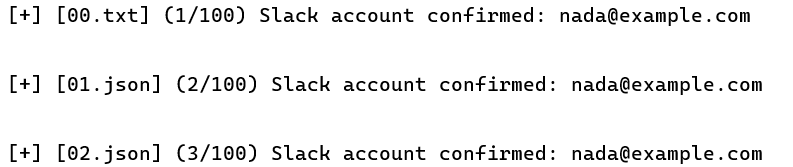
Here’s the output of this phase of execution, continuing from where the last screenshot stopped. The “00.txt”, “01.json”, etc. filenames in brackets on the left side of the screen indicate the Slack ID file being used with each request.
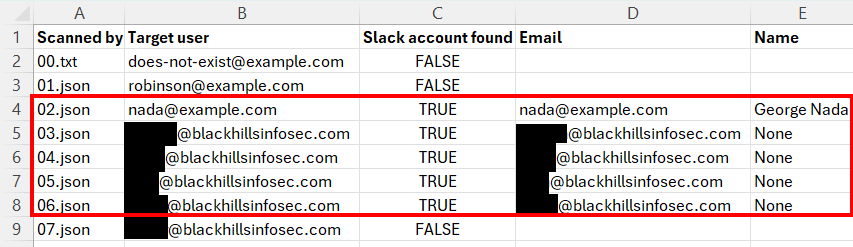
And here’s the same output from the same scan as it appears in the CSV output file.
Finally, since I didn’t want to risk launching a long-running enumeration scan with any Slack IDs that were logged out or had other problems, I added a “–sanity” flag. This flag allows the user to provide a single email address, which is known to be valid, and then to enumerate the same account with every available Slack ID. This way, any Slack IDs that are generating errors or false negatives can be quickly identified before starting a long running job.

Well, that’s it. I hope you enjoyed this article. 🙂
If you’d like to try out SlackEnum yourself, you can download it on GitHub here: https://github.com/Wh1t3Rh1n0/SlackEnum
And if you liked this content, you might want to check out my class, Red Team Initial Access, where I teach all the go-to techniques we use to break into modern, enterprise environments over the Internet today.
Want more content from Michael? Why not take a class with him?
View his upcoming course schedule here:
此内容由惯性聚合(RSS阅读器)自动聚合整理,仅供阅读参考。 原文来自 — 版权归原作者所有。