





Justin Angel //
Penetration testing and red team engagements often require operators to collect user information from various sources that can then be translated into inputs to support social engineering and password attacks. LinkedIn is obviously a prime source for this type of information since users can associate themselves with a particular company. Assuming we have identified the companies our target organization owns during earlier stages of reconnaissance, we may be able to enumerate employee information by simply finding the company page within LinkedIn and browsing the “people” section.
However, for the following (and more) reasons (or magic), this isn’t very efficient or straightforward:
The remainder of this brief post will discuss my strategy for gaining as much profile content as possible and a quick example of how to quickly manipulate the output from Peasant into actionable values.
I use the following strategy to maximize the number of accessible profiles associated with a company:
This is a laborious and time-consuming process when performed manually, so I developed a utility (Peasant) to automate many of these steps. It provides three basic modes of operation:
Warning: The LinkedIn API is quite complicated and I have not researched the calls at great length, only enough to get this code working. Depending on the inputs, there may be times when Peasant fails — particularly when spoofing profiles.
Try to clear all content of your current profile before spoofing content from the foreign profile if this occurs.
You should also know that your profile may be flagged for nasty behavior. Kudos to the LinkedIn team for taking the time and effort to implement detection mechanisms.

If you’ve ever visited the People section of a company profile, you may have noticed that scrolling to the bottom of the list results in the page dynamically adding additional profiles. The web interface is using JavaScript to make API calls and add new HTML elements for each result. Peasant capitalizes on these API calls to extract profile content directly from the API.
Information gathered when harvesting profiles includes an “entity URN” field that is used to identify a specific LinkedIn profile. We can take this value and craft an API call that will send a connection request to the associated URN. Peasant can accept CSV files generated by the harvest_contacts mode and send a connection request to each record. The request message can be customized as well.
Peasant can “spoof” content from a foreign profile and update your profile with that content, including images. This is particularly useful in social engineering situations when you’d like to impersonate an entity that works within a target organization.
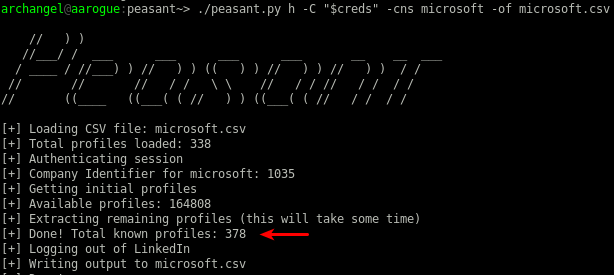
Let’s close out with a quick example focusing on Microsoft’s company profile while using a new account with zero connections. First, I’ll export my credentials to an environment variable (creds) in colon-delimited format (username:password) and run the harvest command (aliased to “h” for short). We can see that a health 338 profiles are returned right off.
Note: LinkedIn recently began prompting with captchas and the like. You can work around this using the “–cookies” flag, which expects one or more file names containing an array of JSON objects representing name-to-value cookie pairs from an authenticated session, like: [{“name”:”cookie_name_here”, ”value”:”cookie_value_here”}]. This should work around the captcha for the moment, and I’ll likely add a jitter capability in the future.

Next, I’ll spoof one of the Microsoft profiles that I can view. To protect the innocent, I’ve omitted the profile identifier and elected not to take a screen capture of the results. Running the harvest subcommand returns an additional 40 profiles this time.

Not too bad, but we can do better by getting some connection requests sent out to target profiles using the add_contacts subcommand while setting the “-if” flag to point at our output CSV file. At least one person accepted the connection request within a minute of sending these out. Harvesting after gaining these connections yielded an additional 662 profiles.
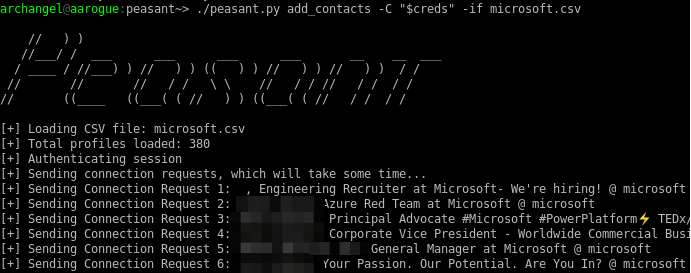


Two requests were accepted within the hour, allowing me to capture profile information from a total of 1,842 accounts.

The CSV output generated by Peasant contains several interesting fields we can use when selecting targets for social engineering and crafting inputs for password attacks. Here are the CSV columns for reference:
awk is your friend if you want to grep out security roles (occupations), which may help you avoid starting a fire by sending connection requests to individuals with a heightened level of awareness: awk -F ‘,’ ‘{print $3}’ microsoft.csv|sort -u|grep -vi security. Now you can iterate over each of these roles and use grep with the inverse flag to filter them from the CSV file. Use the reverse of this technique to identify key roles you may be interested in targeting for social engineering attacks.

I’m partial to another silly project of mine called Parsuite and the templatizer module for crafting user lists and the like, which accepts and mangles CSV input to return new CSV output containing crafted values. Support for random value generation and basic “encoding” of outputs is available as well.
We’d use the following command to generate a list of email addresses in {first_letter_first_name}{last_name}@microsoft.com format. If the template structure looks confusing, clone a copy of Parsuite and run the help command for the templatizer module to get more information.
parsuite templatizer -tts \
'<<<:first_name[1]:lowercase_encode>>><<<:last_name:lowercase_encode>>>@microsoft.com' \
-csv microsoft.csv
Parsuite Command to Craft Email Addresses

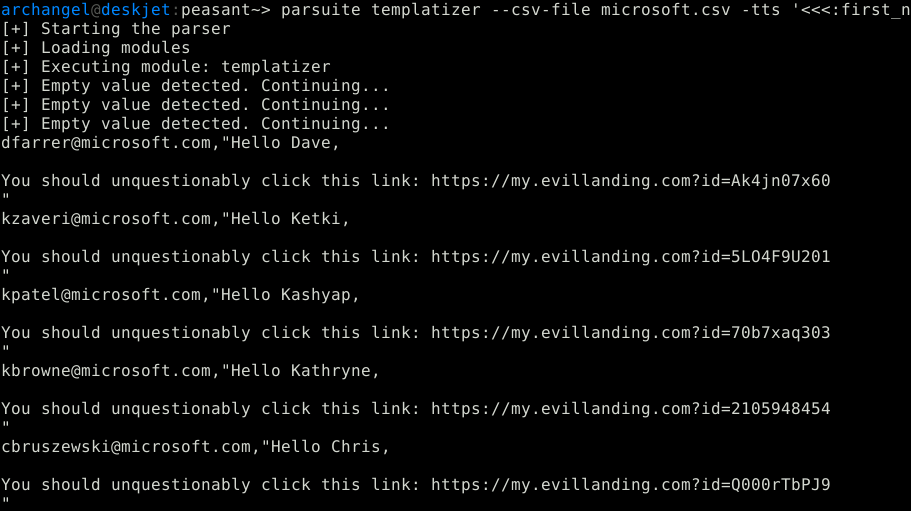
The templatizer module can accept files containing text templates as well, so you could also generate emails containing unique links and identifiers to support a phishing campaign.
Hello <<<:first_name:>>>,

You should unqestionably click this link: https://my.evillanding.com?id=<<<:RAND:>>>
Text Email Template
parsuite templatizer --csv-file microsoft.csv -tts \
'<<<:first_name[1]:lowercase_encode>>><<<:last_name:lowercase_encode>>>@microsoft.com'  \
email_template.txt
Final Parsuite Command
Now you can pass this output to any tool that’ll accept CSV files as input. I’ve recently used SendGrid as a mail delivery service, which is supported by another tool I’ve thrown together and can run right with this file format.
First and foremost, be sure to incorporate content into your security awareness training communicating that threat actors use social media as a phishing message delivery platform and how users should exercise good judgment when interacting with Interplebeians. It’s becoming increasingly difficult to land phishing emails in target inboxes due to technical controls but getting a direct line of messaging through social media is always going to be easy since our brains are primed to drop a dopamine fog-bomb each time a like or friend request is received.
Second, I recommend creating several LinkedIn accounts and joining them to your Company profile. You can then monitor them on occasion to see if they each received invitation requests from the same account in a short period of time, an indicator that you’re being targeted for reconnaissance. Do some due diligence to determine if the activity is malicious and consider reporting the account to LinkedIn. I realize this isn’t the most practical recommendation but company admins have minimal control over who can join a company profile.
A previously unknown access control flaw was identified in LinkedIn while developing the image spoofing capability of Peasant. I initially tried to take the URN identifier of the profile/background image configured in a foreign profile and copied it to my evil profile. The advantage of this approach is that it eliminated several API calls and dealing with the binary content of pictures. The unintended consequence was that deleting the pictures from my profile also deleted the image and URN itself, which resulted in the picture no longer being available for the foreign profile – thus causing the foreign profile to display the default profile picture.
I worked directly with LinkedIn’s security team to remediate the vulnerability over the Thanksgiving holiday. Kudos to them for the prompt response.
Ready to learn more?
Level up your skills with affordable classes from Antisyphon!
Available live/virtual and on-demand

此内容由惯性聚合(RSS阅读器)自动聚合整理,仅供阅读参考。 原文来自 — 版权归原作者所有。