





Joff Thyer //

If you are a fan of web application pen testing, you have been spoiled with a lot of easy pickings over the years. We all love our interception proxies, and I know a lot of us are huge fans of the great work that PortSwigger has done with Burp Suite over the years. Having said this, testing apps in the age of modern web applications that have Document Object Model (DOM) focused frameworks is a little bit different than testing a traditional HTML-based app.
For the remainder of this blog post, please make the assumption that I am referring to Angular versions 2 and up which are object-oriented and based on ECMAScript version 6 (ES6 or ECMAScript 2015). Angular version 1.x previously known as AngularJS is deprecated, and less likely to be encountered, although not dead yet!
Having said this, don’t panic and don’t abandon your normal web app penetration testing techniques. What you need to understand is that in the world of Angular 2+, which is designed with security in mind from the ground up, your normal opportunities specifically for injecting JavaScript into the DOM are severely limited if the developer uses the defaults and common best practices. We should celebrate that things are moving in the right direction with modern frameworks whereby developers don’t have to continually reinvent the wheel!
Here are a few references with some great background for you.
There are mistakes that developers can make which render an Angular application vulnerable from the DOM perspective. These mistakes largely boil down to developers deliberately working around the safeguards that the framework puts in place. Examples would be as follows:
From an attacker perspective, a pretty sizable part of the attack surface has been removed if the developer follows the best practices. There are however opportunities to discover. Some thoughts are as follows:
When pen testing an Angular app, one of the results of the technology shift is that you will likely spend more time in the browser developer console as well as your interception proxy. Angular 2+ has a feature in the form of a special function called “enableProdMode()” which is called right after the framework is bootstrapped in the DOM. This assumes that the developers have indeed deployed the application in “production mode”.
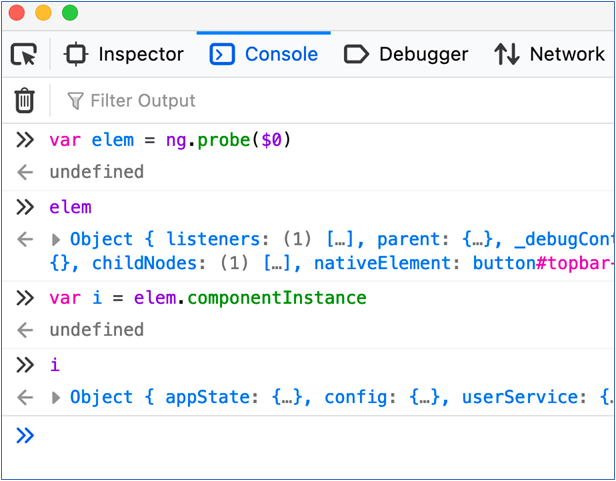
The “enableProdMode()” function makes Angular skip building the debugging elements tree in the browser. This debugging elements tree is useful to you as a penetration tester as you can use the Angular “ng.probe()” function to examine page elements after selecting that element on a page. In production mode, “ng.probe()” for a page component will return a null value which is not useful.
One of the early things you want to do is modify this function “in flight” in your interception proxy so it “fails” to enable production mode.
There is one slight twist on this. If the application is also deployed with https://webpack.js.org, then it is possible that the function name is obfuscated. Fortunately, there is a string within the function that reads “Cannot enable prod mode after platform setup” which you can use to find the obfuscated function name.
If you are using Burp Suite, here is a way you can configure the proxy to rewrite the function in flight. This example assumes that webpack has not been used to obfuscate function names. The steps are as follows:
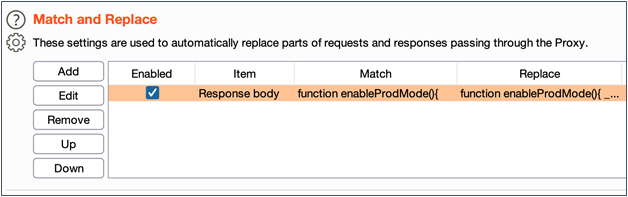
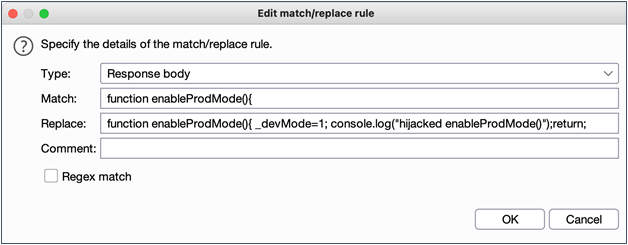
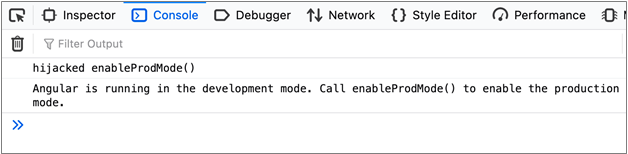
There is another snag you might run into which will force you into adding another match/replace rule. I learned this one the hard way of course (like so many things).
Since 2016, some HTML included source tags have an “integrity” option which is actually a pretty nice feature. In short, the integrity tag allows the developer to specify a hash algorithm and a base64 encoded hash. The browser will attempt to validate the hash and will not execute the JavaScript if the hash does not match.
A related defense in-depth technique is to leverage Content Security Policy (CSP). CSP is a whitelisting technique that allows web server administrators to specify the domains that browsers should be considered as valid sources of executable scripts. For browsers that support CSP, this technique further helps mitigate Cross-Site Scripting and data injection attacks. CSP is implemented with an HTTP header added to server responses. Browsers that don’t support CSP will fall back to the normal same-origin policy model. For more information, please refer to https://developer.mozilla.org/en-US/docs/Web/HTTP/CSP.
As you might imagine, rewriting a JavaScript function in flight will certainly violate the integrity tag check if it is present. A second match/replace rule similar to the below screenshot will remediate this roadblock for you to continue testing.
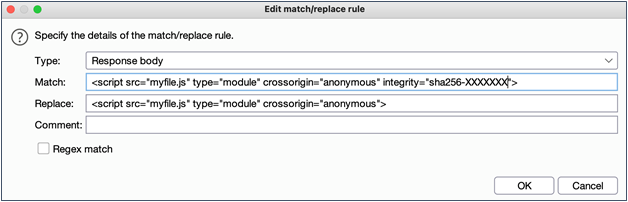
After putting this into place, and reloading your Angular app contents, you can select any page element and probe its state using “ng.probe()” in the developer tools console, and then even create an instance of the JavaScript object to begin your exploration. From here you can manipulate attributes of that object to see what impact it has. What you try to do is only limited by your creativity and time constraints. An example of using this probe technique is shown below.
That’s about all I have for you now. Happy web app testing trails and keep right on hacking.
此内容由惯性聚合(RSS阅读器)自动聚合整理,仅供阅读参考。 原文来自 — 版权归原作者所有。