惯性聚合 高效追踪和阅读你感兴趣的博客、新闻、科技资讯
阅读原文 在惯性聚合中打开

推荐订阅源

小众软件
小众软件
量子位
博客园 - 叶小钗
Apple Machine Learning Research
U
Unit 42
IT之家
IT之家
F
Fortinet All Blogs
GbyAI
GbyAI
MongoDB | Blog
MongoDB | Blog
H
Hackread – Cybersecurity News, Data Breaches, AI and More
大猫的无限游戏
大猫的无限游戏
freeCodeCamp Programming Tutorials: Python, JavaScript, Git & More
The Register - Security
NISL@THU
NISL@THU
Webroot Blog
Webroot Blog
A
Arctic Wolf
钛媒体:引领未来商业与生活新知
钛媒体:引领未来商业与生活新知
V
Visual Studio Blog
Recent Announcements
Threat Intelligence Blog | Flashpoint
Blog — PlanetScale
Blog — PlanetScale
L
LangChain Blog
P
Palo Alto Networks Blog
Y
Y Combinator Blog
WordPress大学
WordPress大学
让小产品的独立变现更简单 - ezindie.com
AWS News Blog
AWS News Blog
有赞技术团队
有赞技术团队
Engineering at Meta
Engineering at Meta
C
Cybersecurity and Infrastructure Security Agency CISA
aimingoo的专栏
aimingoo的专栏
Know Your Adversary
Know Your Adversary
Cyberwarzone
Cyberwarzone
Martin Fowler
Martin Fowler
The Hacker News
The Hacker News
P
Privacy International News Feed
T
Threat Research - Cisco Blogs
G
GRAHAM CLULEY
宝玉的分享
宝玉的分享
博客园 - 聂微东
cs.CL updates on arXiv.org
Cyber Security Advisories - MS-ISAC
奇客Solidot–传递最新科技情报
奇客Solidot–传递最新科技情报
The GitHub Blog
The GitHub Blog
S
Securelist
T
The Exploit Database - CXSecurity.com
T
Threatpost
Microsoft Azure Blog
The Cloudflare Blog
F
Full Disclosure

Black Hills Information Security, Inc.

Bad Habits: An ANTISOC Operation Same Problem, Different Angles: When Red Team and Blue Team Actually Talk to Each Other How to Identify and Exploit New Vulnerabilities Swapper – A Pure Regex Match/Replace Burp Extension A Practical Guide to BloodHound Data Collection Network Engineering Basics Getting Started In Pentesting – Advice From The BHIS Pentest Lead Cloud Security: Tips and Resources for Securing the Cloud Lessons From A Chatbot Incident How to Lead Effective Tabletops Understanding GRC: How to Navigate Risks and Compliance Standards The “P” in PAM is for Persistence: Linux Persistence Technique Malware Analysis: How to Analyze and Understand Malware OSINT: How to Find, Use, and Control Open-Source Intelligence What to Do with Your First Home Lab When the SOC Goes to Deadwood: A Night to Remember Social Engineering and Microsoft SSPR: The Road to Pwnage is Paved with Good Intentions Common Cyber Threats Finding the Right Penetration Testing Company Deceptive-Auditing: An Active Directory Honeypots Tool The Curious Case of the Comburglar How to Set Smart Goals (That Actually Work For You) Inside the BHIS SOC: A Conversation with Hayden Covington Abusing Delegation with Impacket (Part 3): Resource-Based Constrained Delegation Why You Got Hacked – 2025 Super Edition Abusing Delegation with Impacket (Part 2): Constrained Delegation Abusing Delegation with Impacket (Part 1): Unconstrained Delegation GoSpoof – Turning Attacks into Intel Model Context Protocol (MCP) Bypassing WAFs Using Oversized Requests Getting Started with AI Hacking Part 2: Prompt Injection Wrangling Windows Event Logs with Hayabusa & SOF-ELK (Part 2) DomCat: A Domain Categorization Tool Wrangling Windows Event Logs with Hayabusa & SOF-ELK (Part 1) Microsoft Store and WinGet: Security Risks for Corporate Environments Default Web Content MailFail Commonly Abused Administrative Utilities: A Hidden Risk to Enterprise Security Stop Spoofing Yourself! Disabling M365 Direct Send Bypassing CSP with JSONP: Introducing JSONPeek and CSP B Gone Offensive Tooling Cheatsheets: An Infosec Survival Guide Resource DNS Triage Cheatsheet GraphRunner Cheatsheet Burp Suite Cheatsheet Impacket Cheatsheet Wireshark Cheatsheet Hashcat Cheatsheet EyeWitness Cheatsheet Nmap Cheatsheet Netcat (nc) Cheatsheet Hunt for Weak Spots in Your Wireless Network with Airodump-ng from the Aircrack-ng Suite Detecting ADCS Privilege Escalation Vulnerability Scanning with Nmap Getting Started with NetExec: Streamlining Network Discovery and Access How to Use Dirsearch Augmenting Penetration Testing Methodology with Artificial Intelligence – Part 3: Arcanum Cyber Security Bot How to Design and Execute Effective Social Engineering Attacks by Phone Abusing S4U2Self for Active Directory Pivoting Why Use a Macro Pad? Espanso: Text Replacement, the Easy Way Caging Copilot: Lessons Learned in LLM Security Augmenting Penetration Testing Methodology with Artificial Intelligence – Part 2: Copilot Augmenting Penetration Testing Methodology with Artificial Intelligence – Part 1: Burpference Intercepting Traffic for Mobile Applications that Bypass the System Proxy How to Root Android Phones Communicating Security to the C-Suite: A Strategic Approach Offline Memory Forensics With Volatility Getting Started with AI Hacking: Part 1 Go-Spoof: A Tool for Cyber Deception How to Test Adversary-in-the-Middle Without Hacking Tools Canary in the Code: Alert()-ing on XSS Exploits How to Hack Wi-Fi with No Wi-Fi Why Your Org Needs a Penetration Test Program Burp Suite Extension: Copy For Light at the End of the Dark Web Wi-Fi Forge: Practice Wi-Fi Security Without Hardware Avoiding Dirty RAGs: Retrieval-Augmented Generation with Ollama and LangChain Gone Phishing: Installing GoPhish and Creating a Campaign 5 Things We Are Going to Continue to Ignore in 2025 John Strand’s 5 Phase Plan For Starting in Computer Security Questions From a Beginner Threat Hunter GRC for Security Managers: From Checklists to Influence AI Large Language Models and Supervised Fine Tuning Attack Tactics 9: Shadow Creds for PrivEsc w/ Kent & Jordan One Active Directory Account Can Be Your Best Early Warning Introduction to Zeek Log Analysis Indecent Exposure: Your Secrets are Showing Creating Burp Extensions: A Beginner’s Guide Pitting AI Against AI: Using PyRIT to Assess Large Language Models (LLMs) The Top Ten List of Why You Got Hacked This Year (2023/2024) ICS Hard Knocks: Mitigations to Scenarios Found in ICS/OT Backdoors & Breaches Intro to Data Analytics Using SQL Finding Access Control Vulnerabilities with Autorize The Detection Engineering Process Cyber Risk Lessons We Can Learn From Hurricane Preparedness Intro to Desktop Application Testing Methodology What Is Penetration Testing? Adversary in the Middle (AitM): Post-Exploitation Pentesting, Threat Hunting, and SOC: An Overview QEMU, MSYS2, and Emacs: Open-Source Solutions to Run Virtual Machines on Windows
Signed, Trusted, and Abused: Proxy Execution via WebView2
BHIS · 2026-04-15 · via Black Hills Information Security, Inc.
Proxy execution via WebView2 banner

In today’s rapidly evolving digital landscape, Windows and its ecosystem of applications are transforming faster than ever, often leaving the door open for new exploitation techniques. Microsoft Edge WebView2 Runtime, with its presence on hundreds of millions of Windows endpoints, is an integral part of this attack surface and has gone largely unnoticed by both defenders and attackers. This article provides an offensive security perspective on Microsoft Edge WebView2 Runtime, including architectural weaknesses, existing vulnerabilities, and exploitation methods.

Windows Apps 

Modern “Windows Apps” are Store‑delivered, sand-boxed applications built as a container for a web-based application that can run on a Windows endpoint as standalone executable. This differs from traditional applications that require first installing a series of files and dependencies onto the endpoint before being used. A Windows App is lighter in size and faster (operating as if it were a web app). This shifts to signed/trusted applications that offer runtime integrity safeguards, Smart App Control, and clearer permission prompts—reducing risks from legacy installers, COM add‑ins, dropped drivers, or third-party dependencies. 

In Proxying Your Way to Code Execution – A Different Take on DLL Hijacking I talk about how these applications “do not have any third-party or external addons that reside in user-controlled areas (i.e. Appdata), it’s not possible to do any DLL hijacking attacks in the traditional sense. Even with elevated permissions, it’s not possible to access or write to these folders.” 
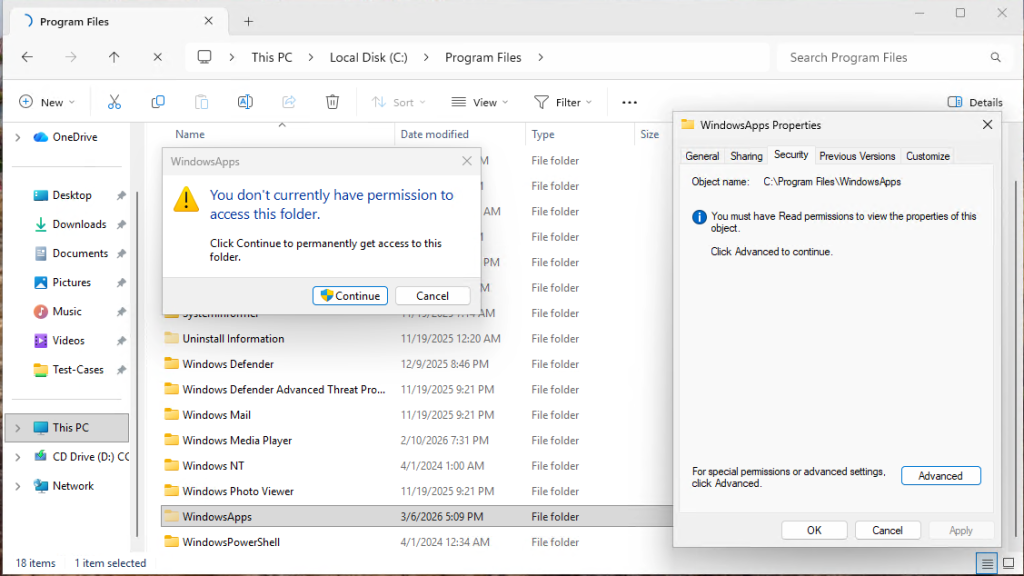
Admins not able to view the contents of the folder

Windows Apps are becoming more common and replacing legacy applications. This includes business applications as well as default applications that come on all Windows 10 and 11 systems. Some examples are: 

  • Outlook for Windows (olk.exe)
  • Word.exe
  • Excel.exe
  • Ms-Teams
  • Edge Browser
  • M365Copilt
  • Photos
  • Calculator
  • Media player
  • Spotify
  • WeChat

These apps work great in running their content as an isolated container, but all depend on Microsoft Edge WebView2 Runtime, which opens an attack vector. 

What is WebView2? 

The Microsoft Edge WebView2 Runtime is a Chromium-based browser engine that can be utilized by Windows applications to render the web content without the requirement of opening a new browser window or loading an external web application. This enables the execution of web applications locally without the need to port them into a conventional GUI-based Windows application that requires an extensive installation process, thus enabling the integration of web technologies such as HTML, CSS, and JavaScript into Windows applications without the requirement of opening the browser window. This enables: 
  • Displaying dynamic web content inside apps. 
  • Reusing web-based UI components. 
  • Ensuring consistent rendering across platforms. 
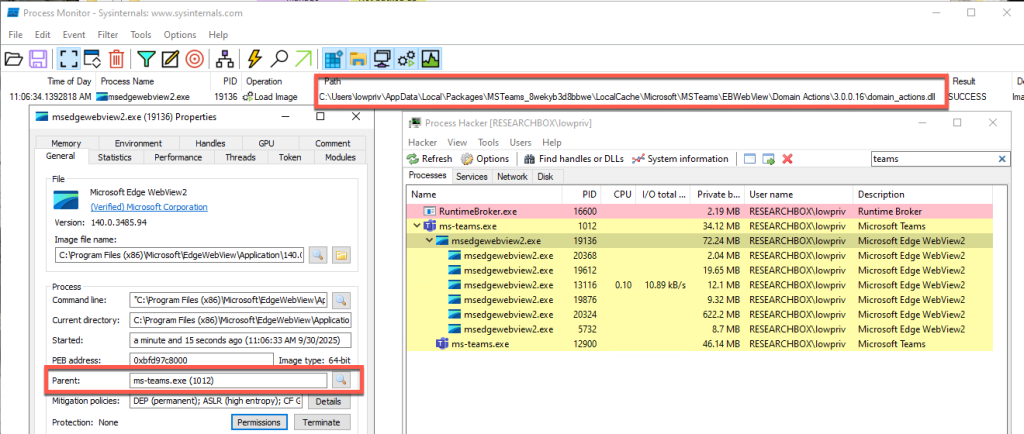
Process Monitor – Showing the Child Process of Ms-Teams.exe

What Makes WebView2 Problematic?

So why do we care about this? From an attacker’s perspective, WebView2 presents an interesting target. These Windows Apps are “self-contained” to prevent the loading of third-party add-ons or requiring external libraries, while relying on WebView2 to render the application; but WebView2 is not designed in the same way. This means that despite their strengths, Windows Apps are still susceptible to DLL sideloading because WebView2 is susceptible to DLL sideloading attacks. More specifically, this is due to a DLL called domain_actions.dll. 

The domain_actions.dll is a Microsoft‑signed DLL that is part of Microsoft Edge Domain Actions Component, a library used internally by Edge to support domain‑related logic inside the browser and any application that embeds the WebView2 engine. While documentation on this library is limited, this DLL: 

  • Handles domain reputation checks 
  • Manages security policy decisions involving domains 
  • Supports Microsoft SmartScreen-like mechanisms 
  • Executes domain‑based actions required by the browser or embedded web views 

Necessary, Hidden, and Vulnerable 

Because Windows Apps rely on msedgewebview2.exe to render embedded web content, domain_actions.dll is loaded by the Windows Apps when they spawn msedgewebview2.exe as a child process. The problem with this is that domain_actions.dll exists outside of the sand-boxed application and is installed and loaded from a user-writable directory under %LocalAppData%. This means that it is possible to perform a traditional DLL hijack attack that msedgewebview2.exe will load into its process’s memory when one of the secure Windows Apps launches. This bypasses modern application allow-listing controls as domain_actions.dll is required for msedgewebview2.exe’s runtime. In addition, an added benefit for attackers is that a Windows App’s own sandbox can make it difficult for defensive software to fully see telemetry inside the container’ed apps.  

Domain_actions.dll is a key part of this whole process – without it msedgewebview2.exe cannot properly load and render content for the Windows App, and the application will often crash or key features inside the application will not work. In fact, Edge version 135 included a fix for an issue where AppLocker mistakenly blocked this file, confirming that it is expected and necessary for normal browser and WebView2 operation. [1]  
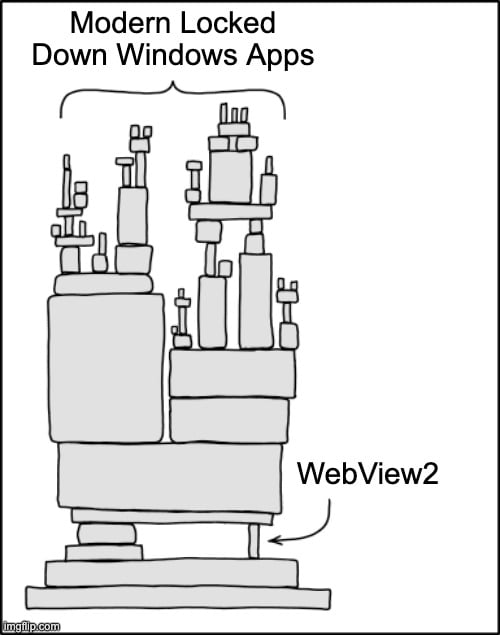
State of Modern Windows Apps

Where it gets interesting is while numerous apps rely on this DLL, multiple copies of the DLL may be installed in various places under the user’s %LocalAppData% folder, depending on the application. While some used the same path, the DLL can also be found in numerous different locations. In addition, because of how necessary this DLL is to WebView, if the DLL is not present in the location the application will install the DLL itself, ensuring its always there.  

How This Vulnerability Could be Weaponized 

The screenshot below demonstrates this attack by executing arbitrary code–in this case, a simple Rust “Hello World” program via msedgewebview2.exe. The malicious DLL includes a definition file that proxies valid function calls to the renamed original DLL, “domain_actions-old.dll”.  

Definition file for Domain_Actions

Since the malicious DLL is placed in the appropriate folder, launching any application that invokes msedgewebview2.exe results in the execution of the attacker’s payload, displaying the “Hello World” message. 
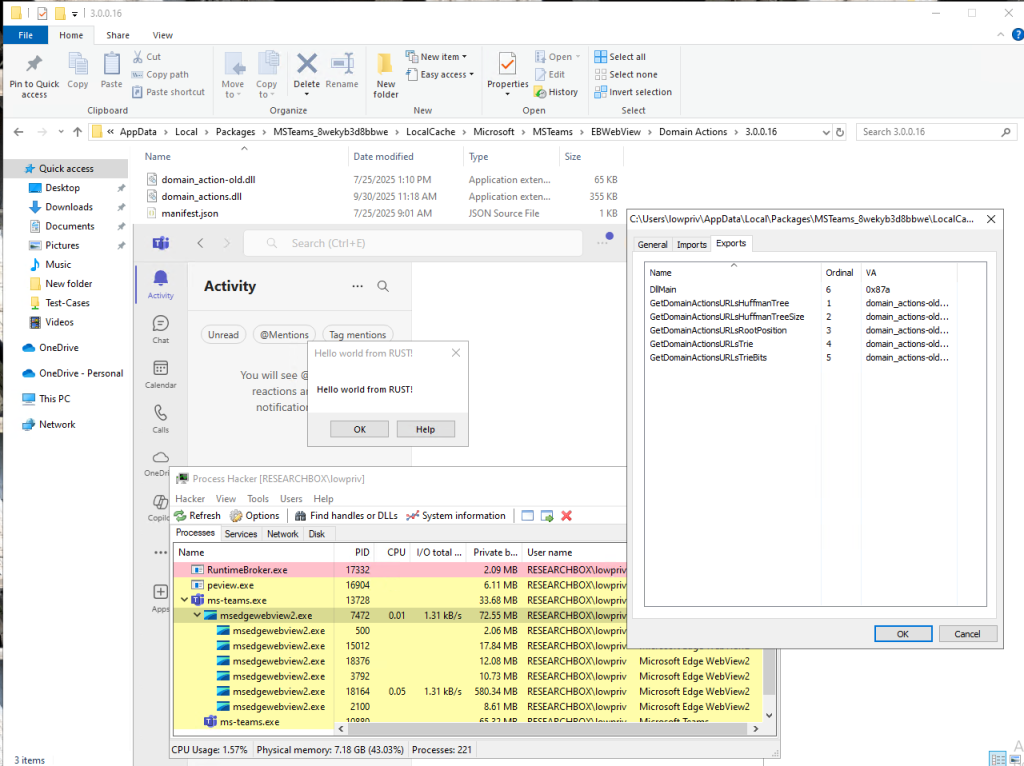
POC of Sideloading into Msesdgewebview2.exe

This makes WebView2 a high-value target for not only initial access but also persistence, as these applications are always running. To further illustrate the impact, the second example uses shellcode from a commercial Command-and-Control (C2) framework, Cobalt Strike, to establish a remote channel on the endpoint. 
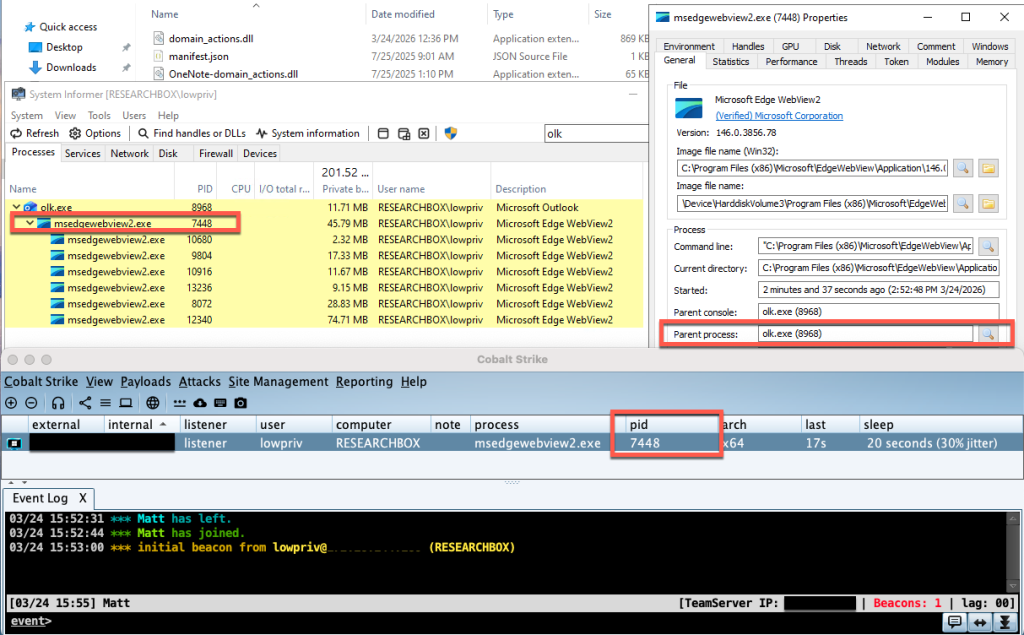
Cobalt Strike Beacon Calling back

Microsoft’s Response 

After completing the initial research to assessing the extent and exploitability of these issues, I reported these findings to Microsoft in October of 2025. The timeline below summarizes this disclosure process. 

Timeline 

  • September 10th – Initial Discovery 
  • October 3rd – Informed Microsoft 
  • October 20th – MSRC confirmed the behavior and based on the results of the review warranted a remediation and possible CVE 
  • October 28th – Provided a Secondary update to Microsoft indicating new windows Apps that were vulnerable 
  • November 18th – Provided a Third update of new vulnerable application 
  • December 3rd – Received a message from Microsoft indicating that Microsoft has assigned a reserved CVE for the confirmed Edge vulnerability, which will be published once the fix is fully validated and released, with your acknowledgment included. The engineering team is actively developing and testing the patch, targeting a future Patch Tuesday (or an earlier out‑of‑cycle release), and the three‑month disclosure delay ensures the update can be thoroughly completed. 

As of March 16, Microsoft had re-reviewed the case and reclassified the impact to be below the threshold to award a CVE. As a result, Microsoft will not be implementing a fix at this time but may in the future.  

“Forever-Day” Vulnerability 

What does this mean for enterprises? It means these vulnerabilities remain present in both Windows 10 and 11 as a “forever-day” – an exploitable vulnerability that the software vendor has no intention to fix and therefore is perpetually abusable by threat actors. As result, Windows endpoints will remain vulnerable to this.  

More information about the DLL exploitation tool, FaceDancer, can be found here: https://github.com/Tylous/FaceDancer 

References:

[1] https://winaero.com/edge-135-released-with-several-new-features-and-improvements/ 


Want to learn more from Matthew? Register now for tomorrow’s webcast taking place Thursday, April 16, at 1 PM EDT:

Proxy Execution with Microsoft Edge WebView2