






Kent Ickler //

Over four years ago now, I wrote a blog post on fixing missing Content-Security-Policy by updating configuration on webservers: https://www.blackhillsinfosec.com/fix-missing-content-security-policy-website/. Content-Security-Policies instruct a user’s web browser how it should behave on certain security considerations.
Oh, how times have changed. Here at Black Hills Information Security (BHIS), we’ve actually migrated webservers, hosting companies, security platforms — that list goes on and on. The “best practices” for Content-Security-Policies have changed in the last four years too. On our new hosting platform, we need to set up appropriate content security headers again. Since we now use Cloudflare for our CDN and WAF provider, we have some new opportunities for fronting our Content-Security-Policies outside of the web server itself.
Before you go about updating your Content-Security-Policies, it’s good to have a clear picture of how your server currently handles/sends Content-Security-Policies. A good way to test this configuration is to use a third-party tool. We can use SecurityHeaders.io to scan our website’s Content-Security-Policy configuration.
Link: https://www.securityheaders.io
In the case below, we’ve had SecurityHeaders.io scan the WildWestHackinFest.com website.
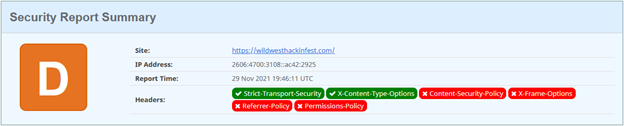
That looks bad, right? Well, maybe. It is important to note that Content-Security-Policies are used to instruct the browser how to handle security concerns within the browser. This is critical on websites where there is user interaction and sensitive information being disclosed. For example, it would be imperative that a banking website, health records portal, or other user-interaction service have appropriate Content-Security-Policy headers. In the scenario where there is no user interaction or no sensitive information disclosed, it becomes less imperative that Content-Security-Policies be configured in a very secured state.
Here’s a good example of a “not-great” configuration scenario: The US Social Security Administration has a portal where users can login and access sensitive information about their account. The portal login landing page is https://secure.ssa.gov:
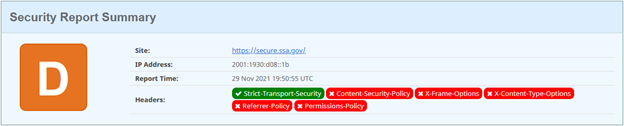
Alright, so that’s a picture of what not to do.
If you’re looking to correct some of these issues, you have a couple methods afforded to you. The first is to read the blog from four years ago that demonstrates how to fix the issue by configuring your web server with the appropriate Content-Security-Headers. But there is another way.
Link: https://workers.cloudflare.com/
Cloudflare Workers are a serverless section of server-side-JavaScript that can perform actions or modify web traffic associated with a Cloudflare CDN/WAF protected site. In the case of our earlier example, https://wildwesthackinfest.com is a website that is served by the Cloudflare network. This allows us to use the Cloudflare Workers service to manipulate web traffic without having to update the backend (“origin”) web servers associated with the website. BHIS operates multiple websites and using Cloudflare Workers will also allow us to centralize the response-header manipulation to one programmatic location, rather than managing multiple backend server configuration.
To allow a Cloudflare Worker to manipulate your web server’s traffic, you must ensure that the webservice has “Orange Cloud” configuration on Cloudflare.

You must also enable the Workers service. After logging into Cloudflare and selecting your domain, click on the “Workers” tab to get the service initiated.
Once you have Cloudflare Workers enabled — on the Workers tab, click on “Manage Workers” and then “Create Service.” Give your new worker a name and select “HTTP Handler” as the starter template. Then, find the “Quick Edit” button to access the Cloudflare Worker editor/IDE.
Next, replace the existing template code with the following worker code.
Link: https://github.com/Relkci/cf-worker-header-injector/blob/main/worker.js
addEventListener('fetch', event => {
  event.respondWith(handleRequest(event.request))
})

async function handleRequest(request) {

  let originalResponse = await fetch(request)

  // pass in the original response so we can modify some of it.
  let response = new Response(originalResponse.body,originalResponse);

  response.headers.set('X-Frame-Options', 'SAMEORIGIN');
  response.headers.set('Referrer-Policy','same-origin');
  response.headers.set('Content-Security-Policy', 'default-src \'self\' \'unsafe-inline\'');
  response.headers.set('Feature-Policy','camera \'none\'; geolocation \'none\'');
  response.headers.set('X-Content-Type-Options','nosniff');
  response.headers.set('X-XSS-Protection','1; mode=block');
  response.headers.set('Permissions-Policy', 'camera=(), geolocation=(), microphone=()');
  return response
}
The above is a starter template for Content-Security-Policies. You should configure each policy as you see fit for your website. Any headers you add here will later be added to your web server’s HTTP Responses. Press “Save and Deploy.” Don’t worry, nothing is live yet.
In the next step, we will associate the new Cloudflare Worker with your website. After we do this, your worker will begin intercepting HTTP responses from your backend (origin) web server and injecting the headers specified in the worker code.
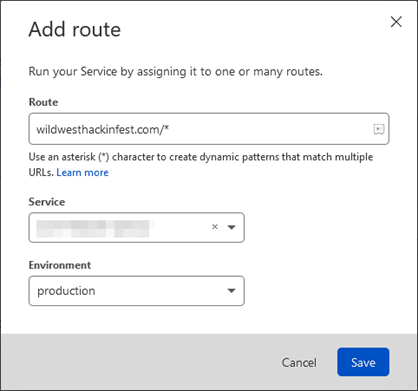
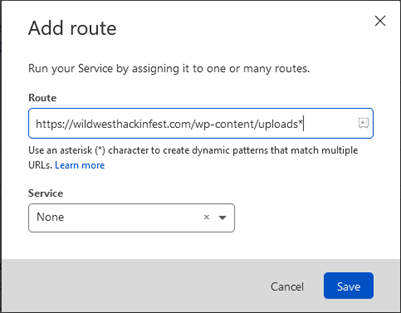
After you have your worker saved, return to the Cloudflare Workers tab associated to your domain and press “Add Route.” The Add Route functionality associates your new worker with your web server. As soon as this is done, your backend (origin) web server’s HTTP responses will be intercepted by the worker and the worker will inject the headers according to its code.
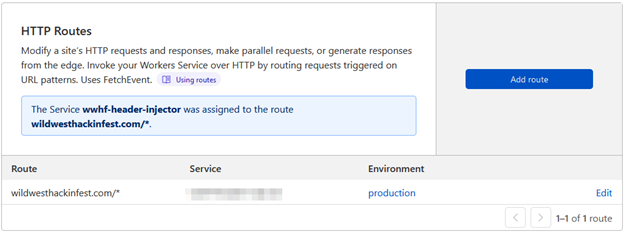
After the worker has been routed with your website, you’ll find the Workers tab now lists the active routes.
As soon as you associate the worker, remember that restrictive Content-Security-Policy settings may break rendering or functions of your website if you use JavaScript, CSS, or external resources. The Content-Security-Policy instructs the browser which resources are safe to load. A restrictive policy may prevent the loading of necessary resources. As you update your Content-Security-Policy for your website, you may see errors or rendering issues that are related to the new Content-Security-Policies. The easiest way to identify the Content-Security-Policy violations is to use the browser’s developer mode (typically, press F12). The Network or Console tabs will typically alert you to violations that will need to be accounted for in the Content-Security-Policy.
Here’s an example of a console error:

This error lets us know that within the script-src setting in the CSP, the stats.wp.com is not explicitly trusted. There are various ways we can go about adding trust for this source; one method is to add https://stats.wp.com to the script-src setting. After updating and re-deploying the worker, refresh and you should see that the resource was allowed to load and consequently did not present an error in the developer console.
One last note regarding the addition of the Workers service and the creation of the Worker later — Cloudflare does provide a free tier to workers, and two different price schemes: Bundled and Unbound.
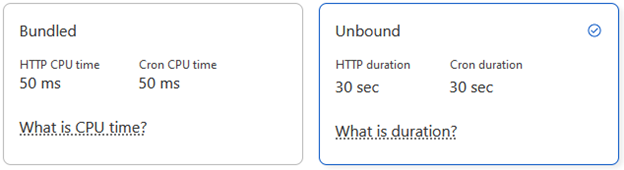
If you’re worried about what that might cost you, we were too. We used the Unbound pricing scheme because it was the default. We’re probably safe to update the model to Bundled since our Workers’ execution time is less than 50ms. The Workers dashboard will show the execution time so you can make your own decision.
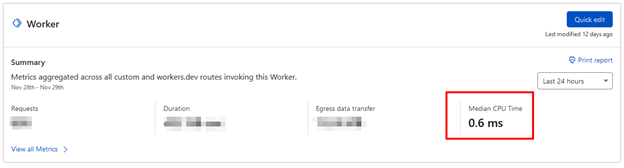
Anyhow, with the Unbound pricing model, we weren’t at much risk regardless. Here’s a picture of one month of Bundled worker activity on one of our busier websites:
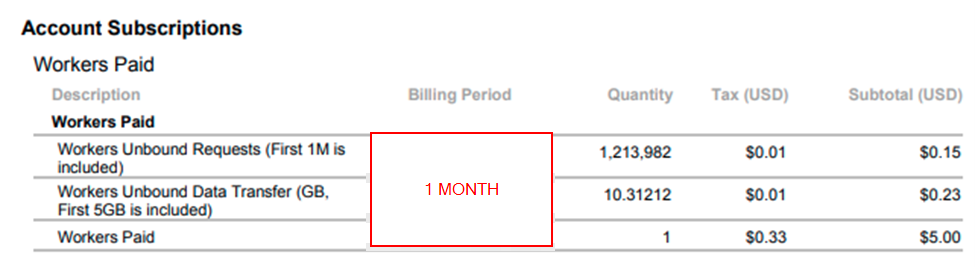
At the end of the day, $5.38 wasn’t a bad cost to us for +1M website hits.
It’s worth noting that you can (and perhaps should) limit your worker route to typically only affect website resources that will instruct a web browser to create additional sub-queries for resources. These are typically HTML, PHP, ASP, etc. Images and videos usually do not need a CSP as they typically do not instruct the browser to create additional HTTP requests. For example, you may omit a web server directory that contains only images. The worker routes can be stacked. Setting a route to a service of “None” will prevent execution of workers.
Link: https://owasp.org/www-project-secure-headers/
For a good resource on the types of Security Headers and their appropriate use, check out the OWASP documentation on Response Headers.
Link: https://content-security-policy.com/
Another good resource, perhaps a bit more technical, is the Content-Security-Policy Resource. This is an update to date compilation of current CSP mechanics and support matrix by browser.
After you have set up your worker and configured your CSP according to your website’s needs, there are a handful of other settings in Cloudflare that will also need configuration to fully align your website with secure practices (and get that better score on SecurityHeaders.io).
Be aware however, that if your website or subdomains of your website are not also aligned according to these changes, you may experience a headache getting everything setup. Of note, once HTTP Strict Transport Security (HSTS) is enabled, there is no easy way to back out of configuration. Ensure that subdomains of your domain and your TLD website are configured with HTTPS appropriately before continuing.
On your Cloudflare Dashboard, jump to your domain and go to the SSL/TLS section and then the Edge Certificate’s tab. You will find two sections that you should configure.
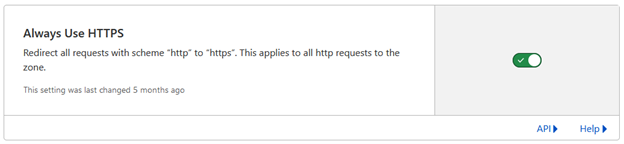
“Always Use HTTPS” will automatically redirect port 80 from Cloudflare’s edge to HTTPS (443) for your website, regardless of if your origin server supports port 80 or serves other content from port 80.
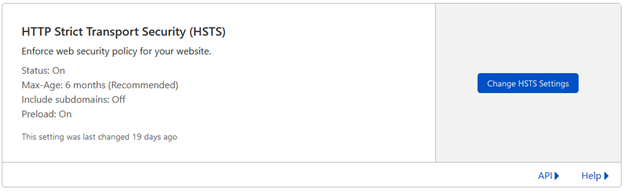
Enable HSTS and configure settings according to your need. It’s best practice to have the max-age header set to at least 6 months, but this setting carries with it some risk. Once enabled, you must always support HTTPS on your site, or a possibility exists that users will not be able to access your website.
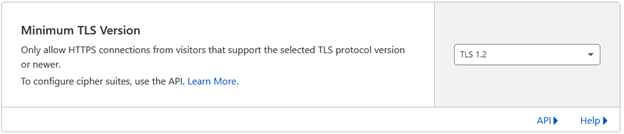
Unless your users are likely to be using unsupported or obsolete web browsers or clients, it is typically safe to enable a minimum TLS version of 1.2.
Versions 1.1, 1.0, and SSL version 2 and version 3 are considered insecure by most security analysts despite a low threat probability.
It’s the new rage, for this year. Enable this option to support TLS 1.3 on the Cloudflare Edge for your web server.
After you have deployed the Cloudflare Worker and updated your Cloudflare Edge SSL/TLS options, it’s time to check out if you’ve made any impact on your “Security Headers” score. Let’s use SecurityHeaders.io again to see if there has been improvement.
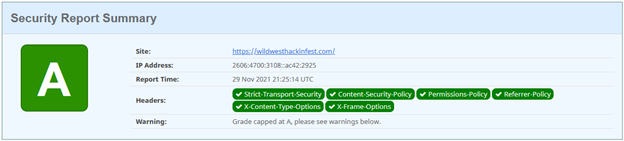
We’re capped at an “A” because the website we host includes an “unsafe-inline” option in the Content-Security-Policy. Ultimately, you want to get rid of those, but it can be used as a stopgap to make your website function as you continue to build a more restrictive CSP. It’s important to note that at the end of the day, effectively every resource source used on a website should be explicitly listed within the CSP. “Unsafe” source inclusions are… “unsafe”ish.

There are some new products out that will assist you in determining your baseline Content-Security-Policy based on your existing website resources used. There is a new CSP method, “report-uri,” that instructs web browsers to report CSP violations to a webservice that then notifies web administrators of the issue. This is something akin to how DMARC reporting works, allowing a domain owner to receive reports of potentially fraudulent email, except in this case the alert is about CSP violations.
A handful of Content-Security-Policy report Service-as-a-Service products exist. They are configured to be the recipient of your users’ browser’s CSP violation reports. They aggregate the reports and then provide you with an appropriate updated baseline Content-Security-Policy.
Frankly, this is something that you can do yourself without the use of a product. Load your webpage and check the Developer-Tools console for CSP violations. Regardless, a third-party service could go a long way in automating some of the monotony, especially for very large or complex websites where manually confirming the entirety of the website rending and functioning appropriately is not possible.
Not a sponsor. Mileage and costs may vary.
Cloudflare Workers: https://workers.cloudflare.com/
Template Worker: https://github.com/Relkci/cf-worker-header-injector/blob/main/worker.js
SecurityHeaders.io: https://www.securityheaders.io
Content-Security-Policy Reference: https://content-security-policy.com/
OWASP Security Header Project: https://owasp.org/www-project-secure-headers/
Fix Missing Security Headers on Web server: https://www.blackhillsinfosec.com/fix-missing-content-security-policy-website/
Want to learn more mad skills from the person who wrote this blog?
Check out these classes from Jordan and Kent:
此内容由惯性聚合(RSS阅读器)自动聚合整理,仅供阅读参考。 原文来自 — 版权归原作者所有。