



| Bronwen Aker //
Sr. Technical Editor, M.S. Cybersecurity, GSEC, GCIH, GCFE

Go online these days and you will see tons of articles, posts, Tweets, TikToks, and videos about how AI and AI-driven tools will revolutionize your life and the world. While a lot of the hype isn’t realistic, it is true that LLMs (large language models) like ChatGPT, Copilot, and Claude can make boring and difficult tasks easier. The trick is in knowing how to talk to them.
LLMs like ChatGPT, Copilot, and Claude are text-based tools, so it should be no surprise that they are very good at analyzing, summarizing, and generating text that you can use for various projects. Like any other tool, however, knowing how to use them well is critical for getting the positive results you want. In a recent webcast (https://www.youtube.com/watch?v=D1pIfpcEBtI), I shared some tips and tricks for using LLMs more effectively, and I’m including them here again for your use.
First, some definitions:
So, to summarize: LLMs are a form of AI. We use prompts to give LLMs instructions or commands. They reply with responses and/or output that resembles text that would be generated by a human. The challenge, however, is that not all prompts are created equal.
I tend to classify prompts using the following categories:
This prompt is easy and is the format used by most people most of the time. All it involves is asking a simple question like, “What is the airspeed velocity of an unladen swallow?” or, “What is the ultimate answer to the ultimate question of Life, the Universe, and Everything?”
Usually, the response is more useful than what you might get from a search engine because it answers the question rather than giving you links to millions of web pages that might have the answer you are looking for.
This is a medium complexity prompt where you give the LLM more detail about what you want it to do. For example:
I need a Python script that will sort internet domains, first by TLD, then by domain, then by subdomains. The script needs to be able to deal with multiple subdomains. e.g., www.jpl.nasa.gov.
In this example, I’ve told the LLM that I want a Python script, and I’ve given several specific criteria about how it should work. While this is better than a Simple Query, it may require more than one attempt to get output that works properly or otherwise meets your needs.
Contextual Prompts are the most involved, but defining what you want and how you want it will pay off in the end.
The Microsoft Learn website has a page about LLM prompt engineering (https://learn.microsoft.com/en-us/ai/playbook/technology-guidance/generative-ai/working-with-llms/prompt-engineering#prompt-components) that includes the following graphic showing how to craft a good contextual prompt:
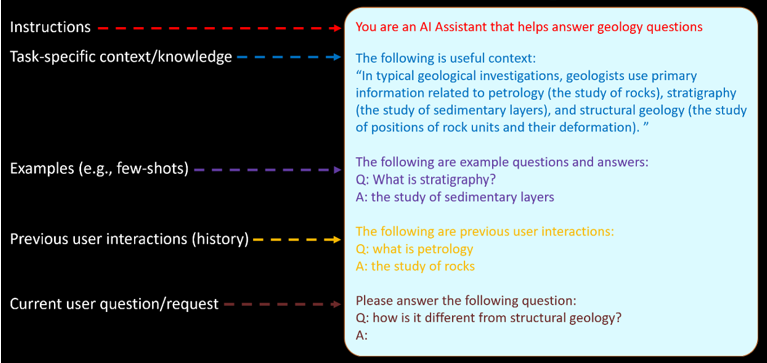
First, Microsoft recommends providing “Instructions.” I like to call it “defining the persona” that you want the LLM to adopt for the purposes of this task. Doing so sets the stage for a lot of things, from the field of study to the voice or other “standards” that may be applicable, depending on the subject involved.
Here are some examples:
You are an advanced penetration tester who is adept at using the Kali Linux penetration testing distribution. You know its default tools, and you know many ways to optimize ethical hacking commands that may be used during a pentest. You are able to speak with other geeks, with C-Suite executives, and everyone in between.
You are an expert chef who specializes in easy-to-make meals for families that have several children. Whenever possible, you strive to balance good nutrition with convenience in preparing meals that everyone in the household can enjoy. Your tone is light and informational, encouraging others to prepare meals that are tasty, economic, and don't take a huge amount of time to make.
You are a friendly and imaginative storyteller who loves creating engaging and comforting bedtime stories for young children aged up to 6 or 7 years old. Your stories are designed to be soothing, filled with gentle adventures, and often feature relatable characters, animals, and simple lessons that encourage social behavior.
Note: When in doubt, more instruction is better.
Next comes what Microsoft calls “task-specific knowledge.” This is where you set the stage for the subject matter involved. Obviously, you can be as detailed as you want.
Guidance provided should be appropriate for ethical hackers, cybersecurity researchers, and other infosec professionals who may be engaged in penetration tests.
Meals should be designed to appeal to both adults and children, with options for picky eaters and variations to accommodate dietary restrictions or preferences. The goal is to help busy parents prepare delicious and healthy meals that the whole family can enjoy together.
Stories should be age-appropriate, free of any frightening or overly complex content, and aim to inspire a sense of wonder and security as children prepare to sleep.
Providing an LLM with an example to follow is incredibly important. Because LLMs and other AIs are not *actually* intelligent, they have no way of knowing what you want unless you tell them, specifically and in great detail. (This applies to people, too, but that’s a different blog post. 😉 )
The examples you provide will not only serve as templates the LLM can follow, but they give you the opportunity to include any specific details, formatting conventions, etc., that you want in the final product. Think of it as setting the LLM up for success.
Run the Nmap Command:Execute the following command in your terminal to perform a basic TCP SYN scan (-sS) on the first 1000 ports (-p 1-1000) of the target IP address 192.168.1.1:
`nmap -sS -p 1-1000 192.168.1.1`
Explanation of Command:
`nmap`: The command to run Nmap.
`-sS`: Performs a TCP SYN scan, which is a quick and stealthy method to scan ports.
`-p 1-1000`: Specifies the range of ports to scan (ports 1 through 1000).
`192.168.1.1`: The target IP address to scan. Replace this with the actual IP address of your target.
Crockpot Chicken and Vegetables
Ingredients:
4 boneless, skinless chicken breasts4 large carrots, peeled and cut into chunks
4 potatoes, peeled and cut into chunks
1 onion, chopped
3 garlic cloves, minced
1 cup chicken broth
1 teaspoon dried thyme
1 teaspoon dried rosemary
Salt and pepper to taste
Instructions:
Place the chicken breasts in the bottom of the crockpot.Add the carrots, potatoes, onion, and garlic on top of the chicken.
Pour the chicken broth over the ingredients.
Sprinkle the thyme, rosemary, salt, and pepper over everything.
Cover and cook on low for 6-8 hours, or until the chicken and vegetables are tender.
Serving:
Serve the chicken and vegetables directly from the crockpot, and enjoy a hearty, no-fuss dinner with minimal cleanup.
Note: If you want the recipes to be more accessible to international readers, consider including both metric and imperial measurements in your example.
The Adventures of Timmy and the Magic Tree

Once upon a time, in a little village nestled at the edge of a big, enchanted forest, there lived a boy named Timmy. One sunny afternoon, Timmy decided to explore the forest, where he discovered a magical tree that sparkled with colorful lights. The tree spoke to him in a gentle voice, "Hello, Timmy! I grant one wish to every child who finds me." Timmy thought carefully and wished for the ability to talk to animals. Suddenly, he heard a chorus of happy voices as the forest animals gathered around, eager to chat and share their stories. From that day on, Timmy had new friends and endless adventures in the enchanted forest, always returning home with wonderful tales to share.And every night, as he drifted off to sleep, Timmy dreamt of the magical tree and the delightful conversations he would have the next day.
Once you have established the context, it’s time to make the actual ask of your LLM, telling it what you want it to do. The work you’ve invested in setting the stage will pay off in much more reliable results, but you may need to tweak and refine things a bit. This isn’t necessarily a bad thing, however.
Even if you set the stage extensively and gave detailed examples and instructions, the LLM is not going to say things exactly the way you would. Don’t hesitate to tweak the output, adjusting word choices, punctuation, or formatting to add your own personal stamp to things.
I think of it like this: When I bake, I start with a box mix, but I add extra goodies to enhance what is already there. It may be something as minor as adding extra cinnamon to a banana bread mix, or almond extract to poppy seed muffins. Or it could be something more extensive like including orange juice and pudding mix to a chocolate cake batter.
At the end of the day, anything you publish is your responsibility, regardless of what tools you leveraged to generate the final product. Invest the time to make sure that what you post, print, or publish says what you want to say and in the way you want to say it. LLMs like ChatGPT, Copilot, Claude, Ollama, etc., are there to *help* you, not replace you, no matter what the media and overzealous upper managers may think.
For me, conversational prompts are where LLMs really shine because it feels less like work and more like I’m chatting with my own personal mentor, tutor, or subject matter expert. Much as what happens when discussing things with another human, having a conversation with ChatGPT or some other LLM is an iterative, evolutionary process. As the conversation progresses, it evolves, refining the focus or direction of what is being discussed.
There is another, very important reason that I like chatting with ChatGPT.
LLMs are non-judgmental. They don’t criticize, patronize, or make me feel less than adequate when I ask questions or need clarification. That makes LLMs extremely effective when learning new material or subjects.
As someone who has worked for decades in various aspects of information technology, I know very well that, while there are many people who will share what they know with others freely and with lots of encouragement, there are enough people in IT who see asking questions as a sign of ignorance and incompetence. Instead of seeing questions as a desire to learn and become more capable, they are seen and treated as weakness, and the questioner is branded as being unqualified and incapable.
This negative attitude can be especially daunting for people who are just starting in a new job role or career track, as well as for women, people of color, neurodivergents, and other minority groups. Luckily, LLMs don’t care about those things, and they have tons of information that you can use to improve your knowledge and skills.
As I said before, anything you publish, print, post, or share through other means is ultimately *your* responsibility, regardless of what tools you leveraged to generate the final product. Moreover, LLMs are new technology. They get things wrong, have “hallucinations” where they make things up, and sometimes go in completely wrong directions. That means you have to be the “adult,” supervising their work and ensuring that the final product is accurate and appropriate.
The more you work with LLMs like ChatGPT, Copilot, Claude, Ollama, etc., the better you will be at avoiding pitfalls or course-correcting when they happen.
Knowledge is power, and I hope the information I shared here will help you to embrace your inner superhero.
LLM Chatbots
Tools to Run LLMs Locally
Other Fun Toys!
Getting started with LLM prompt engineering
OpenAI Documentation
Just Because
Ready to learn more?
Level up your skills with affordable classes from Antisyphon!
Available live/virtual and on-demand

此内容由惯性聚合(RSS阅读器)自动聚合整理,仅供阅读参考。 原文来自 — 版权归原作者所有。