












May 14th, 2025 by Harald Kirschner
When we first introduced agent mode in VS Code, it opened new ways of interacting with your code and workspace through chat. You could ask the agent to inspect files, run builds, and even debug tests. But you were limited by what the model was trained on and the contents of your workspace. So, the next step was clear: we needed a way for agents to reach beyond those boundaries and interact with real, external services in a secure, user-controlled way.
Our first attempt followed the familiar VS Code pattern: extensibility through the Tools and Chat participants APIs. This made sense given the thousands of extensions already in the ecosystem, but the industry was moving quickly toward a new standard: the Model Context Protocol (MCP). MCP is best understood as a protocol for connecting AI agents to a wide range of external tools and services in a consistent way, much like how HTTP standardized communication for the web. The goal is to let any client, not just VS Code, plug in powerful tool servers like databases, code search, and deployment systems, and have them “just work.”
This shift to MCP unlocked a wider ecosystem almost overnight. Now, VS Code users can take advantage of servers like Playwright MCP Server for frontend verification, GitHub MCP Server for repository insights and pull requests, or Context7 for smarter API usage. The list of servers continues to grow, and MCP has quickly become a foundation for bringing additional capabilities across AI agents.
VS Code's design philosophy was always focused on making powerful features easy to use, safe by default, and giving users clear control. Those same principles guided our MCP integration.
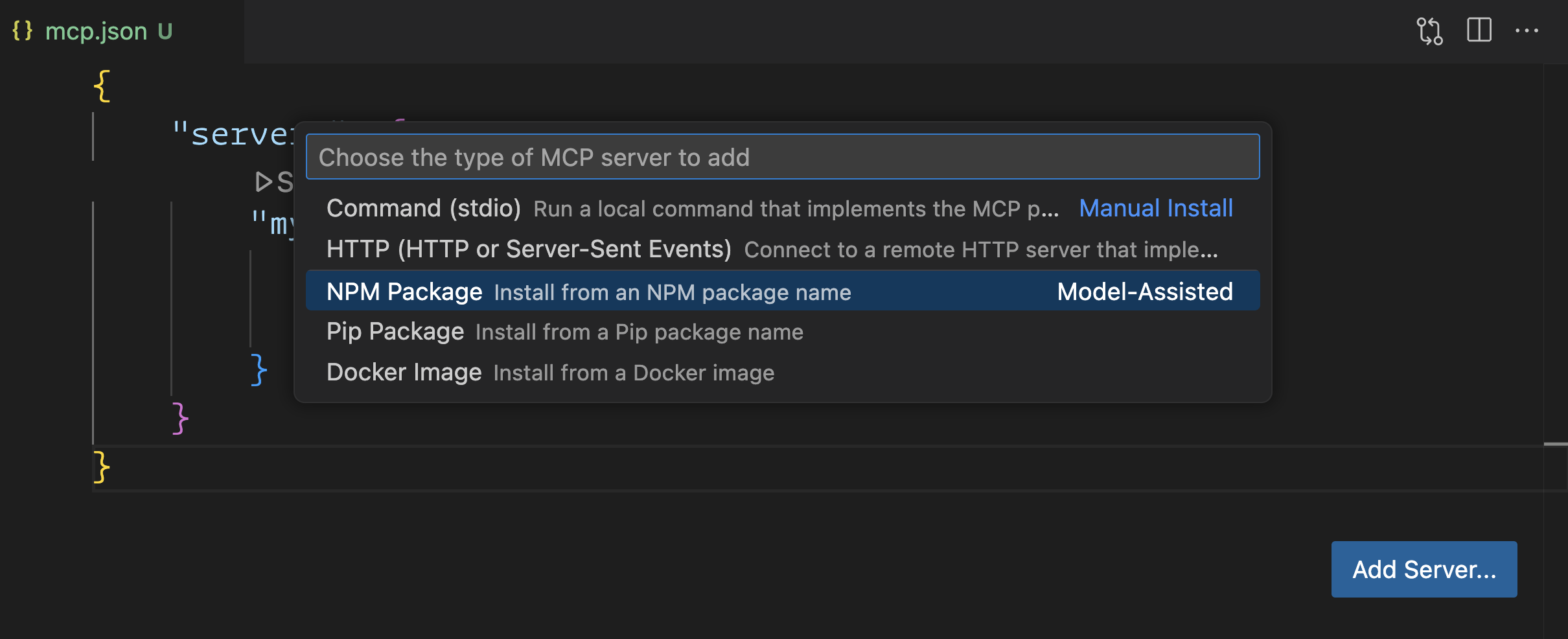
Getting started with MCP servers previously meant copying JSON blocks into a config file and managing command-line flags. We wanted to simplify this: with the MCP: Add Server command, you can set up a server from a package manager (NPM, PyPI, Docker) and have VS Code handle the rest. Websites can even offer an 'Install in VS Code' button to streamline onboarding further, and VS Code auto-discovers configurations from other clients like Claude Desktop when possible.
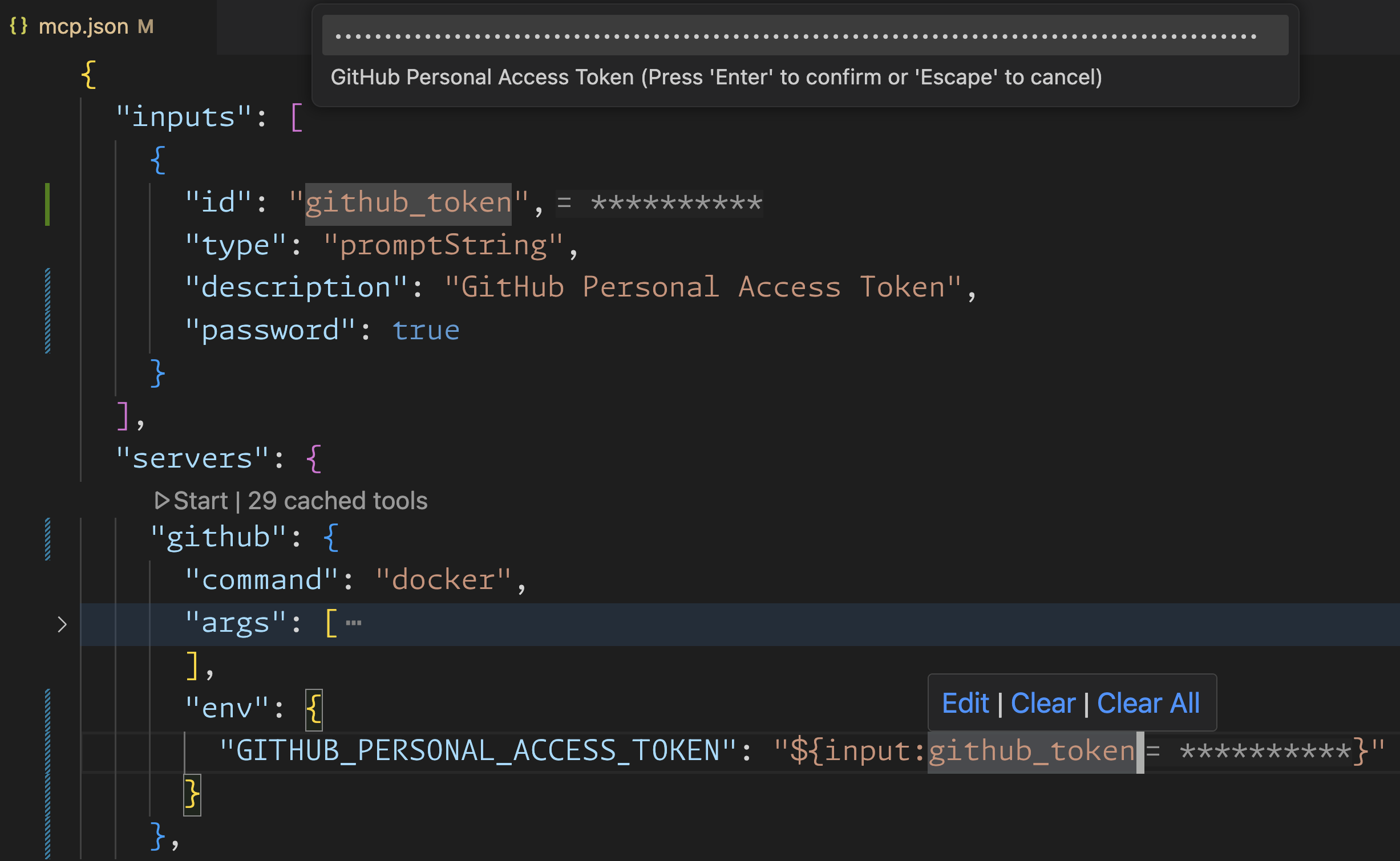
Security was another major focus. Managing secrets for MCP servers should not mean checking passwords into source control. We added support for input variables that prompt you once, then encrypt and store secrets securely, and for referencing existing .env files you already trust for local development. This makes it easier for teams to share and review configurations safely.
User control is central to the experience. With the tool picker, you decide which tools an agent can access in a given session and see clear descriptions and controls. For those developing or debugging servers, VS Code surfaces logs and makes it simple to start, stop, and restart servers. These touches make MCP not just powerful, but approachable for both end users and server developers.
The journey didn’t stop at implementing baseline compatibility for tools. Much of the value of MCP comes from the deeper features in its specification. Capabilities that, when fully supported, make tools more contextual, adaptive, and robust.
For example, roots support lets MCP servers understand the structure of your workspace. Instead of having to ask the user for folder paths or rely on configuration, servers receive a list of workspace folders up front, allowing them to tailor tools to the project at hand. This enables use cases like finding all TODOs across a monorepo, or activating deployment tools based on detected infrastructure files.
Dynamic tool discovery allows servers to change the set of available tools on the fly. Instead of a static list, servers can adapt tools based on context or project state—such as showing different actions as a workflow progresses, or surfacing tools relevant to the frameworks detected in your codebase. This keeps the agent’s capabilities relevant and avoids clutter. For real-live usage check the dynamic servers example from the TypeScript SDK or the dynamic toolset discovery feature in the GitHub MCP Server.
The last VS Code update also added support for tool annotations, which help servers provide helpful metadata for tools, such as human-readable names or hints about whether a tool should be run in read-only mode. These details improve both the agent’s behavior and the user’s understanding.
Finally, streamable HTTP is now supported as the latest transport in the MCP spec. This makes remote server integration smoother and more scalable, especially for cloud-hosted or serverless tool providers.
Our goal is to support the latest MCP features in VS Code, so users can benefit from a rich AI experience and server developers can implement those features with confidence.
MCP is now powering official servers from GitHub, Playwright, Azure, and Perplexity, and the ecosystem is only getting larger. What sets VS Code apart is not just early adoption, but a commitment to spec-first engineering. By following the MCP spec closely and contributing back improvements on authorization, discovery, and security, we’re helping shape the protocol as it matures, making sure that innovation in the ecosystem benefits everyone, not just VS Code users.
Looking ahead, we’re actively working to land support in VS Code for upcoming MCP features already in the spec, including Authorization, Prompts, Resources, and Sampling. These additions will bring even richer and more flexible agent integrations as they arrive in the product.
If you’re building developer tools or infrastructure, MCP is now a practical and open way to make them accessible to AI agents in VS Code and beyond. Whether you want to use servers off the shelf or create your own, the experience should be both robust and straightforward.
To get started, check out ModelContextProtocol.io, VS Code MCP Docs, or reference servers on GitHub.
We’re excited to see what you’ll build—and how agent workflows will evolve as the ecosystem expands.
Happy Coding!
此内容由惯性聚合(RSS阅读器)自动聚合整理,仅供阅读参考。 原文来自 — 版权归原作者所有。