






Follow us on LinkedIn, X, Bluesky
Release date: April 8, 2026
Downloads: Windows: x64 Arm64 | Mac: Universal Intel silicon | Linux: deb rpm tarball Arm snap
Welcome to the 1.115 release of Visual Studio Code. This release makes your agent-native development experience even better with the introduction of the new VS Code Agents companion app!
VS Code Agents app: a new companion app optimized for agent-native development, running alongside VS Code Insiders.
Integrated browser: several improvements to make working with the integrated browser more seamless for agents.
Terminal tools: new capabilities for agents to interact with background terminals.
Happy Coding!
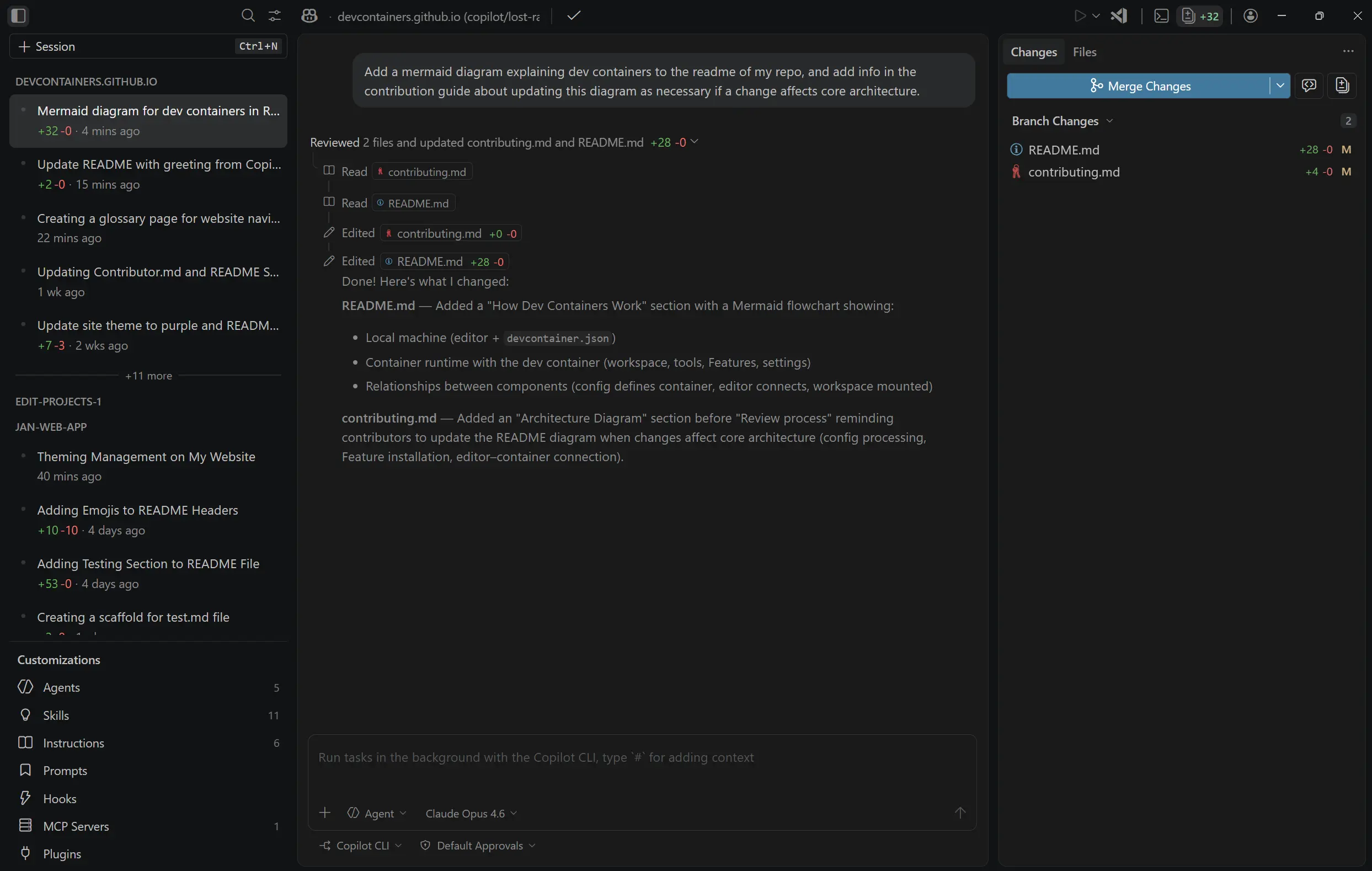
Visual Studio Code Agents is a new preview companion app that ships alongside VS Code Insiders, built for agent-native development.
Parallelize tasks across projects - Kick off agent sessions across multiple repos in parallel (each isolated in its own worktree), quickly switch context (with UI that adapts to your selection), and iterate on human and agentic reviews.
Monitor and review - Track session progress, view diffs inline, leave feedback for agents, and create pull requests without leaving the app.
Your customizations carry over - Custom instructions, prompt files, custom agents, MCP servers, hooks, and plugins all work in the Agents app, along with your other VS Code customizations like themes, for example.
No extra install - The app ships alongside VS Code Insiders. Launch it from your Start menu or Applications folder in the OS, or run Chat: Open Agents Application from the Command Palette.
The Agents app is a rapidly evolving preview. It's currently only available in VS Code Insiders, and we're looking forward to getting your feedback in GitHub issues.
This release, we continue to further enhance the integrated browser experience and its capabilities for agents.
Setting: workbench.browser.enableChatTools This setting is managed at the organization level. Contact your administrator to change it.
When an agent invokes the browser tool, the tool calls now have a more descriptive label and a link to go directly to the target browser tab.
Old:

New:

The Run Playwright Code tool has improved support for long-running scripts. Scripts that take longer than five seconds to run (by default) now return a deferred result for the agent to poll.
Agents are now more heavily discouraged from repetitively opening browser tabs. Now, when an agent attempts to open a new tab and an available tab is already open to the same host, no new tab is opened unless an explicit flag is passed by the agent.
The integrated browser now supports pinch-to-zoom on macOS. Use the trackpad pinch gesture to magnify web page content up to 3x.
Unlike the standard browser zoom (⌘= (Windows, Linux Ctrl+=) / ⌘- (Windows, Linux Ctrl+-)), pinch-to-zoom is a purely visual magnification and doesn't reflow the page layout.
This release improves the agent experience for running terminal commands in the background.
Previously, background terminals were read-only, with only get_terminal_output available. This was particularly limiting when a foreground terminal timed out and moved to the background, as the agent could no longer interact with it.
With the new send_to_terminal tool, the agent can continue interacting with background terminals. For example, if an SSH session times out while waiting for a password prompt, the agent can still send the required input to complete the connection.
Setting: chat.tools.terminal.backgroundNotifications
Previously, when a terminal command was running in the background, the agent had to manually call get_terminal_output to check on its status. There was no way to know when the command completed or needed input.
With the new experimental
chat.tools.terminal.backgroundNotifications
setting, the agent is automatically notified when a background terminal command finishes or requires user input. This also applies to foreground terminals that time out and are moved to the background. The agent can then take appropriate action, such as reviewing the output or providing input via the send_to_terminal tool.
None
Contributions to our issue tracking:
Contributions to vscode:
We really appreciate people trying our new features as soon as they are ready, so check back here often and learn what's new.
If you'd like to read release notes for previous VS Code versions, go to Updates on code.visualstudio.com.
此内容由惯性聚合(RSS阅读器)自动聚合整理,仅供阅读参考。 原文来自 — 版权归原作者所有。