










October 22, 2025 by Olivia Guzzardo McVicker, Pierce Boggan
We know that model choice is important to you. Our team has been hard at work making the latest models like Claude Haiku 4.5 and GPT 5 available to you on the same day they were announced. But we've also heard your feedback that you want support for even more models in VS Code, be it locally or in the cloud.
In March, we released the bring your own key (BYOK) functionality to let you pick from hundreds of models from supported providers like OpenRouter, Ollama, Google, OpenAI, and more to power chat experiences in VS Code.
Now, we're taking BYOK to the next level. In the v1.104 release, we introduced the Language Model Chat Provider API that enables model providers to contribute their models directly through VS Code extensions.
BYOK lets you use any model from a supported provider by bringing your own API key for that provider. This means you can access a vast ecosystem of models beyond those built into VS Code. Whether you want to use a specialized model for code generation, a different model for general chat, or experiment with local models through providers like Ollama, BYOK makes it possible with just your API key. You can configure this through the Chat: Manage Language Models command.
But managing an ever-growing list of supported providers presented challenges for both users and our team. That's why we've released the Language Model Chat Provider API, allowing model providers to contribute their models directly through VS Code extensions.
The Language Model Chat Provider API shifts BYOK from a centralized system to an open, extensible ecosystem where any provider can offer their models with a simple extension install. We will still support a subset of built-in providers, but this extensible ecosystem will allow us to scale out our model choice to meet developers' needs.
Note
Models provided through the Language Model Chat Provider API are currently available to users on individual GitHub Copilot plans (Free, Pro, and Pro+).
Here are some of our favorite extensions you can install right now to get access to more models in VS Code:
The AI Toolkit for Visual Studio Code extension gives you access to its provided models directly in VS Code, whether it's a custom model you've tuned in Azure AI Foundry, a local model via Foundry Local, or any of the models in GitHub Models.
Cerebras Inference powers the world's top coding models, making code generation pretty much instant, great for rapid iteration. It runs Qwen3 Coder and GPT OSS 120B at 2,000 tokens/s which is 20x faster than most inference APIs.
The Hugging Face Provider for GitHub Copilot Chat extension enables you to use frontier open LLMs like Kimi K2, DeepSeek V3.1, GLM 4.5 directly in VS Code. Hugging Face’s Inference Providers give developers access to hundreds of LLMs, powered by world-class inference providers built for high availability and low latency.
For extension developers interested in contributing their own models, check out our Language Model Chat Provider API documentation and sample extension to get started building today.
For developers using OpenAI-compatible models, you can use the custom OpenAI Compatible provider for any OpenAI-compatible API endpoint and configure the models for use in chat. This feature is currently available in VS Code Insiders only.
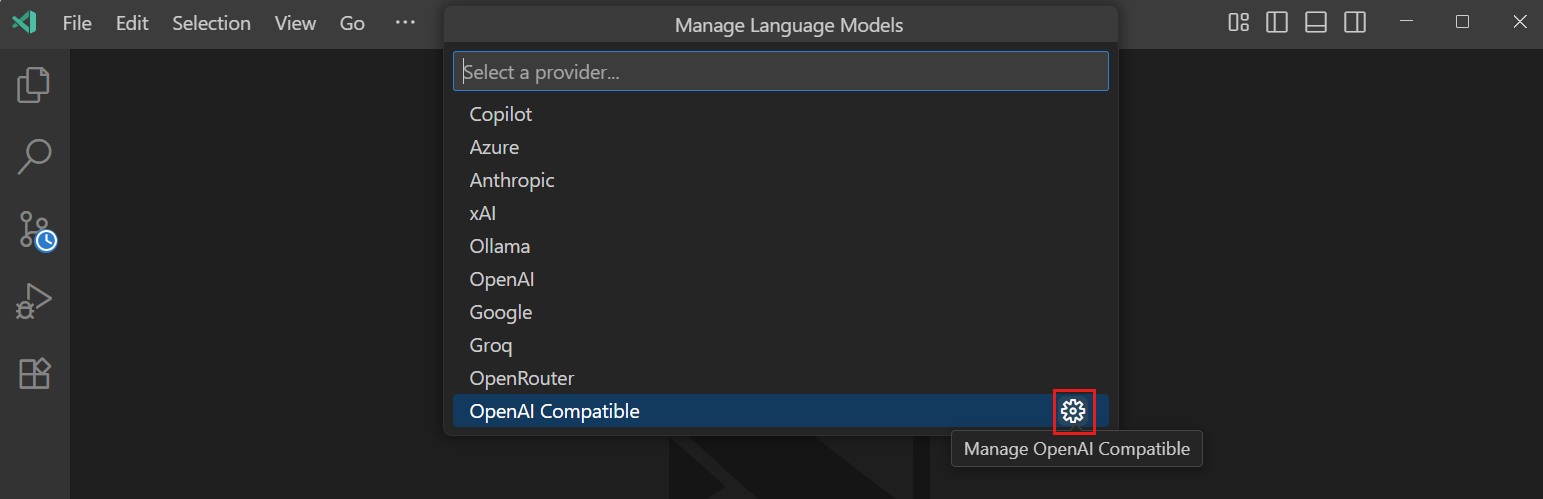
Additionally, you can explicitly configure the list of edit tools through the github.copilot.chat.customOAIModels setting, giving you fine-grained control over which capabilities are available for your custom models.
The Language Model Chat Provider API is just the beginning of bringing more model choice to you. As this ecosystem grows, we expect to see:
We're continuously investing in the BYOK experience. Recent enhancements include improved edit tools for better integration with VS Code's built-in tools, but we know there's work to be done to make the experience feel more native to VS Code - for example, BYOK does not currently work with completions. We'd love to hear your feedback on our GitHub repository!
Happy coding!
此内容由惯性聚合(RSS阅读器)自动聚合整理,仅供阅读参考。 原文来自 — 版权归原作者所有。